GitPick
Clone exactly what you need aka straightforward project scaffolding!




📦 Zero dependencies / Un/packed (~67/25kb) / Faster and more features yet drop-in replacement for degit
Just copy-and-paste any GitHub, GitLab or Bitbucket URL - no editing required (shorthands work too) - to clone individual files, folders, branches, commits, raw content or even entire repositories without the .git directory.
Unlike other tools that force you to tweak URLs or follow strict formats to clone files, folders, branches or commits GitPick works seamlessly with any URL.
You can also try Interactive Mode. Browse any repo right in your terminal. See every file, pick what you want, skip what you don't. Just gitpick owner/repo -i and you're in. No more guessing paths.

Table of Contents
📖 Some Examples
See Quick Usage for to learn more.
npx gitpick owner/repo -i
npx gitpick https://github.com/owner/repo -i
npx gitpick owner/repo
npx gitpick https://github.com/owner/repo
npx gitpick owner/repo/tree/main/path/to/folder
npx gitpick https://github.com/owner/repo/tree/main/path/to/folder
npx gitpick owner/repo/blob/main/path/to/file
npx gitpick https://github.com/owner/repo/blob/main/path/to/file
npx gitpick owner/repo -b canary
npx gitpick https://github.com/owner/repo -b canary
npx gitpick owner/repo/tree/canary
npx gitpick https://github.com/owner/repo/tree/canary
npx gitpick owner/repo -b cc8e93
npx gitpick https://github.com/owner/repo/commit/cc8e93
npx gitpick owner/repo -r
npx gitpick https://github.com/owner/repo -r
npx gitpick https://<token>@github.com/owner/repo
npx gitpick https://gitlab.com/owner/repo
npx gitpick https://gitlab.com/owner/repo/-/tree/main/path/to/folder
npx gitpick https://bitbucket.org/owner/repo
npx gitpick https://bitbucket.org/owner/repo/src/main/path/to/folder
npx gitpick owner/repo --dry-run
npx gitpick owner/repo -i --dry-run
✨ Features
- 🔍 Clone individual files or folders from GitHub, GitLab and Bitbucket
- 🧠 Use shorthands
TanStack/router or full URL's https://github.com/TanStack/router
- ⚙️ Auto-detects branches and target directory (if not specified) like
git clone
- 🔥 Interactive mode - browse and cherry-pick files/folders with
-i | --interactive
- 🔐 Seamlessly works with both public and private repositories using a PAT
- 📦 Can easily clone all submodules with
-r | --recursive
- 🔎 Preview what would be cloned with
--dry-run before cloning
- 🌳 View cloned file structure as a colored tree with
--tree
- 🗑️ Overwrite or replace existing files without a prompt using
-o | --overwrite
- 🔁 Sync changes remotely with
--watch using intervals (e.g., 15s, 1m, 1h)
- 🔇 Silent mode with
--quiet for CI pipelines, debug mode with --verbose
- 📋 Config file support (
.gitpick.json / .gitpick.jsonc) for multi-path picks
🚀 Quick Usage
npx gitpick <url/shorthand> [target] [options]
- [target] and [options] are optional, if not specified, GitPick fallbacks to the default behavior of
git clone
Examples:
npx gitpick https://github.com/owner/repo
npx gitpick owner/repo/tree/main/path/to/folder
npx gitpick owner/repo/blob/main/path/to/file
npx gitpick <url/shorthand>
npx gitpick <url/shorthand> [target]
npx gitpick <url/shorthand> -b [branch/SHA]
npx gitpick <url/shorthand> -o
npx gitpick <url/shorthand> -r
npx gitpick <url/shorthand> -w 30s
npx gitpick <url/shorthand> --dry-run
npx gitpick https://<token>@github.com/owner/repo
npx gitpick https://gitlab.com/owner/repo
npx gitpick https://bitbucket.org/owner/repo

🔧 Options
-b, --branch       Branch/SHA to clone
-i, --interactive  Browse and pick files/folders interactively
-n, --dry-run      Show what would be cloned without cloning
-o, --overwrite    Skip overwrite prompt
-r, --recursive    Clone submodules
-w, --watch [time] Watch the repository and sync every [time]
                   (e.g. 1h, 30m, 15s)
    --tree         List copied files as a tree
-q, --quiet        Suppress all output except errors
    --verbose      Show detailed clone information
-h, --help         display help for command
-v, --version      display the version number
🔥 Interactive Mode
New in v5.0. Browse any repository's file tree in your terminal and cherry-pick exactly the files and folders you want.
npx gitpick owner/repo -i
npx gitpick owner/repo -i -b canary
npx gitpick https://github.com/owner/repo -i
npx gitpick https://gitlab.com/owner/repo -i

Navigate with arrow keys, select with space, expand/collapse with enter, . to select all, c to confirm. Works with GitHub, GitLab, Bitbucket, public and private repos.
🔐 Private Repos
Use a personal access token with read-only contents permission. Works with GitHub, GitLab and Bitbucket:
npx gitpick https://<token>@github.com/owner/repo
npx gitpick https://<token>@gitlab.com/owner/repo
npx gitpick https://<token>@bitbucket.org/owner/repo
Or use environment variables (recommended for CI):
export GITHUB_TOKEN=ghp_xxxx
export GITLAB_TOKEN=glpat-xxxx
export BITBUCKET_TOKEN=xxxx
npx gitpick owner/private-repo
Create a GitHub token 👉 here with repo -> contents: read-only permission.
📋 Config File
Create a .gitpick.json or .gitpick.jsonc in your project to pick multiple files/folders in one command:
// .gitpick.jsonc
[
  // clone a repo without .git
  "owner/repo",
  "https://github.com/owner/repo",
  // clone a folder aka tree
  "owner/repo/tree/main/path/to/folder",
  "https://github.com/owner/repo/tree/main/path/to/folder",
  // clone a file aka blob
  "owner/repo/blob/main/path/to/file",
  "https://github.com/owner/repo/blob/main/path/to/file",
  // clone a branch
  "owner/repo -b canary",
  "https://github.com/owner/repo -b canary",
  "owner/repo/tree/canary",
  "https://github.com/owner/repo/tree/canary",
  // clone a commit SHA
  "owner/repo -b cc8e93",
  "https://github.com/owner/repo/commit/cc8e93",
  // clone submodules
  "owner/repo -r",
  "https://github.com/owner/repo -r",
  // clone a private repo
  "https://<token>@github.com/owner/repo",
  // GitLab
  "https://gitlab.com/owner/repo",
  "https://gitlab.com/owner/repo/-/tree/main/path/to/folder",
  // Bitbucket
  "https://bitbucket.org/owner/repo",
  "https://bitbucket.org/owner/repo/src/main/path/to/folder",
]
Then just run:
npx gitpick
Each entry follows the same <url> [target] syntax as the CLI. All entries are cloned with -o (overwrite) by default.
📦 Install Globally (Optional)
npm install -g gitpick
gitpick <url/shorthand> [target] [options]
🌍 Used By
- Major: Storybook, TanStack Router, ElectricSQL, Alchemy, Porto, oidc-spa, Fidely UI
- Other: hono-better-auth, vite-hono-ssr, tanstack-start-cf, constructa-starter-min, tanstack-starter, react-shadcn-starter, open-store
🛠 More Tools
Check out more projects at github.com/nrjdalal
🔗 Related Projects
- tiged - community driven fork of degit
- giget - alternative approach
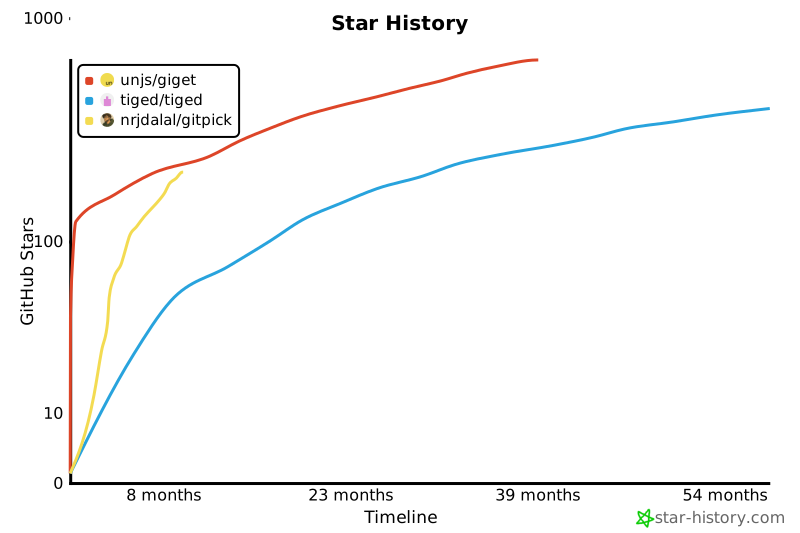
🤝 Contributing
Contributions welcome - any help is appreciated!
- Fork the repo and create a branch (use descriptive names, e.g. feat/ or fix/).
- Make your changes, add tests if applicable, and run the checks:
- Follow the existing code style and commit message conventions (use conventional commits: feat, fix, docs, chore).
- Open a PR describing the change, motivation, and any migration notes; link related issues.
- For breaking changes or large features, open an issue first to discuss the approach.
- By contributing you agree to the MIT license and the project's Code of Conduct.
Thank you for helping improve GitPick!
📄 License
MIT – LICENSE





