One command to connect your Coding Agent to Telegram & Discord
Cursor, Claude Code, OpenCode, Codex — these Coding Agents can already write code, run scripts, analyze data, and reason through complex tasks. But they're stuck in an IDE or a terminal window.
GolemBot gives them a body. One command connects your Coding Agent to Slack, Telegram, Discord, Feishu, DingTalk, WeCom, or any HTTP client — with any LLM provider. Route Claude Code through OpenRouter, run Codex on MiniMax, or point OpenCode at DeepSeek — one config block, zero code changes. Write a custom adapter to plug in email, GitHub Issues, or any other message source. Or embed into your own product with 5 lines of code. No AI framework, no prompt engineering — the agent you already have is the brain.
Your colleagues @ the bot in group chat. It can write code, analyze files, answer questions — because behind it is a real Coding Agent, not a thin API wrapper.
In your product — full agent power, 5 lines of code
import { createAssistant } from'golembot';
const bot = createAssistant({ dir: './my-agent' });
forawait (const event of bot.chat('Analyze last month sales data')) {
if (event.type === 'text') process.stdout.write(event.content);
}
Embed into Slack bots, internal tools, SaaS products, customer support — anything that speaks Node.js.
Why GolemBot, not another AI framework?
GolemBot
Traditional AI Frameworks
AI brain
Cursor / Claude Code / OpenCode / Codex — battle-tested, full coding ability
You wire up LLM APIs + tools from scratch
Setup
golembot init → done
Chains, RAG, vector DB, prompt tuning...
Auto-upgrade
Agent gets smarter? Your assistant gets smarter. Zero code changes.
You maintain everything yourself
Transparency
ls the directory = see what the assistant knows and does
Black box pipelines
Engine lock-in
Change one line in config to swap engines
Rewrite everything
Provider freedom
4 engines × any provider — OpenRouter, MiniMax, DeepSeek, SiliconFlow. One config block.
Locked to one LLM provider per framework
Skills
13,000+ community skills from ClawHub, one command to install
Write your own tools and prompts from scratch
Scheduled tasks
Built-in cron scheduler — daily standups, dependency audits, test reports pushed to IM
Build your own job system
Multimodal
Image messages from IM → saved to disk → agent reads and analyzes. All 6 channels supported.
Parse platform APIs yourself
Quick Start
npm install -g golembot
mkdir my-bot && cd my-bot
golembot onboard # guided setup (recommended)# Or manually:
golembot init -e claude-code -n my-bot
golembot run # REPL conversation
golembot gateway # start IM + HTTP service + Dashboard
golembot fleet ls# list all running bots
golembot skill search "data analysis"# browse 13,000+ ClawHub skills
Dashboard & Fleet
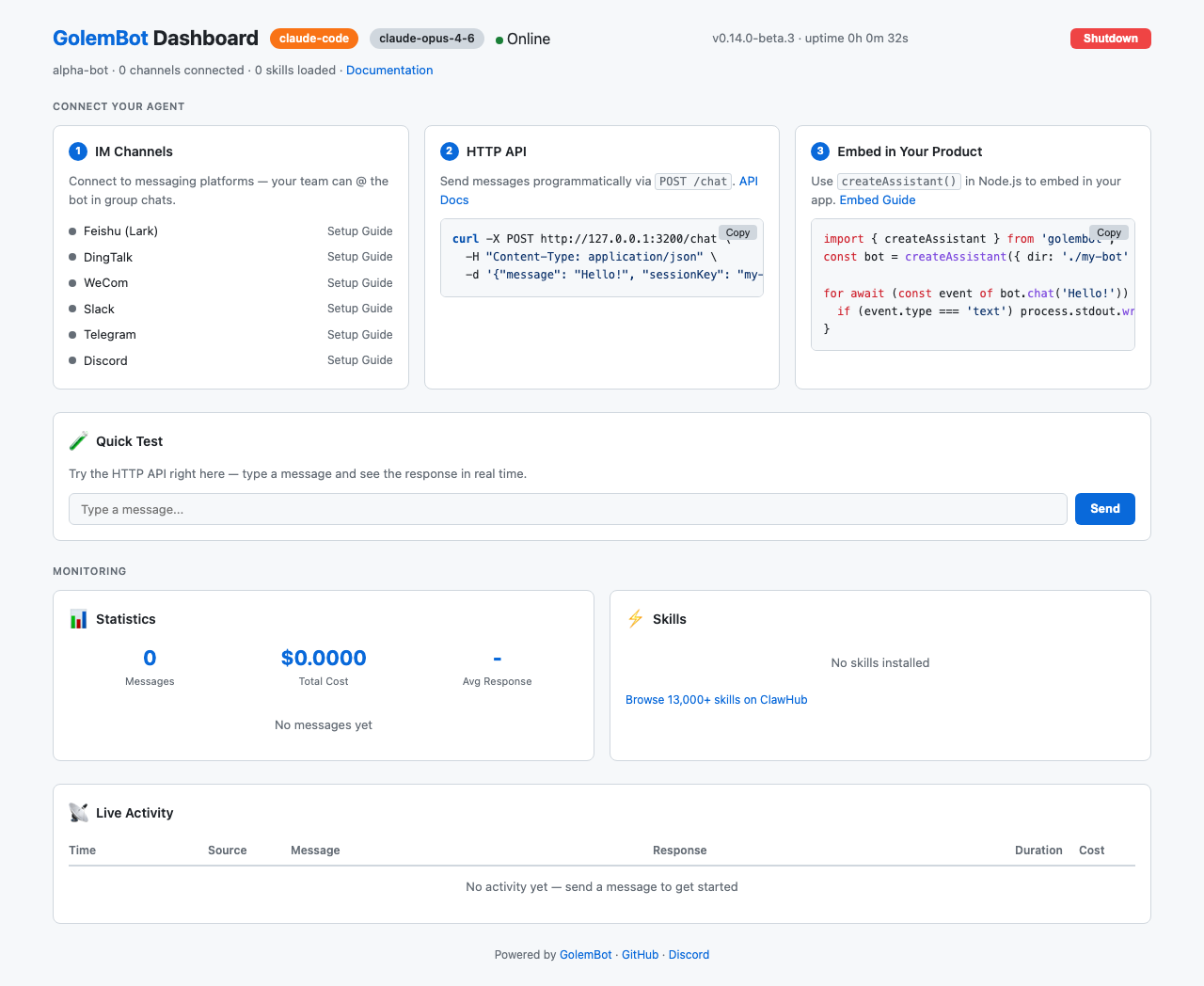
Every golembot gateway instance comes with a built-in web Dashboard showing real-time metrics, channel status, and a quick-test console:
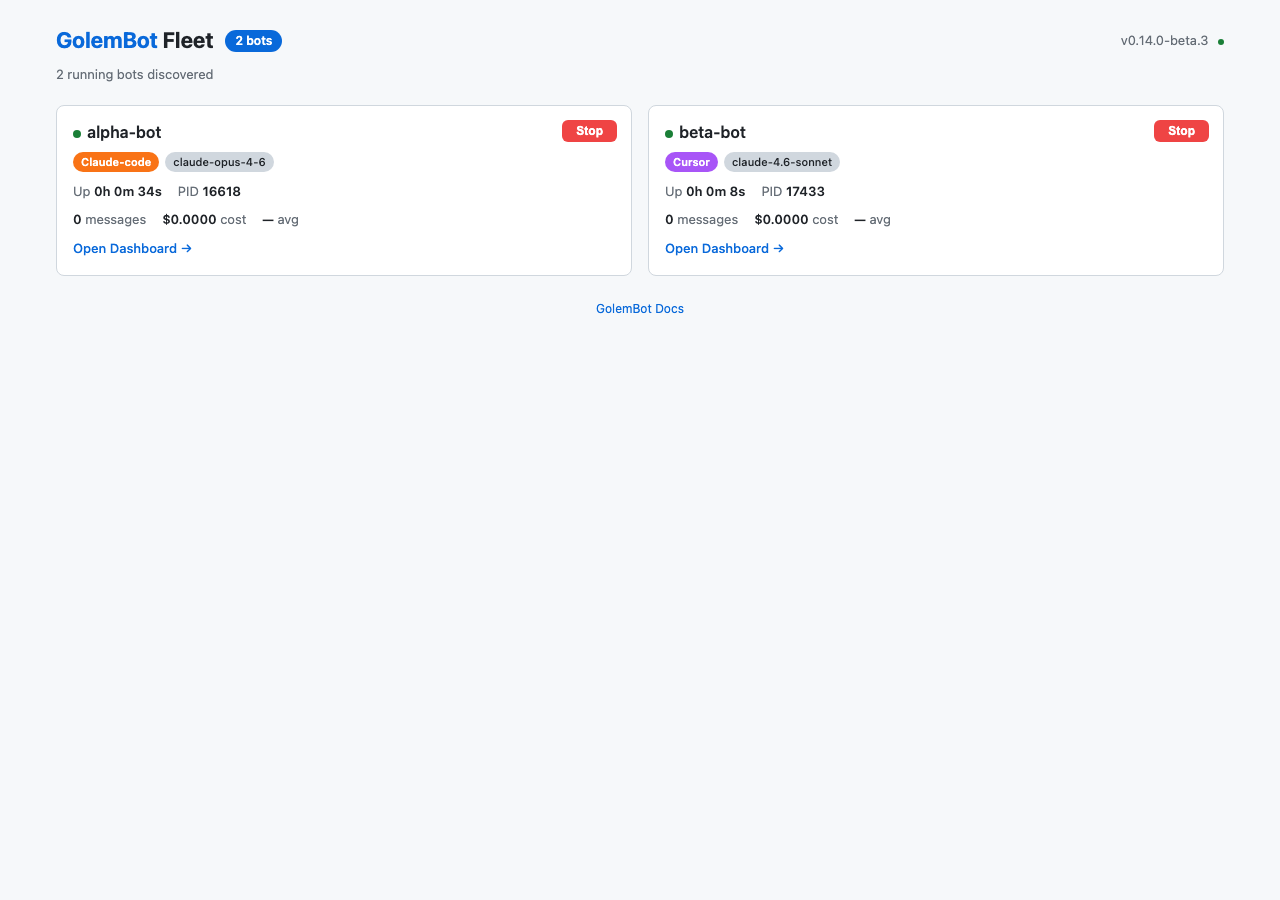
Running multiple bots? golembot fleet serve aggregates them into a single Fleet Dashboard:
The StreamEvent interface is identical across all engines — switching requires zero code changes.
Configuration
golem.yaml — the single config file:
name:my-assistantengine:claude-code# Optional: route engine to a third-party LLM providerprovider:baseUrl:"https://openrouter.ai/api"apiKey:"${OPENROUTER_API_KEY}"model:"anthropic/claude-sonnet-4"channels:slack:botToken:${SLACK_BOT_TOKEN}appToken:${SLACK_APP_TOKEN}telegram:botToken:${TELEGRAM_BOT_TOKEN}discord:botToken:${DISCORD_BOT_TOKEN}botName:my-assistant# optional — normalizes @mention tokens in channel messagesfeishu:appId:${FEISHU_APP_ID}appSecret:${FEISHU_APP_SECRET}# Custom adapter — local file or npm packagemy-email:_adapter:./adapters/email-adapter.jstoken:${EMAIL_TOKEN}gateway:port:3000token:${GOLEM_TOKEN}
Sensitive fields support ${ENV_VAR} references. Custom channel adapters can be local .js/.mjs files or npm packages — see the adapter guide.
Skill System
A Skill is a directory containing SKILL.md + optional scripts. Drop it in, the assistant gains new abilities. Remove it, the ability is gone.
skills/
├── general/          # Built-in: general assistant
│   └── SKILL.md
├── im-adapter/       # Built-in: IM reply conventions
│   └── SKILL.md
└── my-custom-skill/  # Your own
    ├── SKILL.md
    └── analyze.py
ls skills/ is the complete list of what your assistant can do.
13,000+ Skills from ClawHub
GolemBot is fully compatible with ClawHub — the largest AI agent skill marketplace by OpenClaw. The SKILL.md format is 100% compatible, so all 13,000+ community skills work out of the box.
golembot skill search "data analysis"# discover skills
golembot skill add clawhub:data-analysis # one command to install
Agent-powered skill discovery: Your agent can search and install skills autonomously during conversations. Ask it "find me a good code review skill" — it searches ClawHub, shows results, and installs on your confirmation.
All skill commands support --json for programmatic access. The pluggable registry interface supports additional skill sources beyond ClawHub.
Docker Deployment
FROM node:22-slim
RUN npm install -g golembot
WORKDIR /assistant
COPY . .
EXPOSE 3000
CMD ["golembot", "gateway"]
Development
git clone https://github.com/0xranx/golembot.git
cd golembot
pnpm install
pnpm run build
pnpm run test# Unit tests (1252+)
pnpm run e2e:opencode # End-to-end tests (OpenCode)
pnpm run e2e:codex # End-to-end tests (Codex)
Contributing
We welcome contributions! Please see CONTRIBUTING.md for guidelines.
GolemBot - Local-first AI assistant powered by Coding Agent CLI engines
We found that golembot demonstrated a healthy version release cadence and project activity because the last version was released less than a year ago.It has 1 open source maintainer collaborating on the project.
Package last updated on 16 Mar 2026
Did you know?
Socket for GitHub automatically highlights issues in each pull request and monitors the health of all your open source dependencies. Discover the contents of your packages and block harmful activity before you install or update your dependencies.
TC39’s March 2026 meeting advanced eight ECMAScript proposals, including Temporal reaching Stage 4 and securing its place in the ECMAScript 2026 specification.
Since January 31, 2026, we identified at least 72 additional malicious Open VSX extensions, including transitive GlassWorm loader extensions targeting developers.
Six malicious Packagist packages posing as OphimCMS themes contain trojanized jQuery that exfiltrates URLs, injects ads, and loads FUNNULL-linked redirects.