Grapesjs Component Code Editor
A plugin that allows you to edit the code of a component that is selected on the canvas
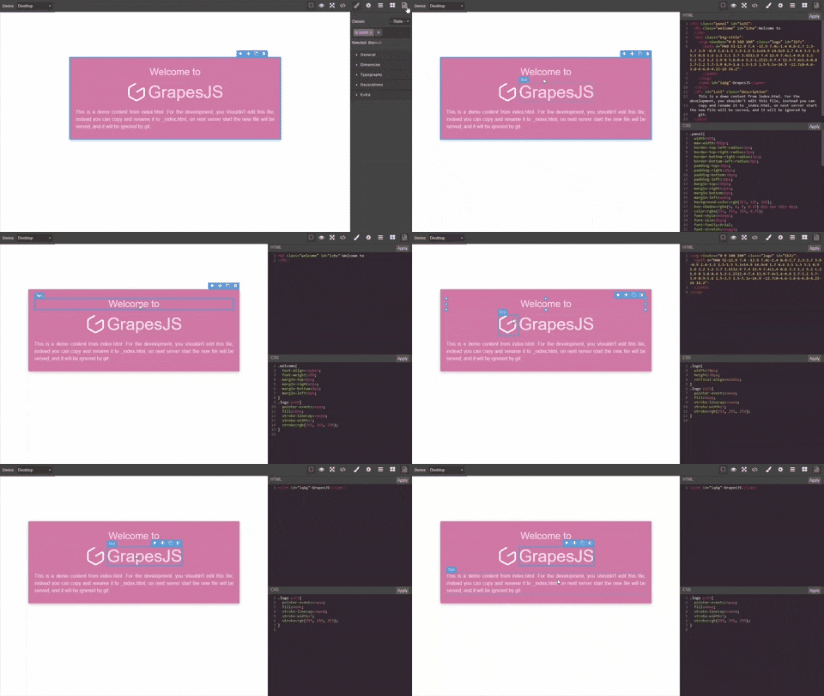
HTML
<link href="https://unpkg.com/grapesjs/dist/css/grapes.min.css" rel="stylesheet">
<script src="https://unpkg.com/grapesjs"></script>
<link href="https://unpkg.com/grapesjs-component-code-editor/dist/grapesjs-component-code-editor.min.css" rel="stylesheet">
<script src="https://unpkg.com/grapesjs-component-code-editor"></script>
<div id="gjs"></div>
JS
const editor = grapesjs.init({
container: '#gjs',
height: '100%',
fromElement: true,
storageManager: false,
panels: {
defaults: [
{
buttons: [
{
attributes: { title: 'Open Code' },
className: 'fa fa-code',
command: 'open-code',
id: 'open-code'
}
],
id: 'views'
}
]
},
plugins: ['grapesjs-component-code-editor'],
});
CSS
body, html {
  margin: 0;
  height: 100%;
}
Summary
- Plugin name:
grapesjs-component-code-editor
- Commands
Options
editJs | Lets you edit component scripts allowScripts must be set to true | false |
openStyleOnSave | Open stylesManager when html changes are applied | true |
Download
- CDN
https://unpkg.com/grapesjs-component-code-editor
- NPM
npm i grapesjs-component-code-editor
- GIT
git clone https://github.com/ju99ernaut/grapesjs-component-code-editor.git
Usage
Directly in the browser
<link href="https://unpkg.com/grapesjs/dist/css/grapes.min.css" rel="stylesheet"/>
<script src="https://unpkg.com/grapesjs"></script>
<link href="./dist/grapesjs-component-code-editor.min.css" rel="stylesheet">
<script src="./dist/grapesjs-component-code-editor.min.js"></script>
<div id="gjs"></div>
<script type="text/javascript">
var editor = grapesjs.init({
container: '#gjs',
panels: { }
plugins: ['grapesjs-component-code-editor'],
pluginsOpts: {
'grapesjs-component-code-editor': { }
}
});
</script>
Modern javascript
import grapesjs from 'grapesjs';
import plugin from 'grapesjs-component-code-editor';
import 'grapesjs/dist/css/grapes.min.css';
import 'grapesjs-component-code-editor/dist/grapesjs-component-code-editor.min.css';
const editor = grapesjs.init({
container : '#gjs',
plugins: [plugin],
pluginsOpts: {
[plugin]: { }
}
plugins: [
editor => plugin(editor, { }),
],
});
Adding after editor initialization
const pn = editor.Panels;
const panelViews = pn.addPanel({
  id: 'views'
});
panelViews.get('buttons').add([{
  attributes: {
     title: 'Open Code'
  },
  className: 'fa fa-file-code-o',
  command: 'open-code',
  id: 'open-code'
}]);
Development
Clone the repository
$ git clone https://github.com/ju99ernaut/grapesjs-component-code-editor.git
$ cd grapesjs-component-code-editor
Install dependencies
$ npm i
Start the dev server
$ npm start
Build the source
$ npm run build
License
MIT





