


Security News
Deno 2.6 + Socket: Supply Chain Defense In Your CLI
Deno 2.6 introduces deno audit with a new --socket flag that plugs directly into Socket to bring supply chain security checks into the Deno CLI.
By Sarah Gooding - Dec 12, 2025
graphql-request
Advanced tools
Minimal GraphQL client supporting Node and browsers for scripts or simple apps.
Minimal GraphQL client supporting Node and browsers for scripts or simple apps.


async / await)TypedDocumentNodenpm add graphql-request graphql
This package uses package.exports. Therefore if you are a TypeScript user you must:
tsconfig.json moduleResolution set to "bundler" or "node16"/"nodenext".package.json type set to "module".Send a GraphQL document using a static request function:
import { gql, request } from 'graphql-request'

const document = gql`
  {
    company {
      ceo
    }
  }
`
await request('https://api.spacex.land/graphql/', document)
The function can be passed a configuration object for more complex cases:
await request({
  url,
  document,
  variables,
  requestHeaders,
})
A class is available for constructing your own instances:
import { gql, GraphQLClient } from 'graphql-request'

const document = gql`
  {
    company {
      ceo
    }
  }
`
const endpoint = 'https://api.spacex.land/graphql/'
const client = new GraphQLClient(endpoint)
await client.request(document)
We only (officially) support versions of Nodejs of the following status:
So for example on Oct 24 2023 that would mean these versions: 18, 20, 21.
Any issue that exists solely for an unsupported version of Nodejs will be rejected (not worked on).
⚠️ This reference is incomplete. Check out the examples for more reference material.
By default GraphQLClient will throw when an error is received. However, sometimes you still want to resolve the (partial) data you received.
You can define errorPolicy in the GraphQLClient constructor.
const client = new GraphQLClient(endpoint, { errorPolicy: 'all' })
Allow no errors at all. If you receive a GraphQL error the client will throw.
Ignore incoming errors and resolve like no errors occurred
Return both the errors and data, only works with rawRequest.
OperationName has been introduced to address issues reported here Support operation name, However, on certain occasions this information may not be needed in requests. In such cases, you might consider ignoring operationName to avoid the extraction steps currently performed by a parsing operation when the document is provided in string format.
By default the GraphQLClient tries to extract the operationName from the document.
You can define excludeOperationName in the constructor of GraphQLClient to avoid the extraction process if it is not needed. This can be useful if you don't use operationName and want to optimise queries by reducing the amount of computation as much as possible, especially if we are in a context where we are using documents in string format to reduce bundle size.
// example where the operation name is not ignored
const client = new GraphQLClient(endpoint, {
  method: 'POST',
})
// example in which the operation name is ignored
const client = new GraphQLClient(endpoint, {
  method: 'POST',
  excludeOperationName: true,
})
In this issue we decided to make this library more stable and maintainable. In principal the feature is still in scope of this library and will make a return when we find time to do the feature right.
graphql?graphql-request uses methods exposed by the graphql package to handle some internal logic. On top of that, for TypeScript users, some types are used from the graphql package to provide better typings.
gql template exported by graphql-request?No. It is there for convenience so that you can get the tooling support like automatic formatting and syntax highlighting. You can use gql from graphql-tag if you need it for some reason too.
graphql-request apart from other clients like Apollo, Relay, etc.?graphql-request is the most minimal and simplest to use GraphQL client. It's perfect for small scripts or simple apps.
Compared to GraphQL clients like Apollo or Relay, graphql-request doesn't have a built-in cache and has no integrations for frontend frameworks. The goal is to keep the package and API as minimal as possible.
Apollo Client is a comprehensive state management library for JavaScript that enables you to manage both local and remote data with GraphQL. It is more feature-rich than graphql-request, offering advanced features like caching, optimistic UI updates, and integration with various view layers.
urql is a highly customizable and versatile GraphQL client for React applications. It includes features like caching, pagination, and subscriptions. It is similar to graphql-request in its simplicity and ease of use but offers more extensibility and integration with the React ecosystem.
Relay is a framework for building data-driven React applications with GraphQL. It provides a powerful and opinionated set of tools for fetching, storing, and managing GraphQL data. Relay is more complex than graphql-request and is designed for use cases that require fine-grained control over data management and performance optimization.
FAQs
Minimal GraphQL client supporting Node and browsers for scripts or simple apps.
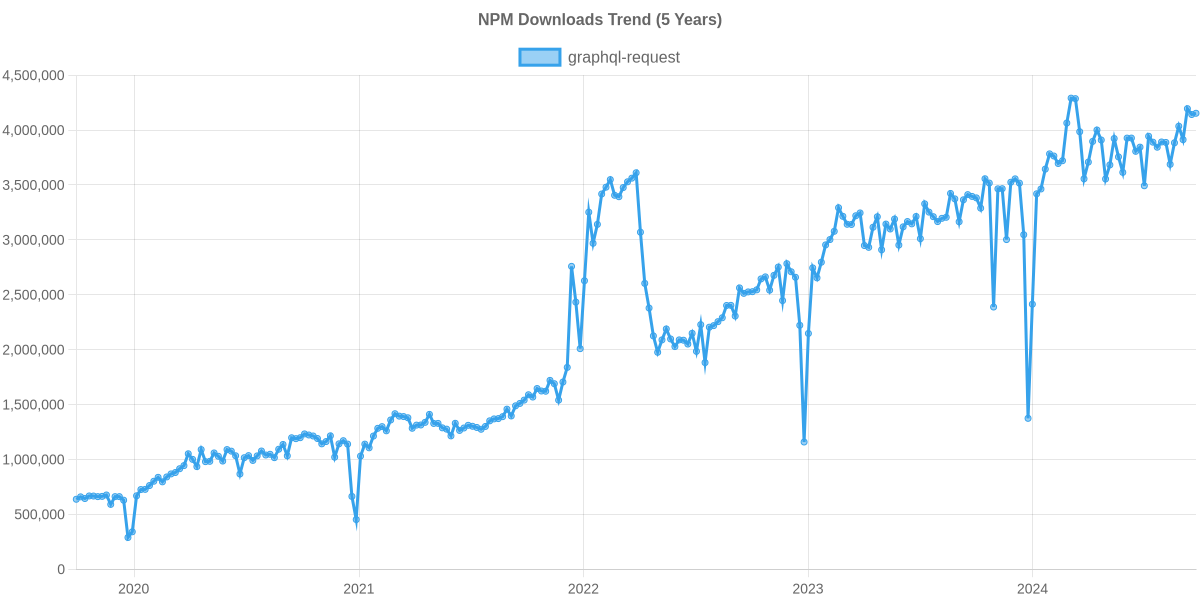
The npm package graphql-request receives a total of 4,318,134 weekly downloads. As such, graphql-request popularity was classified as popular.
We found that graphql-request demonstrated a healthy version release cadence and project activity because the last version was released less than a year ago. It has 5 open source maintainers collaborating on the project.
Did you know?

Socket for GitHub automatically highlights issues in each pull request and monitors the health of all your open source dependencies. Discover the contents of your packages and block harmful activity before you install or update your dependencies.
Security News
Deno 2.6 introduces deno audit with a new --socket flag that plugs directly into Socket to bring supply chain security checks into the Deno CLI.

Security News
New DoS and source code exposure bugs in React Server Components and Next.js: what’s affected and how to update safely.

Security News
Socket CEO Feross Aboukhadijeh joins Software Engineering Daily to discuss modern software supply chain attacks and rising AI-driven security risks.