


Research
2025 Report: Destructive Malware in Open Source Packages
Destructive malware is rising across open source registries, using delays and kill switches to wipe code, break builds, and disrupt CI/CD.
By Kush Pandya - Dec 24, 2025
html-webpack-plugin
Advanced tools









Plugin that simplifies creation of HTML files to serve your bundles
npm i --save-dev html-webpack-plugin
yarn add --dev html-webpack-plugin
This is a webpack plugin that simplifies creation of HTML files to serve your webpack bundles. This is especially useful for webpack bundles that include a hash in the filename which changes every compilation. You can either let the plugin generate an HTML file for you, supply
your own template using lodash templates or use your own loader.
PluginsThe html-webpack-plugin provides hooks to extend it to your needs. There are already some really powerful plugins which can be integrated with zero configuration
async, defer or module attributes to your <script> elements, or even inline them<link>s to external stylesheets into <style> elements containing internal CSS<link rel='preload'> and <link rel='prefetch'><link rel='preload'> helping with lazy-loading<link /> tags to have their media attribute set automatically; useful for providing specific desktop/mobile/print etc. stylesheets that the browser will conditionally download<head>The plugin will generate an HTML5 file for you that includes all your webpack
bundles in the body using script tags. Just add the plugin to your webpack
config as follows:
webpack.config.js
const HtmlWebpackPlugin = require('html-webpack-plugin')

module.exports = {
  entry: 'index.js',
  output: {
    path: __dirname + '/dist',
    filename: 'index_bundle.js'
  },
  plugins: [
    new HtmlWebpackPlugin()
  ]
}
This will generate a file dist/index.html containing the following
<!DOCTYPE html>
<html>
  <head>
    <meta charset="utf-8">
    <title>Webpack App</title>
  </head>
  <body>
    <script src="index_bundle.js"></script>
  </body>
</html>
If you have multiple webpack entry points, they will all be included with script tags in the generated HTML.
If you have any CSS assets in webpack's output (for example, CSS extracted with the ExtractTextPlugin)
then these will be included with <link> tags in the HTML head.
If you have plugins that make use of it, html-webpack-plugin should be ordered first before any of the integrated plugins.
You can pass a hash of configuration options to html-webpack-plugin.
Allowed values are as follows
| Name | Type | Default | Description |
|---|---|---|---|
title | {String} | Webpack App | The title to use for the generated HTML document |
filename | {String} | 'index.html' | The file to write the HTML to. Defaults to index.html. You can specify a subdirectory here too (eg: assets/admin.html) |
template | {String} | `` | webpack require path to the template. Please see the docs for details |
templateParameters | {Boolean|Object|Function} | `` | Allows to overwrite the parameters used in the template |
inject | {Boolean|String} | true | true || 'head' || 'body' || false Inject all assets into the given template or templateContent. When passing true or 'body' all javascript resources will be placed at the bottom of the body element. 'head' will place the scripts in the head element |
favicon | {String} | `` | Adds the given favicon path to the output HTML |
meta | {Object} | {} | Allows to inject meta-tags. E.g. meta: {viewport: 'width=device-width, initial-scale=1, shrink-to-fit=no'} |
minify | {Boolean|Object} | false | Pass html-minifier's options as object to minify the output |
hash | {Boolean} | false | If true then append a unique webpack compilation hash to all included scripts and CSS files. This is useful for cache busting |
cache | {Boolean} | true | Emit the file only if it was changed |
showErrors | {Boolean} | true | Errors details will be written into the HTML page |
chunks | {?} | ? | Allows you to add only some chunks (e.g only the unit-test chunk) |
chunksSortMode | {String|Function} | auto | Allows to control how chunks should be sorted before they are included to the HTML. Allowed values are 'none' | 'auto' | 'dependency' | 'manual' | {Function} |
excludeChunks | {Array.<string>} | `` | Allows you to skip some chunks (e.g don't add the unit-test chunk) |
xhtml | {Boolean} | false | If true render the link tags as self-closing (XHTML compliant) |
Here's an example webpack config illustrating how to use these options
webpack.config.js
{
  entry: 'index.js',
  output: {
    path: __dirname + '/dist',
    filename: 'index_bundle.js'
  },
  plugins: [
    new HtmlWebpackPlugin({
      title: 'My App',
      filename: 'assets/admin.html'
    })
  ]
}
Generating Multiple HTML FilesTo generate more than one HTML file, declare the plugin more than once in your plugins array
webpack.config.js
{
  entry: 'index.js',
  output: {
    path: __dirname + '/dist',
    filename: 'index_bundle.js'
  },
  plugins: [
    new HtmlWebpackPlugin(), // Generates default index.html
    new HtmlWebpackPlugin({  // Also generate a test.html
      filename: 'test.html',
      template: 'src/assets/test.html'
    })
  ]
}
Writing Your Own TemplatesIf the default generated HTML doesn't meet your needs you can supply
your own template. The easiest way is to use the template option and pass a custom HTML file.
The html-webpack-plugin will automatically inject all necessary CSS, JS, manifest
and favicon files into the markup.
plugins: [
  new HtmlWebpackPlugin({
    title: 'Custom template',
    // Load a custom template (lodash by default see the FAQ for details)
    template: 'index.html'
  })
]
index.html
<!DOCTYPE html>
<html>
  <head>
    <meta charset="utf-8"/>
    <title><%= htmlWebpackPlugin.options.title %></title>
  </head>
  <body>
  </body>
</html>
If you already have a template loader, you can use it to parse the template.
Please note that this will also happen if you specifiy the html-loader and use .html file as template.
webpack.config.js
module: {
  loaders: [
    { test: /\.hbs$/, loader: "handlebars-loader" }
  ]
},
plugins: [
  new HtmlWebpackPlugin({
    title: 'Custom template using Handlebars',
    template: 'index.hbs'
  })
]
You can use the lodash syntax out of the box. If the inject feature doesn't fit your needs and you want full control over the asset placement use the default template of the html-webpack-template project as a starting point for writing your own.
The following variables are available in the template:
htmlWebpackPlugin: data specific to this plugin
htmlWebpackPlugin.files: a massaged representation of the
assetsByChunkName attribute of webpack's stats
object. It contains a mapping from entry point name to the bundle filename, eg:
"htmlWebpackPlugin": {
  "files": {
    "css": [ "main.css" ],
    "js": [ "assets/head_bundle.js", "assets/main_bundle.js"],
    "chunks": {
      "head": {
        "entry": "assets/head_bundle.js",
        "css": [ "main.css" ]
      },
      "main": {
        "entry": "assets/main_bundle.js",
        "css": []
      },
    }
  }
}
If you've set a publicPath in your webpack config this will be reflected correctly in this assets hash.
htmlWebpackPlugin.options: the options hash that was passed to
the plugin. In addition to the options actually used by this plugin,
you can use this hash to pass arbitrary data through to your template.
webpack: the webpack stats
object. Note that this is the stats object as it was at the time the HTML template
was emitted and as such may not have the full set of stats that are available
after the webpack run is complete.
webpackConfig: the webpack configuration that was used for this compilation. This
can be used, for example, to get the publicPath (webpackConfig.output.publicPath).
compilation: the webpack compilation object.
This can be used, for example, to get the contents of processed assets and inline them
directly in the page, through compilation.assets[...].source()
(see the inline template example).
Filtering ChunksTo include only certain chunks you can limit the chunks being used
webpack.config.js
plugins: [
  new HtmlWebpackPlugin({
    chunks: ['app']
  })
]
It is also possible to exclude certain chunks by setting the excludeChunks option
webpack.config.js
plugins: [
  new HtmlWebpackPlugin({
    excludeChunks: [ 'dev-helper' ]
  })
]
EventsTo allow other plugins to alter the HTML this plugin executes tapable hooks.
The lib/hooks.js contains all information about which values are passed.
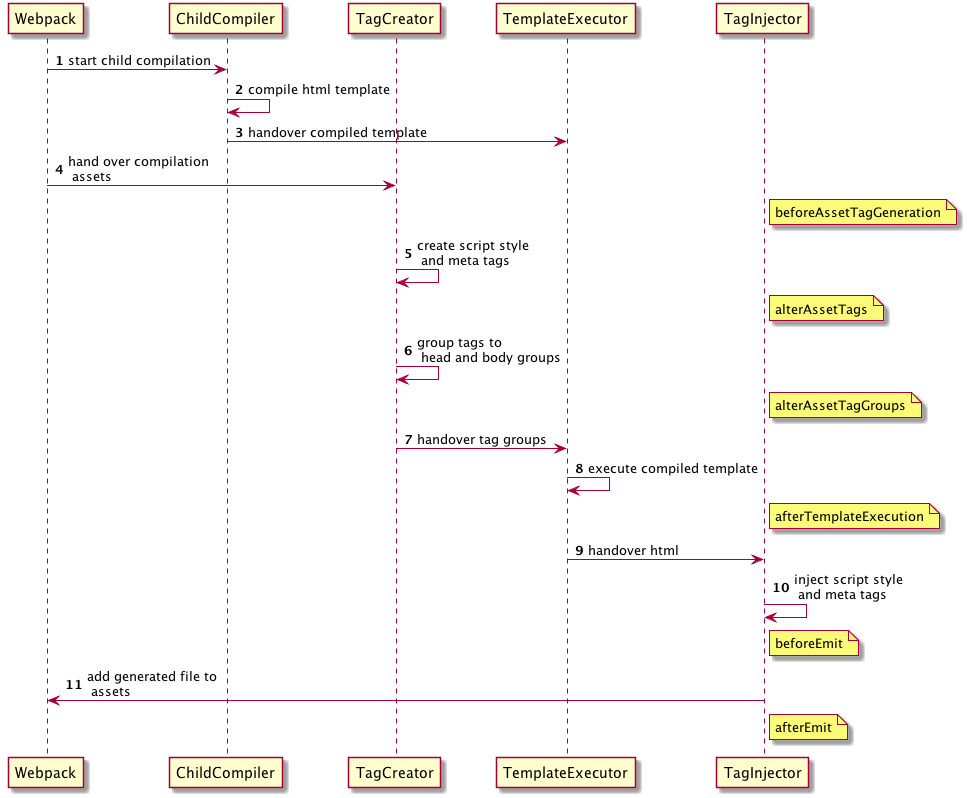
beforeAssetTagGeneration hook AsyncSeriesWaterfallHook<{
assets: {
publicPath: string,
js: Array<{string}>,
css: Array<{string}>,
favicon?: string | undefined,
manifest?: string | undefined
},
outputName: string,
plugin: HtmlWebpackPlugin
}>
alterAssetTags hook AsyncSeriesWaterfallHook<{
assetTags: {
scripts: Array<HtmlTagObject>,
styles: Array<HtmlTagObject>,
meta: Array<HtmlTagObject>,
},
outputName: string,
plugin: HtmlWebpackPlugin
}>
alterAssetTagGroups hook AsyncSeriesWaterfallHook<{
headTags: Array<HtmlTagObject | HtmlTagObject>,
bodyTags: Array<HtmlTagObject | HtmlTagObject>,
outputName: string,
plugin: HtmlWebpackPlugin
}>
afterTemplateExecution hook AsyncSeriesWaterfallHook<{
html: string,
headTags: Array<HtmlTagObject | HtmlTagObject>,
bodyTags: Array<HtmlTagObject | HtmlTagObject>,
outputName: string,
plugin: HtmlWebpackPlugin,
}>
beforeEmit hook AsyncSeriesWaterfallHook<{
html: string,
outputName: string,
plugin: HtmlWebpackPlugin,
}>
afterEmit hook AsyncSeriesWaterfallHook<{
outputName: string,
plugin: HtmlWebpackPlugin
}>
Example implementation: html-webpack-harddisk-plugin
plugin.js
class MyPlugin {
  apply (compiler) {
    compiler.hooks.compilation.tap('MyPlugin', (compilation) => {
      console.log('The compiler is starting a new compilation...')

      // Staic Plugin interface |compilation |HOOK NAME | register listener
      HtmlWebpackPlugin.getHooks(compilation).beforeEmit.tapAsync(
        'MyPlugin', // <-- Set a meaningful name here for stacktraces
        (data, cb) => {
          // Manipulate the content
          data.html += 'The Magic Footer'
          // Tell webpack to move on
          cb(null, data)
        }
      )
    })
  }
}

module.exports = MyPlugin
webpack.config.js
plugins: [
  new MyPlugin({ options: '' })
]
Note that the callback must be passed the HtmlWebpackPluginData in order to pass this onto any other plugins listening on the same beforeEmit event

Jan Nicklas |

Thomas Sileghem |
This project exists thanks to all the people who contribute.
You're free to contribute to this project by submitting issues and/or pull requests. This project is test-driven, so keep in mind that every change and new feature should be covered by tests.
This project uses the semistandard code style.

Thank you to all our backers! 🙏 Become a backer



Support this project by becoming a sponsor. Your logo will show up here with a link to your website. Become a sponsor










This package provides a pluggable template for the html-webpack-plugin, offering additional features like meta tags, links to CDN-hosted libraries, and more. It is more opinionated than the base html-webpack-plugin, which allows for more customization.
This is a webpack plugin that generates a 'manifest.json' for your Progressive Web Application, with auto icon resizing and fingerprinting support. It serves a different purpose than html-webpack-plugin but is often used alongside it to set up web app manifests.
This plugin for webpack uses the favicons library to automatically generate favicons for different platforms and insert them into an HTML file generated by html-webpack-plugin. It complements the html-webpack-plugin by managing favicon generation.
FAQs
Simplifies creation of HTML files to serve your webpack bundles
The npm package html-webpack-plugin receives a total of 8,586,504 weekly downloads. As such, html-webpack-plugin popularity was classified as popular.
We found that html-webpack-plugin demonstrated a healthy version release cadence and project activity because the last version was released less than a year ago. It has 5 open source maintainers collaborating on the project.
Did you know?

Socket for GitHub automatically highlights issues in each pull request and monitors the health of all your open source dependencies. Discover the contents of your packages and block harmful activity before you install or update your dependencies.
Research
Destructive malware is rising across open source registries, using delays and kill switches to wipe code, break builds, and disrupt CI/CD.

Security News
Socket CTO Ahmad Nassri shares practical AI coding techniques, tools, and team workflows, plus what still feels noisy and why shipping remains human-led.

Research
/Security News
A five-month operation turned 27 npm packages into durable hosting for browser-run lures that mimic document-sharing portals and Microsoft sign-in, targeting 25 organizations across manufacturing, industrial automation, plastics, and healthcare for credential theft.