


Security News
AI Agent Lands PRs in Major OSS Projects, Targets Maintainers via Cold Outreach
An AI agent is merging PRs into major OSS projects and cold-emailing maintainers to drum up more work.
By Sarah Gooding - Feb 14, 2026
image-guard
Advanced tools


(This project was based on sum.cumo’s imagemin-merlin. Changes are documented, and include this README. Image Guard supports two additional file formats—WebP and AVIF—, comes with improved code and documentation, and is being maintained. For this reason, it’s not based on any Imagemin packages anymore.)
Image Guard takes care of near-lossless compression of your images, to help you avoid bloat in your repositories. It makes it convenient and as safe as possible to automatically compress PNG, JPG, GIF, WebP, and AVIF images.
It’s convenient because setup is simple. Run it right away—done. Or install, run, add hook—done.
It’s as safe as possible because compression happens losslessly (near-lossless for JPG and GIF images). That allows you to stop worrying about forgetting to compress images, but also about sacrificing too much quality. (You can take care of additional optimizations manually or through other tooling.)
(Note available parameters below.)
You can use Image Guard right away, without installation, by running
npx image-guard
Install Image Guard in your project:
npm i -D image-guard
Run Image Guard by calling
npx image-guard
To make sure that all images are being compressed, it’s recommended to run Image Guard like this at least once, after installation.
Install Image Guard in your project:
npm i -D image-guard
To compress images already in the code base, run Image Guard once by calling
npx image-guard
For automated use, Image Guard should be triggered through a Git hook on pre-commit. You can choose between native Git hooks (recommended for simple projects) or Husky.
Native Git hooks are simpler to set up and don’t require additional dependencies. Run these commands from your project root:
mkdir -p .githooks;\
cat > .githooks/pre-commit << 'EOF'
#!/bin/sh
npx image-guard --staged
EOF
chmod +x .githooks/pre-commit;\
git config core.hooksPath .githooks;\
git add .githooks/pre-commit;\
git commit -m "feat: add Git pre-commit hook for Image Guard";\
npm pkg set scripts.postprepare="mkdir -p .githooks && cat > .githooks/pre-commit << 'EOF'
#\!/bin/sh
npx image-guard --staged
EOF
chmod +x .githooks/pre-commit && git config core.hooksPath .githooks"
If you already use Husky, run the following commands in your project root (you can copy and execute them at once):
grep -qxF "npx image-guard --staged" .husky/pre-commit || echo "\nnpx image-guard --staged" >> .husky/pre-commit;\
git add .husky/pre-commit;\
git commit -m "feat: add Husky pre-commit hook for Image Guard";\
npm pkg set scripts.postprepare="grep -qxF 'npx image-guard --staged' .husky/pre-commit || echo '\nnpx image-guard --staged' >> .husky/pre-commit"
If you don’t use Husky yet, run the following commands from your project root:
npm i -D husky;\
npx husky init;\
echo "npx image-guard --staged" > .husky/pre-commit;\
git add .husky/pre-commit;\
git commit -m "feat: add Husky pre-commit hook for Image Guard";\
npm pkg set scripts.postprepare="grep -qxF 'npx image-guard --staged' .husky/pre-commit || echo '\nnpx image-guard --staged' >> .husky/pre-commit"
(The postprepare script ensures that the hook is added to the repository whenever someone installs the package.)
Important: When you commit images that have not yet been compressed, the automated compression process (triggered by the pre-commit hook) will modify those image files to reduce their size. As a result, after your initial commit attempt, you will see these images appear as changed files in Git. To include the optimized images in your repository, you need to stage and commit them again. In rare cases, if further compression is possible, you may need to repeat this process until no further changes are detected. This workflow is intentional and ensures that only optimally compressed images are committed. Many editors can display diffs for images, helping you review these changes.
--dry allows you to run Image Guard in “dry mode.” All changes are shown in the terminal.
--ignore allows you to specify paths to be ignored (as in --ignore=example,test). Multiple paths must be separated by commas. The option supports glob patterns (e.g., assets/**, **/*.png); matching is case‑insensitive and honors .gitignore.
--staged (recommended with automated use) triggers a mode that watches PNG, JPG, GIF, WebP, and AVIF files in git diff and only compresses those files—that approach makes Image Guard more efficient in operation.
--quiet suppresses per‑file logs and prints only the final summary (plus errors). This reduces console noise and speeds up runs in CI and Git hooks.
If Git hooks fail with “npx: command not found,” make sure to install (npm i -D image-guard) and to refer to the binary directly in the pre-commit hook (and, not detailed here, also in the postprepare script):
#!/bin/sh
export PATH="$PWD/node_modules/.bin:$PATH"
./node_modules/.bin/image-guard --staged
This issue can arise in GUI Git clients (VS Code, GitHub Desktop, etc.) or with Node version managers, as these environments may not inherit your shell's PATH/Node environment. This affects any tool using npx in hooks.
Roughly like this:
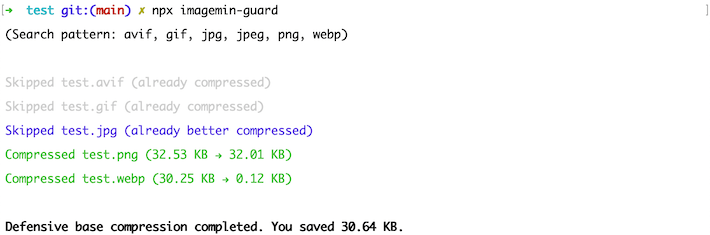
Tip: Use --quiet to suppress these per‑file lines and keep only the final summary.
Image Guard is a Node script that uses sharp under the hood.
Automated compression works by monitoring whether a given change list includes any PNGs, JPGs, GIFs, WebPs, or AVIFs. It’s initiated by a Git hook. Only those images are compressed where there is an improvement. The compressed images can then be committed to the underlying repository.
Through this approach, though glossed over here, Image Guard makes up for what’s missing or complicated in other packages, namely easy, near-riskless, automatable, resource-friendly in-repo optimization.
You use Image Guard when you need a simple, automatable, robust solution to compress images in a way that limits unnecessary image payload right from the start, in your repositories, and that reduces the risk that entirely uncompressed images go into production.
As Image Guard compresses near-losslessly, there’s little risk of quality issues from compression. (Lossless compression is not possible for every image format, however, so there’s a risk when excessively iterating over the same images. Doing so may eventually degrade quality.)
Image Guard is no substitute for image fine-tuning and micro-optimization. That’s difficult to do in an automated fashion, because this type of compression requires balancing quality and performance and is context-dependent. In its most extreme form, when maximum quality at maximum performance is required from each graphic, micro-optimization is even challenging to do manually.
That is, micro-optimization still needs to be taken care of through other means, whether manually or through tools. Image Guard just solves the problem that images are checked in or go live that are not compressed at all.
There are a few ideas, like adding light SVG support, or ensuring compatibility with projects in which the project’s .git folder is not at the same level as its package.json (currently, automatic mode doesn’t work in these cases).
Feedback is appreciated: Please file an issue or send a pull request. Thank you!
Copyright 2019 sum.cumo GmbH Copyright 2022 Jens Oliver Meiert
Licensed under the Apache License, Version 2.0 (the “License”); you may not use this file except in compliance with the License. You may obtain a copy of the License at
http://www.apache.org/licenses/LICENSE-2.0
Unless required by applicable law or agreed to in writing, software distributed under the License is distributed on an “AS IS” BASIS, WITHOUT WARRANTIES OR CONDITIONS OF ANY KIND, either express or implied. See the License for the specific language governing permissions and limitations under the License.
FAQs
Near-lossless image compressor that’s easy to use and easy to automate
The npm package image-guard receives a total of 262 weekly downloads. As such, image-guard popularity was classified as not popular.
We found that image-guard demonstrated a healthy version release cadence and project activity because the last version was released less than a year ago. It has 1 open source maintainer collaborating on the project.
Did you know?

Socket for GitHub automatically highlights issues in each pull request and monitors the health of all your open source dependencies. Discover the contents of your packages and block harmful activity before you install or update your dependencies.
Security News
An AI agent is merging PRs into major OSS projects and cold-emailing maintainers to drum up more work.

Research
/Security News
Chrome extension CL Suite by @CLMasters neutralizes 2FA for Facebook and Meta Business accounts while exfiltrating Business Manager contact and analytics data.

Security News
After Matplotlib rejected an AI-written PR, the agent fired back with a blog post, igniting debate over AI contributions and maintainer burden.