js-conditional-compile-loader
A conditional compiling loader for webpack, support any source files like js, ts, vue, css, scss, html.
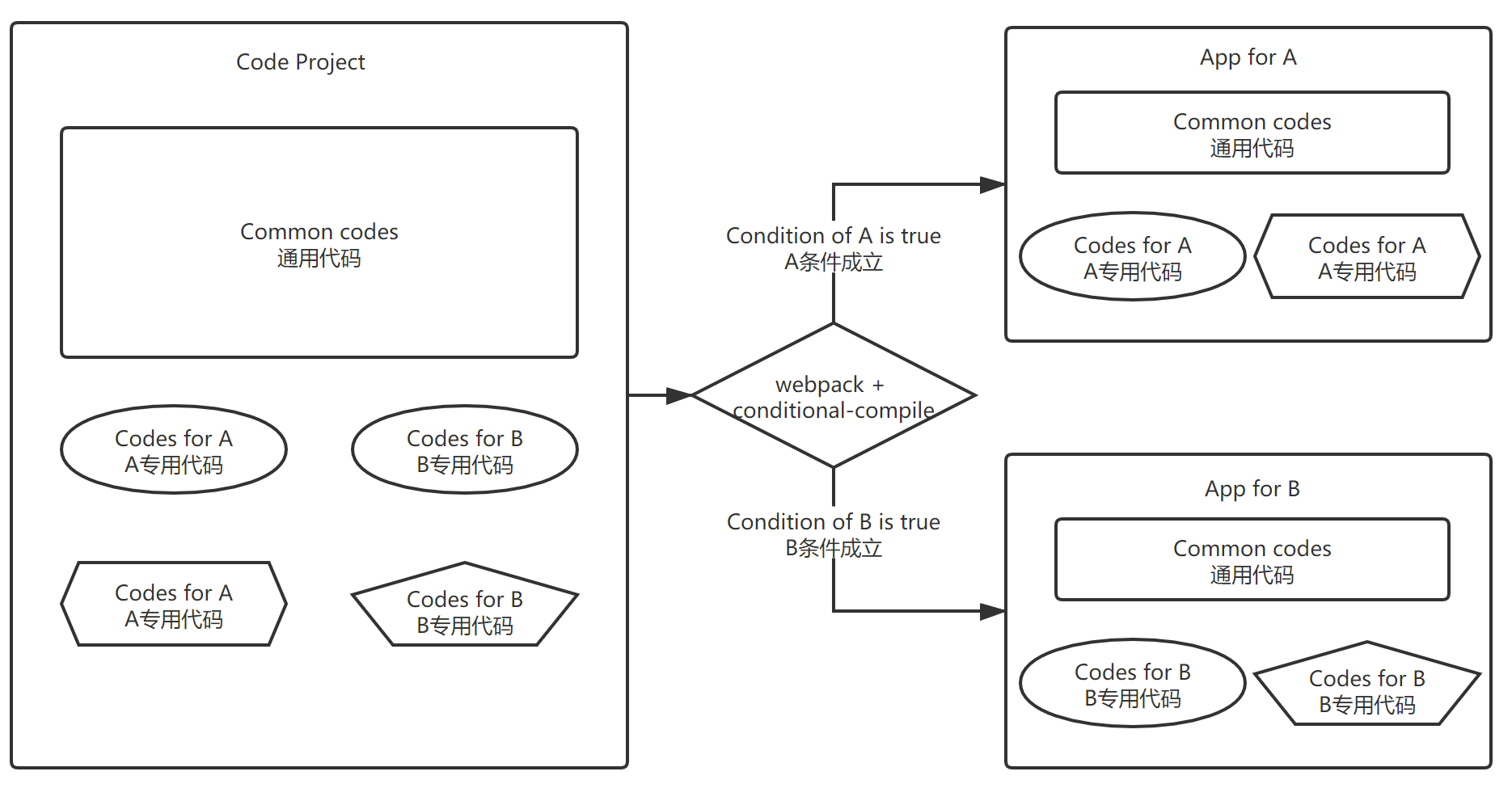
Conditional compiling means that we can use the same codes and compiling process, to build different applications with different environment conditions.
- For example: we can output two different program for debug or release environment with a same source code project.
- Another sample: Use same codes and compiling process to supply different customers, just by using different building command args, like this:
npm run build --ali for alibaba, npm run build --tencent for tencent。
Usage
This loader provides two directives: IFDEBUG and IFTRUE. Just use them anywhere in js code like this: Start with /*IFDEBUG or /*IFTRUE_xxx, end with FIDEBUG*/ or FITRUE_xxx*/, place js code in the center. The xxx is any condition property of the options in webpack, such like myFlag.
- Mode 1 - comment all
Since it is designed by a js comment style, the code can run normaly even though the js-conditional-compile-loader is not used.
- Mode 2 -- head and foot
In this mode, you can use eslint to check your code.
var anyJsHere = 'Any js here'
function anyJsHere(){
}
Build result with source code
Source code:
var aliCode = require('./ali/alibaba-business.js')
aliCode.doSomething()
$state.go('win', {dir: menu.winId })
Compiled output by options: {isDebug: true, forAlibaba: true}:
var aliCode = require('./ali/alibaba-business.js')
aliCode.doSomething()
$state.go('win', {dir: menu.winId, reload: true })
Compiled output by options: {isDebug: false, forAlibaba: false}:
$state.go('win', {dir: menu.winId})
Setup
npm i -D js-conditional-compile-loader
Config in webpack
Change webpack config like this:
See this sample: vue-element-ui-scaffold-webpack4(https://github.com/hzsrc/vue-element-ui-scaffold-webpack4)
js-conditional-compile-loader needs to be added as step 1 for a rule, means it is set as the last item of the use array.
This sample is a config for vue and js files, ts file is alike. For config of css、scss, See this sample
const conditionalCompiler = {
loader: 'js-conditional-compile-loader',
options: {
isDebug: process.env.NODE_ENV === 'development',
envTest: process.env.ENV_CONFIG === 'test',
myFlag: process.env.npm_config_myflag,
}
}
module.exports = {
module: {
rules: [
{
test: /\.vue$/,
use: ['vue-loader', conditionalCompiler],
},
{
test: /\.js$/,
include: [resolve('src'), resolve('test')],
use: [
'babel-loader?cacheDirectory',
conditionalCompiler,
],
},
]
}
}
options
If isDebug === false, all the codes between /\*IFDEBUG and FIDEBUG\*/ will be removed, otherwise the codes will be remained.
Defualt value of isDebug is set by: process.env.NODE_ENV === 'development'
- changeSource: Function(source, options)
Custom function to change source code. Optional. Sample: change .aspx to .do for java backend:
var options = {
    changeSource: process.env.npm_config_java ? source => source.replace(/\.aspx\b/i, '.do') : null
}
Samples -- Any file, Anywhere!
Conditional compiling directives can be used anywhere in any source files.
Like these:
const tx = "This is app /* IFTRUE_Ali of debug FITRUE_Ali */ here";
div > ul > li {
a {
color: red;
}
}
h2{
background: red;
}
Vue.component('debugInfo', {
template: ''
,
watch: {
curRule (v){
this.ruleData = v
},
},
});
<temeplate>
    <div>
        /* IFTRUE_myFlag
        <h2>This is a test! For HTML. vue模板内也可以使用!</h2>
        <pre>
            {{$attrs.info || ''}}
        </pre>
        FITRUE_myFlag */
    </div>
</temeplate>

<script>
    var vueComponent = {
        data: {
            /* IFTRUE_myFlag
            falgData: 'Flag Data',
            FITRUE_myFlag */
        },
    };
</script>

/* IFTRUE_myFlag*/
<style scoped>
    .any-where-test {
        color: red;
    }
</style>
/* FITRUE_myFlag*/


<style id="a" scoped>
    /* IFTRUE_myFlag*/
    .test-for-css {
        color: red;
    }
    /*FITRUE_myFlag */
</style>





