
Mappls Maps SDK for React Native
Easy To Integrate Maps & Location APIs & SDKs For Android Applications
Powered with India's most comprehensive and robust mapping functionalities.
-
You can get your api key to be used in this document here: Mappls Dashboard
-
The sample code is provided to help you understand the basic functionality of Mappls maps & REST APIs working on Android native development platform.
-
Explore through 200+ countries & territories with Global Search, Routing and Mapping APIs & SDKs by Mappls.
Version History
| 2.0.2 | 29 Sep 2025 | Mappls API Team |
| 2.0.1 | 17 Sep 2025 | Mappls API Team |
| 2.0.0 | 29 Aug 2025 | Mappls API Team |
Your Mappls Maps SDK usage needs a set of license keys (get them here) and is governed by the API terms and conditions. As part of the terms and conditions, you cannot remove or hide the Mappls logo and copyright information in your project.
The allowed SDK hits are described on the user dashboard page. Note that your usage is shared between platforms, so the API hits you make from a web application, Android app or an iOS app all add up to your allowed daily limit.
- Sign Up and Log In
- Create Separate Apps for Android & iOS
- Create two separate apps in the Mappls Dashboard:
- One for React Native Android
- One for React Native iOS
- Install Dependencies
- Install all required dependencies for Mappls SDK integration into your React Native project.
- Android Configuration
- iOS Configuration
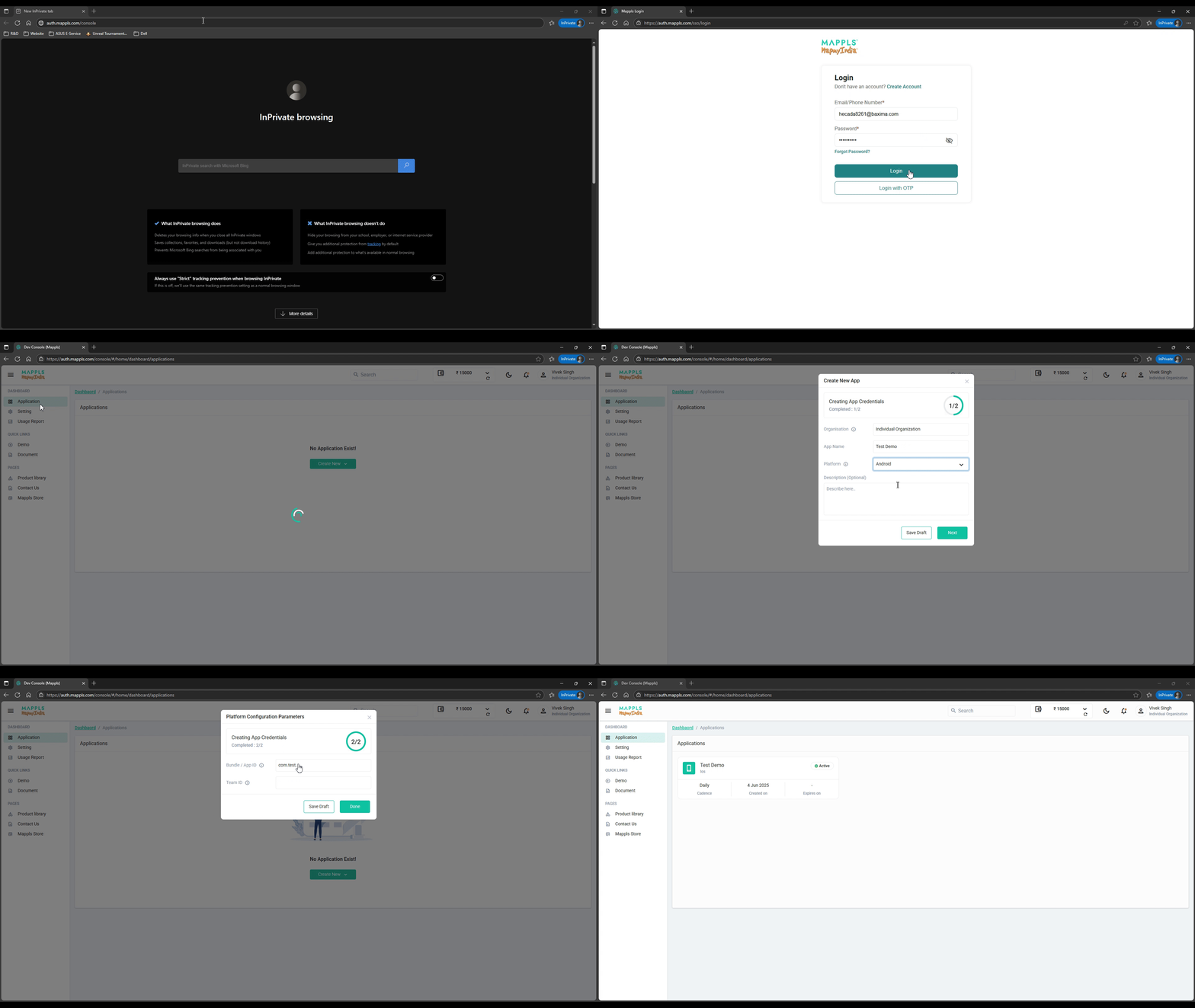
How to create an app on Mappls Console
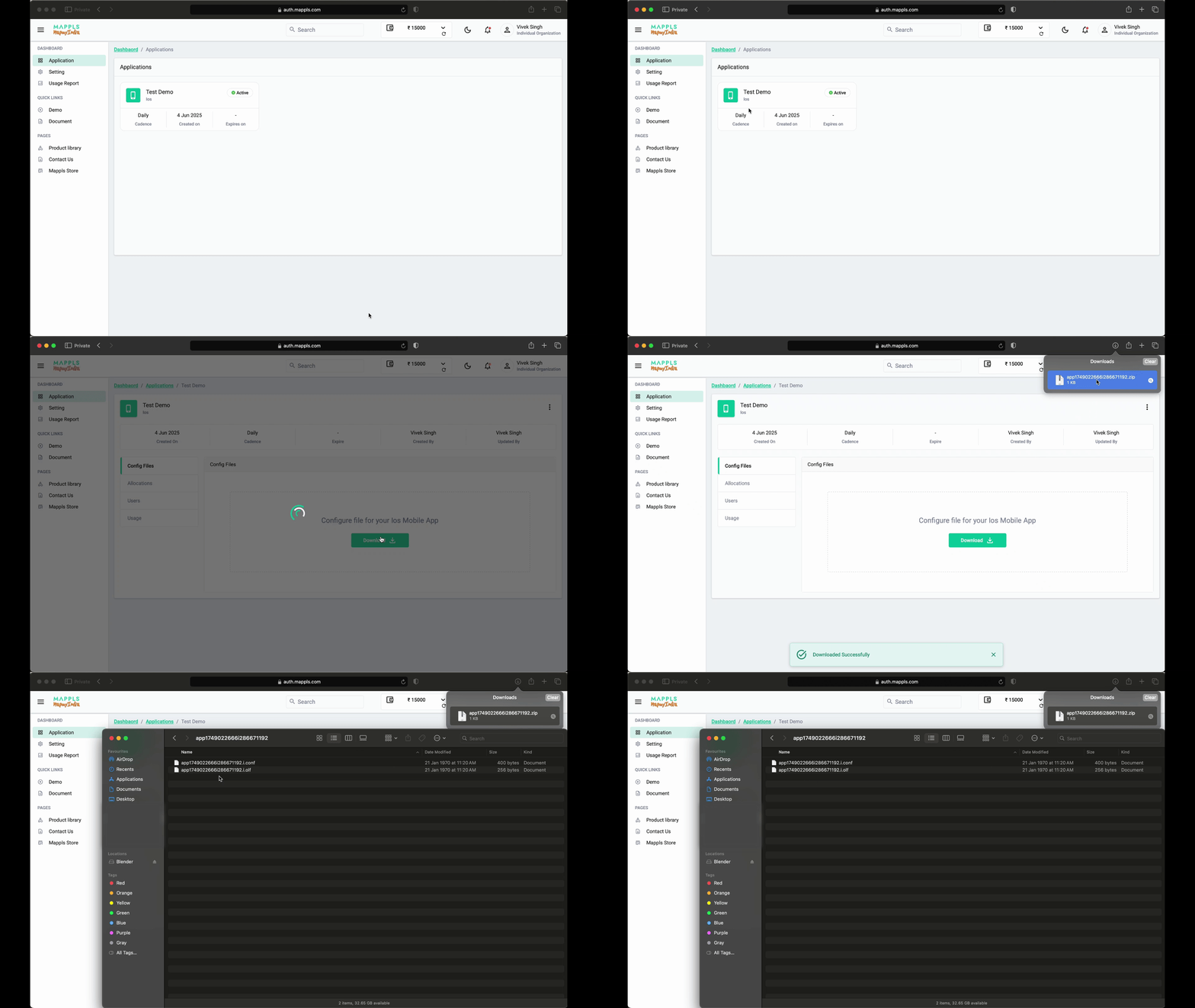
How to download config files from App from Console
Installation
npm
npm install mappls-map-react-native --save
Installation for Android
Add Mappls Repository
- Add the Mappls repository to your
settings.gradle or settings.gradle.kts file:
Kotlin (settings.gradle.kts)
dependencyResolutionManagement {
repositories {
    google()
    mavenCentral()
    maven(url = "https://maven.mappls.com/repository/mappls/")
}
}
Groovy (settings.gradle)
dependencyResolutionManagement {
repositories {
        google()
        mavenCentral()
        maven {
            url 'https://maven.mappls.com/repository/mappls/'
        }
}
}
Adding Mappls Configuration file
- Download Configuration files for your app (associated with Package Name and Signing Certificate SHA-256)
- Add Configuration files (
<appId>.a.olf and <appId>.a.conf) into the module app-level root directory of your app
Installation for IOS
How to Add a MapView
import React, { Component } from "react";
import {View } from "react-native";
import  MapplsGL  from  'mappls-map-react-native';

export default class App extends Component {
 render() {
 return (
 <View style={{flex:1}}>
 <MapplsGL.MapView style={{flex:1}} >
	 <MapplsGL.Camera
		 ref={c  => (this.camera = c)}
		 zoomLevel={12}
		 minZoomLevel={4}
		 maxZoomLevel={22}
		 centerCoordinate={[77.231409,28.6162]}
	 />
 </MapplsGL.MapView>
 </View>
 );
 }
}
For any queries and support, please contact:

Email us at
apisupport@mappls.com
 Support
Need support? contact us!
Support
Need support? contact us!





@ Copyright 2025 CE Info Systems Ltd. All Rights Reserved.





