missionlog



🚀 missionlog is a lightweight, structured logging package designed for performance, flexibility, and ease of use. It works as a drop-in replacement for console.log or ts-log, and offers both log level filtering, optional tag filtering, and customizable output handling—all in a tiny (~1KB) package.
✔ Fully Typed (TypeScript) • ✔ ESM & CJS Support • ✔ Zero Dependencies • ✔ 100% Coverage
✨ Why Use missionlog?
- Drop-in Replacement for
console.log & ts-log – Start using it instantly!
- Seamless Upgrade to Tagged Logging – Reduce log clutter and focus on what's important.
- Configurable Log Levels – Adjust visibility for log level and tags at runtime.
- Customizable Output – Send logs anywhere: console, JSON, cloud services.
- Automatic Buffering – Log calls before
init() are automatically buffered and processed once initialized.
- Blazing Fast Performance – O(1) log level lookups with advanced level caching.
- TypeScript-First – Full type safety with LogMessage and LogConfig interfaces.
- Chainable API – All methods return the logger instance for method chaining.
- Works Everywhere – Browser, Node.js, Firebase, AWS Lambda etc.
📦 Installing
npm i missionlog
🚀 Getting Started
Basic Usage
Missionlog works as a drop-in replacement for console.log:
import { log } from 'missionlog';
log.info('Hello, world!');
log.warn('Warning message');
log.error('Error occurred!');
log.debug('Starting process').info('Process step 1 complete').warn('Process running slowly');
💡 Usage Examples
Using Tags for Categorization
import { log, tag, LogLevel, DEFAULT_TAG } from 'missionlog';
log.init({
network: LogLevel.DEBUG,
ui: LogLevel.INFO,
[DEFAULT_TAG]: LogLevel.WARN,
});
log.debug(tag.network, 'Connection established');
log.info(tag.ui, 'Component rendered');
log.debug("This won't be logged because DEFAULT_TAG is WARN");
log.error('This will be logged because ERROR > WARN');
Automatic Buffering
Missionlog automatically buffers log calls that occur before init() is called, ensuring no important logs are lost during application startup:
import { log } from 'missionlog';
log.info('Application starting...');
log.debug('Loading configuration');
log.warn('Using default settings');
log.init({
[DEFAULT_TAG]: 'INFO'
}, (level, tag, message, params) => {
console.log(`[${level}] ${tag ? `[${tag}] ` : ''}${message}`, ...params);
});
The buffer automatically:
- Stores up to 50 log entries before
init() is called
- Processes all buffered entries when
init() is called
- Respects the configured log levels when draining the buffer
- Uses a circular buffer (oldest entries are dropped if buffer overflows)
Custom Log Handler (with Chalk)
import { log, LogLevel, LogLevelStr } from 'missionlog';
import chalk from 'chalk';
function createCustomHandler() {
const logConfig: Record<LogLevelStr, { color: (text: string) => string; method: (...args: unknown[]) => void }> = {
ERROR: { color: chalk.red, method: console.error },
WARN: { color: chalk.yellow, method: console.warn },
INFO: { color: chalk.blue, method: console.log },
DEBUG: { color: chalk.magenta, method: console.log },
TRACE: { color: chalk.cyan, method: console.log },
OFF: { color: () => '', method: () => {} },
};
return (level: LogLevelStr, tag: string, message: unknown, params: unknown[]) => {
const { method, color } = logConfig[level];
const logLine = `[${color(level)}] ${tag ? tag + ' - ' : ''}${message}`;
method(logLine, ...params);
};
}
log.init({ network: LogLevel.INFO, [DEFAULT_TAG]: LogLevel.INFO }, createCustomHandler());
if (log.isDebugEnabled('network')) {
const stats = getNetworkStatistics();
log.debug(tag.network, 'Network statistics', stats);
}
if (log.isTraceEnabled('ui')) {
const detailedMetrics = calculateDetailedRenderMetrics();
log.trace(tag.ui, 'UI rendering detailed metrics', detailedMetrics);
}
if (log.isLevelEnabled(LogLevel.WARN, 'security')) {
const securityCheck = performSecurityAudit();
log.warn(tag.security, 'Security audit results', securityCheck);
}
⚠️ Breaking Changes in v4.0.0
Removed Enhanced Callback
The enhanced callback functionality has been removed to simplify the API:
- ❌
log.setEnhancedCallback() method removed
- ❌
LogCallbackParams interface removed
- ❌
EnhancedLogCallback type removed
Migration: Use the standard callback in log.init() instead:
log.setEnhancedCallback((params) => {
const { level, tag, message, timestamp, params: extraParams } = params;
console.log(`[${timestamp.toISOString()}] [${level}] ${message}`, ...extraParams);
});
log.init({}, (level, tag, message, params) => {
const timestamp = new Date().toISOString();
console.log(`[${timestamp}] [${level}] ${message}`, ...params);
});
📖 API Reference
Log Methods
log.trace(messageOrTag?, ...params) - Lowest verbosity levellog.debug(messageOrTag?, ...params) - Detailed debugging informationlog.info(messageOrTag?, ...params) - Notable but expected eventslog.log(messageOrTag?, ...params) - Alias for info()log.warn(messageOrTag?, ...params) - Potential issues or warningslog.error(messageOrTag?, ...params) - Error conditions
Configuration
log.init(config?, callback?) - Configure log levels and custom handlerlog.isLevelEnabled(level, tag?) - Check if a specific level would be logged for a taglog.isDebugEnabled(tag?) - Convenience method to check if DEBUG level is enabled for a taglog.isTraceEnabled(tag?) - Convenience method to check if TRACE level is enabled for a taglog.reset() - Clear all tag registrations and configurations
Log Levels (in order of verbosity)
LogLevel.TRACE - Most verboseLogLevel.DEBUGLogLevel.INFO - Default levelLogLevel.WARNLogLevel.ERRORLogLevel.OFF - No logs
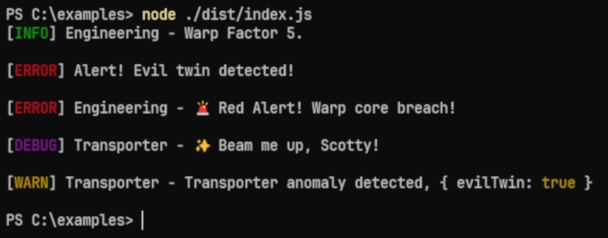
🖼️ Example Output
🤝 Contributing
Contributions, issues, and feature requests are welcome! Feel free to check issues page or submit a pull request.
📄 License
MIT License
© 2019-2025 Ray Martone
🚀 Install missionlog today and make logging clean, structured, and powerful!





