mjml-qr-code


A component for adding QR codes to your email using an open-source QuickChart provider.
Usage
This mjml...
<mjml>
<mj-body>
<mj-section>
<mj-column>
<mj-qr-code value="hello world" />
</mj-column>
</mj-section>
</mj-body>
</mjml>
Will show this QR code:
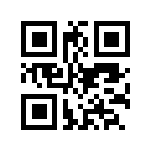
Customize the color, size, positioning, and other QR parameters using the attributes below.
Setup
Install via npm:
npm install mjml-qr-code --save
Then add the package to your .mjmlconfig:
{
  "packages": [
    "mjml-qr-code/lib/MjQrCode.js"
  ]
}
Attributes
The <mj-qr-code> tag supports all the attributes of the <mj-image> tag. View those attributes here.
In addition to regular image attributes which you can using for sizing and positioning, the component supports the following QR-specific attributes:
| value | The content encoded in your QR code | Yes | | |
| color | The color of the QR code | No | 000000 (black) | |
| background-color | The background of the QR code | No | ffffff (white) | |
| qr-margin | The number of QR blocks to leave empty around the QR code | No | 4 | |
| error-correction-level | The QR error correction level | No | M | |
| width | Width of the QR code image | No | 200 | |
| host | The host of the QR image server | No | quickchart.io | |
| protocol | The protocol of the QR image server | No | https | |
Hosting
By default, this component uses the public QuickChart web service to render QR codes, but you can use the host attribute to point to your own QR renderer.





