


Security News
The Hidden Blast Radius of the Axios Compromise
The Axios compromise shows how time-dependent dependency resolution makes exposure harder to detect and contain.
By Ahmad Nassri - Apr 01, 2026
monito-action
Advanced tools
#使用说明在微信公众号里 关注微信公众号号 阿勇学前端
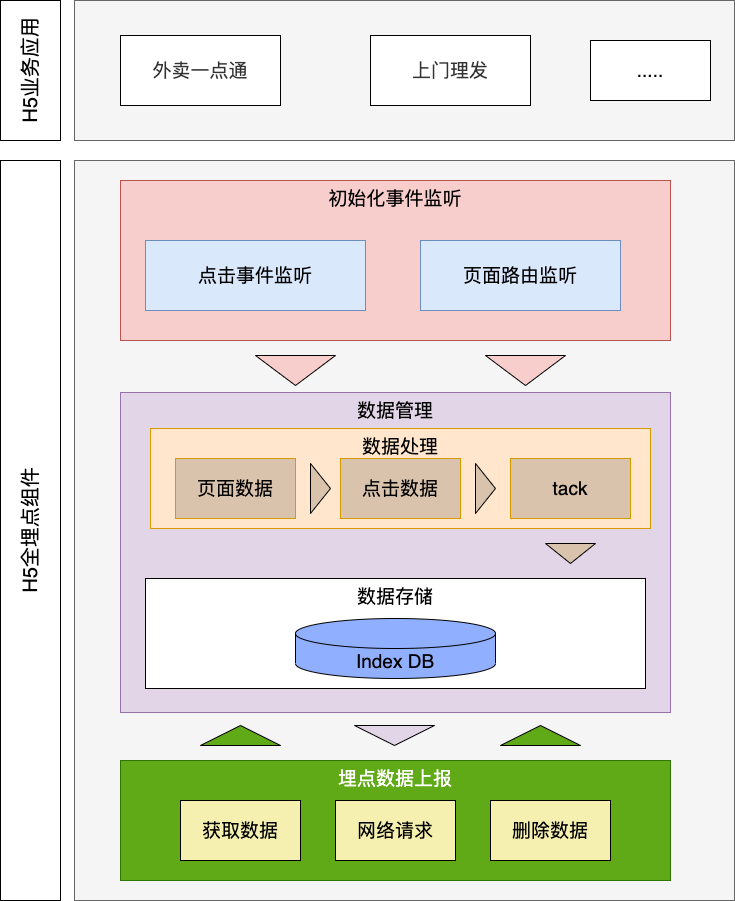
#H5全埋点组件
#全埋点
该组件已发布npm🪧库
下载方式
npm i monito-action
具体使用说明见 https://mp.weixin.qq.com/s?__biz=MzkxMjI2NzgyMw==&mid=2247483966&idx=1&sn=931f0258b5fb366bd3a694cf53e0dafa
对于互联网公司来说,数据埋点有着多方面的实际作用,包括但不限于以下这些。
了解和跟踪数据的总体情况:PV 、UV 、曝光点击数、用户数、会员数、复购率等。
用户行为分析:用户的使用习惯、用户的决策路径、用户使用产品的热力图分布等。
掌握产品的变化趋势:产品每日流量、产品所处的生命周期,以及电商大促活动前后一周、两周的数据变化趋势等。
数据形成反馈,用于产品迭代:用户行为的转化漏斗,基于用户行为 (浏览、点击、关注、收藏、加购、评论、分享)、商品、店铺、品类、 大促活动等的转化率。
文件顺序按照系统文件排列数据
|---monito-action //组件外层目录
| |---module //组件模块层
| | |--data-store //数据模块
| | | |--data //数据存储模块
| | | | |--db// indexDB ts方法封装
| | | | |--index// 数据存储管理类(包含数据上报)
| | | |--data-process //数据层逻辑整合 (包含数据上报)
| | |
| | |--data-type//数据类型interface接口
| | |--event-listener//事件监听功能封装
| | |--global-const//全局常量
| | |--hardware-data//设备硬件数据处理
| | |--init//埋点初始化(点击事件监听, 页面路由监听)
| | |--log-output//日志输出模块
| | |--performance //性能分析模块
| | |--report//数据上报方法封装
| | |---index//模块层入口
|------index//组件入口
#使用方式
目前兼容框架有 uniapp vue2.0 vue3.0 react; 微信小程序框架目前未做兼容, 阿勇正在玩命开发...
更新日志公告🪧以 微信公众号为主 ⚠️⚠️⚠️!!! (关注公众号) => 阿勇学前端
| 字段介绍 | 类型 | 说明 |
|---|---|---|
| id | string | 数据唯一id |
| actionType | string | 采集类型 见下方详情 |
| elementText | string | 用户交互节点文案(actionType=click时才有) |
| ....业务数据 | string | 插入当前文案所绑定的业务数据,使用方式见 组件init 方法调用 |
| 字段介绍 | 类型 | 说明 |
|---|---|---|
| actionType | string | 采集类型 见下方详情 |
| DNS | number | nsc时长 |
| DOM | number | dom渲染时长 |
| Load | number | 页面加载时长 |
| TCP | number | tcp请求时长 |
| WhitecrSeend | number | 白屏时长 |
| allResourceLoad | Indicators[] | 项目所以资源加载(图片,JS,link,CSS)时间 |
| entetTim | number | 页面进入时间戳 |
| leaveTime | number | 页面离开时间戳 |
| remainTime | number | 页面停留时间 |
| oldURL | string | 跳转前的页面 |
| 字段介绍 | 类型 | 说明 |
|---|---|---|
| pageUrl | string | 当前页面路径 |
| projectName | string | 项目名称 |
| userInfo | userInfo | 一般信息 |
| availHeight | string | 屏幕高度 |
| availWidth | string | 屏幕宽度 |
| resolution | string | 屏幕像素 |
| systemType | string | 系统类型 |
| phoneBrand | string | 手机品牌 |
| phoneVision | string | 手机系统版本 |
| position | string | 定位信息 (定位失败时候是 报错信息) 默认不获取定位信息, 获取定位需要在组件使用时传入参数配置详情见使用方式 |
| 字段介绍 | 类型 | 说明 |
|---|---|---|
| click | string | 用户点击 |
| pageLoad | string | 页面加载 |
| pagejump | string | 页面跳转 |
| pageBack | string | 页面返回 |
当前页面首次所有资源加载性能allResourceLoad字段介绍
| 字段介绍 | 类型 | 说明 |
|---|---|---|
| name | string | 资源加载地址 |
| duration | number | 页面加载 |
使用方式 1下载 2引入 3调组件init()方法传入参数即可使用
在项目没有package.json情况下需要
npm init -y
npm install monito-action
// 或
//yarn add monito-action
init方法调用示例 新建J S文件并导出实例对象原因 是因为,在Vue3中没有this, 实例对象中的tack方法必须通用过引入JS文件调用
如果是vue2项目可直接在main.js引入 ,通过挂载全局对象,在页面中使用this进行调用
Vue.prototype.$monitoAction = monitoAction;
import MonitoAction from 'monito-action';
export const monitoAction = new MonitoAction();

monitoAction.init({
    frameType:'vue',
    reques:{
        requestUrl:'http://www.liulongbin.top:3006/api/post',
        requerequesKeysHeader:{},
        requesKey:'value',
        maxRequesGatewayLength:3,
    },
    showLog: true,
    monitoSwitch: true,
    isPosition: true,
    userInfo:{
        userCode:'1540018883'
    },
    projectName: '全埋点组件',
    globaMonitoConfigList: [{
        elementText: 'Hello',
        elementEevent: '',
    },{
        elementText: 'add',
        elementEevent: '',
    }, ],
    globaMonitoImgList:[
        {imgSrc:'ayong.jpeg',businessData:'1号广告位置'}
    ]
})
export default monitoAction
import {createApp} from 'vue';
import App from './App.vue';
import './action'
const app = createApp(App);
app.use(router).use(ElementPlus).use(store).mount('#app');
<<template>>
  <div @click="monitoAction.track({actionType:(+ new Date()).toString()})">tack</div>
</template>
<script lang="ts" setup>
import monitoAction from '../../action'
</script>
| 字段名 | 类型 | 是否必传 | 介绍 |
|---|---|---|---|
| frameType | FrameType | 必传 | 项目框架类型;见下方详情 FrameType介绍 |
| globaMonitoConfigList | MonitoList[ ] | 必传 | 埋点采集配置列表;见下方详情 MonitoList介绍 |
| userInfo | UserInfo | 必传 | 一般信息;见下方详情userInfo介绍 |
| projectName | string | 必传 | 项目名称 |
| reques | Reques | 非必传 | 上报数据入参 reques介绍 |
| monitoSwitch | Boolean | 非必传 | 是否开启埋点 默认开启 true |
| showLog | Boolean | 非必传 | 是否打印日志 默认false不打印 |
| isPosition | Boolean | 非必传 | 是否获取定位信息 默认不获取 fasle (获取定位用户页面会收到是否获取定位的系统弹框) |
| globaMonitoImgList | ImgList[] | 非必传 | 项目图片交互数据采集 数据格式详情ImgList介绍 |
| 值 | 类型 | 介绍 |
|---|---|---|
| 'vue' | string | Vue2 vue3 框架兼容 |
| 'react', | string | react 框架兼容 |
| 'uniapp' | string | Uniapp 编译H5兼容 ⚠️不包括uniapp编译小程序 |
| 'wx', | string | 1.0.0当前版本暂不支持wx框架 |
| 值 | 类型 | 介绍 |
|---|---|---|
| elementText | string | 需要采集的dom节点文案 |
| ... | any | 该dom节点的其他业务数据;字段名直接增加即可 示例如下 |
const globaMonitoConfigList: [{
        elementText: '登陆',
        businessData: '这是登陆按钮的业务数据',
    },{
        elementText: '查看信息',
        businessData: '这是查看信息按钮的业务数据',
    }, ]

monitoAction.init({
    ...
        globaMonitoConfigList,
    ....
})
| 值 | 类型 | 介绍 |
|---|---|---|
| imgSrc | string | 需要采集的图片文件名(包含文件后缀) |
| ... | any | 该图片的其他业务数据;字段名直接增加即可 示例如下 |
const globaMonitoConfigList: [{
        imgSrc: 'star.jpeg',
        businessData: '这是星星图片业务数据',
    },{
    imgSrc: 'pasword.png',
        businessData: '这是验证码图片业务数据',
    }, ]

monitoAction.init({
    ...
        globaMonitoConfigList,
    ....
})
| 值 | 类型 | 介绍 |
|---|---|---|
| useCode | string | 唯一字符 (主要用于采集数据本地存储时 数据库名唯一) |
| 值 | 类型 | 介绍 |
|---|---|---|
| requestUrl | string | 上报数据地址,不配置组件只采集数据并存储将不会上传, 需要开发人员自定义上传;自定义上传数据需要操作采集数据方式见下方详情 |
| requesHeader | Object | 上传请求头:例如token,后端身份验证参数 使用示例 |
| requesKey | string | 上传数据时与公司服务器后端接收字段,默认值 : value 例如 {[requesKey]:采集数据} 使用示例 |
| maxRequesGatewayLength | Number | 最大存储量(单位/条)上传;默认10,例如采集10条数据后将进行上传,设置为1时将实时上传,在不传requestUrl字段时需要实时获取采集数据,进行自定义上传数据 操作采集数据方式见下方详情 |
window.addEventListener('monito', async res => {
	const allData = await res.detail.getAllData();//获取所有数据
	const countData = await res.detail.getCountData();//获取数据量条数
/****
*  自定义上传数据网络请求
**/
	const clearData = await res.detail.clearData(); //删除所有数据
});
FAQs
H5全埋点组件
We found that monito-action demonstrated a healthy version release cadence and project activity because the last version was released less than a year ago. It has 1 open source maintainer collaborating on the project.
Did you know?

Socket for GitHub automatically highlights issues in each pull request and monitors the health of all your open source dependencies. Discover the contents of your packages and block harmful activity before you install or update your dependencies.
Security News
The Axios compromise shows how time-dependent dependency resolution makes exposure harder to detect and contain.

Research
A supply chain attack on Axios introduced a malicious dependency, plain-crypto-js@4.2.1, published minutes earlier and absent from the project’s GitHub releases.

Research
Malicious versions of the Telnyx Python SDK on PyPI delivered credential-stealing malware via a multi-stage supply chain attack.