Navstack
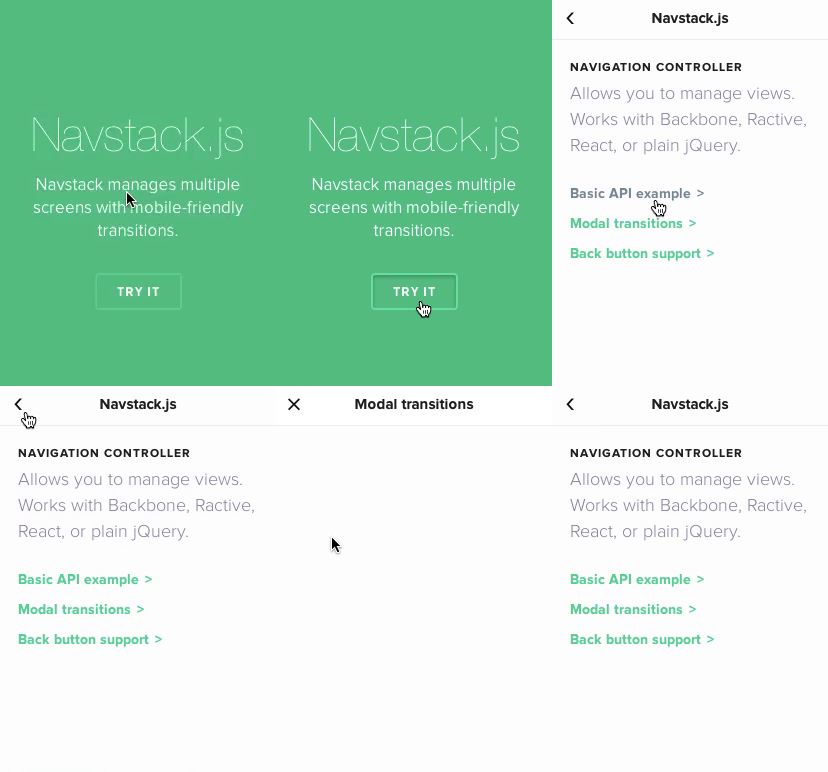
Manage a stack of multiple views. Perfect for tabs, navigation stacks, and
similar. Inspired by iOS's UINavigationController.
-
Framework-agnostic: made to play fair with Backbone, Ractive,
React.js and more. Can even work with plain old jQuery.
-
Router-friendly: made to be able to work with pushstate routers (like
page.js), giving you back/forward button support.
-
Mobile-like transitions: buttery-smooth transitions are available out of
the box, modeled after iOS7.

Installation
Navstack is a JS + CSS bundle.
Or get it via Bower or NPM:
$ npm install --save navstack
$ bower install --save navstack
Then use it:
<script src="navstack.js"></script>
<link rel="stylesheet" href="navstack.css">
Getting started
Create your stack by instanciating Navstack. Pass a jQuery object or a DOM
node to el.
stage = new Navstack({
  el: $('#stage')
});
Adding panes
Use .push() to create your panes. It takes 2 arguments:
name (string): the ID of the pane. This will the unique identifier that
will identify your pane.initializer (function): a function to return the pane's contents.
stage.push('/home', function() {
return $("<div class='full-screen'>This is the home screen</div>");
});
stage.push('/task/1', function() {
return $("<div class='full-screen'>Task #1 details: ...</div>");
});
Libraries support: The initializer can return jQuery elements, Backbone
views, Ractive instances, or React.js components.
stage.push('task:1', function() {
return new Backbone.View({ ... });
return new Ractive({ template: '...' });
var MyComponent = React.createClass({ ... });
return new MyComponent({ name: "John" });
});
Returning back: Calling .push() again with a pane that is already part of
the stack will make the stage will animate backwards (slide left) to that old
pane. If the pane is recent (ie, last 5 panes used or so), the pane's DOM
element is previously hidden and will be made visible. If it's an old pane, it
will be recreated based on the initializer first passed onto .push().
stage.push('/home', function() { ... });
stage.push('/task/1', function() { ... });
stage.push('/home', function() { ... });
Groups & modal dialogs
Group panes together by passing the { group: 'groupname' } option to
push().
This allows you to create logical sections of your app UI. Panes of the same
group will slide left-and-right by default, while panes of a different group
will pop up like modal dialogs.
In this example below, the settings pages will pop up in a modal:
stage = new Navstack({ el: ... });
stage.push('home', function () { ... });
stage.push('messages', function () { ... });
stage.push('message/user1', function () { ... });
stage.push('config', {group: 'settings'}, function () { ... });
stage.push('account', {group: 'settings'}, function () { ... });
stage.push('home', function () { ... });
Prefixes: You can also prefix names with groupname! (eg,
settings!account) -- this accomplishes the same thing.
stage.push('config', {group: 'settings'}, function () { ... });
stage.push('settings!config', function () { ... });
Sleeping and waking
When a view is about to be hidden, a navstack:sleep event is called. When a
view is about to be shown, a navstack:wake event is called. These are
triggered as jQuery, Backbone, Ractive or React events, depending on
what your pane is.
var $box = $("<div>hello</div>");
$box.on('navstack:sleep', function () { ... });
$box.on('navstack:wake', function () { ... });

stage.push('home', function () {
  return $box;
});
Use with routers
To take full advantage of Navstack, it's recommended to use it with a router to
manage browser history states (read: makes the browser "Back" button work).
Here's an example usage of Navstack with page.js:
var stack = new Navstack();

page('/home', function (ctx) {
  stack.push(ctx.canonicalPath, function () {
    return $("<div>...</div>");
  });
});

page('/book/:id', function (ctx) {
  stack.push(ctx.canonicalPath, function () {
    return $("<div>...</div>");
  });
});

document.body.appendChild(stack.el);
Or with Backbone.Router:
var stack = new Navstack();

App.Router = Backbone.Router.extend({
  routes: {
    '': 'home',
    'book/:id': 'showBook'
  },

  home: function () {
    stack.push('home', function () {
      return new HomeView(...);
    });
  },

  showBook: function (id) {
    stack.push('book:' + id, function () {
      var book = new Book(id: id);
      return new BookView(book);
    });
  }
});

$(function () {
  $(stack.el).appendTo('body');
  Backbone.history.start();
});
Navstack
new Navstack(options)
Instanciates a new Navstack stage that manages multiple panes.
stage = new Navstack({
  el: '#stack'
});
You may pass any of these options below. All of them are optional.
el — a selector, a jQuery object, or a DOM element.transition — a string of the transition name to use.groupTransition — a string of the transition to use in between groups.
You'll then use push to add panes into the stage.
stage.push('home', function () {
  return $("<div>Hello</div>");
});
Attributes
panes
Index of panes that have been registered with this Navstack.
Object with pane names as keys and Pane instances as values.
stage.push('home', function () { ... });
stage.panes['home']
stage.panes['home'].name
stage.panes['home'].el
stage.panes['home'].view
active
A reference to the active pane. This is a Navstack.Pane instance.
stage.push('home', function() { ... });
stage.active.name
stage.active.el
stage.active.view
It is a pointer to the active pane in the panes object.
stage.push('home', function() { ... });
stage.active === stage.panes['home']
stack
Ordered array of pane names of what are the panes present in the stack.
When doing push(), you are adding an item to the stack.
stage.push('home', function() { ... });
stage.stack
=> ['home']

stage.push('timeline', function() { ... });
stage.stack
=> ['home', 'timeline']
transition
The transition name to be used. Defaults to "slide". This can either
be a String (a transition name), a Function, or false (no animations).
stage = new Navstack({
transition: 'slide',
groupTransition: 'modal'
});
stage.push('home', function() { ... });
stage.push('mentions', function() { ... });
stage.push('auth!login', function() { ... });
groupTransition
Pane transition to use in between groups. Defaults to "modal".
See transition for more details.
el
The DOM element of the stack. You may specify this while creating a
Navstack instance. When no el is given, it will default to creating a
new <div> element.
stage = new Navstack({
  el: document.getElementById('#box')
});
You may also pass a jQuery object here for convenience.
stage = new Navstack({
  el: $('#box')
});
You can access this later in the Navstack instance:
$(stage.el).show()
Methods
push
.push(name, [options], [fn])
Registers a pane with the given name.
The function will specify the initializer that will return the view to
be pushed. It can return a DOM node, a jQuery object, a Backbone view,
Ractive instance, or a React component.
stage.push('home', function() {
  return $("<div>...</div>");
});
You can specify a pane's group by prefixing the name with the group name
and a bang.
stage.push('modal!form', function() {
  return $("<div>...</div>");
});
You can specify options.
stage.push('home', { group: 'root' }, function() {
  return $("<div>...</div>");
});
Available options are (all are optional):
group (String) — the group name that the pane should belong to.transition (String) — the name of the transition to use. See Navstack.transitions.
init
Constructor. You may override this function when subclassing via
Navstack.extend to run some code when subclassed stack is
instanciated.
var MyStack = Navstack.extend({
init: function() {
}
});
goNow
.goNow(name, [options])
Performs the actual moving, as delegated to by .go(), which is then
delegated from .push().
For external API, Use .push() instead.
remove
Destroys the Navstack instance, removes the DOM element associated with
it.
stage = new Navstack({ el: '#stack' });
stage.remove();
This is also aliased as .teardown(), following Ractive's naming conventions.
ready
ready(fn)
Runs a function fn when transitions have elapsed. If no transitions
are happening, run the function immediately.
nav = new Navstack();
nav.push('home', function () { ... });
nav.push('messages', function () { ... });
nav.ready(function () {
});
Events
A stack may emit events, which you can listen to via [on()].
stage = new Navstack();
stage.on('push', function (e) {
e.direction
e.current
e.previous
});
stage.on('push:NameHere', function (e) {
...
});
Available events are:
push -- called after a push() succeedspush:NAME -- called after a pane with the name NAME is pushedpurge -- called when a pane is purged from being obsoletepurge:NAME -- called when pane NAME is purgedremove -- called when removing the stack
on
.on(event, function)
Binds an event handler.
stage.on('remove', function() {
});
off
.off(event, callback)
Removes an event handler.
stage.off('remove', myfunction);
one
.one(event, callback)
Works like .on, except it unbinds itself right after.
Navstack.Pane
Panes are accessible via navstack.panes['name'] or navstack.active.
stage = new Navstack();
pane = stage.active;
pane.name
pane.initializer
pane.el
pane.view
You'll find these properties:
name (String) — the identifier for this pane as passed onto push().parent — a reference to the Navstack instance.el — DOM element.view — the view instance created by the initializer passed onto push().adaptor — a wrapped version of view (internal).
Static members
These are static members you can access from the global Navstack object.
Navstack.extend
extend(prototype)
Subclasses Navstack to create your new Navstack class. This allows you to
create 'presets' of the options to be passed onto the constructor.
var Mystack = Navstack.extend({
transition: 'slide'
});
var stack = new Mystack({ el: '#stack' });
Navstack.transitions
The global transitions registry. It's an Object where transition functions are
stored.
Available transitions are:
default — show new panes immediately, no animationslide — slides the new panes horizontally like iOS7modal — slides the new panes vertically
Whenever a transition is used on a Navstack (eg, with new Navstack({ transition: 'slide' })), it is first looked up in the stack's own registry
(stage.transitions). If it's not found there, it's then looked up in the
global transitions registry, Navstack.transitions.
You can define your own transitions via:
Navstack.transitions.foo = function (direction, current, previous) {
return {
before: function (next) {
if (current) $(current.el).hide();
next();
},
run: function (next) {
if (current) $(current.el).show();
if (previous) $(previous.el).hide();
next();
},
after: function (next) {
next();
}
}
};
Navstack.jQuery
Pointer to the instance of jQuery to optionally use. Set this if you would
like Navstack to utilize [jQuery.queue].
Navstack.jQuery = jQuery;
Cheat sheet
stage = new Navstack();
stage = new Navstack({
el: 'body',
adapt: ['backbone'],
adaptors: { backbone: ... },
transition: 'slide' | 'modal',
transitions: { slide: ... },
});
stage.push('pane_id', function () {
return $("<div>...</div>");
return new Ractive(...);
return new ReactComponent(...);
});
stage.push('pane_id');
stage.el;
stage.active;
stage.active.el;
stage.active.view;
stage.active.name;
stage.stack;
stage.stack['pane_id'].view;
stage.stack.length;
Navstack.adaptors = {...};
Navstack.transitions = {...};
Thanks
Navstack © 2014+, Rico Sta. Cruz. Released under the MIT License.
Authored and maintained by Rico Sta. Cruz with help from contributors.
ricostacruz.com ·
GitHub @rstacruz ·
Twitter @rstacruz





