Navstack
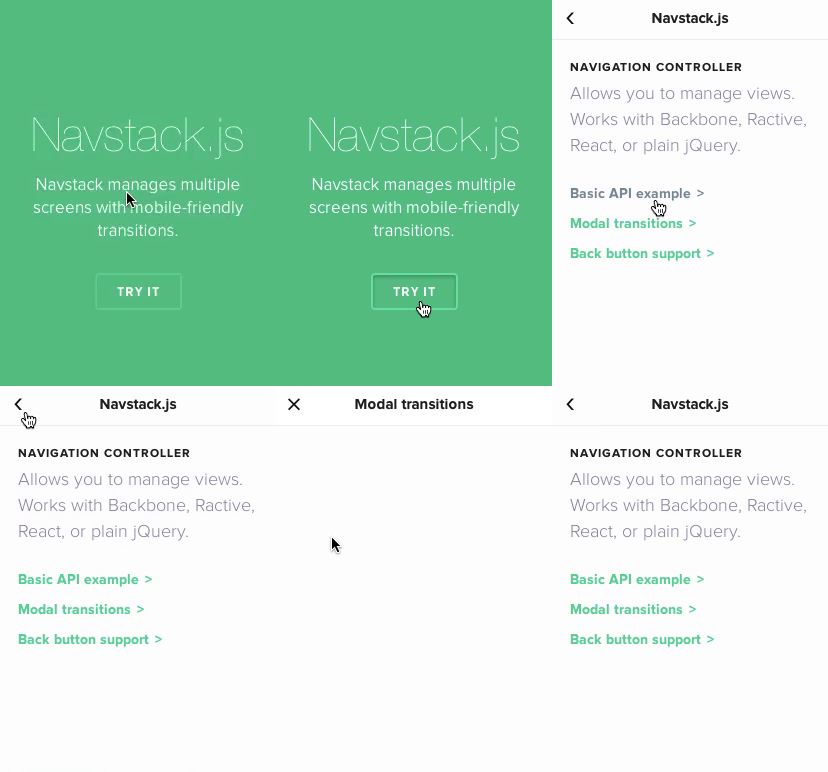
Manage a stack of multiple views. Perfect for tabs, navigation stacks, and
similar. Inspired by iOS's UINavigationController.
-
Framework-agnostic: made to play fair with Backbone, Ractive,
React.js and more. Can even work with plain old jQuery.
-
Router-friendly: made to be able to work with pushstate routers (like
page.js), giving you back/forward button support.
-
Mobile-like transitions: buttery-smooth transitions are available out of
the box, modeled after iOS7.
Requires jQuery 1.7+.

Status: very usable - just need to add documentation and examples.
Install
Navstack is a JS + CSS bundle.
Or get it via Bower:
bower install navstack
Then use it:
<script src="jquery.js"></script>
<script src="navstack.js"></script>
<link rel="stylesheet" href="navstack.css">
Usage
Create your stack. You may pass a selector to el, or a jQuery object (eg,
$('#stage')), or a DOM node.
stage = new Navstack({ el: '#stage' });
Basic usage
Use .push() to create your panes. It takes 2 arguments:
name (string): the ID of the pane. This allows you to go back to previous panes.callback (function): a callback to return the pane's contents.
stage.push('home', function() {
return $("<div class='full-screen'>This is the home screen</div>");
});
stage.push('task:1', function() {
return $("<div class='full-screen'>Task #1 details: ...</div>");
});
Libraries support
You may use Backbone views, Ractive instances, or React.js components as
well.
stage.push('task:1', function() {
return new Backbone.View({ ... });
return new Ractive({ template: '...' });
var MyComponent = React.createClass({ ... });
return new MyComponent({ name: "John" });
});
Switching back
To switch back to previously-defined panes, use .push(name).
If the pane is recent (ie, last 5 panes used or so), the pane's DOM element is
previously hidden and will be made visible. If it's an old pane, it will be
recreated based on the initializer first passed onto .push().
stage.push('home');
Transitions
Include the navstack.css file and use:
stage = new Navstack({
  el: '#hello',
  transition: 'slide'
})
Available transitions are slide and modal.
Events
You can listen to events.
stage = new Navstack().
stage.on('push', function (e) {
e.direction
e.current
e.previous
});
stage.on('push:yourpanenamehere', function (e) { ... });
Groups
Allows you to do modal dialogs.
(TODO: explain this.)
stage = new Navstack({
  transition: 'slide',
  groupTransition: 'modal',
});

stage.push('root!hello', function () { ... });
stage.push('modal!login', function () { ... });
stage.push('modal!confirm-email', function () { ... });
Sleeping and waking
When a view is about to be hidden, a navstack:sleep event is called.
When a view is about to be shown, a navstack:wake event is called.
var $box = $("<div>hello</div>");
$box.on('navstack:sleep', function () { ... });
$box.on('navstack:wake', function () { ... });

stage.push('home', function () {
  return $box;
});

### Use with routers

To take full advantage of Navstack, it's recommended to use it with a router to
manage browser history states (read: makes the browser "Back" button work).

An example usage of Navstack with [page.js]:

``` js
var stack = new Navstack();

page('/home', function () {
  stack.push('home', function () {
    return $("<div>...</div>");
  });
});

page('/book/:id', function (ctx) {
  var id = ['book', ctx.params.id].join(':');
  stack.push(id, function () {
    return $("<div>...</div>");
  });
});

$(function () {
  $(stack.el).appendTo('body');
});
Or with Backbone.Router:
var stack = new Navstack();

App.Router = Backbone.Router.extend({
  routes: {
    '': 'home',
    'book/:id': 'showBook'
  },

  home: function () {
    stack.push('home', function () {
      return new HomeView(...);
    });
  },

  showBook: function (id) {
    stack.push('book:' + id, function () {
      var book = new Book(id: id);
      return new BookView(book);
    });
  }
});

$(function () {
  $(stack.el).appendTo('body');
  Backbone.history.start();
});
As a class
Rather than repetitively defining your constructor parameters across different
instances, you can subclass Navstack using Navstack.extend. This allows you
to set preset parameters, as well as define your own methods.
Stage = Navstack.extend({
});
stage = new Stage({ el: '#stage' });
stage.go('home');
Cheat sheet
stage = new Navstack();
stage = new Navstack({
el: 'body',
adapt: ['backbone'],
adaptors: { backbone: ... },
transition: 'slide' | 'modal',
transitions: { slide: ... },
});
stage.push('pane_id', function () {
return $("<div>...</div>");
return new Ractive(...);
return new ReactComponent(...);
});
stage.push('pane_id');
stage.el;
stage.active;
stage.active.el;
stage.active.view;
stage.active.name;
stage.stack;
stage.stack['pane_id'].view;
stage.stack.length;
Navstack.adaptors = {...};
Navstack.transitions = {...};
Status
Public API is stable, and is okay for public consumption. The internal API is
not stable yet (eg, transitions are due for a refactor).
License
Thanks
Navstack © 2014, Rico Sta. Cruz. Released under the MIT License.
Authored and maintained by Rico Sta. Cruz with help from contributors.
ricostacruz.com ·
GitHub @rstacruz ·
Twitter @rstacruz





