Phone Number Input With Country Code and Flag for Angular (NgxDialerInput)
Compatibility:
Validation with google-libphonenumber
| 16.x.x | 16 | >= 11.0.2 |
| 17.x.x | 17 | >= 11.0.2 |
| 18.x.x | 18 | >= 18.0.0 |
View example
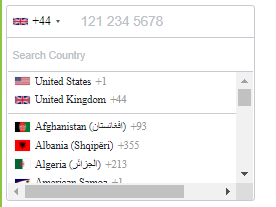
Installation
Install Dependencies
$ npm install intl-tel-input --save
$ npm install google-libphonenumber --save
$ ng add ngx-bootstrap
Further, Angular CLI should tree-shake the rest of Ngx-Boostrap away if you don't utilize other dependencies from
the bootstrap package. This should keep this dependency a lean feature-add
Add Dependency Style
Add 'intl-tel-input' style file:
./node_modules/intl-tel-input/build/css/intlTelInput.css
to angular.json styles array:
"styles": [
  "./node_modules/intl-tel-input/build/css/intlTelInput.css",
  "src/styles.css"
],
Install This Library
$ npm install ngx-dialer-input
Usage
Import
Add NgxDialerInputModule to your module file:
import { NgxDialerInputModule } from 'ngx-dialer-input';
imports: [NgxDialerInputModule];
Example
import { Component } from '@angular/core';
import { CountryISO, PhoneNumberFormat, SearchCountryField } from 'ngx-dialer-input';

@Component({
  selector: 'app-root',
  templateUrl: './app.component.html',
  styleUrls: ['./app.component.css']
})
export class AppComponent {
  title = 'test';

	separateDialCode = true;
	SearchCountryField = SearchCountryField;
	CountryISO = CountryISO;
  PhoneNumberFormat = PhoneNumberFormat;
	preferredCountries: CountryISO[] = [CountryISO.UnitedStates, CountryISO.UnitedKingdom];
}
<form [formGroup]="phoneForm">
	<ngx-dialer-input
		[cssClass]="'custom'"
		[preferredCountries]="[CountryISO.UnitedStates, CountryISO.UnitedKingdom]"
		[enableAutoCountrySelect]="false"
		[enablePlaceholder]="true"
		[searchCountryFlag]="true"
		[searchCountryField]="[SearchCountryField.Iso2, SearchCountryField.Name]"
		[selectFirstCountry]="false"
		[selectedCountryISO]="CountryISO.India"
		[maxLength]="15"
		[phoneValidation]="true"
		[inputId]="my-input-id"
		name="phone"
		formControlName="phone"
	></ngx-dialer-input>
</form>
Options
| cssClass | string | control-form | Bootstrap input css class or your own custom one. |
| preferredCountries | <CountryISO>[] | [] | List of countries, which will appear at the top. |
| onlyCountries | <CountryISO>[] | [] | List of manually selected countries, which will appear in the dropdown. |
| enableAutoCountrySelect | boolean | true | Toggle automatic country (flag) selection based on user input. |
| enablePlaceholder | boolean | true | Input placeholder text, which adapts to the country selected. |
| customPlaceholder | string | None | Custom string to be inserted as a placeholder. |
| numberFormat | <PhoneNumberFormat> | PhoneNumberFormat.International | Custom string to be inserted as a placeholder. |
| searchCountryFlag | boolean | false | Enables input search box for countries in the flag dropdown. |
| searchCountryField | <SearchCountryField>[] | [SearchCountryField.All] | Customize which fields to search in, if searchCountryFlag is enabled. Use SearchCountryField helper enum. |
| searchCountryPlaceholder | string | 'Search Country' | Placeholder value for searchCountryField |
| maxLength | number | None | Add character limit. |
| selectFirstCountry | boolean | true | Selects first country from preferredCountries if is set. If not then uses main list. |
| phoneValidation | boolean | true | Disable phone validation. |
| inputId | string | phone | Unique ID for <input> element. |
| selectedCountryISO | <CountryISO> | None | Set specific country on load. |
| separateDialCode | boolean | false | Visually separate dialcode into the drop down element. |
| countryChange | <Country> | None | Emits country value when the user selects a country from the dropdown. |
Supported Formats
Following formats are supported
- NATIONAL // Produces "011 111 11 11"
- INTERNATIONAL // Produces "+11 11 111 11 11"
- E164 // Produces "+11111111111"





