


Research
2025 Report: Destructive Malware in Open Source Packages
Destructive malware is rising across open source registries, using delays and kill switches to wipe code, break builds, and disrupt CI/CD.
By Kush Pandya - Dec 24, 2025
ngx-print-element
Advanced tools
This library is built to provide a solution for printing on html elements.
This library is built to provide a solution for printing on html elements.
This is the stackblitz.
Install ngx-print-element from npm:
npm install ngx-print-element --save
Add wanted package to NgModule imports:
import { NgxPrintElementModule } from 'ngx-print-element';
@NgModule({
    imports: [
        NgxPrintElementModule,
    ]
})
Need to import css
@import '~ngx-print-element/styles.css';
Printing data sheet with id is up to you.
If there is an element you don't want to display you can add the class print-none
<table id="demo" class="table table-bordered">
  <tr>
    <th>No</th>
    <th>Company</th>
    <th>Contact</th>
    <th>Country</th>
  </tr>
  <tr class="print-none" style="background: greenyellow"><!-- No print -->
    <td>01</td>
    <td>Alfreds Futterkiste</td>
    <td>Maria Anders</td>
    <td>Germany</td>
  </tr>
  <tr>
    <td>02</td>
    <td>Centro comercial Moctezuma</td>
    <td>Francisco Chang</td>
    <td>Mexico</td>
  </tr>
  <tr>
    <td>03</td>
    <td>AIS Playground</td>
    <td>Nakhon Pathom</td>
    <td>Thailand</td>
  </tr>
  <tr class="print-none" style="background: greenyellow"> <!-- No print -->
    <td>04</td>
    <td>FPT Software</td>
    <td>Cau Giay</td>
    <td>Vietnamese</td>
  </tr>
</table>

<button [print]="['demo']">Print</button>
<table id="demo" class="table table-bordered">
  <tr>
    <th>No</th>
    <th>Company</th>
    <th>Contact</th>
    <th>Country</th>
  </tr>
  <tr class="print-none" style="background: greenyellow"><!-- No print -->
    <td>01</td>
    <td>Alfreds Futterkiste</td>
    <td>Maria Anders</td>
    <td>Germany</td>
  </tr>
  <tr>
    <td>02</td>
    <td>Centro comercial Moctezuma</td>
    <td>Francisco Chang</td>
    <td>Mexico</td>
  </tr>
  <tr>
    <td>03</td>
    <td>AIS Playground</td>
    <td>Nakhon Pathom</td>
    <td>Thailand</td>
  </tr>
  <tr class="print-none" style="background: greenyellow"> <!-- No print -->
    <td>04</td>
    <td>FPT Software</td>
    <td>Cau Giay</td>
    <td>Vietnamese</td>
  </tr>
</table>

<button [print]="['demo', config]">Print</button>
import { Component } from '@angular/core';
@Component({
  selector: 'app-root',
  templateUrl: './app.component.html',
  styleUrls: ['./app.component.css']
})
export class AppComponent {
  public config = {
    printMode: 'template-popup',
    popupProperties: 'toolbar=yes,scrollbars=yes,resizable=yes,top=0,left=0,fullscreen=yes',
    pageTitle: 'Hello World',
    templateString: '<header>I\'m part of the template header</header>{{printBody}}<footer>I\'m part of the template footer</footer>',
    stylesheets: [{ rel: 'stylesheet', href: 'https://maxcdn.bootstrapcdn.com/bootstrap/4.0.0/css/bootstrap.min.css' }],
    styles: ['td { border: 1px solid black; color: green; }', 'table { border: 1px solid black; }', 'header, table, footer { margin: auto; text-align: center; }']
  }
}
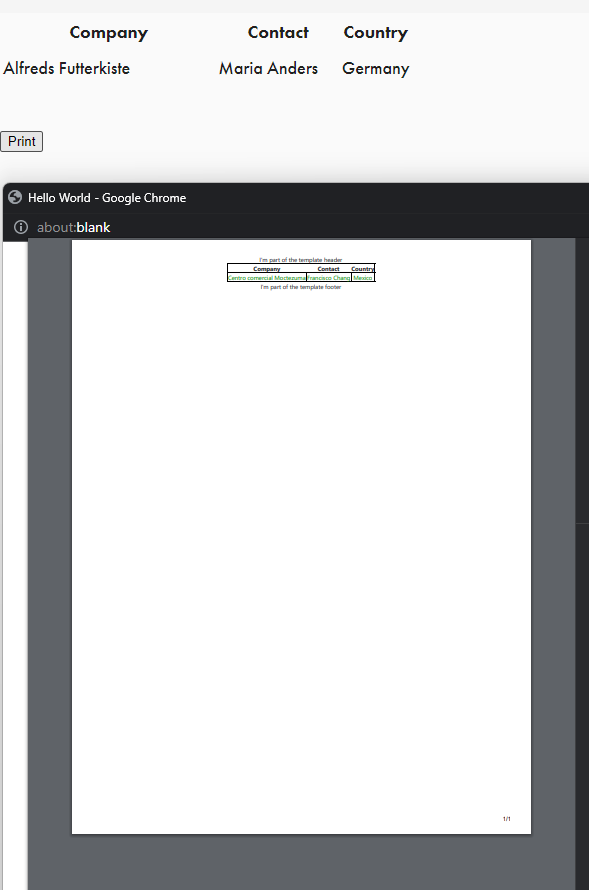
You should be greeted with a nicely formatted table when you press print.
import { Component } from '@angular/core';
import { NgxPrintElementService } from 'ngx-print-element';
@Component({
  selector: 'app-root',
  templateUrl: './app.component.html',
  styleUrls: ['./app.component.css']
})
export class AppComponent {
  constructor(public print: NgxPrintElementService) {}
}
<p id="demo">Angular-Print</p>
<button (click)="print.print('demo')">Print</button>
| Field | Description | Type | Default |
|---|---|---|---|
| htmlType | domObj,text | string | 'domObj' |
| printMode | template,template-popup | string | template |
| popupProperties | Options window.open | string | blank |
| pageTitle | Print title | string | blank |
| templateString | html | string | blank |
| stylesheets | Set the external style sheet for printing | object or object[] | null |
| styles | Set the internal style sheet for printing | string or string[] | null |
Angular 8 >= 8.0.14
Angular 9 >= 8.0.14-rc.1
Angular 14 >= 14.0.0
Author: DaiDH, Tel: 0845882882
MIT License. Copyright (c) 2022 DaiDH
FAQs
This library is built to provide a solution for printing on html elements.
The npm package ngx-print-element receives a total of 491 weekly downloads. As such, ngx-print-element popularity was classified as not popular.
We found that ngx-print-element demonstrated a not healthy version release cadence and project activity because the last version was released a year ago. It has 1 open source maintainer collaborating on the project.
Did you know?

Socket for GitHub automatically highlights issues in each pull request and monitors the health of all your open source dependencies. Discover the contents of your packages and block harmful activity before you install or update your dependencies.
Research
Destructive malware is rising across open source registries, using delays and kill switches to wipe code, break builds, and disrupt CI/CD.

Security News
Socket CTO Ahmad Nassri shares practical AI coding techniques, tools, and team workflows, plus what still feels noisy and why shipping remains human-led.

Research
/Security News
A five-month operation turned 27 npm packages into durable hosting for browser-run lures that mimic document-sharing portals and Microsoft sign-in, targeting 25 organizations across manufacturing, industrial automation, plastics, and healthcare for credential theft.