NTERMCP
MCP server for terminal operations and file editing





Work with code and text, run processes, and automate tasks with NTERMCP - without API token costs.

Table of Contents
All of your AI development tools in one place.
NTERMCP puts all dev tools in one chat.
Execute long-running terminal commands on your computer and manage processes through Model Context Protocol (MCP). Built on top of MCP Filesystem Server to provide additional search and replace file editing capabilities.
Features
- Enhanced terminal commands with interactive process control
- Execute code in memory (Python, Node.js, R) without saving files
- Instant data analysis - just ask to analyze CSV/JSON files
- Interact with running processes (SSH, databases, development servers)
- Execute terminal commands with output streaming
- Command timeout and background execution support
- Process management (list and kill processes)
- Session management for long-running commands
- Server configuration management:
- Get/set configuration values
- Update multiple settings at once
- Dynamic configuration changes without server restart
- Full filesystem operations:
- Read/write files
- Create/list directories
- Move files/directories
- Search files
- Get file metadata
- Negative offset file reading: Read from end of files using negative offset values (like Unix tail)
- Code editing capabilities:
- Surgical text replacements for small changes
- Full file rewrites for major changes
- Multiple file support
- Pattern-based replacements
- vscode-ripgrep based recursive code or text search in folders
- Comprehensive audit logging:
- All tool calls are automatically logged
- Log rotation with 10MB size limit
- Detailed timestamps and arguments
How to install
Desktop Commander offers multiple installation methods to fit different user needs and technical requirements.
📋 Update & Uninstall Information: Before choosing an installation option, note that only Options 1, 2, 3, and 6 have automatic updates. Options 4 and 5 require manual updates. See the sections below for update and uninstall instructions for each option.
Option 1: Install through npx ⭐ Auto-Updates Requires Node.js
Just run this in terminal:
npx ntermcp@latest ntermcp-setup
For debugging mode (allows Node.js inspector connection):
npx ntermcp@latest ntermcp-setup --debug
Command line options during setup:
--debug: Enable debugging mode for Node.js inspector--no-onboarding: Disable onboarding prompts for new users
Restart Claude if running.
✅ Auto-Updates: Yes - automatically updates when you restart Claude
🔄 Manual Update: Run the setup command again
🗑️ Uninstall: Run npx @wonderwhy-er/desktop-commander@latest remove
Option 2: Using bash script installer (macOS) ⭐ Auto-Updates Installs Node.js if needed
For macOS users, you can use our automated bash installer which will check your Node.js version, install it if needed, and automatically configure NTERMCP:
curl -fsSL https://raw.githubusercontent.com/Neural-Nirvana/NTERMCP/refs/heads/main/install.sh | bash
This script handles all dependencies and configuration automatically for a seamless setup experience.
✅ Auto-Updates: Yes - requires manual updates
🔄 Manual Update: Re-run the bash installer command above
🗑️ Uninstall: Run npx ntermcp@latest ntermcp-remove
Option 3: Installing via Smithery ⭐ Auto-Updates Requires Node.js
To install NTERMCP for Claude Desktop via Smithery:
- Visit the Smithery page: https://smithery.ai/server/ntermcp
- Login to Smithery if you haven't already
- Select your client (Claude Desktop) on the right side
- Install with the provided key that appears after selecting your client
- Restart Claude Desktop
The old command-line installation method is no longer supported. Please use the web interface above for the most reliable installation experience.
✅ Auto-Updates: Yes - automatically updates when you restart Claude
🔄 Manual Update: Visit the Smithery page and reinstall
Option 4: Add to claude_desktop_config manually ⭐ Auto-Updates Requires Node.js
Add this entry to your claude_desktop_config.json:
- On Mac:
~/Library/Application\ Support/Claude/claude_desktop_config.json
- On Windows:
%APPDATA%\Claude\claude_desktop_config.json
- On Linux:
~/.config/Claude/claude_desktop_config.json
{
  "mcpServers": {
    "ntermcp": {
      "command": "npx",
      "args": [
        "-y",
        "ntermcp@latest"
      ]
    }
  }
}
Restart Claude if running.
✅ Auto-Updates: Yes - automatically updates when you restart Claude
🔄 Manual Update: Run the setup command again
🗑️ Uninstall: Run npx ntermcp@latest ntermcp-remove or remove the "ntermcp" entry from your claude_desktop_config.json file
### Option 5: Checkout locally ❌ Manual Updates Requires Node.js ❌ Manual Updates Requires Node.js
git clone https://github.com/Neural-Nirvana/NTERMCP.git
cd DesktopCommanderMCP
npm run setup
Restart Claude if running.
The setup command will:
- Install dependencies
- Build the server
- Configure Claude's desktop app
- Add MCP servers to Claude's config if needed
❌ Auto-Updates: No - requires manual git updates
🔄 Manual Update: cd NTERMCP && git pull && npm run setup
🗑️ Uninstall: Run npx ntermcp@latest ntermcp-remove or remove the cloned directory and remove MCP server entry from Claude config
Option 6: Docker Installation 🐳 ⭐ Auto-Updates No Node.js Required
Perfect for users who want complete or partial isolation or don't have Node.js installed. NTERMCP runs in a sandboxed Docker container with a persistent work environment.
Prerequisites
Important: Make sure Docker Desktop is fully started before running the installer.
Automated Installation (Recommended)
macOS/Linux:
bash <(curl -fsSL https://raw.githubusercontent.com/Neural-Nirvana/NTERMCP/refs/heads/main/install-docker.sh)
Windows PowerShell:
# Download and run the installer (one-liner)
iex ((New-Object System.Net.WebClient).DownloadString('https://raw.githubusercontent.com/Neural-Nirvana/NTERMCP/refs/heads/main/install-docker.ps1'))
The automated installer will:
- Check Docker installation
- Pull the latest Docker image
- Prompt you to select folders for mounting
- Configure Claude Desktop automatically
- Restart Claude if possible
How Docker Persistence Works
Desktop Commander creates a persistent work environment that remembers everything between sessions:
- Your development tools: Any software you install (Node.js, Python, databases, etc.) stays installed
- Your configurations: Git settings, SSH keys, shell preferences, and other personal configs are preserved
- Your work files: Projects and files in the workspace area persist across restarts
- Package caches: Downloaded packages and dependencies are cached for faster future installs
Think of it like having your own dedicated development computer that never loses your setup, but runs safely isolated from your main system.
Manual Docker Configuration
If you prefer manual setup, add this to your claude_desktop_config.json:
Basic setup (no file access):
{
  "mcpServers": {
    "ntermcp-in-docker": {
      "command": "docker",
      "args": [
        "run",
        "-i",
        "--rm",
        "Neural-Nirvana/ntermcp:latest"
      ]
    }
  }
}
With folder mounting:
{
  "mcpServers": {
    "ntermcp-in-docker": {
      "command": "docker",
      "args": [
        "run",
        "-i",
        "--rm",
        "-v", "/Users/username/Desktop:/mnt/desktop",
        "-v", "/Users/username/Documents:/mnt/documents",
        "Neural-Nirvana/ntermcp:latest"
      ]
    }
  }
}
Advanced folder mounting:
{
  "mcpServers": {
    "ntermcp-in-docker": {
      "command": "docker",
      "args": [
        "run", "-i", "--rm",
        "-v", "dc-system:/usr",
        "-v", "dc-home:/root",
        "-v", "dc-workspace:/workspace",
        "-v", "dc-packages:/var",
        "-v", "/Users/username/Projects:/mnt/Projects",
        "-v", "/Users/username/Downloads:/mnt/Downloads",
        "Neural-Nirvana/ntermcp:latest"
      ]
    }
  }
}
Docker Benefits
✅ Controlled Isolation: Runs in sandboxed environment with persistent development state
✅ No Node.js Required: Everything included in the container
✅ Cross-Platform: Same experience on all operating systems
✅ Persistent Environment: Your tools, files, configs, and work survives restarts
✅ Auto-Updates: Yes - latest tag automatically gets newer versions
🔄 Manual Update: docker pull Neural-Nirvana/ntermcp:latest then restart Claude
Docker Management Commands
macOS/Linux:
Check installation status:
bash <(curl -fsSL https://raw.githubusercontent.com/Neural-Nirvana/NTERMCP/refs/heads/main/install-docker.sh) --status
Reset all persistent data (removes all installed tools and configs):
bash <(curl -fsSL https://raw.githubusercontent.com/Neural-Nirvana/NTERMCP/refs/heads/main/install-docker.sh) --reset
Windows PowerShell:
Check status:
$script = (New-Object System.Net.WebClient).DownloadString('https://raw.githubusercontent.com/Neural-Nirvana/NTERMCP/refs/heads/main/install-docker.ps1'); & ([ScriptBlock]::Create("$script")) -Status
Reset all data:
$script = (New-Object System.Net.WebClient).DownloadString('https://raw.githubusercontent.com/Neural-Nirvana/NTERMCP/refs/heads/main/install-docker.ps1'); & ([ScriptBlock]::Create("$script")) -Reset
Show help:
$script = (New-Object System.Net.WebClient).DownloadString('https://raw.githubusercontent.com/Neural-Nirvana/NTERMCP/refs/heads/main/install-docker.ps1'); & ([ScriptBlock]::Create("$script")) -Help
Verbose output:
$script = (New-Object System.Net.WebClient).DownloadString('https://raw.githubusercontent.com/Neural-Nirvana/NTERMCP/refs/heads/main/install-docker.ps1'); & ([ScriptBlock]::Create("$script")) -VerboseOutput
Troubleshooting Docker Installation
If you broke the Docker container or need a fresh start:
bash <(curl -fsSL https://raw.githubusercontent.com/Neural-Nirvana/NTERMCP/refs/heads/main/install-docker.sh) --reset && bash <(curl -fsSL https://raw.githubusercontent.com/Neural-Nirvana/NTERMCP/refs/heads/main/install-docker.sh)
This will completely reset your persistent environment and reinstall everything fresh with exception of not touching mounted folders
Updating & Uninstalling NTERMCP
Automatic Updates (Options 1, 2, 3, 4 & 6)
Options 1 (npx), Option 2 (bash installer), 3 (Smithery), 4 (manual config), and 6 (Docker) automatically update to the latest version whenever you restart Claude. No manual intervention needed.
Manual Updates (Option 5)
- Option 5 (local checkout):
cd DesktopCommanderMCP && git pull && npm run setup
Uninstalling NTERMCP
🤖 Automatic Uninstallation (Recommended)
The easiest way to completely remove NTERMCP:
npx ntermcp@latest ntermcp-remove
This automatic uninstaller will:
- ✅ Remove NTERMCP from Claude's MCP server configuration
- ✅ Create a backup of your Claude config before making changes
- ✅ Provide guidance for complete package removal
- ✅ Restore from backup if anything goes wrong
🔧 Manual Uninstallation
If the automatic uninstaller doesn't work or you prefer manual removal:
Remove from Claude Configuration
- Locate your Claude Desktop config file:
- macOS:
~/Library/Application Support/Claude/claude_desktop_config.json
- Windows:
%APPDATA%\Claude\claude_desktop_config.json
- Linux:
~/.config/Claude/claude_desktop_config.json
- Open the file in a text editor
- Find and remove the
"ntermcp" entry from the "mcpServers" section
- Save the file
Example - Remove this section:
{
    "ntermcp": {
      "command": "npx",
      "args": ["ntermcp@latest"]
    }
}
Close and restart Claude Desktop to complete the removal.
🆘 Troubleshooting
If automatic uninstallation fails:
- Use manual uninstallation as a fallback
If Claude won't start after uninstalling:
- Restore the backup config file created by the uninstaller
- Or manually fix the JSON syntax in your claude_desktop_config.json
Need help?
Getting Started
Once NTERMCP is installed and Claude Desktop is restarted, you're ready to supercharge your Claude experience!
🚀 New User Onboarding
NTERMCP includes intelligent onboarding to help you discover what's possible:
For New Users: When you're just getting started (fewer than 10 successful commands), Claude will automatically offer helpful getting-started guidance and practical tutorials after you use NTERMCP successfully.
Request Help Anytime: You can ask for onboarding assistance at any time by simply saying:
- "Help me get started with NTERMCP"
- "Show me NTERMCP examples"
- "What can I do with NTERMCP?"
Claude will then show you beginner-friendly tutorials and examples, including:
- 📁 Organizing your Downloads folder automatically
- 📊 Analyzing CSV/Excel files with Python
- ⚙️ Setting up GitHub Actions CI/CD
- 🔍 Exploring and understanding codebases
- 🤖 Running interactive development environments
Usage
The server provides a comprehensive set of tools organized into several categories:
Available Tools
| Configuration | get_config | Get the complete server configuration as JSON (includes blockedCommands, defaultShell, allowedDirectories, fileReadLineLimit, fileWriteLineLimit, telemetryEnabled) |
| set_config_value | Set a specific configuration value by key. Available settings:
• blockedCommands: Array of shell commands that cannot be executed
• defaultShell: Shell to use for commands (e.g., bash, zsh, powershell)
• allowedDirectories: Array of filesystem paths the server can access for file operations (⚠️ terminal commands can still access files outside these directories)
• fileReadLineLimit: Maximum lines to read at once (default: 1000)
• fileWriteLineLimit: Maximum lines to write at once (default: 50)
• telemetryEnabled: Enable/disable telemetry (boolean) |
| Terminal | start_process | Start programs with smart detection of when they're ready for input |
| interact_with_process | Send commands to running programs and get responses |
| read_process_output | Read output from running processes |
| force_terminate | Force terminate a running terminal session |
| list_sessions | List all active terminal sessions |
| list_processes | List all running processes with detailed information |
| kill_process | Terminate a running process by PID |
| Filesystem | read_file | Read contents from local filesystem or URLs with line-based pagination (supports positive/negative offset and length parameters) |
| read_multiple_files | Read multiple files simultaneously |
| write_file | Write file contents with options for rewrite or append mode (uses configurable line limits) |
| create_directory | Create a new directory or ensure it exists |
| list_directory | Get detailed listing of files and directories |
| move_file | Move or rename files and directories |
| start_search | Start streaming search for files by name or content patterns (unified ripgrep-based search) |
| get_more_search_results | Get paginated results from active search with offset support |
| stop_search | Stop an active search gracefully |
| list_searches | List all active search sessions |
| get_file_info | Retrieve detailed metadata about a file or directory |
| Text Editing | edit_block | Apply targeted text replacements with enhanced prompting for smaller edits (includes character-level diff feedback) |
| Analytics | get_usage_stats | Get usage statistics for your own insight |
| give_feedback_to_desktop_commander | Open feedback form in browser to provide feedback to Desktop Commander Team |
Quick Examples
Data Analysis:
"Analyze sales.csv and show top customers" → Claude runs Python code in memory
Remote Access:
"SSH to my server and check disk space" → Claude maintains SSH session
Development:
"Start Node.js and test this API" → Claude runs interactive Node session
Tool Usage Examples
Search/Replace Block Format:
filepath.ext
<<<<<<< SEARCH
content to find
=======
new content
>>>>>>> REPLACE
Example:
src/main.js
<<<<<<< SEARCH
console.log("old message");
=======
console.log("new message");
>>>>>>> REPLACE
Enhanced Edit Block Features
The edit_block tool includes several enhancements for better reliability:
- Improved Prompting: Tool descriptions now emphasize making multiple small, focused edits rather than one large change
- Fuzzy Search Fallback: When exact matches fail, it performs fuzzy search and provides detailed feedback
- Character-level Diffs: Shows exactly what's different using
{-removed-}{+added+} format
- Multiple Occurrence Support: Can replace multiple instances with
expected_replacements parameter
- Comprehensive Logging: All fuzzy searches are logged for analysis and debugging
When a search fails, you'll see detailed information about the closest match found, including similarity percentage, execution time, and character differences. All these details are automatically logged for later analysis using the fuzzy search log tools.
Docker Support
🐳 Isolated Environment Usage
NTERMCP can be run in Docker containers for complete isolation from your host system, providing zero risk to your computer. This is perfect for testing, development, or when you want complete sandboxing.
Installation Instructions
-
Install Docker for Windows/Mac
- Download and install Docker Desktop from docker.com
-
Get NTERMCP Docker Configuration
-
Mount Your Machine Folders (Coming Soon)
- Instructions on how to mount your local directories into the Docker container will be provided soon
- This will allow you to work with your files while maintaining complete isolation
Benefits of Docker Usage
- Complete isolation from your host system
- Consistent environment across different machines
- Easy cleanup - just remove the container when done
- Perfect for testing new features or configurations
URL Support
read_file can now fetch content from both local files and URLs- Example:
read_file with isUrl: true parameter to read from web resources
- Handles both text and image content from remote sources
- Images (local or from URLs) are displayed visually in Claude's interface, not as text
- Claude can see and analyze the actual image content
- Default 30-second timeout for URL requests
Fuzzy Search Log Analysis (npm scripts)
The fuzzy search logging system includes convenient npm scripts for analyzing logs outside of the MCP environment:
npm run logs:view -- --count 20
npm run logs:analyze -- --threshold 0.8
npm run logs:export -- --format json --output analysis.json
npm run logs:clear
For detailed documentation on these scripts, see scripts/README.md.
Fuzzy Search Logs
Desktop Commander includes comprehensive logging for fuzzy search operations in the edit_block tool. When an exact match isn't found, the system performs a fuzzy search and logs detailed information for analysis.
What Gets Logged
Every fuzzy search operation logs:
- Search and found text: The text you're looking for vs. what was found
- Similarity score: How close the match is (0-100%)
- Execution time: How long the search took
- Character differences: Detailed diff showing exactly what's different
- File metadata: Extension, search/found text lengths
- Character codes: Specific character codes causing differences
Log Location
Logs are automatically saved to:
- macOS/Linux:
~/.claude-server-commander-logs/fuzzy-search.log
- Windows:
%USERPROFILE%\.claude-server-commander-logs\fuzzy-search.log
What You'll Learn
The fuzzy search logs help you understand:
- Why exact matches fail: Common issues like whitespace differences, line endings, or character encoding
- Performance patterns: How search complexity affects execution time
- File type issues: Which file extensions commonly have matching problems
- Character encoding problems: Specific character codes that cause diffs
Audit Logging
NTERMCP now includes comprehensive logging for all tool calls:
What Gets Logged
- Every tool call is logged with timestamp, tool name, and arguments (sanitized for privacy)
- Logs are rotated automatically when they reach 10MB in size
Log Location
Logs are saved to:
- macOS/Linux:
~/.claude-server-commander/claude_tool_call.log
- Windows:
%USERPROFILE%\.claude-server-commander\claude_tool_call.log
This audit trail helps with debugging, security monitoring, and understanding how Claude is interacting with your system.
Handling Long-Running Commands
For commands that may take a while:
Configuration Management
⚠️ Important Security Warnings
For comprehensive security information and vulnerability reporting: See SECURITY.md
-
Known security limitations: Directory restrictions and command blocking can be bypassed through various methods including symlinks, command substitution, and absolute paths or code execution
-
Always change configuration in a separate chat window from where you're doing your actual work. Claude may sometimes attempt to modify configuration settings (like allowedDirectories) if it encounters filesystem access restrictions.
-
The allowedDirectories setting currently only restricts filesystem operations, not terminal commands. Terminal commands can still access files outside allowed directories.
-
For production security: Use the Docker installation which provides complete isolation from your host system.
Configuration Tools
You can manage server configuration using the provided tools:
get_config({})
set_config_value({ "key": "defaultShell", "value": "/bin/zsh" })
set_config_value({ "key": "defaultShell", "value": "/bin/bash" })
set_config_value({ "key": "allowedDirectories", "value": ["/Users/username/projects"] })
The configuration is saved to config.json in the server's working directory and persists between server restarts.
Understanding fileWriteLineLimit
The fileWriteLineLimit setting controls how many lines can be written in a single write_file operation (default: 50 lines). This limit exists for several important reasons:
Why the limit exists:
- AIs are wasteful with tokens: Instead of doing two small edits in a file, AIs may decide to rewrite the whole thing. We're trying to force AIs to do things in smaller changes as it saves time and tokens
- Claude UX message limits: There are limits within one message and hitting "Continue" does not really work. What we're trying here is to make AI work in smaller chunks so when you hit that limit, multiple chunks have succeeded and that work is not lost - it just needs to restart from the last chunk
Setting the limit:
set_config_value({ "key": "fileWriteLineLimit", "value": 1000 })
set_config_value({ "key": "fileWriteLineLimit", "value": 25 })
Maximum value: You can set it to thousands if you want - there's no technical restriction.
Best practices:
- Keep the default (50) to encourage efficient AI behavior and avoid token waste
- The system automatically suggests chunking when limits are exceeded
- Smaller chunks mean less work lost when Claude hits message limits
Best Practices
-
Create a dedicated chat for configuration changes: Make all your config changes in one chat, then start a new chat for your actual work.
-
Be careful with empty allowedDirectories: Setting this to an empty array ([]) grants access to your entire filesystem for file operations.
-
Use specific paths: Instead of using broad paths like /, specify exact directories you want to access.
-
Always verify configuration after changes: Use get_config({}) to confirm your changes were applied correctly.
Command Line Options
NTERMCP supports several command line options for customizing behavior:
Disable Onboarding
By default, NTERMCP shows helpful onboarding prompts to new users (those with fewer than 10 tool calls). You can disable this behavior:
node dist/index.js --no-onboarding
npm run start:no-onboarding
{
"mcpServers": {
"ntermcp": {
"command": "npx",
"args": [
"-y",
"ntermcp@latest",
"--no-onboarding"
]
}
}
}
When onboarding is automatically disabled:
- When the MCP client name is set to "desktop-commander"
- When using the
--no-onboarding flag
- After users have used onboarding prompts or made 10+ tool calls
Debug information:
The server will log when onboarding is disabled: "Onboarding disabled via --no-onboarding flag"
Using Different Shells
You can specify which shell to use for command execution:
execute_command({ "command": "echo $SHELL" })
execute_command({ "command": "echo $SHELL", "shell": "/bin/zsh" })
execute_command({ "command": "echo $SHELL", "shell": "/bin/bash" })
This allows you to use shell-specific features or maintain consistent environments across commands.
execute_command returns after timeout with initial output- Command continues in background
- Use
read_output with PID to get new output
- Use
force_terminate to stop if needed
Debugging
If you need to debug the server, you can install it in debug mode:
npx ntermcp@latest ntermcp-setup --debug
npm run setup:debug
This will:
- Configure Claude to use a separate "ntermcp" server
- Enable Node.js inspector protocol with
--inspect-brk=9229 flag
- Pause execution at the start until a debugger connects
- Enable additional debugging environment variables
To connect a debugger:
- In Chrome, visit
chrome://inspect and look for the Node.js instance
- In VS Code, use the "Attach to Node Process" debug configuration
- Other IDEs/tools may have similar "attach" options for Node.js debugging
Important debugging notes:
- The server will pause on startup until a debugger connects (due to the
--inspect-brk flag)
- If you don't see activity during debugging, ensure you're connected to the correct Node.js process
- Multiple Node processes may be running; connect to the one on port 9229
- The debug server is identified as "ntermcp-debug" in Claude's MCP server list
Troubleshooting:
- If Claude times out while trying to use the debug server, your debugger might not be properly connected
- When properly connected, the process will continue execution after hitting the first breakpoint
- You can add additional breakpoints in your IDE once connected
Model Context Protocol Integration
This project extends the MCP Filesystem Server to enable:
- Local server support in Claude Desktop
- Full system command execution
- Process management
- File operations
- Code editing with search/replace blocks
Created as part of exploring Claude MCPs: https://youtube.com/live/TlbjFDbl5Us
DONE
- 20-05-2025 v0.1.40 Release - Added audit logging for all tool calls, improved line-based file operations, enhanced edit_block with better prompting for smaller edits, added explicit telemetry opt-out prompting
- 05-05-2025 Fuzzy Search Logging - Added comprehensive logging system for fuzzy search operations with detailed analysis tools, character-level diffs, and performance metrics to help debug edit_block failures
- 29-04-2025 Telemetry Opt Out through configuration - There is now setting to disable telemetry in config, ask in chat
- 23-04-2025 Enhanced edit functionality - Improved format, added fuzzy search and multi-occurrence replacements, should fail less and use edit block more often
- 16-04-2025 Better configurations - Improved settings for allowed paths, commands and shell environments
- 14-04-2025 Windows environment fixes - Resolved issues specific to Windows platforms
- 14-04-2025 Linux improvements - Enhanced compatibility with various Linux distributions
- 12-04-2025 Better allowed directories and blocked commands - Improved security and path validation for file read/write and terminal command restrictions.
Terminal still can access files ignoring allowed directories.
- 11-04-2025 Shell configuration - Added ability to configure preferred shell for command execution
- 07-04-2025 Added URL support -
read_file command can now fetch content from URLs
- 28-03-2025 Fixed "Watching /" JSON error - Implemented custom stdio transport to handle non-JSON messages and prevent server crashes
- 25-03-2025 Better code search (merged) - Enhanced code exploration with context-aware results
Roadmap
The following features are currently being explored:
- Support for WSL - Windows Subsystem for Linux integration
- Support for SSH - Remote server command execution
- Better file support for formats like CSV/PDF
- Terminal sandboxing for Mac/Linux/Windows for better security
- File reading modes - For example, allow reading HTML as plain text or markdown
- Interactive shell support - ssh, node/python repl
- Improve large file reading and writing
Support NTERMCP
📢 SUPPORT THIS PROJECT
NTERMCP is free and open source, but needs your support to thrive!
Our philosophy is simple: we don't want you to pay for it if you're not successful. But if NTERMCP contributes to your success, please consider contributing to ours.
Ways to support:
❤️ Supporters Hall of Fame
Generous supporters are featured here. Thank you for helping make this project possible!
Why your support matters
Your support allows us to:
- Continue active development and maintenance
- Add new features and integrations
- Improve compatibility across platforms
- Provide better documentation and examples
- Build a stronger community around the project
Website
Visit our official website at https://desktopcommander.app/ for the latest information, documentation, and updates.
Media
Learn more about this project through these resources:
Article
Claude with MCPs replaced Cursor & Windsurf. How did that happen? - A detailed exploration of how Claude with Model Context Protocol capabilities is changing developer workflows.
Video
NTERMCP Video Tutorial - Watch how to set up and use NTERMCP effectively.
Publication at AnalyticsIndiaMag
 This Developer Ditched Windsurf, Cursor Using Claude with MCPs
Join our Discord server to get help, share feedback, and connect with other users.
Testimonials
 https://www.youtube.com/watch?v=ly3bed99Dy8&lc=UgyyBt6_ShdDX_rIOad4AaABAg
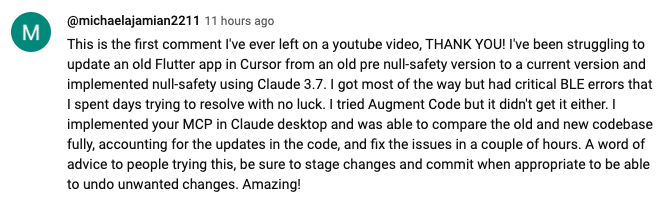 https://www.youtube.com/watch?v=ly3bed99Dy8&lc=UgztdHvDMqTb9jiqnf54AaABAg
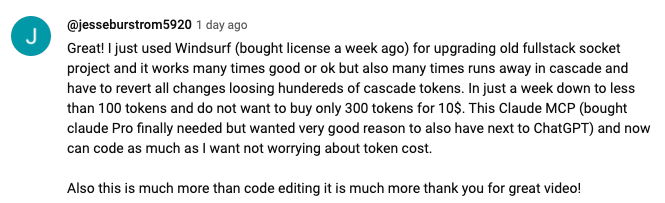 https://www.youtube.com/watch?v=ly3bed99Dy8&lc=UgyQFTmYLJ4VBwIlmql4AaABAg
 https://www.youtube.com/watch?v=ly3bed99Dy8&lc=Ugy4-exy166_Ma7TH-h4AaABAg
 https://medium.com/@pharmx/you-sir-are-my-hero-62cff5836a3e
If you find this project useful, please consider giving it a ⭐ star on GitHub! This helps others discover the project and encourages further development.
We welcome contributions from the community! Whether you've found a bug, have a feature request, or want to contribute code, here's how you can help:
- Found a bug? Open an issue at github.com/wonderwhy-er/DesktopCommanderMCP/issues
- Have a feature idea? Submit a feature request in the issues section
- Want to contribute code? Fork the repository, create a branch, and submit a pull request
- Questions or discussions? Start a discussion in the GitHub Discussions tab
All contributions, big or small, are greatly appreciated!
If you find this tool valuable for your workflow, please consider supporting the project.
Frequently Asked Questions
Here are answers to some common questions. For a more comprehensive FAQ, see our detailed FAQ document.
What is NTERMCP?
It's an MCP tool that enables Claude Desktop to access your file system and terminal, turning Claude into a versatile assistant for coding, automation, codebase exploration, and more.
How is this different from Cursor/Windsurf?
Unlike IDE-focused tools, NTERMCP provides a solution-centric approach that works with your entire OS, not just within a coding environment. Claude reads files in full rather than chunking them, can work across multiple projects simultaneously, and executes changes in one go rather than requiring constant review.
Do I need to pay for API credits?
No. This tool works with Claude Desktop's standard Pro subscription ($20/month), not with API calls, so you won't incur additional costs beyond the subscription fee.
Does NTERMCP automatically update?
Yes, when installed through npx or Smithery, NTERMCP automatically updates to the latest version when you restart Claude. No manual update process is needed.
What are the most common use cases?
- Exploring and understanding complex codebases
- Generating diagrams and documentation
- Automating tasks across your system
- Working with multiple projects simultaneously
- Making surgical code changes with precise control
I'm having trouble installing or using the tool. Where can I get help?
Join our Discord server for community support, check the GitHub issues for known problems, or review the full FAQ for troubleshooting tips. You can also visit our website FAQ section for a more user-friendly experience. If you encounter a new issue, please consider opening a GitHub issue with details about your problem.
How do I report security vulnerabilities?
Please create a GitHub Issue with detailed information about any security vulnerabilities you discover. See our Security Policy for complete guidelines on responsible disclosure.
Data Collection & Privacy
Desktop Commander collects limited anonymous telemetry data to help improve the tool. No personal information, file contents, file paths, or command arguments are collected.
Usage Analytics (Local Only)
- Local usage statistics are always collected and stored locally on your machine for functionality and the
get_usage_stats tool
- Use the
get_usage_stats tool to view your personal usage patterns, success rates, and performance metrics
- This data is NOT sent anywhere - it remains on your computer for your personal insights
Feedback System
- Use the
give_feedback_to_ntermcp tool to provide feedback about NTERMCP
- Opens a browser-based feedback form to send suggestions and feedback to the development team
- Only basic usage statistics (tool call count, days using, platform) are pre-filled to provide context but you can remove them
External Telemetry Opt-Out
External telemetry (sent to analytics services) is enabled by default but can be disabled:
- Open the chat and simply ask:
"Disable telemetry"
- The chatbot will update your settings automatically.
Note: This only disables external telemetry. Local usage analytics remain active for tool functionality but is not share externally
For complete details about data collection, please see our Privacy Policy.
Verifications

License
MIT






