You're Invited:Meet the Socket Team at RSAC and BSidesSF 2026, March 23–26.RSVP
Socket
Book a DemoSign in
Socket

open-agreements

Package Overview
Dependencies
Maintainers
1
Versions
9
Alerts
File Explorer

Advanced tools

Socket logo

Install Socket

Detect and block malicious and high-risk dependencies

Install

open-agreements

Open-source legal template filling CLI and library

latest
Source
npmnpm
Version
0.5.0
Version published
Weekly downloads
122
-85.73%
Maintainers
1
Weekly downloads
 
Created
Source

OpenAgreements

npm version npm downloads License: MIT Agent Skill CI MCP Server Status codecov GitHub stargazers Tests: Vitest OpenSpec Traceability Socket Badge install size

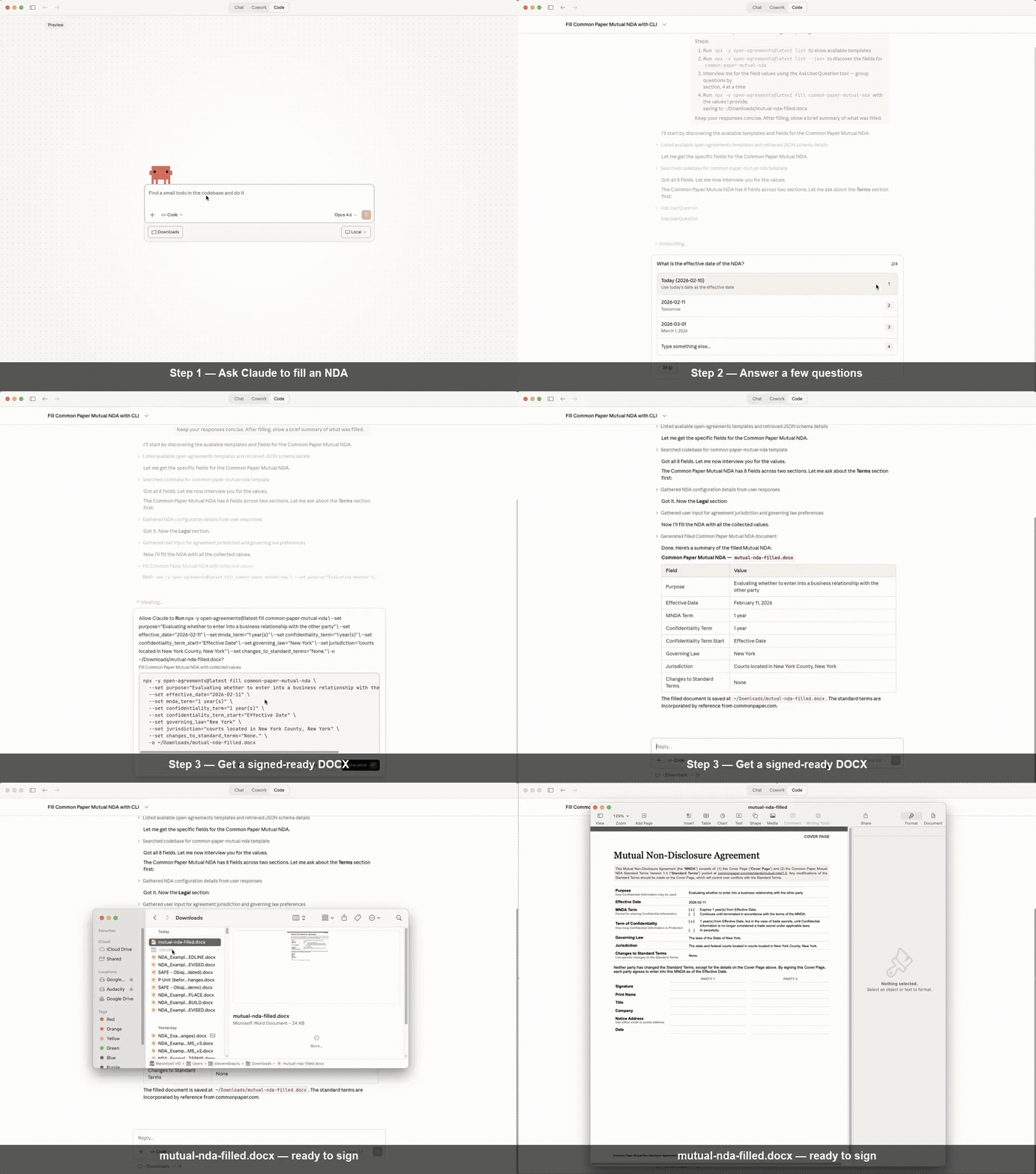
Fill a Mutual NDA in Claude Code — prompt, answer questions, get a signed-ready DOCX

Demo: Claude fills a Common Paper Mutual NDA in under 2 minutes. Sped up for brevity.

Fill standard legal agreement templates and produce signable DOCX files. Templates cover NDAs, cloud terms, employment docs, contractor agreements, SAFEs, and NVCA financing documents.

Open Agreements by UseJunior — part of the UseJunior developer tools. In production at Am Law 100 firms.

Quality and Trust Signals

  • CI runs on pull requests and pushes to main.
  • Live service health is published via OpenStatus at openagreements.openstatus.dev.
  • Coverage is published to Codecov with repository-defined patch/project gates in codecov.yml.
  • The active JS test framework is Vitest, with JUnit test results uploaded for Codecov test analytics.
  • OpenSpec scenario traceability is enforced via npm run check:spec-coverage. For a local matrix export, run npm run check:spec-coverage -- --write-matrix integration-tests/OPENSPEC_TRACEABILITY.md.
  • Recipe source drift canary (npm run check:source-drift) verifies expected source hash plus structural replacement/normalize anchors.
  • Assumption-level regressions are tracked in docs/assumptions.md and validated via targeted regression tests + CI gates.
  • LibreOffice-powered DOCX visual rendering uses a pinned build config on macOS (config/libreoffice-headless.json); run npm run check:libreoffice before visual Allure evidence tests.
  • Maintainer: Steven Obiajulu (MIT-trained mechanical engineer; Harvard Law trained lawyer).

How It Works

  • Step 1: Choose a template (36 standard agreements)
  • Step 2: Fill in your details (interactive prompts or MCP)
  • Step 3: Get a professionally formatted DOCX

OpenAgreements supports two execution modes with different trust boundaries:

  • Hosted remote MCP connector (https://openagreements.ai/api/mcp) for fast setup in Claude.
  • Fully local package execution (npx, global install, or local stdio MCP package) for machine-local workflows.

There is no global default mode recommendation. Choose based on document sensitivity, internal policy, and workflow speed needs. See docs/trust-checklist.md for a 60-second data-flow summary.

Quick Decision

  • If your document is sensitive, use fully local package execution.
  • If you prioritize convenience, use the hosted remote MCP connector.

Use with Claude Code

OpenAgreements works as a Claude Code plugin and Agent Skill. No pre-installation required — Claude downloads and runs the CLI on demand via npx.

npx skills add open-agreements/open-agreements

Then ask Claude to draft an agreement:

> Draft an NDA between Acme Corp and Beta Inc

Claude discovers available templates, interviews you for field values, and renders a signed-ready DOCX.

Option 2: Gemini CLI Extension

gemini extensions install https://github.com/open-agreements/open-agreements

Then ask Gemini to draft an agreement. The extension provides MCP tools, context files, and skills for template discovery and filling.

Option 3: Direct with Claude Code

If you have Node.js >= 20, just ask Claude:

> Fill the Common Paper mutual NDA for my company

Claude runs npx -y open-agreements@latest list --json to discover templates, then npx -y open-agreements@latest fill <template> to render the output. Zero install.

Option 4: CLI

# Install globally
npm install -g open-agreements

# List available templates
open-agreements list

# Fill a template
open-agreements fill common-paper-mutual-nda -d values.json -o my-nda.docx

What Happens

  • Claude runs list --json to discover available templates and their fields
  • Claude interviews you for field values (grouped by section, up to 4 questions per round)
  • Claude runs fill <template> to render a DOCX preserving all original formatting
  • You review and sign the output document

Use with Cursor

This repository includes a Cursor plugin manifest with MCP wiring:

  • Plugin manifest: .cursor-plugin/plugin.json
  • MCP config: mcp.json
  • Skill: skills/open-agreements/SKILL.md

The default MCP setup in mcp.json includes:

  • Hosted OpenAgreements MCP connector (https://openagreements.ai/api/mcp)
  • Local workspace MCP server (npx -y @open-agreements/contracts-workspace-mcp)
  • Local template drafting MCP server (npx -y @open-agreements/contract-templates-mcp)

To publish this plugin in Cursor Marketplace, submit this repository at:

Templates

28 templates across three tiers. Run open-agreements list for the full inventory.

TierCountSourceHow It Works
Internal templates17Common Paper, Bonterms, OpenAgreementsShipped in package, CC BY 4.0
External templates4Y CombinatorVendored unchanged, CC BY-ND 4.0
Recipes7NVCADownloaded on demand (not redistributable)

Internal templates (NDAs, cloud terms, employment forms, contractor agreements, etc.) are CC BY 4.0 — we ship the DOCX with {tag} placeholders.

External templates (YC SAFEs) are CC BY-ND 4.0 — we vendor the original unchanged. The filled output is a transient derivative on your machine.

Recipes (NVCA financing documents) are freely downloadable but not redistributable — we ship only transformation instructions and download the source DOCX from nvca.org at runtime.

Guidance Extraction

Source documents contain expert commentary — footnotes, drafting notes, [Comment: ...] blocks — written by domain specialists (e.g., securities lawyers). The recipe cleaner removes this content to produce a fillable document, but can also extract it as structured JSON:

open-agreements recipe clean source.docx -o cleaned.docx \
  --recipe nvca-indemnification-agreement \
  --extract-guidance guidance.json

This produces a guidance.json with every removed footnote, comment, and drafting note tagged by source type and document position. The guidance is a local-only artifact (not committed or shipped) that AI agents or human authors can reference while filling the form. See Adding Recipes — Guidance Extraction for format details.

Why programmatic extraction? The source document is the single source of truth. Re-running extraction after a publisher update produces fresh guidance with zero manual effort, preserves the exact language of domain experts, and captures everything — an AI can summarize on the fly, but cannot recover discarded content.

Each template is a self-contained directory:

content/templates/<name>/
├── template.docx     # DOCX with {tag} placeholders
├── metadata.yaml     # Fields, license, source, attribution
└── README.md         # Template-specific documentation

CLI Commands

fill <template>

Render a filled DOCX from a template.

# Using a JSON data file
open-agreements fill common-paper-mutual-nda -d data.json -o output.docx

# Using inline --set flags
open-agreements fill common-paper-mutual-nda --set party_1_name="Acme Corp" --set governing_law="Delaware"

validate [template]

Run the validation pipeline on one or all templates.

open-agreements validate                          # All templates
open-agreements validate common-paper-mutual-nda  # One template

list

Show available templates with license info and field counts.

open-agreements list

# Machine-readable JSON output (for agent skills and automation)
open-agreements list --json

Contracts Workspace CLI (Separate Package)

OpenAgreements now includes a sibling package for repository/workspace operations:

  • Package: @open-agreements/contracts-workspace
  • Binary: open-agreements-workspace
  • Docs: docs/contracts-workspace.md

This package is intentionally separate from open-agreements so teams can adopt:

  • template filling only
  • workspace management only
  • or both together

Core workspace features:

  • topic-first init planning (minimal suggested structure with top-level domains)
  • forms catalog with URL + SHA-256 validation
  • YAML status indexing and linting with filename-driven _executed status

The v1 model is filesystem-only and works in locally synced cloud-drive folders (for example, Google Drive sync). No Drive API/OAuth integration is required.

Local MCP for Workspace Demo

For local connector demos, there is a local stdio MCP package:

  • Package: @open-agreements/contracts-workspace-mcp
  • Binary: open-agreements-workspace-mcp
  • Docs: docs/contracts-workspace.md

Quick start:

npm run build:workspace-mcp
node packages/contracts-workspace-mcp/bin/open-agreements-workspace-mcp.js

Local MCP for Template Drafting

For local Gemini/Cursor template drafting flows, use:

  • Package: @open-agreements/contract-templates-mcp
  • Binary: open-agreements-contract-templates-mcp

Quick start:

npm run build:contract-templates-mcp
node packages/contract-templates-mcp/bin/open-agreements-contract-templates-mcp.js

Website (Vercel)

A static marketing site is generated from site/ with Eleventy.

  • Entry points: site/index.njk, site/templates.njk, site/template-detail.njk
  • Styles: site/styles.css
  • Demo media: site/assets/demo-fill-nda.gif
  • Deployment config: vercel.json
  • Discovery outputs (generated during npm run build:site): _site/llms.txt, _site/llms-full.txt, _site/sitemap.xml, _site/robots.txt

Local preview:

npm run build:site
python3 -m http.server 8080 --directory _site

Then open http://localhost:8080.

Vercel deploy notes:

  • Import this repository in Vercel
  • Keep project root as repo root
  • The included vercel.json deploys _site/ as static output

Compliance & Audit Skills

Open Agreements includes AI agent skills for ISO 27001 and SOC 2 compliance work. These are markdown-only procedural skills — no scripts executed, no secrets required, evidence stays local. Developed with Hazel Castro (ISO 27001 Lead Auditor, 14+ years, 100+ audits).

ISO 27001 Evidence Collection

Collect, organize, and validate evidence for ISO 27001 and SOC 2 audits. API-first approach with CLI commands for major cloud platforms. Produces timestamped, auditor-ready evidence packages.

npx skills add open-agreements/open-agreements --skill iso-27001-evidence-collection

ISO 27001 Internal Audit

Run a structured internal audit against ISO 27001:2022. Walk through controls by domain, identify gaps, collect evidence, and generate findings with corrective action recommendations.

npx skills add open-agreements/open-agreements --skill iso-27001-internal-audit

SOC 2 Readiness

Assess SOC 2 Type II readiness. Map Trust Services Criteria to controls, identify gaps, and build a prioritized remediation plan with NIST SP 800-53 cross-mapping.

npx skills add open-agreements/open-agreements --skill soc2-readiness

All three skills use NIST SP 800-53 (public domain) as their canonical reference. Browse the full skill catalog at skills.sh/open-agreements.

Optional Content Roots (Future-Proofing)

To support logical unbundling as form libraries grow, open-agreements can load content from additional roots via:

  • env var: OPEN_AGREEMENTS_CONTENT_ROOTS
  • format: path-delimited list of absolute/relative directories (for example, dirA:dirB on macOS/Linux)
  • expected structure under each root: templates/, external/, and/or recipes/ (or nested under content/)

Lookup precedence is:

  • roots in OPEN_AGREEMENTS_CONTENT_ROOTS (in listed order)
  • bundled package content (default fallback)

This keeps default installs simple while allowing advanced users to move large content libraries outside the core package.

See Also

  • safe-docx — surgical editing of existing Word documents with coding agents (MCP server)
  • UseJunior Developer Tools — product page with install options and template catalog

Contributing

See CONTRIBUTING.md for how to add templates, recipes, and other improvements.

Releasing

Releases are automated through GitHub Actions using npm trusted publishing (OIDC) with provenance enabled.

  • Update versions in root package + publishable MCP packages.
  • Push commit + tag with git push origin main --tags
  • Run the local Gemini extension gate (copy/symlink into ~/.gemini/extensions/open-agreements and verify both local MCP servers start/respond).
  • The Release workflow publishes from the tag after running build, validation, tests, isolated runtime smoke, and package checks.

Workflow guardrails:

  • tag must match root + publishable package versions
  • release commit must be contained in origin/main
  • publish fails if any target npm version already exists

Architecture

  • Language: TypeScript
  • DOCX Engine: docx-templates (MIT)
  • CLI: Commander.js
  • Validation: Zod schemas
  • Skill Pattern: Agent-agnostic ToolCommandAdapter interface
content/                    # All content directories
├── templates/              # Internal templates (CC BY 4.0)
├── external/               # External templates (CC BY-ND 4.0)
└── recipes/                # Recipes (downloaded at runtime)

src/                        # TypeScript source + collocated unit tests
├── cli/                    # Commander.js CLI
├── commands/               # fill, validate, list, recipe, scan
├── core/
│   ├── engine.ts           # docx-templates wrapper
│   ├── metadata.ts         # Zod schemas + loader
│   ├── recipe/             # Recipe pipeline (clean → patch → fill → verify)
│   ├── external/           # External template support
│   ├── validation/         # template, license, output, recipe
│   └── command-generation/
│       ├── types.ts        # ToolCommandAdapter interface
│       └── adapters/       # Claude Code adapter
└── index.ts                # Public API

integration-tests/          # Integration and end-to-end tests

Resources

License

MIT

Template content is licensed by their respective authors — CC BY 4.0 (Common Paper, Bonterms), CC BY-ND 4.0 (Y Combinator), or proprietary (NVCA, downloaded at runtime). See each template's metadata.yaml for details.

Privacy

  • Local mode (npx, global install, stdio MCP): all processing happens on your machine. No document content is sent externally.
  • Hosted mode (https://openagreements.ai/api/mcp): template filling runs server-side. No filled documents are stored after the response is returned.

See our Privacy Policy for details.

Disclaimer

This tool generates documents from standard templates. It does not provide legal advice. No affiliation with or endorsement by Common Paper, Bonterms, Y Combinator, NVCA, or any template source is implied. Consult an attorney for legal guidance.

Keywords

legal

FAQs

Package last updated on 19 Mar 2026

Did you know?

Socket

Socket for GitHub automatically highlights issues in each pull request and monitors the health of all your open source dependencies. Discover the contents of your packages and block harmful activity before you install or update your dependencies.

Install

Related posts