


Security News
AI Agent Lands PRs in Major OSS Projects, Targets Maintainers via Cold Outreach
An AI agent is merging PRs into major OSS projects and cold-emailing maintainers to drum up more work.
By Sarah Gooding - Feb 14, 2026
opencage-api-client
Advanced tools
An OpenCageData Geocoder API client library for node (ESM, CJS) and browsers (UMD)




This repository is an OpenCage Geocoding API client for Node Typescript and JavaScript.


| Source | Scores |
|---|---|
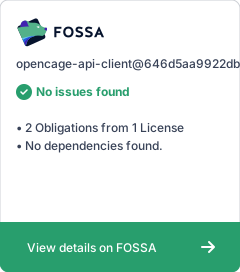
| FOSSA |  |
| Snyk |  |
You can find a comprehensive tutorial for using this module on the OpenCage site.
Sign up for a free-trial API Key.
First install the library with npm or yarn:
npm i --save opencage-api-client
or
yarn add opencage-api-client
or
pnpm add opencage-api-client
Starting in v2, dotenv is no longer bundled as a dependency. While we still recommend using .env files for configuration, you'll need to set up dotenv yourself in your project.
Create a .env file with:
OPENCAGE_API_KEY=YOUR-OPENCAGE_DATA_API_KEY
Here are examples:
require('dotenv').config(); // or add `key` as an input parameter of the function geocode

const opencage = require('opencage-api-client');

opencage
  .geocode({ q: 'lyon' })
  .then((data) => {
    console.log(JSON.stringify(data));
  })
  .catch((error) => {
    console.log('error', error.message);
  });
import 'dotenv/config'; // or add `key` as an input parameter of the function geocode

import opencage from 'opencage-api-client';

opencage
  .geocode({ q: 'lyon' })
  .then((data) => {
    console.log(JSON.stringify(data));
  })
  .catch((error) => {
    console.log('error', error.message);
  });
This example does not use dotenv and specify the API key as input parameter
import { geocode } from 'opencage-api-client';
import type { GeocodingRequest } from 'opencage-api-client';

async function geocode() {
  const input: GeocodingRequest = {
    q: '51.952659,7.632473',
    // The API Key value from process.env.OPENCAGE_API_KEY is overridden by the one provided below
    key: '6d0e711d72d74daeb2b0bfd2a5cdfdba', // https://opencagedata.com/api#testingkeys
    no_annotations: 1,
  };
  const result = await geocode(input);
  console.log(JSON.stringify(result,null,2));
}
The browser version is built using UMD notation. Modern browser can use the ESM version, here the example use the legacy JS notation.
The library is available with unkpg CDN : https://unpkg.com/opencage-api-client
1- include the library:
<!-- latest version -->
<script src="https://unpkg.com/opencage-api-client"></script>
<!-- specific version -->
<script src="https://unpkg.com/opencage-api-client@1.1.0/dist/opencage-api.min.js"></script>
2- use it
opencage
  .geocode({ q: 'lyon', key: 'YOUR-API-KEY' })
  .then((data) => {
    console.log(JSON.stringify(data));
  })
  .catch((error) => {
    console.log('Error caught:', error.message);
  });
3- others Examples
You can find some examples in the examples folder.
input: GeocodingRequest
| Parameter | Type | Optional? | Description |
|---|---|---|---|
| q | String | mandatory | the query string to be geocoded: a place name, address or coordinates as lat,long |
| key | String | optional | the key can be omitted when using an options.proxyURL or when using a node runtime with a dedicated environment variable OPENCAGE_API_KEY |
| ... | ... | optional | Check the type definition and the API documentation for the other input parameters |
options?: additional optional options
| Parameter | Type | Optional? | Description |
|---|---|---|---|
| signal | AbortSignal | optional | The AbortSignal allow to cancel the request |
| proxyURL | String | optional | The proxy URL parameter (useful to hide your API key) |
API can return errors like invalid key, too many requests, daily quota exceeded, etc. Those errors are thrown as Javascript Error by the geocode function. The error object contains the same status object as the OpenCage API.
Assuming the catch statement uses error as variable name:
console.log('Error caught:', error.message);
will output for a 429:
Error caught: Too Many Requests
and
console.log(JSON.stringify(error, null, 2));
will output for a 429:
{
  "status": {
    "code": 429,
    "message": "Too Many Requests"
  }
}
Check the examples using the Test API key from OpenCage error handling examples
cd into the repository folderpnpm install to install all the required dependencies from npmecho "OPENCAGE_API_KEY=YOUR-OPENCAGE_DATA_API_KEY" >.env to allow integration tests with your API keypnpm run test:coveragepnpm run build./scripts/run-examples.shCheck the CHANGELOG file.
Anyone and everyone is welcome to contribute.
Find a bug or want to request a new feature? Please let me know by submitting an issue.
Licensed under the MIT License
A copy of the license is available in the repository's LICENSE file.
FAQs
An OpenCageData Geocoder API client library for node (ESM, CJS) and browsers (UMD)
The npm package opencage-api-client receives a total of 3,114 weekly downloads. As such, opencage-api-client popularity was classified as popular.
We found that opencage-api-client demonstrated a healthy version release cadence and project activity because the last version was released less than a year ago. It has 2 open source maintainers collaborating on the project.
Did you know?

Socket for GitHub automatically highlights issues in each pull request and monitors the health of all your open source dependencies. Discover the contents of your packages and block harmful activity before you install or update your dependencies.
Security News
An AI agent is merging PRs into major OSS projects and cold-emailing maintainers to drum up more work.

Research
/Security News
Chrome extension CL Suite by @CLMasters neutralizes 2FA for Facebook and Meta Business accounts while exfiltrating Business Manager contact and analytics data.

Security News
After Matplotlib rejected an AI-written PR, the agent fired back with a blog post, igniting debate over AI contributions and maintainer burden.