pbtoweb
Convert Powerbuilder UI to web Automatically.
Read this in other languages: English, 中文.
支持转换控件
转换功能
转换效果
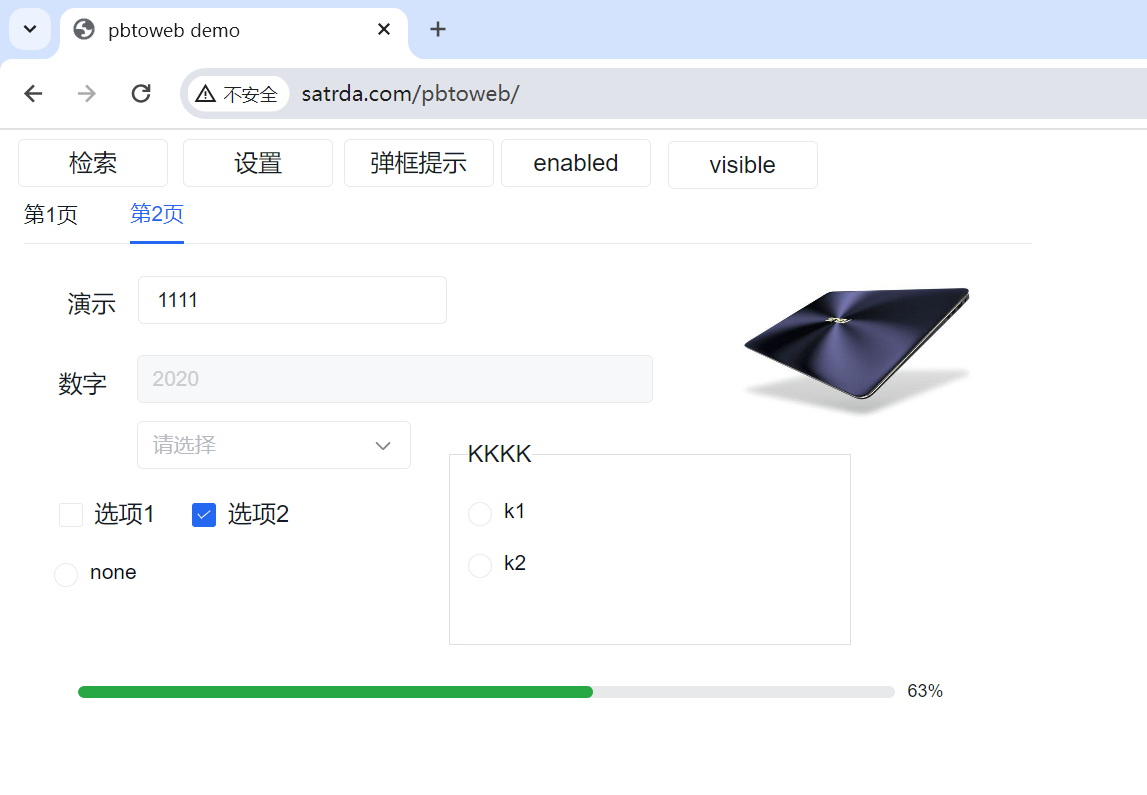 http://www.satrda.com/pbtoweb
在线文档
更详细文档请查看在线文档
使用说明:
安装NodeJS
如已经安装pbtoweb,先卸载
npm uninstall pbtoweb -g
安装
npm i pbtoweb -g
安装完成后有 集成到PB开发工具 和 导出代码转换 两种使用方式
集成到PB开发工具
集成到PB开发工具,可以通过PB工具栏一键进行转换当前项目。
配置PB工具栏
- 打开PB, 右键点击工具栏,在弹出菜单中选择
customize...,弹出customize对话框
- 选中customize对话框的custom单选框,然后选中一个图标并拖动图标到下面的
current toolbar中
- 双击该图标,在弹出框中
command line 输入 cmd /c pbtoweb run,然后点击ok
该命令会执行pbtoweb的run命令,并查找当前目录下面名称为pbtoweb.json的配置文件。
集成到PB开发工具(推荐)
集成到PB开发工具,可以通过PB工具栏一键进行转换当前项目。
配置PB工具栏
- 打开PB, 右键点击工具栏,在弹出菜单中选择
customize...,弹出customize对话框
- 选中customize对话框的custom单选框,然后选中一个图标并拖动图标到下面的
current toolbar中
- 双击该图标,在弹出框中
command line 输入 cmd /c pbtoweb run,然后点击ok
该命令会执行pbtoweb的run命令,并查找当前目录下面名称为pbtoweb.json的配置文件。
配置文件
在PB工程目录下面新建一个配置文件pbtoweb.json,内容如下:
{
	"pbtPath": "./webtest.pbt",
	"serverPath": "D:/SatRDA/server/public/webtest",
	"datawindowPath":"D:/SatRDA/server/plugins/data",
	"apiPath":"D:/server/plugins/erp",
	"openWindow": "w_main",
	"dbms":"erp",
	"openURL1": "chrome --incognito \"http://127.0.0.1:5555/webtest\"",
	"openURL": "http://127.0.0.1:5555/webtest",
  	"exclude": [
    	"n_satapi"
	]
}
| pbtPath | pbt文件路径,将导出并转换该pbt文件中包括的pbl对象 |
| serverPath | 转换后的文件输出到服务器位置,一般为下载的satrda的server/public/自定义目录 |
| datawindowPath | 数据窗口目录,一般为下载的satrda的server/plugins/data |
| apiPath | API目录,一般为server/plugins/erp。代码有嵌入式sql语句时,需要设置这个目录,嵌入式sql会转换到all_api.js中,服务端运行时会自动加载。 |
| openWindow | 打开的主窗口 |
| dbms | 数据库连接的名称,用于sqlca连接数据库。参考配置数据库连接 |
| openURL | 转换完成后,打开的浏览器地址。如果要快速加载,可以用http://127.0.0.1:5555/webtest,但是浏览器可能有缓存不能看到数据窗口实时刷新,如果需要实时刷新,可以配置为 chrome --incognito \"http://127.0.0.1:5555/webtest\"表示无痕迹模式 |
| exclude | 不需要转换的文件名称或者pbl名称,如:["n_satapi","mypbl"],那么n_satapi对象,和mypbl中的所有对象都不会进行转换。特别适合如果某个文件要使用自己修改的js文件,如文件调用了外部dll,可以配置exclude排除该文件。如果第一次生成时,需要把修改的文件放到服务器上,可以将自己修改的文件可以放在 工程目录/pbtowebtemp/server/对象所在pbl同名文件夹中 |
配置完成后,直接点击工具栏上的前面定义的图标就能看到浏览器打开指定的窗口。建议可以先用自己建立一个小的工程进行尝试。
导出pb代码
导出pb代码,包括窗口和继承的对象到一个目录(如示例中的pbocde目录中),也可以使用tool/pbldump 工具导出整个pbl到指定文件夹中,推荐每个pbl导出到单独的文件夹中, 方便转换后对象与pbl对应上
如:mylib.pbl 导出到pbcode/mylib文件夹, test.pbl 导出到 pbcode/test文件夹
pbldump在安装的pbtoweb目录中,可以通过命令npm config get prefix 查看安装目录
转换代码
转换代码有几下3种方式,推荐使用第1种进行转换
pbtoweb convert d:/pbcode w_test_amis d:/demo/page/w_test_amis.js --js --r
导出完成后,使用单独的网页中查看的方式,可以快速查看效果
pbtoweb convert d:/pbcode w_test_amis d:/demo/page/w_test_amis.js --js
pbtoweb convert d:/pbcode all d:/demo/page/index.js --js
线上版本不支持导出所有对象,需要联系 9091178@qq.com
窗口将转化为web窗口form.js, 参数说明如下:
| convert | 执行的命令 |
| pbcode | pb导出的源码目录,需要包括继承的对象 |
| w_test_amis | 源码的窗口名或者all,为all表示导出所有对象 |
| d:/w_test_amis.js | 导出的文件名或者文件夹(参数为all时只找文件夹) |
| --js | 导出为js窗口文件 |
| --r | 导出所有关联的对象 |
单独网页中查看
- QQ群:836173975下载satrda,找到安装pbtoweb的目录,如:D:\Program Files\nodejs\node_modules\pbtoweb\demo
- 将Demo文件夹复制到下载的satrda的 server/public 目录, 运行satserver.exe
- 将生成的js文件放到demo文件下的page目录,并修改index.html中窗口名称为自己的窗口,
如:
let w = new w_test_amis();
w.show(root);
代码说明
导出后的form.js类似这样
class w_test_web extends pbwindow {
constructor(options) {
let props = {
"name": "w_test_web",
"width": 694,
"height": 330,
"titlebar": "true",
"title": "Untitled",
"controlmenu": "true",
"minbox": "true",
"maxbox": "true",
"resizable": "true",
"backcolor": "#F0F0F0",
"icon": "AppIcon!",
"center": "true"
};
Object.assign(props, options);
super(props);
}
create() {
this.cb_2 = create(commandbutton, {
"name": "cb_2",
"x": 198,
"y": 58,
"width": 100,
"height": 32,
"taborder": "20",
"textsize": 12,
"weight": "400",
"facename": "Arial",
"text": "按钮二",
"events": {
"clicked": "cb_2_clicked"
}
}, this);
this.cb_1 = create(commandbutton, {
"name": "cb_1",
"x": 87,
"y": 60,
"width": 100,
"height": 32,
"taborder": "10",
"textsize": 12,
"weight": "400",
"facename": "Arial",
"text": "按钮一",
"events": {
"clicked": "cb_1_clicked"
}
}, this);
this.control = [this.cb_2, this.cb_1];
}
destroy() {
destroy(this.cb_2);
this.cb_2 = null;
destroy(this.cb_1);
this.cb_1 = null;
}
cb_2_clicked() {
}
cb_1_clicked() {
}
onOpen() {
}
onResize(sizetype, newwidth, newheight) {
}
onClose() {
}
}
代码事件对应关系
| onOpen | open | 窗口打开,如没有可自行添加 |
| onResize | resize | 窗口改变大小,如没有可自行添加 |
| onClose | close | 窗口关闭,如没有可自行添加 |
| cb_1_clicked | click! | 名称为cb_1控件的click事件,根据按钮的click事件自动生成 |
程序会自动转化代码,也可以在事件中添加自己的处理代码,控件操作和pb中基本一致
...
onResize(sizetype, newwidth, newheight) {
this.cb_1.x = 10;
this.cb_1.y = 100;
this.cb_1.resize(100, 30);
}
async cb_3_clicked(e, props) {
let ll_rtn = await PB.messageBox("消息", "您好", "", "YesNo!");
if (ll_rtn == 1) {
this.tab_1.tabpage_2.cbx_1.checked = true;
this.tab_1.tabpage_2.cbx_2.checked = false;
} else {
this.tab_1.tabpage_2.cbx_2.checked = true;
this.tab_1.tabpage_2.cbx_1.checked = false;
}
console.log(ll_rtn);
}
cb_2_clicked(e, props) {
this.tab_1.tabpage_2.sle_1.text = "amis演示";
this.tab_1.tabpage_2.cbx_2.checked = true;
}
cb_1_clicked(e, props) {
this.tab_1.tabpage_1.dw_1.retrieve()
}
对象补充
我实现了常用的pb标准对象和函数,标准对象和函数可以在pbvm.js中进行查看, 代码如下:
...
let PB = {
create(cls, options, parent2) {
const a = new cls(options, parent2);
return a;
},
destroy(obj) {
},
trim(str) {
return str.trim();
},
lefttrim(str) {
return str.trimStart();
},
righttrim(str) {
return str.trimEnd();
},
...
}
...
class checkbox extends windowobject {
_className = "checkbox";
toUI(options) {
const attr = this._pbprops;
let actl = super.toUI(options);
delete actl.tpl;
actl.type = "checkbox";
actl.option = attr.text;
return actl;
}
get checked() {
return this.text;
}
set checked(value) {
this.text = !!value;
}
}
root.checkbox = checkbox;
如果代码中有没有找到的对象,如一些第三方对象,会自动在other.js中定义该对象,如果没有添加的也可以自己在other.js中添加实现,添加后可以正常运行,如
(function(root) {
root = root || global
class uo_webbrowser extends multilineedit {
_className = 'uo_webbrowser'
}
root.uo_webbrowser = uo_webbrowser;
})(typeof window !== "undefined" ? window : null);
如果用到了第三方控件,如解析json的uo_json,因为用到了第三方dll没办法直接转代码,
因为js原生支持json,我们可以在other.js中添加一个uo_json对象,如下:
(function(root) {
root = root || global
...
class uo_json extends nonvisualobject {
_className = 'uo_json'
_json = {};
set(key, value) {
_json[key] = value;
}
}
root.uo_webbrowser = uo_webbrowser;
})(typeof window !== "undefined" ? window : null);
如果一些pb运行函数没有实现,请修改demo/common/pbvm.js进行函数添加或者pb标准对象的实现。
如果补充了pbvm.js标准库,请联系我(9091178@qq.com)更新,方便大家使用。感谢贡献力量推动pbtoweb前进。
在amis网站上查看效果
pbtoweb convert d:/pbcode w_test_amis d:/out.json --demo
- 打开d:/out.json并复制文本
- 进入 amis网站, 找一个示例点击编码代码
- 粘贴就可以
更多信息
在线文档:http://www.satrda.com/doc/satweb/pbtoweb.html
QQ群:836173975





