Perfrunner 
Perfrunner - performance testing tool for websites and web applications. Tracks your application performance with Performance Events and visualize the progress. Supports various predefined network conditions, CPU throttling, cache. Supports different output - HTML, CSV, JSON. Uses multiple reruns for better precision.
Tracks:
- First Contentful Paint
- Largest Contentful Paint
- Layout duration time
- Script duration time
- Resources size (js, css, img, fonts)
- And much more!
Example
npx perfrunner drag13.io
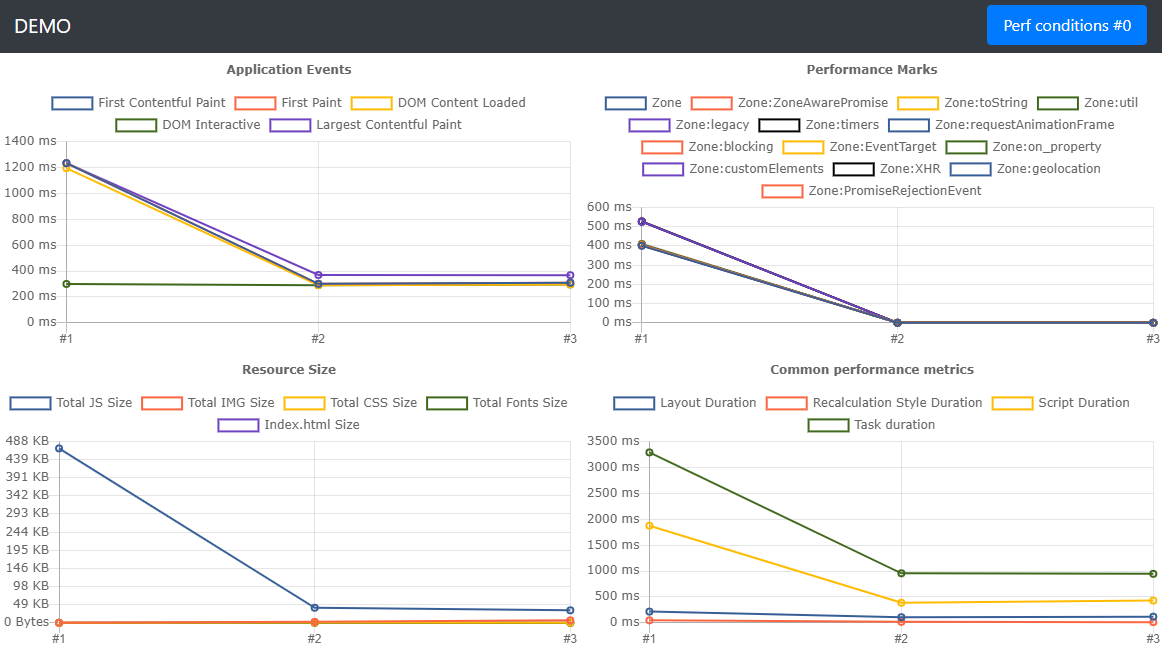
It's just an example, please don't consider to take framework depending on this chart :)
Installation
To save it into your project:
npm i perfrunner -D
For one-time usage:
npx perfrunner https://drag13.io
Default options
- Network:original/ fast3g
- Cache: false
- Runs: 3
- Reporter: html
- Throttling: 2
All options
| | Run tests using perfrunner.json config file | | Optional |
| --cache | -C | Using browser cahce. Mutliple values supported. <true/false> | false | Optional |
| --chrome-args | - | Additional arguments to pass to the browser instance. Should be passed using camelCase style like: "noSandbox" | undefined | Optional |
| --comment | - | Provide additional information about test. May be used from reporter | undefined | Optional |
| --executable-path | -E | Sets path to the Chrome instance | undefined | Optional |
| --ignore-default-args | - | Ignore defaultArgs for launching Chromium | false | Optional |
| --init | - | Creates perfrunner.json config file, requires URL as a parameter | undefined | Optional |
| --log-level | - | Setup log level: <verbose> | undefined | Optional |
| --network | - | Setup network contions. Multiple values supported. <online/regular4g/fast3g/hspa/slow3g> | online,fast3g | Optional |
| --no-headless | - | Disables headless mode | false | Optional |
| --purge | - | Remove old data before the test run | false | Optional |
| --reporter | - | Specify reporter | html | Optional |
| --report-only | - | Skips profiling session and only generates report | false | Optional |
| --runs | -R | Number of runs you want to be performed | 3 | Optional |
| --test-name | - | Name of the test run. Will be used to name testRun folder and grouping results | undefined | Optional |
| --throttling | -T | CPU slowdown multiplier | 2 | Optional |
| --timeout | - | Set timeout for the single test run in miliseconds | 90_000 | Optional |
| --url | - | Url to profile | This field is required | Required |
| --wait-for | -W | Specify selector or time in miliseconds to wait | undefined | Optional |
Reporters
Supported reporters:
- HTML - renders basic metrics into HTML (FCP, LCP, DCL, Size, etc)
- MD - generates simple markdown report with First Contentful Paint and Largest Contentful Paint, DOM Interactive and some other metrics
- JSON - saves all data to json
- CSV - saves all data to csv
- custom - you can specify your own custom reporter
To switch between reporters, use --reporter flag:
npx drag13.io --reporter json
HTML
Generates output as an HTML file. Includes:
- Performance events Chart (DOM Content Loaded, First Paint, First Contentful Paint, Largest Contentful Paint, DOM Interactive)
- Default Performance Metrics Chart - Layout Duration, Recalculation Style Duration, Script Duration, Task duration
- Resource Size Chart (JS, CSS ,IMG, Fonts, XHR)
- Performance Marks Chart - shows performance marks from application
Example:
This is default reporter so you don't need to name it
npx perfrunner drag13.io
MD
Generate simple markdown report, that includes:
- Performance events - First Contentful Paint and Largest Contentful Paint
- Performance metrics DOM Interactive, Script Duration, Layout Duration, Recalculate Style metrics.
Example:
npx perfrunner drag13.io --reporter md
JSON
Generates output as JSON file
Example:
npx perfrunner drag13.io --reporter json
CSV
Generates output as CSV file
Example:
npx perfrunner drag13.io --reporter csv
Custom
You also can use your own custom reporter
npx perfrunner https://drag13.io --reporter my-custom-reporter.js
where reporter should looks like:
module.exports = {
    generateReport: (data, args) => console.log(outputFolder, JSON.stringify(data), args),
    defaultReportName: 'reporter.txt',
};
Config file
Config file supports additional features:
- Testing multiple plages
- Network customization
- Executing post loading script
OnAfterPageLoaded
To run script after it was loaded, you need to:
- Create new file on the root of the project using
module.exports = function notation
- Set
onAfterPageLoadedScript property to "./YOUR-FILE-NAME.js"
Example:
module.exports = async function () {
    console.log('start');
    return new Promise((r) => setTimeout((x) => (console.log('end'), r()), 3000));
};
The script will beexecuted after page loaded. If the script is async - page will wait till completion
Troubleshooting
Internally, perfrunner uses puppeteer, so please check this page for troubleshooting.
Perfrunner supports passing chromeArgs and ignoreDefaults flags for better control from your side:
npx perfrunner https://drag13.io --ignore-default-args --chrome-args noSandbox
You also can use Perfrunner without headless mode
npx perfrunner https://drag13.io --no-headless
If nothing helps, try to use --executable-path option
npx perfrunner https://drag13.io -E "Path\To\chrome.exe"
What next
For the next updates, please check the project. It's not very well described but might give you an idea of what is planned.
More details
Here you can find an introduction article about the Perfrunner.





