


Research
2025 Report: Destructive Malware in Open Source Packages
Destructive malware is rising across open source registries, using delays and kill switches to wipe code, break builds, and disrupt CI/CD.
By Kush Pandya - Dec 24, 2025
plotly.js
Advanced tools




Plotly.js is a standalone Javascript data visualization library, and it also powers the Python and R modules named plotly in those respective ecosystems (referred to as Plotly.py and Plotly.R).
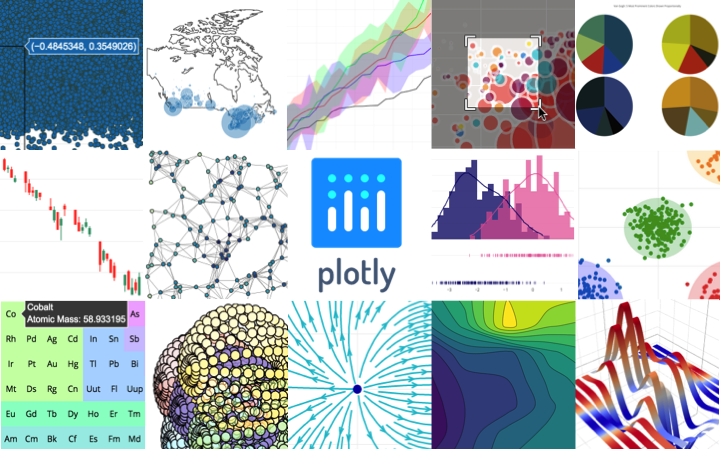
Plotly.js can be used to produce dozens of chart types and visualizations, including statistical charts, 3D graphs, scientific charts, SVG and tile maps, financial charts and more.
Contact us for Plotly.js consulting, dashboard development, application integration, and feature additions.
npm install plotly.js-dist
and import plotly.js as
import Plotly from 'plotly.js-dist'
// Or using require,
var Plotly = require('plotly.js-dist')
<!-- Latest compiled and minified plotly.js JavaScript -->
<script src="https://cdn.plot.ly/plotly-latest.min.js" charset="utf-8"></script>

<!-- OR use a specific plotly.js release (e.g. version 1.52.3) -->
<script src="https://cdn.plot.ly/plotly-1.52.3.min.js" charset="utf-8"></script>

<!-- OR an un-minified version is also available -->
<script src="https://cdn.plot.ly/plotly-latest.js" charset="utf-8"></script>
and use the Plotly object in the window scope.
Fastly supports Plotly.js with free CDN service. Read more at https://www.fastly.com/open-source
and use the plotly.js dist file(s). More info here.
Starting in v1.15.0, plotly.js ships with several partial bundles (more info here).
Starting in v1.39.0, plotly.js publishes distributed npm packages with no dependencies. For example, run npm install plotly.js-geo-dist and add import Plotly from 'plotly.js-geo-dist'; to your code to start using the plotly.js geo package.
If none of the distributed npm packages meet your needs, and you would like to manually pick which plotly.js modules to include, you'll first need to run npm install plotly.js and then create a custom bundle by using plotly.js/lib/core, and loading only the trace types that you need (e.g. pie or choropleth). The recommended way to do this is by creating a bundling file. For example, in CommonJS:
// in custom-plotly.js
var Plotly = require('plotly.js/lib/core');

// Load in the trace types for pie, and choropleth
Plotly.register([
    require('plotly.js/lib/pie'),
    require('plotly.js/lib/choropleth')
]);

module.exports = Plotly;
Then elsewhere in your code:
var Plotly = require('./path/to/custom-plotly');
Important: the plotly.js code base contains some non-ascii characters. Therefore, please make sure to set the charset attribute to "utf-8" in the script tag that imports your plotly.js bundle. For example:
<script src="my-plotly-bundle.js" charset="utf-8"></script>
Building instructions using webpack, browserify and other build frameworks are in BUILDING.md
Have a bug or a feature request? Please open a Github issue keeping in mind the issue guidelines. You may also want to read about how changes get made to Plotly.js
Official plotly.js documentation is hosted at https://plotly.com/javascript.
These pages are generated by the Plotly graphing-library-docs repo built with Jekyll and publicly hosted on GitHub Pages. For more info about contributing to Plotly documentation, please read through contributing guidelines.
Please read through our contributing guidelines. Included are directions for opening issues, using plotly.js in your project and notes on development.
plotly-js) or
on Stack Overflow (tagged plotly).plotly on packages which modify or add to the functionality of plotly.js when distributing through npm.This project is maintained under the Semantic Versioning guidelines.
See the Releases section of our GitHub project for changelogs for each release version of plotly.js.
Plotly.js is at the core of a large and dynamic ecosystem with many contributors who file issues, reproduce bugs, suggest improvements, write code in this repo (and other upstream or downstream ones) and help users in the Plotly community forum. The following people deserve special recognition for their outsized contributions to this ecosystem:
| GitHub | Status | ||
|---|---|---|---|
| Alex C. Johnson | @alexcjohnson | Active, Maintainer | |
| Mojtaba Samimi | @archmoj | @solarchvision | Active, Maintainer |
| Antoine Roy-Gobeil | @antoinerg | Active, Maintainer | |
| Nicolas Kruchten | @nicolaskruchten | @nicolaskruchten | Active |
| Jon Mease | @jonmmease | @jonmmease | Active |
| Étienne Tétreault-Pinard | @etpinard | @etpinard | Hall of Fame |
| Mikola Lysenko | @mikolalysenko | @MikolaLysenko | Hall of Fame |
| Ricky Reusser | @rreusser | @rickyreusser | Hall of Fame |
| Dmitry Yv. | @dy | @DimaYv | Hall of Fame |
| Robert Monfera | @monfera | @monfera | Hall of Fame |
| Robert Möstl | @rmoestl | @rmoestl | Hall of Fame |
| Nicolas Riesco | @n-riesco | Hall of Fame | |
| Miklós Tusz | @mdtusz | @mdtusz | Hall of Fame |
| Chelsea Douglas | @cldougl | Hall of Fame | |
| Ben Postlethwaite | @bpostlethwaite | Hall of Fame | |
| Chris Parmer | @chriddyp | Hall of Fame | |
| Alex Vados | @alexander-daniel | Hall of Fame |
Code and documentation copyright 2020 Plotly, Inc.
Code released under the MIT license.
Chart.js is a simple yet flexible JavaScript charting library for designers & developers. It offers a good variety of chart types and is known for its ease of use and integration. Compared to Plotly.js, Chart.js is more lightweight but may lack some of the advanced features and customization options.
Highcharts is a charting library written in pure JavaScript, offering an easy way of adding interactive charts to your web site or web application. Highcharts is known for its rich feature set and extensive documentation. It is comparable to Plotly.js in terms of functionality but is often used in commercial applications due to its licensing model.
D3.js is a JavaScript library for producing dynamic, interactive data visualizations in web browsers. It uses SVG, HTML, and CSS. D3.js is highly flexible and powerful but has a steeper learning curve compared to Plotly.js, which abstracts many of the complexities of D3.js.
ECharts is a free, powerful charting and visualization library offering an easy way of adding intuitive, interactive, and highly customizable charts. It is similar to Plotly.js in terms of functionality and is known for its performance and ease of use.
FAQs
The open source javascript graphing library that powers plotly
The npm package plotly.js receives a total of 237,671 weekly downloads. As such, plotly.js popularity was classified as popular.
We found that plotly.js demonstrated a healthy version release cadence and project activity because the last version was released less than a year ago. It has 14 open source maintainers collaborating on the project.
Did you know?

Socket for GitHub automatically highlights issues in each pull request and monitors the health of all your open source dependencies. Discover the contents of your packages and block harmful activity before you install or update your dependencies.
Research
Destructive malware is rising across open source registries, using delays and kill switches to wipe code, break builds, and disrupt CI/CD.

Security News
Socket CTO Ahmad Nassri shares practical AI coding techniques, tools, and team workflows, plus what still feels noisy and why shipping remains human-led.

Research
/Security News
A five-month operation turned 27 npm packages into durable hosting for browser-run lures that mimic document-sharing portals and Microsoft sign-in, targeting 25 organizations across manufacturing, industrial automation, plastics, and healthcare for credential theft.