


Security News
New React Server Components Vulnerabilities: DoS and Source Code Exposure
New DoS and source code exposure bugs in React Server Components and Next.js: what’s affected and how to update safely.
By Sarah Gooding - Dec 12, 2025
react-easy-sort
Advanced tools
A React component to sort items in lists or grids




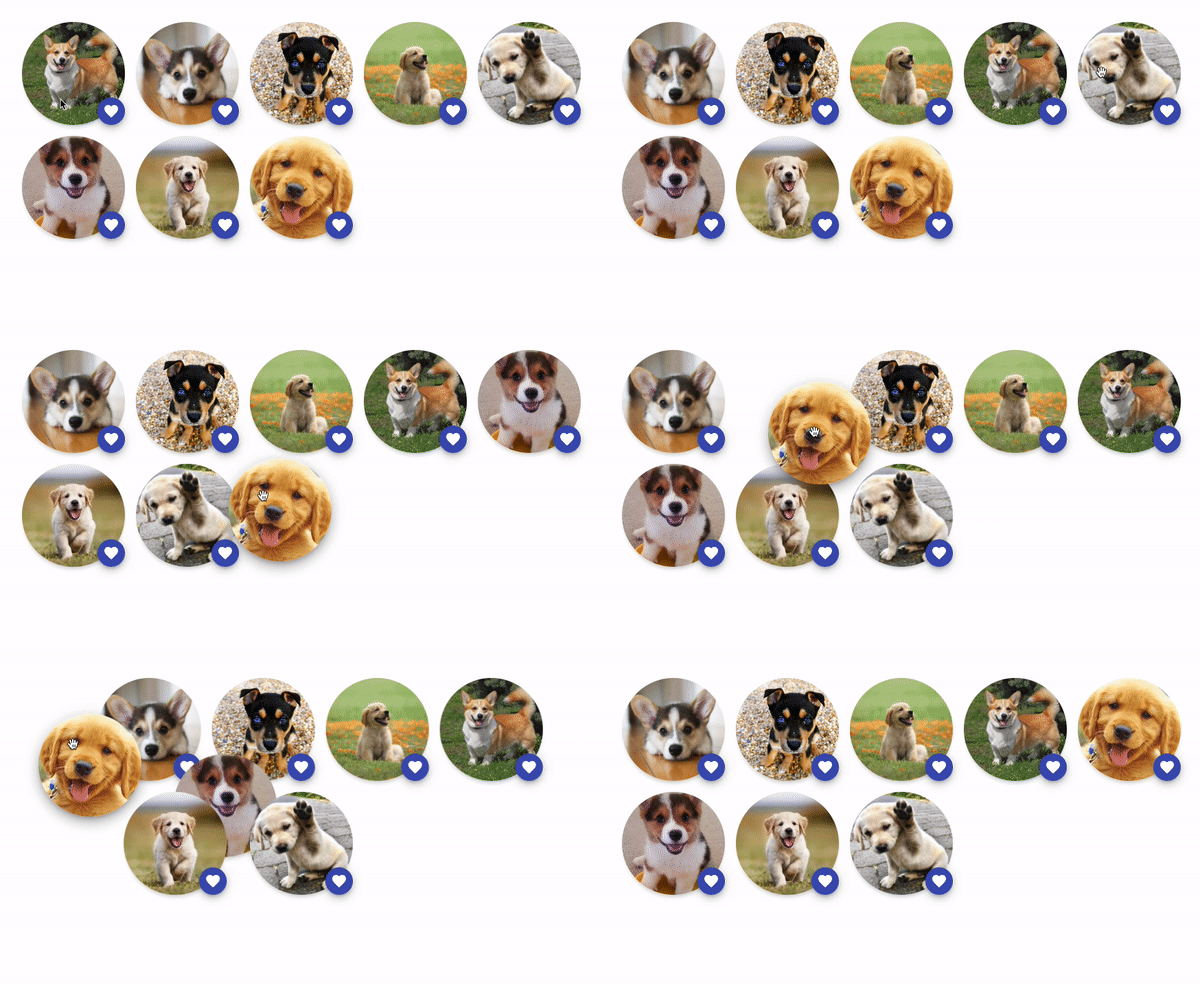
The goal of this component is to allow sorting elements with drag and drop.
It is mobile friendly by default. It doesn't block scrolling the page when swiping inside it: the user needs to press an item during at least 200ms to start the drag gesture.
On non-touch devices, the drag gesture only starts after moving an element by at least one pixel. This is done to avoid blocking clicks on clickable elements inside an item.
Check out the examples:
yarn add react-easy-sort
or
npm install react-easy-sort --save
import SortableList, { SortableItem } from 'react-easy-sort'
import { arrayMoveImmutable } from 'array-move'

const App = () => {
  const [items, setItems] = React.useState(['A', 'B', 'C', 'D', 'E', 'F', 'G', 'H', 'I'])

  const onSortEnd = (oldIndex: number, newIndex: number) => {
    setItems((array) => arrayMoveImmutable(array, oldIndex, newIndex))
  }

  return (
    <SortableList onSortEnd={onSortEnd} className="list" draggedItemClassName="dragged">
      {items.map((item) => (
        <SortableItem key={item}>
          <div className="item">{item}</div>
        </SortableItem>
      ))}
    </SortableList>
  )
}
| Name | Description | Type | Default |
|---|---|---|---|
| as | Determines html tag for the container element | keyof JSX.IntrinsicElements | div |
| onSortStart | Called when the user starts a sorting gesture | () => void | - |
| onSortMove | Called when the dragged item changes position during a sorting gesture | (newIndex: number) => void | - |
| onSortEnd* | Called when the user finishes a sorting gesture. | (oldIndex: number, newIndex: number) => void | - |
| draggedItemClassName | Class applied to the item being dragged | string | - |
| lockAxis | Determines if an axis should be locked | 'x' or 'y' | |
| allowDrag | Determines whether items can be dragged | boolean | true |
| customHolderRef | Ref of an element to use as a container for the dragged item | React.RefObject<HTMLElement | null> | document.body |
| dropTarget | React element to use as a dropTarget | ReactNode | |
| autoScroll | Determines whether the containing element (or window) should scroll during sort | boolean | false |
This component doesn't take any other props than its child. This child should be a single React element that can receives a ref. If you pass a component as a child, it needs to be wrapped with React.forwardRef().
You can use this component if you don't want the whole item to be draggable but only a specific area of it.
import SortableList, { SortableItem, SortableKnob } from 'react-easy-sort'
import arrayMove from 'array-move'

const App = () => {
  const [items, setItems] = React.useState(['A', 'B', 'C', 'D', 'E', 'F', 'G', 'H', 'I'])

  const onSortEnd = (oldIndex: number, newIndex: number) => {
    setItems((array) => arrayMove(array, oldIndex, newIndex))
  }

  return (
    <SortableList onSortEnd={onSortEnd} className="list" draggedItemClassName="dragged">
      {items.map((item) => (
        <SortableItem key={item}>
          <div className="item">
            <SortableKnob>
              <div>Drag me</div>
            </SortableKnob>
            {item}
          </div>
        </SortableItem>
      ))}
    </SortableList>
  )
}
This component doesn't take any other props than its child. This child should be a single React element that can receive a ref. If you pass a component as a child, it needs to be wrapped with React.forwardRef().
To disable browser default behaviors that can interfer with the dragging experience, we recommend adding the following declarations on the "items":
user-select: none;: disable the selection of content inside the item (the blue box)pointer-events: none;: required for some browsers if your items contain images (see the Interactive avatars demo)yarn
yarn start
Now, open http://localhost:3001/index.html and start hacking!
This project is maintained by Valentin Hervieu.
This project was originally part of @ricardo-ch organisation because I (Valentin) was working at Ricardo. After leaving this company, they gracefully accepted to transfer the project to me. ❤️
FAQs
A React component to sort items in lists or grids
The npm package react-easy-sort receives a total of 57,167 weekly downloads. As such, react-easy-sort popularity was classified as popular.
We found that react-easy-sort demonstrated a healthy version release cadence and project activity because the last version was released less than a year ago. It has 1 open source maintainer collaborating on the project.
Did you know?

Socket for GitHub automatically highlights issues in each pull request and monitors the health of all your open source dependencies. Discover the contents of your packages and block harmful activity before you install or update your dependencies.
Security News
New DoS and source code exposure bugs in React Server Components and Next.js: what’s affected and how to update safely.

Security News
Socket CEO Feross Aboukhadijeh joins Software Engineering Daily to discuss modern software supply chain attacks and rising AI-driven security risks.

Security News
GitHub has revoked npm classic tokens for publishing; maintainers must migrate, but OpenJS warns OIDC trusted publishing still has risky gaps for critical projects.