
React Export Table
A package for for exporting array data or table data as excel sheet, csv, pdf and tools for copied data to clipboard or printing data. By using this package you can you can export table data and print table data or copy to clipboard all in one place.

- Small in Size
- All in one
- Properly Maintained
Installation
$ npm i react-export-table
import { ExportAsExcel, ExportAsPdf, ExportAsCsv, CopyToClipboard, CopyTextToClipboard, PrintDocument, ExcelToJsonConverter, FileUpload } from "react-export-table";


//Export as Excel Sheet
<ExportAsExcel
    data={data}
    headers={["Name", "Age", "Something"]}
>
    {(props)=> (
      <button {...props}>
        Export as Excel
      </button>
    )}
</ExportAsExcel>

//Export as pdf
<ExportAsPdf
    data={data}
    headers={["CreatedBy", "Age", "Something Else"]}
    headerStyles={{ fillColor: "red" }}
    title="Sections List"
>
    {(props)=> (
      <button {...props}>
        Export as PDF
      </button>
    )}
</ExportAsPdf>

//Export as CSV
<ExportAsCsv
    data={data}
>
    {(props)=> (
      <button {...props}>Hello World</button>
    )}
</ExportAsCsv>

//Copy to clipboard (Array or Table)
<CopyToClipboard
    data={data}
    headers={["CreatedBy", "Age", "Something Else"]}
>
    {(props)=> (
      <button {...props}>
        Copy Document
      </button>
    )}
</CopyToClipboard>

//Copy to clipboard (text)
<CopyTextToClipboard text="Hello World">
    {(props)=> (
      <button {...props}>
        Copy Text
      </button>
    )}
</CopyTextToClipboard>


//Print data
<PrintDocument
    data={data}
    headers={["CreatedBy", "Age", "Something Else"]}
>
    {(props)=> (
      <button {...props}>
        Copy Text
      </button>
    )}
</PrintDocument>

//Excel to json converter or Read Excel File
<ExcelToJsonConverter>
    {({
        isDragging,
        dragProps,
        onFileUpload,
        errors,
        data,
        fileInfo
    }) => (
        <div {...dragProps} onClick={onFileUpload}>
            {errors}
        </div>
    )}
</ExcelToJsonConverter>

//File Upload
<FileUpload acceptType={[".pdf"]}>
    {({
        isDragging,
        dragProps,
        onFileUpload,
        errors,
        fileInfo
    }) => (
        <div className="border border-solid border-red-600 p-8" {...dragProps} onClick={onFileUpload}>
            {errors}
        </div>
    )}
</FileUpload>
Options
ExportAsExcel
| Name | Types | Default |
|---|
| chilren | ReactNode (Required) | |
| data | Array (Required) | |
| headers | string[] (Required) | |
| name | string (Optional) | reactExportTable |
| minColumnWidth | number (Optional) | 15 |
| fileName | string (Optional) | reactExportTable |
ExportAsPdf
| Name | Types | Default |
|---|
| chilren | ReactNode (Required) | |
| data | Array (Required) | |
| headers | string[] (Required) | |
| foot | string[] (Optional) | |
| title | string (Optional) | |
| fileName | string (Optional) | reactExportTable |
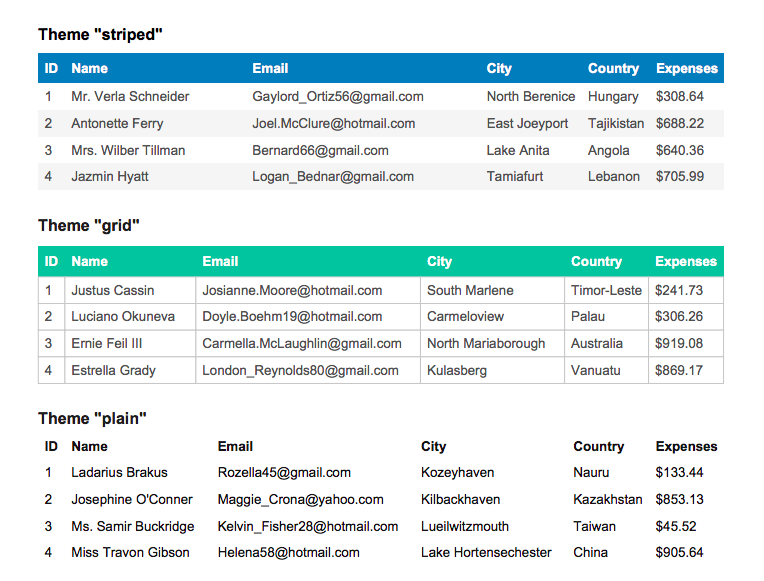
| theme | "striped" | "grid" | "plain" (Optional) | "grid" |
| styles | StylesDefs (Optional) | |
| headerStyles | StylesDefs (Optional) | |
| footerStyles | StylesDefs (Optional) | |
| margin | Margin (Optional) | |
StylesDefs
font: 'helvetica'|'times'|'courier' = 'helvetica'fontStyle: 'normal'|'bold'|'italic'|'bolditalic' = 'normal'overflow: 'linebreak'|'ellipsize'|'visible'|'hidden' = 'linebreak'fillColor: Color? = nulltextColor: Color? = 20cellWidth: 'auto'|'wrap'|number = 'auto'minCellWidth: number? = 10minCellHeight: number = 0halign: 'left'|'center'|'right' = 'left'valign: 'top'|'middle'|'bottom' = 'top'fontSize: number = 10cellPadding: Padding = 10lineColor: Color = 10lineWidth: border = 0 // If 0, no border is drawn
Margin
top: numberright: numberbottom: numberleft: number
Theme
You find this three type theme-
ExportAsCsv
| Name | Types | Default |
|---|
| chilren | ReactNode (Required) | |
| data | Array (Required) | |
| fileName | String (Optional) | Custom CSV File Name |
CopyToClipboard
| Name | Types | Default |
|---|
| chilren | ReactNode (Required) | |
| data | Array (Required) | |
| headers | string[] (Required) | |
| onCopied | Function (Optional) | When copy will be success |
| onFailed | Funtion (Optional) | When copy will be failed |
CopyTextToClipboard
| Name | Types | Default |
|---|
| chilren | ReactNode (Required) | |
| text | string (Required) | |
| headers | string[] (Required) | |
| onCopied | Function (Optional) | When copy will be success |
| onFailed | Funtion (Optional) | When copy will be failed |
PrintDocument
- Same as
ExportAsPdf Component!
ExcelToJsonConverter
Props
| Name | Types | Description | Example |
|---|
| onRead | Function (Optional) | For getting json data | `onRead={(data:YourType)=> console.log(data)}` |
| inputProps | React.HTMLProps (Optional) | Input Props for input field | |
| onChange | Function (Optional) | | `onChange={(file:File)=> console.log(file)}` |
Exported Options
| Name | Types | Description |
|---|
| dragProps | object | Native element props for drag and drop feature |
| isDragging | boolean | "true" if a file is being dragged |
| onFileUpload | function | Called when an element is clicks and triggers to open a file dialog |
| errors | string | Validation Error |
| data | Array | Read or Converted data |
| fileInfo | object | Selected file info |
FileUpload
Props
| Name | Types | Description | Example |
|---|
| acceptType | Function (Required) | File Accept Type | `acceptType={[".pdf"]}` |
| inputProps | React.HTMLProps (Optional) | Input Props for input field | |
| onChange | Function (Optional) | | `onChange={(file:File)=> console.log(file)}` |
| size | File size for validation (Optional) | Size Need to be define in MB | |
Exported Options
| Name | Types | Description |
|---|
| dragProps | object | Native element props for drag and drop feature |
| isDragging | boolean | "true" if a file is being dragged |
| onFileUpload | function | Called when an element is clicks and triggers to open a file dialog |
| errors | string | Validation Error |
| fileInfo | object | Selected file info |
Migrate to Version 3
In version 3 I added more headless on each component. I update only CopyTextToClipboard, CopyToClipboard, ExportAsCsv, ExportAsExcel, ExportAsPdf, PrintDocument component.
Update this
<AnyOfThoseComponent
    data={data}
    headers={["Name", "Age", "Something"]}
>
    <button>
        Export as Excel
    </button>
</AnyOfThoseComponent>
to
<AnyOfThoseComponent
    data={data}
    headers={["Name", "Age", "Something"]}
>
    {(props)=> (
      <button {...props}>
        Export as Excel
      </button>
    )}
</AnyOfThoseComponent>
Stay in touch





