


Security News
Deno 2.6 + Socket: Supply Chain Defense In Your CLI
Deno 2.6 introduces deno audit with a new --socket flag that plugs directly into Socket to bring supply chain security checks into the Deno CLI.
By Sarah Gooding - Dec 12, 2025
react-material-ui-mongoose-form-validation
Advanced tools
Simple validator for forms designed with material-ui components, with optional mongoose schema



Simple form validation component for material-ui library inspired by formsy-react
Supported types:
Default validation rules:
Some rules can accept extra parameter, example:
<TextValidator
{...someProps}
validators={['minNumber:0', 'maxNumber:255', 'matchRegexp:^[0-9]$']}
/>
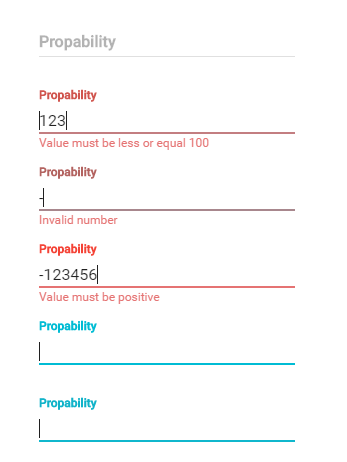
You can pass any props of field components, but note that errorText prop will be replaced when validation errors occurred.
Your component must provide a theme.
import React from 'react';
import RaisedButton from 'material-ui/RaisedButton';
import { ValidatorForm, TextValidator} from 'react-material-ui-form-validator';

class MyForm extends React.Component {

    constructor(props) {
        super(props);

        this.handleChange = this.handleChange.bind(this);
    }

    handleChange(event) {
        const email = event.target.value;
        this.setState({ email });
    }

    handleSubmit() {
        // your submit logic
    }

    render() {
        const { email } = this.state;
        return (
            <ValidatorForm
                ref="form"
                onSubmit={this.handleSubmit}
                onError={errors => console.log(errors)}
            >
                <TextValidator
                    floatingLabelText="Email"
                    onChange={this.handleChange}
                    name="email"
                    value={email}
                    validators={['required', 'isEmail']}
                    errorMessages={['this field is required', 'email is not valid']}
                />
                <RaisedButton type="submit" />
            </ValidatorForm>
        );
    }
}
You can add your custom rules:
import React from 'react';
import RaisedButton from 'material-ui/RaisedButton';
import { ValidatorForm, TextValidator} from 'react-material-ui-form-validator';

class ResetPasswordForm extends React.Component {

    constructor(props) {
        super(props);
        this.state = {
            user: {},
        };
        this.handleChange = this.handleChange.bind(this);
    }

    componentWillMount() {
        // custom rule will have name 'isPasswordMatch'
        ValidatorForm.addValidationRule('isPasswordMatch', (value) => {
            if (value !== this.state.user.password) {
                return false;
            }
            return true;
        });
    }

    handleChange(event) {
        const { user } = this.state;
        user[event.target.name] = event.target.value;
        this.setState({ user });
    }

    handleSubmit() {
        // your submit logic
    }

    render() {
        const { user } = this.state;

        return (
            <ValidatorForm
                onSubmit={this.handleSubmit}
            >
                <TextValidator
                    floatingLabelText="Password"
                    onChange={this.handleChange}
                    name="password"
                    type="password"
                    validators={['required']}
                    errorMessages={['this field is required']}
                    value={user.password}
                />
                <TextValidator
                    floatingLabelText="Repeat password"
                    onChange={this.handleChange}
                    name="repeatPassword"
                    type="password"
                    validators={['isPasswordMatch', 'required']}
                    errorMessages={['password mismatch', 'this field is required']}
                    value={user.repeatPassword}
                />
                <RaisedButton type="submit" />
            </ValidatorForm>
        );
    }
Currently material-ui doesn't support error messages for switches, but you can easily add your own:
import React from 'react';
import { red300 } from 'material-ui/styles/colors';
import Checkbox from 'material-ui/Checkbox';
import { ValidatorComponent } from 'react-material-ui-form-validator';

class CheckboxValidatorElement extends ValidatorComponent {

    render() {
        const { errorMessages, validators, requiredError, value, ...rest } = this.props;

        return (
            <div>
                <Checkbox
                    {...rest}
                    ref={(r) => { this.input = r; }}
                />
                {this.errorText()}
            </div>
        );
    }

    errorText() {
        const { isValid } = this.state;

        if (isValid) {
            return null;
        }

        const style = {
            right: 0,
            fontSize: '12px',
            color: red300,
            position: 'absolute',
            marginTop: '-25px',
        };

        return (
            <div style={style}>
                {this.getErrorMessage()}
            </div>
        );
    }
}

export default CheckboxValidatorElement;
    componentWillMount() {
        ValidatorForm.addValidationRule('isTruthy', value => value);
    }
...
    <CheckboxValidatorElement
        ...
        validators=['isTruthy']
        errorMessages=['this field is required']
        checked={value}
        value={value} <---- you must provide this prop, it will be used only for validation
    />
| Prop | Required | Type | Default value | Description |
|---|---|---|---|---|
| onSubmit | true | function | Callback for form that fires when all validations are passed | |
| instantValidate | false | bool | true | If true, form will be validated after each field change. If false, form will be validated only after clicking submit button. |
| onError | false | function | Callback for form that fires when some of validations are not passed. It will return array of elements which not valid. |
| Prop | Required | Type | Default value | Description |
|---|---|---|---|---|
| validators | false | array | Array of validators. See list of default validators above. | |
| errorMessages | false | array | Array of error messages. Order of messages should be the same as validators prop. | |
| name | true | string | Name of input | |
| validatorListener | false | function | It triggers after each validation. It will return true or false |
This component covers all my needs, but feel free to contribute.
FAQs
Simple validator for forms designed with material-ui components, with optional mongoose schema
The npm package react-material-ui-mongoose-form-validation receives a total of 6 weekly downloads. As such, react-material-ui-mongoose-form-validation popularity was classified as not popular.
We found that react-material-ui-mongoose-form-validation demonstrated a not healthy version release cadence and project activity because the last version was released a year ago. It has 1 open source maintainer collaborating on the project.
Did you know?

Socket for GitHub automatically highlights issues in each pull request and monitors the health of all your open source dependencies. Discover the contents of your packages and block harmful activity before you install or update your dependencies.
Security News
Deno 2.6 introduces deno audit with a new --socket flag that plugs directly into Socket to bring supply chain security checks into the Deno CLI.

Security News
New DoS and source code exposure bugs in React Server Components and Next.js: what’s affected and how to update safely.

Security News
Socket CEO Feross Aboukhadijeh joins Software Engineering Daily to discuss modern software supply chain attacks and rising AI-driven security risks.