


Security News
The Hidden Blast Radius of the Axios Compromise
The Axios compromise shows how time-dependent dependency resolution makes exposure harder to detect and contain.
By Ahmad Nassri - Apr 01, 2026
react-native-keyboard-avoiding-view
Advanced tools
Focus view will slide on the window, to prevent rolling to the outside of the screen
(中文版本请参看这里)
iOS Keyboard Avoiding View. Focus view will slide on the window, to prevent rolling to the outside of the screen
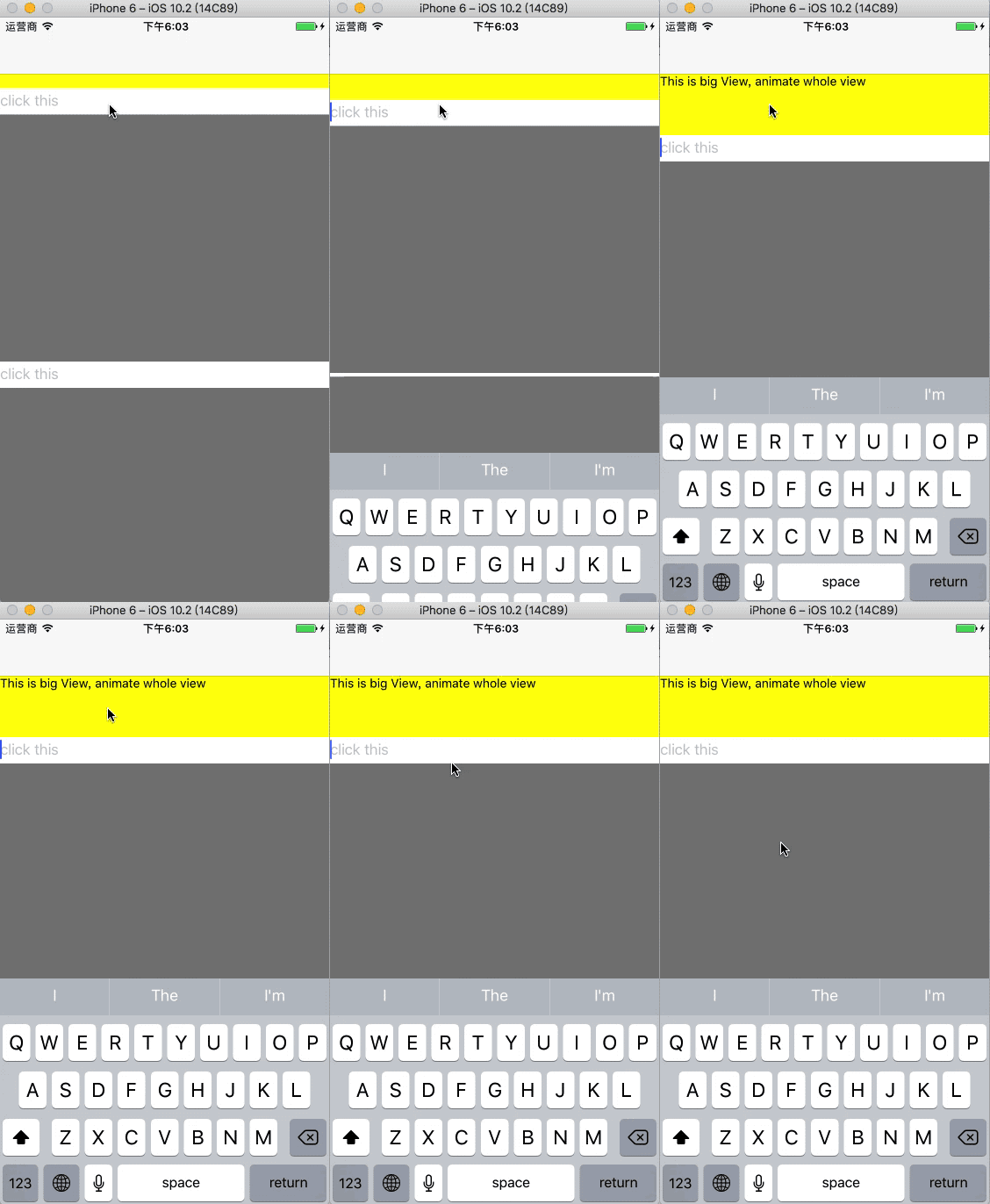
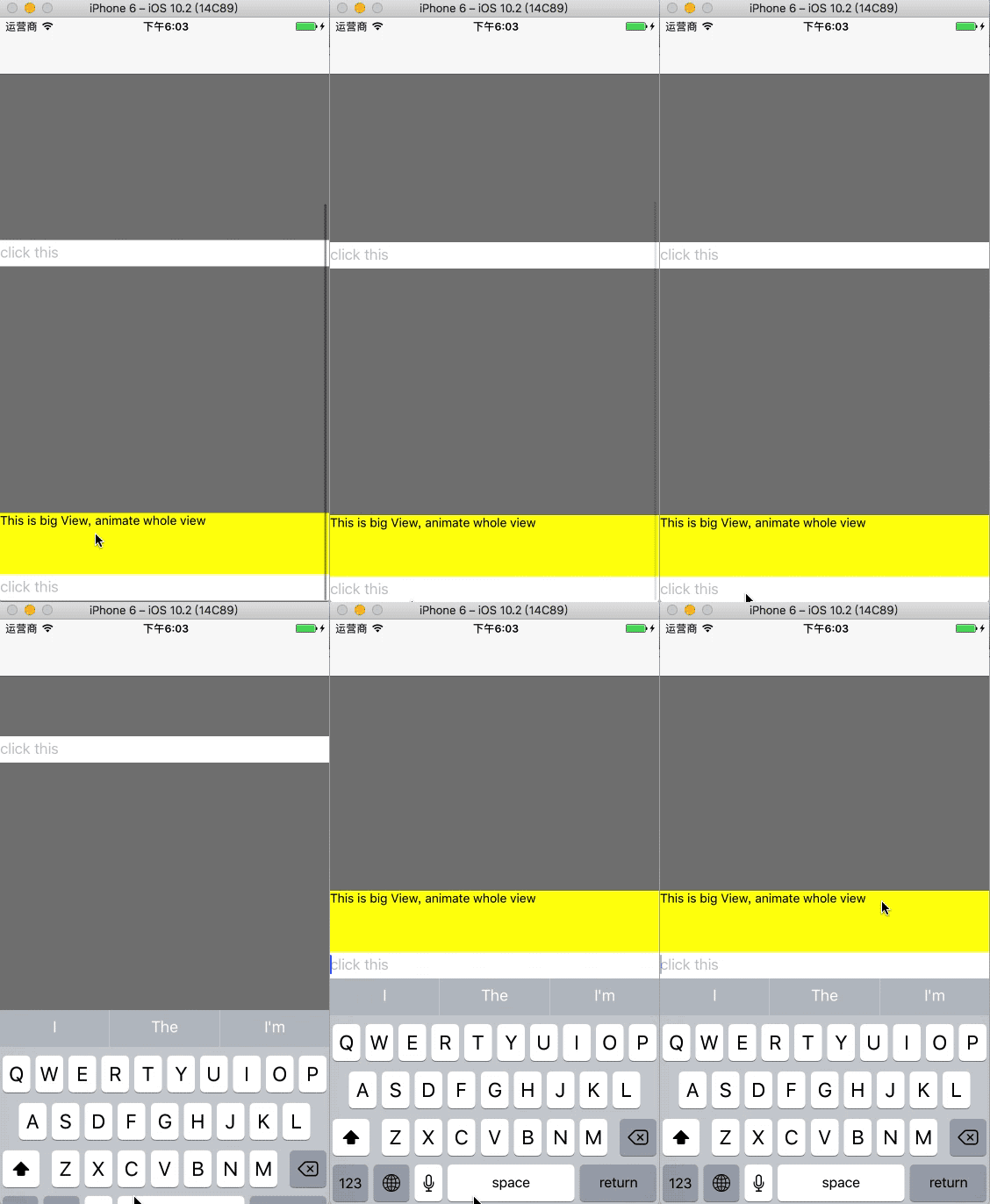
react-native-keyboard-avoiding-view use like ScrollView.
<KeyboardAvoidingView
	ref={'keyboardView'}
	style={styles.container}
	contentContainerStyle={styles.content}
>
</KeyboardAvoidingView>
Bind onFocus for TextInput
<TextInput
	ref={'secondView'}
	onFocus={() => this.onFocus(this.refs.secondView)}
/>
send scroll event
onFocus = (focusView) => {
	const keyboardView = this.refs.keyboardView;
	keyboardView.focusViewOnFocus(focusView);
}
focusView can be use any view. If use super view, animate will scroll with super view.
<KeyboardAvoidingView
	ref={'keyboardView'}
	style={styles.container}
	contentContainerStyle={styles.content}
>
	<View
		style={styles.bigView}
		ref={'firstView'}
	>
		<TextInput
			style={styles.textInput}
			onFocus={() => this.onFocus(this.refs.firstView)}
		/>
	</View>
</KeyboardAvoidingView>
作为系统 KeyboardAvoidingView 的扩展类,实现键盘弹起后自动滚动到TextInput位置,解决ios键盘弹起后输入框被遮盖问题。
react-native-keyboard-avoiding-view 使用方式与 ScrollView 相同.
<KeyboardAvoidingView
	ref={'keyboardView'}
	style={styles.container}
	contentContainerStyle={styles.content}
>
</KeyboardAvoidingView>
TextInput 绑定 onFocus 事件
<TextInput
	ref={'secondView'}
	onFocus={() => this.onFocus(this.refs.secondView)}
/>
发送滚动事件
onFocus = (focusView) => {
	const keyboardView = this.refs.keyboardView;
	keyboardView.focusViewOnFocus(focusView);
}
发送滚动事件时,focusView 能够传递任何view。如果传入的是TextInput的包裹view,滚动时将会按照传入的view的大小和坐标滚动。
<KeyboardAvoidingView
	ref={'keyboardView'}
	style={styles.container}
	contentContainerStyle={styles.content}
>
	<View
		style={styles.bigView}
		ref={'firstView'}
	>
		<TextInput
			style={styles.textInput}
			onFocus={() => this.onFocus(this.refs.firstView)}
		/>
	</View>
</KeyboardAvoidingView>
FAQs
Focus view will slide on the window, to prevent rolling to the outside of the screen
We found that react-native-keyboard-avoiding-view demonstrated a not healthy version release cadence and project activity because the last version was released a year ago. It has 1 open source maintainer collaborating on the project.
Did you know?

Socket for GitHub automatically highlights issues in each pull request and monitors the health of all your open source dependencies. Discover the contents of your packages and block harmful activity before you install or update your dependencies.
Security News
The Axios compromise shows how time-dependent dependency resolution makes exposure harder to detect and contain.

Research
A supply chain attack on Axios introduced a malicious dependency, plain-crypto-js@4.2.1, published minutes earlier and absent from the project’s GitHub releases.

Research
Malicious versions of the Telnyx Python SDK on PyPI delivered credential-stealing malware via a multi-stage supply chain attack.