


Product
Socket for Jira Is Now Available
Socket for Jira lets teams turn alerts into Jira tickets with manual creation, automated ticketing rules, and two-way sync.
By Jeppe Hasseriis - Apr 20, 2026
react-native-markdown-editor
Advanced tools
[](https://badge.fury.io/js/react-native-markdown-editor) [](https://travis-ci.org/kunal


This is a library for rendering a markdown editor for the markdown with helper buttons to easily write markdown. With live preview markdown as well (thanks to https://github.com/Benjamin-Dobell/react-native-markdown-view)
Install the node module:
yarn add react-native-markdown-editor
or with npm:
npm install --save react-native-markdown-editor
Then see Usage for futher details
Screenshot:
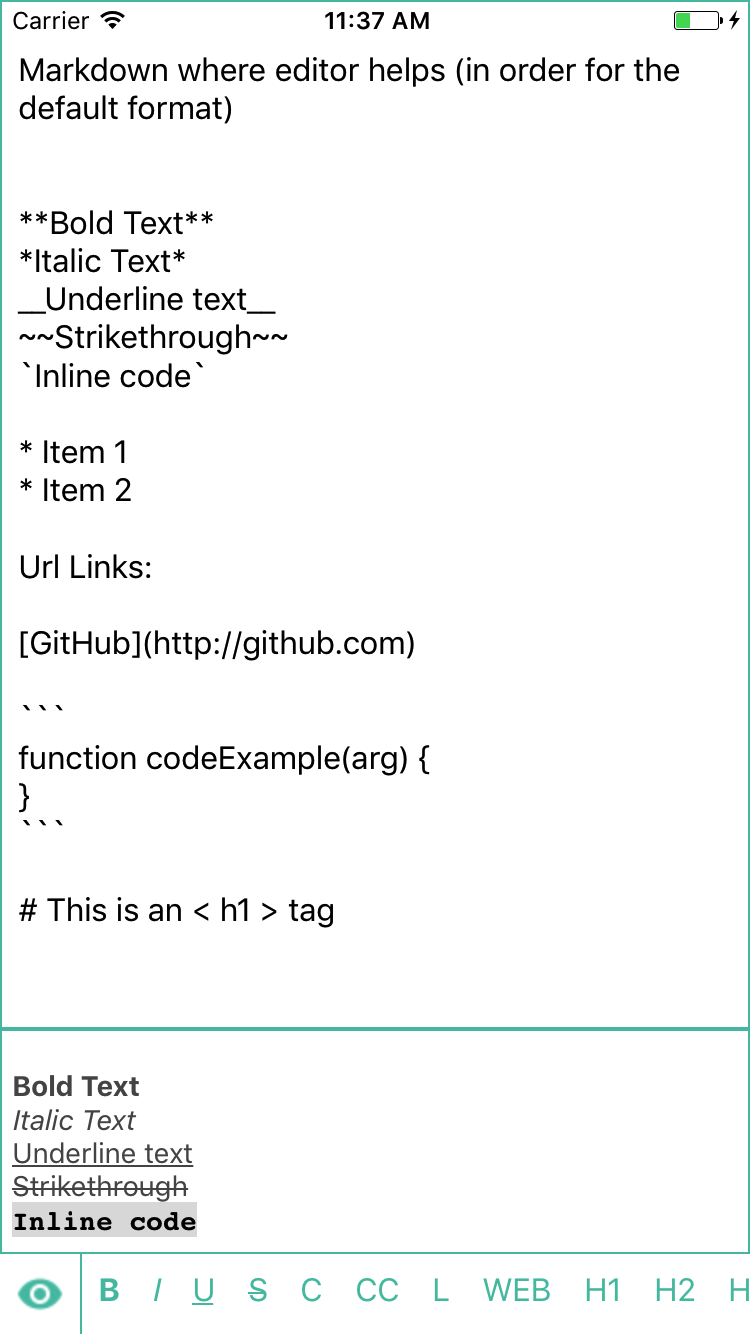
Bold Text
Italic Text
Underline text
Strikethrough
Inline code
Url Links:
function codeExample(arg) {
}
Import the editor through
import { MarkdownEditor } from 'react-native-markdown-editor';
And use like this this in the jsx
<MarkdownEditor />
And pass a function onMarkdownChange which will be callback when markdown is changed
<MarkdownEditor onMarkdownChange={this.onTextChange} />
It can be used with a toolbar and have a submit menu option there!
You can give a custom list of buttons you want to give the default is Formats by speicifying
<MarkdownEditor Formats={YOUR_CUSTOM_Formats} />
You can customize the helper button using the markdownButton prop.
The buttons are rendered using a FlatList and the data passed is the Formats
markdownButton can be method like
const defaultMarkdownButton = ({ item, getState, setState }) =>
  <Button
    title={item.key}
    onPress={() => item.onPress({ getState, setState, item })}
    color={FOREGROUND_COLOR}
    style={inlinePadding}
  />
Where item is an each object in the Formats list
You can also import the methods used in Formats by using
import { applyWrapFormatNewLines, applyWrapFormat, applyWebLinkFormat, applyListFormat } from 'react-native-markdown-editor';
You can add a style key in the Formats.js and this will be used while rendering the button
{ key: 'B', wrapper: '**', onPress: applyWrapFormat, style: { fontWeight: 'bold' } },
| Name | Type | Default | Description |
|---|---|---|---|
| Formats | Array | Formats | Elements for the markdown buttons |
| markdownButton | function | defaultMarkdownButton | A custom function to render the markdown buttons |
| onMarkdownChange | function | Callback function, calls when markdown is typed | |
| showPreview | boolean | false | To show the markdown preview by Default |
PR's/Issues/Bugs or suggestions are welcomed. Please post them at https://github.com/kunall17/react-native-markdown-editor/issues.
The MIT License.
FAQs
[](https://badge.fury.io/js/react-native-markdown-editor) [](https://travis-ci.org/kunal
The npm package react-native-markdown-editor receives a total of 50 weekly downloads. As such, react-native-markdown-editor popularity was classified as not popular.
We found that react-native-markdown-editor demonstrated a not healthy version release cadence and project activity because the last version was released a year ago. It has 1 open source maintainer collaborating on the project.
Did you know?

Socket for GitHub automatically highlights issues in each pull request and monitors the health of all your open source dependencies. Discover the contents of your packages and block harmful activity before you install or update your dependencies.
Product
Socket for Jira lets teams turn alerts into Jira tickets with manual creation, automated ticketing rules, and two-way sync.

Company News
Socket won two 2026 Reppy Awards from RepVue, ranking in the top 5% of all sales orgs. AE Alexandra Lister shares what it's like to grow a sales career here.

Security News
NIST will stop enriching most CVEs under a new risk-based model, narrowing the NVD's scope as vulnerability submissions continue to surge.