Welcome to react-native-pdf-painter👋
Your React Native PDF Viewer with native annotation support



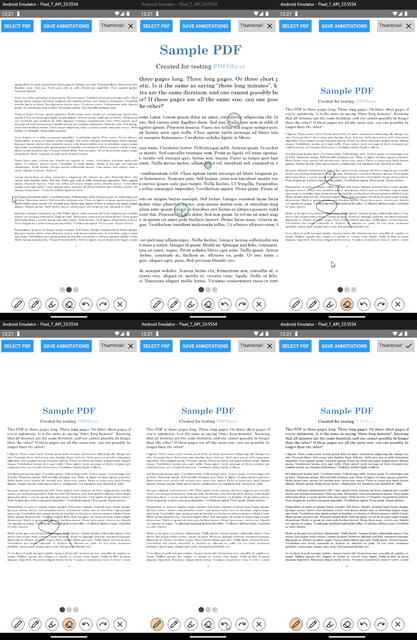
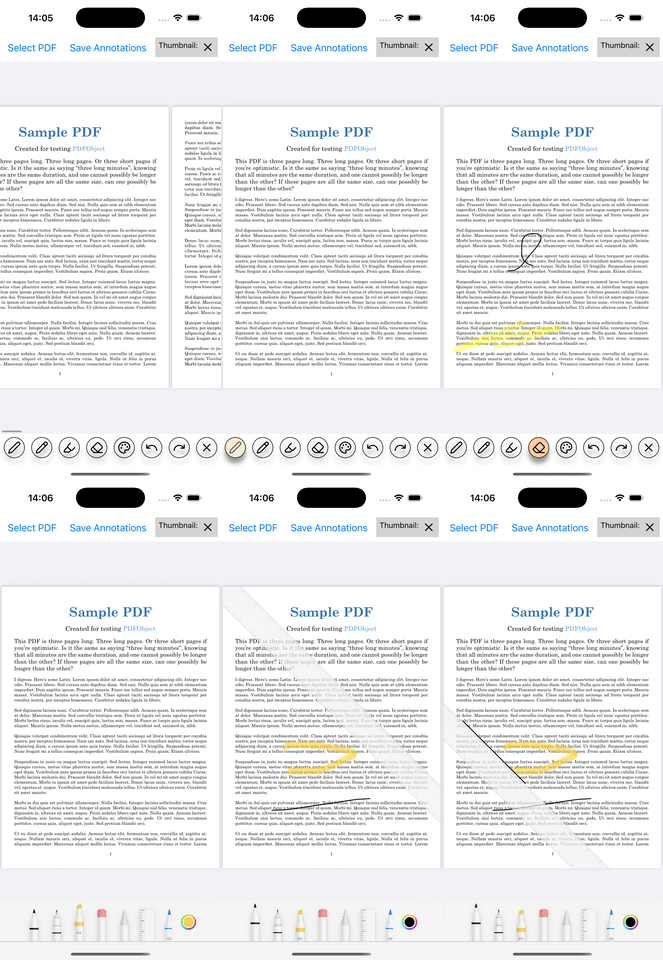
Easy-to-use react native component for efficient displaying of PDFs, with finger and pen support for hand drawing. Supports PencilKits ToolPicker out-of-the-box on iOS.
📥 Installation
npm install react-native-pdf-painter
or
yarn add react-native-pdf-painter
Starting from version 0.8.0 of this library, it's only compatible with React Native >= 0.77! If you are using an older version of React Native, please use the version 0.7.2 of this library.
iOS
cd ios && pod install
WARNING
This library is completely written as Fabric components and is therefore only compatible with the new architecture!
For Android users: This library uses androidx.ink in version 1.0.0alpha3, which means that this library is not recommended for production use yet! Some issues have already been discovered (e.g. flickering when drawing)
For iOS users: Annotations only work for iOS versions >= 16, everything below can view PDFs but not draw.
The annotations created with this library are not embedded in the PDF file itself! Instead it creates a new file containing the annotations in a proprietary json-like (compressed) format which is not platform interoperable.
▶️ Usage
Import the PdfAnnotationView component and assign a path to a pdf file to it. If you want to display the drawn annotations, add the annotationFile property.
import { PdfAnnotationView } from "react-native-pdf-painter";

<PdfAnnotationView
    pdfUrl={pathToPdfFile}
    annotationFile={pathToAnnotationFile}
    autoSave={true} // automatically save annotations on unmount to the annotationFile
/>
You can handle saving and loading of the annotations manually by using the saveAnnotations and loadAnnotations methods:
import { PdfAnnotationView, type Handle } from "react-native-pdf-painter";

const Component = () => {
    const ref = useRef<Handle>(null);

    const saveAnnotations = () => ref.current?.saveAnnotations(FILE_PATH);
    const loadAnnotations = () => ref.current?.loadAnnotations(FILE_PATH);

    return (
        <PdfAnnotationView
            ref={ref}
            pdfUrl={pathToPdfFile}
            annotationFile={pathToAnnotationFile}
            autoSave={true} // automatically save annotations on unmount to the annotationFile
        />
    );
}
Refer to example for detailed usage example.
Props, Methods & types
| pdfUrl | ios, android | String? | Local URL of the PDF file |
| annotationsFile | ios, android | String? | Local URL of the files used for annotations (file extension doesn't matter) |
| thumbnailMode | ios, android | Boolean? | Displays only the first page without interaction |
| autoSave | ios, android | Boolean? | Automatically save file after changing pdf url or unmounting the component |
| brushSettings | ios, android | BrushSettings | Pass undefined to disable drawing and pass an BrushSettings object to enable drawing with the provided configuration |
| hidePagination | ios, android | Boolean? | Disable the pagination buttons at the bottom |
| iosToolPickerVisible | ios | Boolean? | Show/Hide the PencilKit ToolPicker |
| currentPage | ios, android | number? | (Optional) Controlled page selection |
| containerStyles | ios, android | StyleProp? | Override container styles |
| pageIndicatorContainerStyles | ios, android | StyleProp? | Override container styles of page indicator bar |
| androidBeyondViewportPageCount | android | Number of pages which are rendered before/after the current page | |
| onPageCount | ios, android | ((pageCount: number) => unknown)? | Event fired when the number of pages changes |
| onPageChange | ios, android | ((page: number) => unknown)? | Event fired when the current page changes |
| onDocumentFinished | ios, android | ((event: BubblingEventHandler) => unknown)? | Event fired when the user wants to navigate to the next/previous page but is already at the end/beginning |
| onTap | ios, android | ((event: BubblingEventHandler) => unknown)? | Event fired when the user taps on the PDF page |
| onLinkCompleted | ios, android | ((event: BubblingEventHandler) => unknown)? | Event fired when the brush settings is link and the user has finished creating the link |
Info: The ToolPicker is fixed and always at the bottom of the iPhone screen! Keep this in mind when designing your PDF Viewer screen!
saveAnnotations(filePath: string): void
Save the current drawings on all pages to the provided file path.
loadAnnotations(filePath: string): void
Load the drawings of all pages from the provided file path.
undo(): void
Undo the last change on the current page
redo(): void
Redo the last undone change on the current page
clear(): void
Delete all drawings on the current page
setPage(page: number): void
Manually change the page of the pdf viewer
BrushSettings
interface BrushSettings {
    type?: WithDefault<BrushType, 'marker'>;
    color: string;
    size: Float;
}
BrushType
type BrushType =
    | 'marker'
    | 'pressure-pen'
    | 'highlighter'
    | 'eraser'
    | 'link'
    | 'none';
How it works
Android
This library uses the PdfRenderer class to render the pages of the pdf as a bitmap, scaled to a higher resolution (to make zoomed pages look sharp enough). For drawing, the new androidx ink library is used.
iOS
Uses PdfKit in conjunction with PencilKit to support drawing on pages.
Contributing
See the contributing guide to learn how to contribute to the repository and the development workflow.
License
MIT





