react-native-pie-chart



Simple pie chart module for your React Native app, for both iOS and Android.
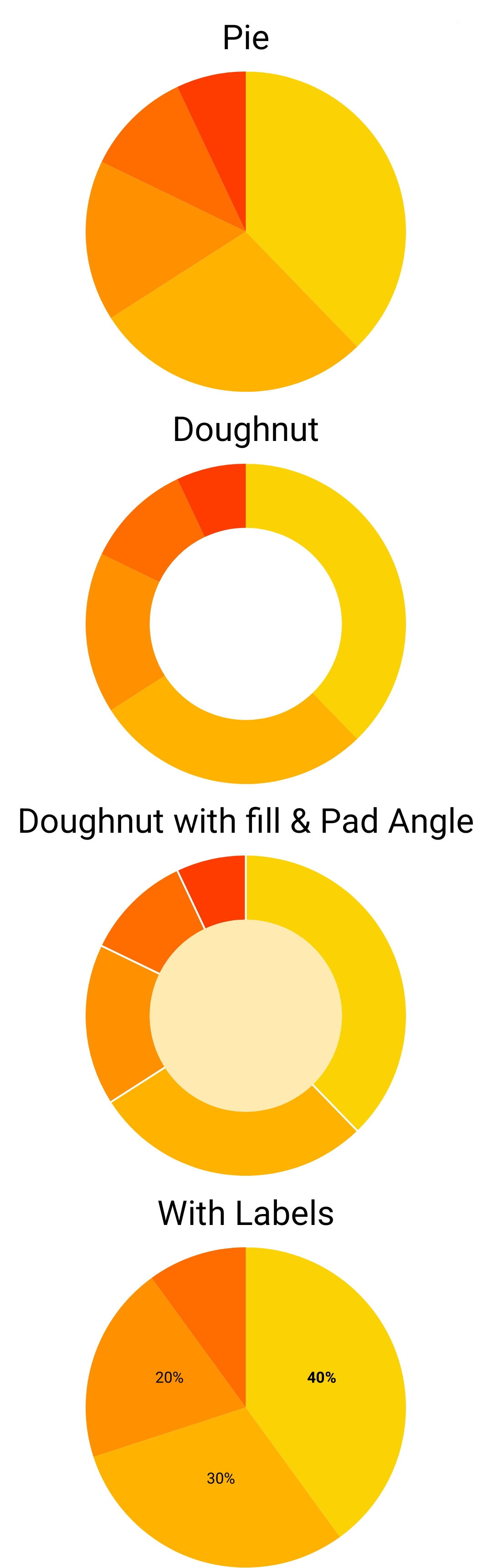
Installation
You need to have react, react-native and react-native-svg as your app's dependencies.
react-native-svg can be installed both in expo and in an ejected app. If you had trouble installing react-native-svg, refer to the project's documentation: https://www.npmjs.com/package/react-native-svg
Then install this package with:
~$ npm install react-native-pie-chart --save
If you're upgradeing from an old version, see the upgrade guide below.
Usage
Here's a quick start code. Refer to the example directory for a fully working app.
import React, { Component } from 'react'
import { StyleSheet, ScrollView, Text, View } from 'react-native'
import PieChart from 'react-native-pie-chart'

export default class TestChart extends Component {
  render() {
    const widthAndHeight = 250

    const series = [
      { value: 430, color: '#fbd203' },
      { value: 321, color: '#ffb300' },
      { value: 185, color: '#ff9100' },
      { value: 123, color: '#ff6c00' },
    ]

    return (
      <ScrollView style={{ flex: 1 }}>
        <View style={styles.container}>
          <Text style={styles.title}>Basic</Text>
          <PieChart widthAndHeight={widthAndHeight} series={series} />

          <Text style={styles.title}>Doughnut</Text>
          <PieChart widthAndHeight={widthAndHeight} series={series} cover={0.45} />
        </View>
      </ScrollView>
    )
  }
}

const styles = StyleSheet.create({
  container: {
    flex: 1,
    alignItems: 'center',
  },
  title: {
    fontSize: 24,
    margin: 10,
  },
})
Adding labels to the chart
For each element in the series list, you can also pass a label object. It allows you to adjust the font and position of each label. By default, the labels will appear at the center of each slice of the pie. You can use offsetX and offsetY to move the label.
For example, in the above example code, you can add the labels like this:
const series = [
  { value: 430, color: '#fbd203', label: { text: 'A', fontWeight: 'bold' } },
  { value: 321, color: '#ffb300', label: { text: 'mobile', offsetY: 10, offsetX: 10 } },
  { value: 185, color: '#ff9100', label: { text: '%22', fontSize: 8, fontStyle: 'italic', outline: 'white' } },
  { value: 123, color: '#ff6c00' },
]
Example App
Have a look at the app in the example directory for a complete Typescript app that shows a few charts.
To setup and run the example app follow these instructions:
~$ git clone https://github.com/genexu/react-native-pie-chart.git
~$ cd react-native-pie-chart/example
~$ npm install
~$ npm run start
TypeScript
The npm package includes TypeScript types.
Upgrade guide
Upgrade from 3.x.x to 4.x.x
If you don't want to change your code, we still provide the old API. You only need to change your imports from react-native-pie-chart to react-native-pie-chart/v3api. Nothing else needs to be changed!
But if you want to use the new features, you need to use the new API. Here's how to upgrade your code.
series prop is now a list of an object, that includes the value and color of each pie's slice. You need to change this:
const series = [100, 120, 80]
const sliceColors = ['red', 'blue', 'pink']
to this:
const series = [
  { value: 100, color: 'red' },
  { value: 120, color: 'blue' },
  { value: 80, color: 'pink' },
]
coverRadius and coverFill props are also combined into a cover object. cover can be a number or an object containing radius and color. So, this:
<PieChart coverRadius={0.6} ... />
will change to this:
<PieChart cover={0.6} ... />
And this:
<PieChart coverRadius={0.6} coverFill='white' ... />
will change to this:
<PieChart cover={{ radius: 0.6, color: 'white' }} ... />
Upgrade version 2.x.x to 3.x.x
The package migrated from deprecated @react-native-community/art to react-native-svg. You need to install react-native-svg as per installation guide above. You can now remove @react-native-community/art if you didn't use it in your own code.
doughnut property is removed. If you set the coverFill prop, the chart will become a doughnut.
Upgrade version 1.x.x to 2.x.x
The only breaking change between version one and two is chart_wh prop. It is renamed to widthAndHeight. Beside that, there shouldn't be any issue upgrading.
Props
export type SliceLabel = {
text: string
fill?: string
stroke?: string
fontSize?: NumberProp
fontWeight?: FontWeight
fontFamily?: string
fontStyle?: FontStyle
offsetX?: number
offsetY?: number
}
export type Slice = {
value: number
color: string
label?: SliceLabel
}
export type Cover = {
radius: number
color?: string
}
export type Props = {
widthAndHeight: number
series: Slice[]
cover?: number | Cover
style?: StyleProp<ViewStyle>
padAngle?: number
}
v3 API
For backward compatibility, we still provide the older API from v3. If you import the component like this:
import PieChart from 'react-native-pie-chart/v3api'
It will have the following props.
export type Props = {
widthAndHeight: number
series: number[]
sliceColor: string[]
coverFill?: string | null
coverRadius?: number
style?: StyleProp<ViewStyle>
}





