Remember The Milk Command Line Interface
node module: rtm-cli
GitHub repo: dwaring87/rtm-cli
This Node module provides a command line interface, written in JavaScript,
for the popular Remember the Milk task list
manager.
Installation
NPM
If you already have Node installed, this program can be
installed via npm:
npm install -g rtm-cli
which will install the executable rtm into your $PATH.
Executable Releases
COMING SOON
Standalone executables, that do not require a pre-existing installation of Node,
will soon be released.
Usage
The main usage of the program:
  Usage: rtm [options] <command> [command arguments]


  Options:

    -V, --version  output the version number
    -p, --plain    Do not print styled/colored text
    -h, --help     output usage information


  Commands:

    add|a [task...]                     Add a new Task
    addList|al [name] [filter...]       Add a new List or Smart List
    addTags|at [index] [tags...]        Add one or more tags to a Task
    comp|x [indices...]                 Complete one or more Tasks
    decPri|- [indices...]               Decrease the Priority of one or more Tasks
    due [index] [due...]                Set the Due Date of a Task
    edit [index] [name...]              Change the name of a Task
    incPri|+ [indices...]               Increase the Priority of one or more Tasks
    lists|l                             Display all lists
    login                               Add RTM User information
    logout                              Remove RTM User information
    ls [filter...]                      List all tasks sorted first by list then by priority
    lsd [filter...]                     List all tasks sorted first by due date then by priority
    lsp [filter...]                     List all tasks sorted first by priority then due date
    move|mv [index] [list...]           Move Task to a different List
    postpone|pp [indices...]            Postpone one or more Tasks
    pri|p [index] [priority]            Change Task Priority
    remove|rm [indices...]              Remove one or more Tasks
    removeList|rml [name...]            Remove a List
    removeTags|rmt [index] [tags...]    Remove one or more tags from a Task
    renameList|mvl [oldName] [newName]  Rename a List
    reset                               Reset cached task indices
    tags|t                              Display all tags
    uncomp|unc [indices...]             Mark one or more Tasks as not complete
Commands
Add a Task: add, a
add [Task Name]
The Task Name can use RTM's Smart Add Syntax.
Additionally, to minimize the need to escape special characters at the command line,
the following properties can be specified:
- priority as
p:{priority}
- list as
l:{list}
- tags as
t:tag1 t:tag2
- due date as
due:{due date}
If Task Name is not provided, a prompt allowing multiple new task entries
will be displayed. Enter a blank line to finish adding new tasks.
Examples:
> add Buy Milk ^tomorrow !2 #Shopping
> add Feed The Cat today p:1 l:Chores t:pets *daily
Add a List: addList, al
addList [List Name] [Smart List Filter]
This command will add a new empty List to the User's account or if a
Smart List Filer is provided, a Smart List using the provided
advanced search criteria
will be created.
If no arguments are provided, a prompt allowing multiple new list names
will be displayed. Enter a blank line to finish add new lists.
Examples:
> addList Bills
> addList Important priority:1 OR priority:2
Add Tags to a Task: addTags, at
addTags [index] [tags...]
This command will add one or more tags to a Task. Tasks are referenced by index
number, which are displayed when listing tasks. Multiple tags can be provided
as arguments to this command.
If no arguments are provided, a prompt allowing multiple task indices and tags
to be entered will be displayed. Enter a blank line to finish adding tasks and
tags.
Examples:
> addTags 1 rent
> addTags 5 rent bills
Complete a Task: comp, x
comp [indices...]
This command will mark the Tasks as complete. Tasks are referenced by index
number, which are displayed when listing tasks. Multiple task indices can be
provided as arguments to this command.
If no arguments are provided, a prompt allowing multiple task indices to be
entered will be displayed. Enter a blank line to finish adding task indices.
Examples:
> comp 15
> comp 1 9 8
Decrease Task Priority: decPri, -
decPri [indices...]
This command will decrease the priority of the Tasks by 1. Tasks are referenced
by index number, which are displayed when listing tasks. Multiple task indices
can be provided as arguments to this command.
If no arguments are provided, a prompt allowing multiple task indices to be
entered will be displayed. Enter a blank line to finish adding task indices.
Examples:
> decPri 15
> decPri 1 9 8
Set Task Due Date: due
due [index] [due date]
This command will set the Due Date of a Task. Tasks are referenced by index
number, which are displayed when listing tasks. Due Dates can be entered in any
format that RTM can parse.
If no arguments are provided, a prompt allowing multiple task and due dates to be
entered will be displayed. Enter a blank line to finish adding tasks and due dates.
Examples:
> due 1 tomorrow
> due 15 May 12
> due 3 days
Edit Task Name: edit
edit [new task name]
This command will change the name of a Task. Tasks are referenced by index
number, which are displayed when listing tasks.
If no arguments are provided, a prompt allowing multiple task indices and names
to be entered will be displayed. Enter a blank line to finish adding indices
and names.
Example:
> edit 1 Buy More Milk
Increase Task Priority: incPri, +
incPri [indices...]
This command will increase the priority of the Tasks by 1. Tasks are referenced
by index number, which are displayed when listing tasks. Multiple task indices
can be provided as arguments to this command.
If no arguments are provided, a prompt allowing multiple task indices to be
entered will be displayed. Enter a blank line to finish adding task indices.
Examples:
> incPri 15
> incPri 1 9 8
Display all Lists: lists, l
This command will display the names of all Lists. If the List is a 'Smart List',
the search criteria will be displayed alongside the list name.
Login: login
This command will remove any saved RTM user information and start the
login procedure. An Auth URL will be displayed and opened in the User's
browser. This URL will ask the User to grant RTM CLI access to their
account. Once authorized, the user's information (id, username, full name
and an Auth Token provided by RTM) will be saved locally ($HOME/.rtm.json
by default).
Logout: logout
This command will remove any saved RTM user information. Any future requests
to the RTM API Server will require the User to login again.
List Tasks By List, Priority: ls
ls [filter]
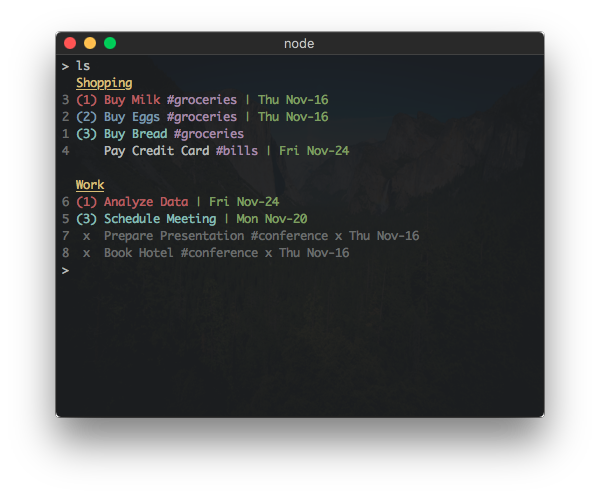
This command will display the User's tasks sorted first by List then by
priority. A filter, using RTM's Advanced Search Syntax
can be used to filter the tasks displayed.
Examples:
> ls
> ls priority:1 AND list:Work
List Tasks By Due Date, Priority: lsd
lsd [filter]
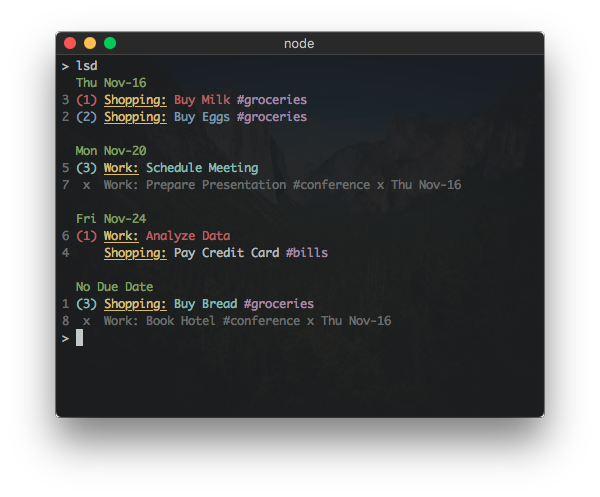
This command will display the User's tasks sorted first by Due Date (with
tasks without a due date shown first) then by priority. A filter, using RTM's
Advanced Search Syntax
can be used to filter the tasks displayed.
Examples:
> lsd
> lsd priority:1 AND list:Work
List Tasks By Priority, Due Date: lsp
lsp [filter]
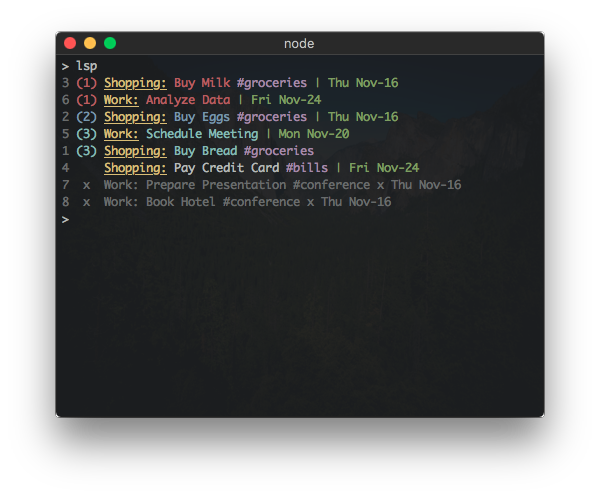
This command will display the User's tasks sorted first by priority then by
due date. A filter, using RTM's Advanced Search Syntax
can be used to filter the tasks displayed.
Examples:
> lsp
> lsp priority:1 AND list:Work
Move Task to List: move, mv
move [index] [list name]
This command will move a Task to a different List. Tasks are referenced by index
number, which are displayed when listing tasks. The list name must be the
name of an existing List.
Note: This command will fail if there is more than 1 List matching the
new List name.
Example:
> move 1 Work
Postpone a Task: postpone, pp
postpone [indices...]
This command will postpone the due date of a Task by one day. Tasks are referenced
by index number, which are displayed when listing tasks. Multiple task indices
can be provided as arguments to this command.
Examples:
> postpone 1
> postpone 1 15 8
Set Task Priority: pri, p
pri [index] [priority]
This command will set the priority of the tasks. Tasks are referenced by index
number, which are displayed when listing tasks. Acceptable priority values
include 1, 2, and 3 - any other value removes the priority from the task.
If no arguments are provided, a prompt allowing for multiple task and priority
inputs is displayed. Enter a blank line to finish adding tasks/priorities.
Examples:
> pri 15 1
> pri 14 0
Remove a Task: remove, rm
remove [indices...]
This command will remove the Tasks from the User's account. Tasks are referenced
by index number, which are displayed when listing tasks. Multiple task indices
can be provided as arguments to this command.
Examples:
> remove 1
> remove 1 15 8
Remove a List: removeList, rml
removeList [name]
This command will remove the List matching the provided name from the User's
account. Any tasks remaining in the List will be moved to the User's Inbox.
Note: This command will fail if there is more than one List matching the
provided list name.
If no list name is provided, a prompt allowing for multiple list names to be
entered will be displayed. Enter a blank line to finish adding list names.
Example:
> removeList Bills
Remove Tags From a Task: removeTags, rmt
removeTags [index] [tags...]
This command will remove one or more tags from the Task. Tasks are referenced
by index number, which are displayed when listing tasks. Multiple tags can be
provided as arguments to this command.
Examples:
> removeTags 1 bills
> removeTags 15 bills rent
Rename a List: renameList, mvl
renameList [old name] [new name]
This command will change the name of the List from old name to new name.
Note: This command will fail if there is more than one List matching the
provided old name.
Note: This command is unable to rename a 'Smart List' (the RTM API
considers a 'Smart List' to be read-only).
Example:
> renameList Food Groceries
Reset Task Index Cache: reset
This command will regenerate the cached lookup table used to reference a
specific task to an index number. This is helpful when many tasks have
been deleted and the task indices are getting large.
Display all Tags: tags, t
This command will display all tag names associated with the User's tasks. Next
to each tag will be the number of incomplete and complete Tasks for that tag.
Un-Complete a Task: uncomp, unc
uncomp [indices...]
This command will mark the Task as incomplete. Tasks are referenced by index
number, which are displayed when listing tasks. Multiple task indices can be
provided as arguments to this command.
Examples:
> uncomp 1
> uncomp 15 8
Interactive Mode
An interactive mode is started when no commands are given to rtm, which
allows commands to be given sequentially.
Use the quit command to leave the interactive mode.
Configuration





