 S3Lite → SQLite + S3






A wrapper library for SQLite that keeps database file on Amazon S3 storage and adds support for promises and async/await.
Usage
npm i --save s3lite
const S3Lite = require('s3lite')
const db = S3Lite.database(
  'https://bucket-name.s3.eu-central-1.amazonaws.com/database.sqlite',
  {
    s3Options: {
      accessKeyId: 'AWS_ACCESS_KEY_ID',
      secretAccessKey: 'AWS_SECRET_ACCESS_KEY'
    }
  }
)

const data = await db.all('SELECT * FROM table WHERE column = ?', 'value')
Table of contents
How It Works
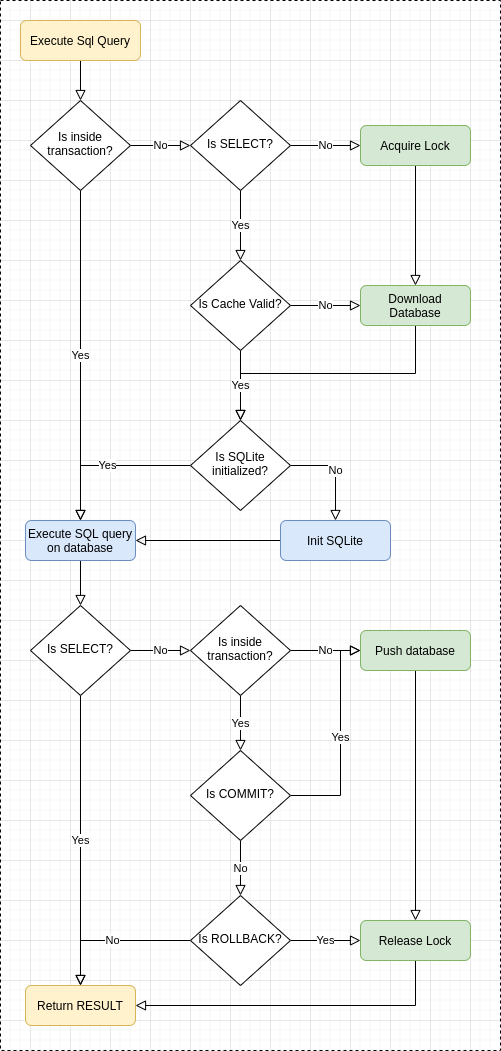
- To execute select-like sql query S3Lite pull the database file from s3 bucket if database file has changed. Then initialize the Sqlite object if needed, execute query and return result on success.
- To execute non-select-like sql query S3Lite acquire lock on s3 bucket, then pull the database file from s3 bucket if database file has changed. Then initialize the Sqlite object if needed, execute query. After successful executing query S3Lite push the database to S3 bucket and release lock, then return result.
For details look on the architecture diagram:
Minimal AWS S3 Policy to library works:
{
  "Id": "S3LitePolicyId",
  "Version": "2012-10-17",
  "Statement": [
    {
      "Sid": "S3LiteStatementPolicyId",
      "Action": ["s3:DeleteObject", "s3:GetObject", "s3:PutObject"],
      "Effect": "Allow",
      "Resource": [
        "arn:aws:s3:::bucket-name/database.sqlite",
        "arn:aws:s3:::bucket-name/database.sqlite.lock"
      ],
      "Principal": {
        "Your": "Principal ARN"
      }
    }
  ]
}
API Documentation
Since this library is using node-sqlite3 under the hood all information about parameters in the specified methods can be found here.
S3Lite
static database (s3FileName, [options]) → {Database}
Init Database object. It doesn't fetch database file or open SQLite connection. Database object is in lazy mode, it means during first query it will fetch the database file and open connection to SQLite.
If you need to open database before executing the sql query use the db.open() method.
Parameters:
{string} s3FileName Access url to a database on s3 bucket.
Supports three different access url styles:
- Virtual Hosted Style Access:
https://bucket.s3.region.amazonaws.com/key
- Path-Style Access:
https://s3.region.amazonaws.com/bucket-name/key
- Aws-Cli Style Access:
s3://bucket-name/key
As you can see in this case there is no information about region (which is required by aws-cli). To provide region use s3Options parameter.
For more information see https://docs.aws.amazon.com/AWSJavaScriptSDK/latest/AWS/S3.html#constructor-property
{Object} [options] (optional):
{string} | localFilePath | /tmp/s3lite | This is directory where downloaded database form s3 has been saved. |
{number} | mode | S3Lite.OPEN_READWRITE | S3Lite.OPEN_CREATE | Mode to open the Sqlite. Combination of: S3Lite.OPEN_READONLY, S3Lite.OPEN_READWRITE, S3Lite.OPEN_CREATE |
{Object} | s3Options | {} | Object passed to AWS.S3 constructor. |
{number} | acquireLockRetryTimeout | 100ms | Timeout in milliseconds to wait before retrying acquire lock again. |
{number} | remoteDatabaseCacheTime | 1000ms | Timeout in milliseconds to wait before checking database update on s3 bucket. |
{number} | maxLockLifetime | 60000ms | Maximum lock lifetime on s3 bucket. |
{number} | minLockLifetime | 1000ms | Minimum lock lifetime on s3 bucket. |
Returns:
{Database}: Database object
const db = S3Lite.database(
  'https://bucket-name.s3.eu-central-1.amazonaws.com/database.sqlite',
  {
    localFilePath: '/tmp',
    s3Options: {
      accessKeyId: 'AWS_ACCESS_KEY_ID',
      secretAccessKey: 'AWS_SECRET_ACCESS_KEY'
    }
  }
)
Database
async all (sql, [params...]) → {Promise<Array>}
Runs the sql query with the specified parameters and returns Promise of Array if the query has been executed successfully.
If no data found, empty array has been resolved by the promise.
Parameters:
{string} sql: The sql query to run. It can contains placeholder to be bound by the given parameters.{...*|Object|Array} [params] (optional): Parameters to bind. There are three ways to pass parameters: as an arguments, as an array or as na object.
Returns:
{Promise<Array>}: If the query has been executed successfully method returns Promise of Array of objects.
const data = await db.all('SELECT id, name FROM table LIMIT ?', 10)
db.all('SELECT id, name FROM table LIMIT $a', { $a: 10 }).then(data => {
console.log(data)
})
async get (sql, [params...]) → {Promise<Object>}
Runs the sql query with the specified parameters and returns Promise of Object if the query has been executed successfully.
If no data found, undefined has been resolved by the promise.
Parameters:
{string} sql: The sql query to run. It can contains placeholder to be bound by the given parameters.{...*|Object|Array} [params] (optional): Parameters to bind. There are three ways to pass parameters: as an arguments, as an array or as na object.
Returns:
{Promise<Object|undefined>}: If the query has been executed successfully method returns Promise of Object or undefined if nothing found.
const data = await db.get('SELECT id, name FROM table')
db.get('SELECT id, name FROM table').then(data => {
console.log(data)
})
async exec (sql) → {Promise<Database>}
Run all the sql queries. No results have been returned here.
Parameters:
{string} sql: Sql queries to run.
Returns:
{Promise<Database>}: If the query has been executed successfully method returns Promise of Database object.
await db.exec(`
CREATE TABLE test(id INTEGER PRIMARY KEY, name TEXT, control INTEGER);
INSERT INTO test VALUES(1, 'foo1', 1);
INSERT INTO test VALUES(2, 'foo2', 2);
`)
db.exec(
'CREATE TABLE test(id INTEGER PRIMARY KEY, name TEXT, control INTEGER)'
).then(() => {
})
async run (sql, [params...]) → {Promise<{lastID: number, changes: number, sql: string}>}
Runs the sql query with the specified parameters and returns Promise of Object containing {lastID: number, changes: number, sql: string} if the query has been executed successfully.
Parameters:
{string} sql: The sql query to run. It can contains placeholder to be bound by the given parameters.{...*|Object|Array} [params] (optional): Parameters to bind. There are three ways to pass parameters: as an arguments, as an array or as na object.
Returns:
{Promise<{lastID: number, changes: number, sql: string}>}: If the query has been executed successfully method returns Promise of Object:
lastId: id of the last inserted rowchanges: number of changes done by the sql querysql: executed sql query
const result = await db.run("INSERT INTO test VALUES(NULL, 'foo1', 1)")
db.run("INSERT INTO test VALUES(NULL, 'foo1', 1)").then(result => {
console.log(result)
})
async prepare (sql, [params...]) → {Promise<Statement>}
Prepare a statement
Parameters:
{string} sql: The sql query to run. It can contains placeholder to be bound by the given parameters.{...*|Object|Array} [params] (optional): Parameters to bind. There are three ways to pass parameters: as an arguments, as an array or as na object.
Returns:
{Promise<Statement>}: Statement object (self)
const stmt = await db.prepare('INSERT INTO test VALUES(NULL, ?, ?)')
db.prepare('INSERT INTO test VALUES(NULL, ?, ?)').then(stmt => {
})
async open () → {Promise<Database>}
Open the database, fetch database file from s3 bucket and open the SQLite connection.
Returns:
{Promise<Database>}: Database object
await db.open()
db.open().then(() => {
})
async close () → {Promise<Database>}
Close the SQLite connection
Returns:
{Promise<Database>}: Database object
await db.close()
db.close().then(() => {
})
Statement
Statement object created by db.prepare() method.
It contains three properties:
lastId: id of the last inserted rowchanges: number of changes done by the sql querysql: executed sql query
async all ([params...]) → {Promise<Array>}
Execute the statement with the specified parameters and returns Promise of Array if the query has been executed successfully.
If no data found, empty array has been resolved by the promise.
Parameters:
{...*|Object|Array} [params] (optional): Parameters to bind. There are three ways to pass parameters: as an arguments, as an array or as na object.
Returns:
{Promise<Array>}: If the query has been executed successfully method returns Promise of Array of objects.
const stmt = await db.prepare('SELECT * FROM test WHERE column = ? LIMIT ?')
const data = await stmt.all(1, 5)
db.prepare('SELECT * FROM test WHERE column = ?').then(stmt => {
stmt.all().then(data => {
console.log(data)
})
})
async get ([params...]) → {Promise<Object>}
Execute the statement with the specified parameters and returns Promise of Object if the query has been executed successfully.
If no data found, undefined has been resolved by the promise.
Parameters:
{...*|Object|Array} [params] (optional): Parameters to bind. There are three ways to pass parameters: as an arguments, as an array or as na object.
Returns:
{Promise<Object|undefined>}: If the query has been executed successfully method returns Promise of Object or undefined if nothing found.
const stmt = await db.prepare('SELECT * FROM test WHERE column = ? LIMIT 1')
const data = await stmt.get(3)
db.prepare('SELECT * FROM test WHERE column = ?').then(stmt => {
stmt.get(3).then(data => {
console.log(data)
})
})
async run ([params...]) → {Promise<Statement>}
Execute the statement with the specified parameters and returns Promise of Object containing {lastID: number, changes: number, sql: string} if the query has been executed successfully.
Parameters:
{...*|Object|Array} [params] (optional): Parameters to bind. There are three ways to pass parameters: as an arguments, as an array or as na object.
Returns:
{Promise<Statement>}: Statement object (self)
const stmt = await db.prepare('INSERT INTO test VALUES (NULL, ?)')
await stmt.run('foo')
db.prepare('INSERT INTO test VALUES (NULL, ?)').then(stmt => {
stmt.run('foo').then(stmt => {
console.log(stmt)
})
})
async reset () → {Promise<Statement>}
Reset the cursor of the statement. It's require for re-execute the query with the same params.
Returns:
{Promise<Statement>}: Statement object (self)
const result = await stmt.reset()
stmt.reset().then(stmt => {
console.log(stmt)
})
async finalize () → {Promise<Statement>}
Finalize the statement
Returns:
{Promise<Statement>}: Statement object (self)
const result = await stmt.finalize()
stmt.finalize().then(stmt => {
console.log(stmt)
})





