目录
1 版本更新
1.0.0 初版发布,基础的聊天组件
1.0.1 使用方法修改
1.0.2 组件文档调用补充
1.0.3 支持非流式响应
1.0.4 组件文档调用补充
1.0.5 优化messages传递方式
1.0.6 添加重试回调函数
1.0.7 message参数补充
1.0.8 增加语音转文字识别功能
1.0.9 解决输入文本后发送按钮置灰问题
1.1.0 解决输入框光标置前问题
1.1.1 解决开始think后数据重复问题
1.1.2 支持思考过程和详细步骤功能显示
1.1.3 支持appid切换
1.1.4 messages结构修改
1.1.6 解决messages回显失败问题,统一点踩状态字段
2.0.0 messages逻辑结构修改
2.0.1 解决详细步骤调用工具结果回显失败问题
2.0.2 解决非流式接口因结构不同导致失败问题
2.0.3 echart图表渲染
2.0.4 详细步骤,思考过程标题增加显示与隐藏功能。详细步骤,思考过程支持输出完成后收起共功能。数字人,录音转文字集成补充
2.0.5 readme文档补充
2.0.6 消息状态调整,点菜状态调整,readme文档补充
2.0.7 readme点踩状态文档修正
2.0.8 解决点踩失败问题
2.0.9 解决任务执行失败消息不显示问题
2.1.0 支持theme主题切换
2.1.1 修改背景色变量名称
2.1.2 一次只允许单次问答,修复正在思考时删除问答,未终止回答问题
2.1.3 修复上一次问答未完成时,按回车键可以继续发送问题
2.1.4 支持mermaid渲染,支持头像替换
2.1.5 当数字人形象连接成功后,点击朗读,调用数字人服务朗读,未连接数字人时,调用系统自带的朗读功能
2.1.6 解决当数字人形象连接成功后,朗读失败问题
2.1.7 支持ai中台定制化流程渲染及页面跳转
2.1.8 优化deep-link 字体颜色
2 使用说明:
2.1 sg-chat 集成说明
2.1.1 下载
npm install sg-chat
2.1.2 使用
  import { SgChat } from 'sg-chat'
  import 'sg-chat/sg-chat.css'
 <sg-chat
    :chatId="chatId"
    action="/api/v1/chat/completions"
    v-model="state.messages"
    :stream="false"
    :isRecord="true"
    wssUrl="wss://172.20.20.199:10096"
    :completeCalling="true"
    :variables="variables"
    appId=""
    theme="dark"
    @on-send="onSend"
    @on-receive="onReceive"
    @on-delete="onDelete"
    @on-close="onClose"
    @on-error="onError"
    class="right-panel"
  />
2.1.3 参数说明
| chatId | 会话ID | String | 是 |
| isSupportFile | 是否支持文件,默认false | Boolean | 否 |
| action | 服务地址 | String | 是 |
| stream | 流式响应,默认true | Boolean | 否 |
| value | 消息 | Array | 是 |
| theme | 主题,支持 light(亮色),dark(暗色) 默认light | String | 否 |
| completeCalling | 是否完整性 | Boolean | 否 |
| variables | 参数 | Object | 否 |
| appId | 智能体id | String | 是 |
| isRecord | 是否支持语音转文字 默认false | Boolean | 否 |
| wssUrl | asr服务器地址 isRecord为true时必填 | String | 否 |
| prologue | 开场白 {text:'开场白',problems:['问题1','问题1']} | Object | 否 |
| aiAvatarUrl | 智能体头像地址 | String | 否 |
| aiAvatarStyle | 智能体头像样式 {width:'30px',height:'30px'} | Object | 否 |
| userAvatarUrl | 用户头像地址 | String | 否 |
| userAvatarStyle | 用户头像样式 {width:'30px',height:'30px'} | Object | 否 |
| isConnectDigit | 是否连接数字人 默认false | Boolean | 否 |
| on-send | 发送消息回调函数 | Function | 否 |
| on-receive | 接受消息回调函数 | Function | 否 |
| on-delete | 删除消息回调函数 | Function | 否 |
| on-close | 消息接收完成回调函数 | Function | 否 |
| on-love | 点赞/踩回到函数 userFeedback default:默认,upvote:点, downvote:踩 | Function | 否 |
| on-jump | 页面跳转回调函数 | Function | 否 |
Messages 参数
1.参数说明
| question | 用户消息内容 | 是 |
| dataId | 消息编号 | 是 |
| status | 消息状态 waiting:等待,running:运行中,finished:完成,failed:失败 | 是 |
| completeDetails | 智能体消息内容 | 是 |
| userFeedback | 点赞/踩状态 default:默认,upvote:点, downvote:踩 | 否 |
message 结构示例
 {
    "chatId": "9762b3a5-509f-4745-9984-2f79c57e176f",
    "dataId": "BU5NxZjGkNlMG6ZEUFRa",
    "question": "aaaa",
    "completeDetails": [
        {
            "event": "TextMessage",
            "data": {
                "id": "9762b3a5-509f-4745-9984-2f79c57e176f",
                "dataId": "BU5NxZjGkNlMG6ZEUFRa",
                "object": "southgis.chat.completion",
                "created": 1750817401514,
                "model": "Qwen3-30B-A3B-Int4-W4A16",
                "choices": [
                    {
                        "message": {
                            "role": "user",
                            "content": "aaaa"
                        },
                        "finish_reason": null,
                        "index": 0
                    }
                ],
                "usage": null,
                "type": "OtherResponse"
            }
        },
        {
            "event": "ThoughtEvent",
            "data": {
                "id": "9762b3a5-509f-4745-9984-2f79c57e176f",
                "dataId": "BU5NxZjGkNlMG6ZEUFRa",
                "object": "southgis.chat.completion",
                "created": 1750817401514,
                "model": "Qwen3-30B-A3B-Int4-W4A16",
                "choices": [
                    {
                        "message": {
                            "role": "Assistant",
                            "content": "好的,用户发送了“aaaa”。首先,我需要确定用户的需求是什么。可能的情况有很多种:用户可能是在测试系统,或者误操作发送了多个a,也可能有其他意图。\n\n接下来,我要考虑如何回应。如果用户只是随意输入,可能需要友好地询问是否有问题需要帮助。同时,要保持自然,避免让用户感到被质疑。\n\n另外,要检查是否有潜在的问题。比如,用户是否在尝试触发某种特定的响应,或者是否有拼写错误。但“aaaa”看起来像是重复的字母,可能没有实际意义。\n\n还要注意用户可能的背景。如果是新用户,可能需要更详细的引导;如果是老用户,可能已经了解如何与系统互动。但当前信息不足,无法确定。\n\n最后,确保回应符合公司的政策和价值观,保持专业和友好,同时鼓励用户提供更多信息以便更好地帮助他们。"
                        },
                        "finish_reason": null,
                        "index": 0
                    }
                ],
                "usage": null,
                "type": "FinalResponse"
            }
        },
        {
            "event": "TextMessage",
            "data": {
                "id": "9762b3a5-509f-4745-9984-2f79c57e176f",
                "dataId": "BU5NxZjGkNlMG6ZEUFRa",
                "object": "southgis.chat.completion",
                "created": 1750817401514,
                "model": "Qwen3-30B-A3B-Int4-W4A16",
                "choices": [
                    {
                        "message": {
                            "role": "Assistant",
                            "content": "你好!看起来你可能在测试或随意输入了一些字符。如果有任何问题或需要帮助,请随时告诉我!😊"
                        },
                        "finish_reason": "stop",
                        "index": 0
                    }
                ],
                "usage": {
                    "prompt_tokens": 0,
                    "completion_tokens": 0,
                    "total_tokens": 0
                },
                "type": "FinalResponse"
            }
        }
    ],
    "status": 'finished',
    "userFeedback": 'default',

}
2.completeDetails 说明
autogen的消息和事件说明
2.2 录音功能集成说明
2.2.1 开启录音功能
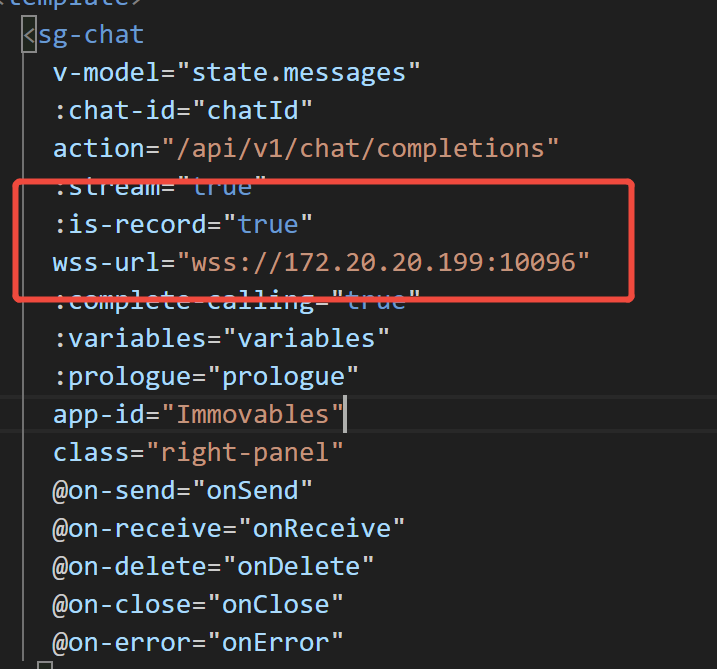
isRecord为true,并设置wssUrl 录音服务的值,如下
2.2.2 集成录音失败的原因
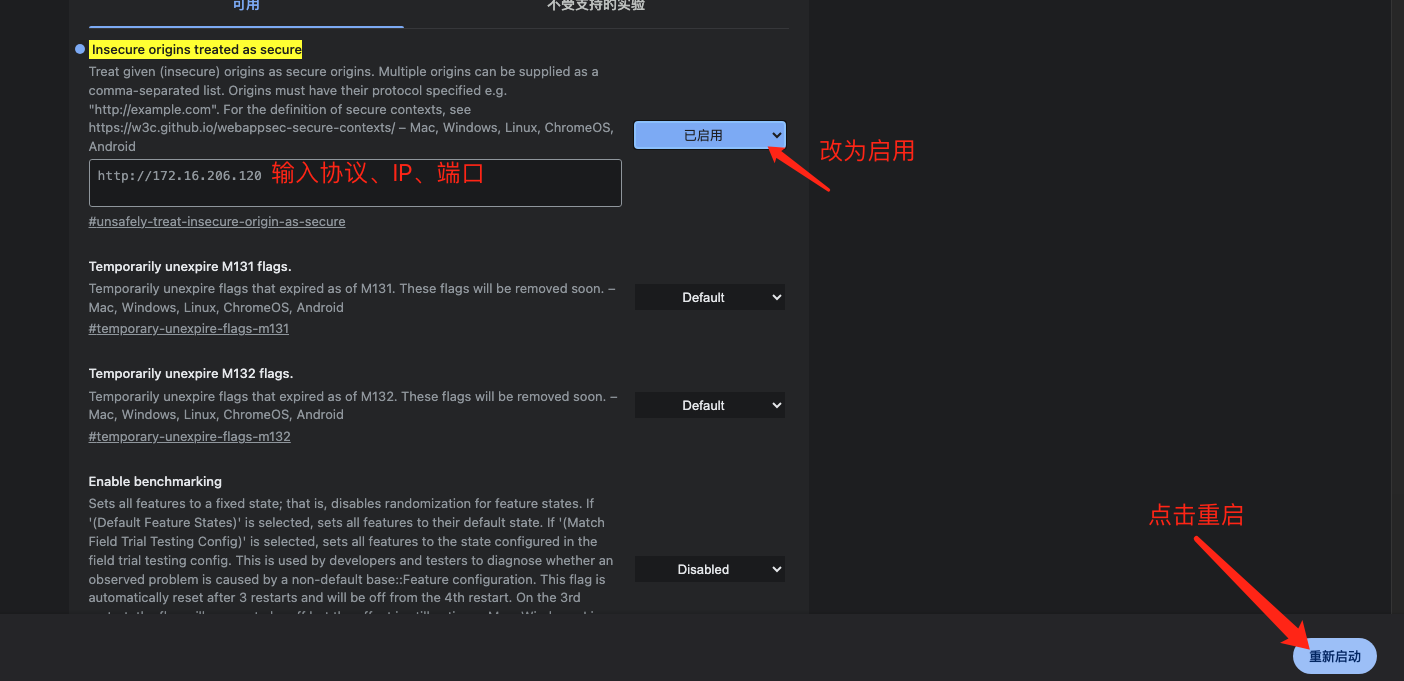
因为像摄像头和麦克风属于可能涉及重大隐私问题的API,getUserMedia()的规范提出了浏览器必须满足一系列隐私和安全要求。这个方法功能很强大,只能在安全的上下文中使用,在不安全的环境中为undefined
允许的安全环境有:
如果想要在服务器使用录音设备,有两种方法:
2.3 数字人虚拟形象集成说明
2.3.1 video 显示
<video ref="digitalHumanVideo" autoplay playsinline @canplay="computeFrame" style="opactiy: 0" width="400" height="400"></video>
<div class="bg-content"><canvas id="canvas" ref="videoCanvas" v-if="isConnected" width="400" height="400"/></div>
2.3.2 WebRTC工具
/**
 * WebRTC 服务类,用于处理 WebRTC 连接和流媒体传输
 */
class WebRTCService {
    constructor() {
        // WebRTC 连接对象
        this.peerConnection = null;
        // 远程媒体流
        this.remoteStream = null;
    }

    /**
     * 初始化 WebRTC 连接
     * @param {Object} configuration - WebRTC 配置项,包含 ICE 服务器等信息
     * @returns {Promise<boolean>} 初始化是否成功
     */
    async initializeConnection(configuration = {
        iceServers: [
            { urls: 'stun:stun.l.google.com:19302' }
        ]
    }) {
        try {
            this.peerConnection = new RTCPeerConnection(configuration);

            // 添加音视频收发器,设置为仅接收模式
            this.peerConnection.addTransceiver('video', { direction: 'recvonly' });
            this.peerConnection.addTransceiver('audio', { direction: 'recvonly' });

            this.setupPeerConnectionListeners();
            return true;
        } catch (error) {
            console.error('Failed to initialize WebRTC connection:', error);
            return false;
        }
    }

    /**
     * 设置 WebRTC 连接的事件监听器
     * 包括 ICE 候选者和远程流接收的处理
     */
    setupPeerConnectionListeners() {
        // 处理 ICE 候选者
        this.peerConnection.onicecandidate = (event) => {
            if (event.candidate) {
                this.onIceCandidate(event.candidate);
            }
        };

        // 处理接收到的远程媒体流
        this.peerConnection.ontrack = (event) => {
            this.remoteStream = event.streams[0];
            this.onRemoteStreamReceived(this.remoteStream);
        };
    }

    /**
     * 创建并设置本地 SDP offer
     * @returns {Promise<RTCSessionDescription>} 本地 SDP 描述
     */
    async createOffer() {
        try {
            const offer = await this.peerConnection.createOffer();
            await this.peerConnection.setLocalDescription(offer);
            return this.peerConnection.localDescription;
        } catch (error) {
            console.error('Error creating offer:', error);
            throw error;
        }
    }

    /**
     * 处理远程 SDP answer
     * @param {RTCSessionDescriptionInit} answer - 远程 SDP 答复
     */
    async handleAnswer(answer) {
        try {
            await this.peerConnection.setRemoteDescription(new RTCSessionDescription(answer));
        } catch (error) {
            console.error('Error handling answer:', error);
            throw error;
        }
    }

    // 回调函数接口
    onIceCandidate(candidate) {}
    onRemoteStreamReceived(stream) {}

    /**
     * 关闭并清理 WebRTC 连接
     */
    closeConnection() {
        if (this.peerConnection) {
            this.peerConnection.close();
        }
        this.remoteStream = null;
        this.peerConnection = null;
    }
}

export default WebRTCService;
2.3.3 初始化数字人
 webRTC.value = new WebRTCService()
    await webRTC.value.initializeConnection({
      sdpSemantics: 'unified-plan',
      iceServers: [{ urls: ['stun:stun.l.google.com:19302'] }]
    })

    webRTC.value.onRemoteStreamReceived = (stream) => {
      if (digitalHumanVideo.value) {
        digitalHumanVideo.value.srcObject = stream
      }
    }

    webRTC.value.onIceCandidate = async (candidate) => {
      if (!sessionId.value) return
      try {
        const response = await fetch(`/webrtcApi2/ice`, {
          method: 'POST',
          headers: {
            'Content-Type': 'application/json'
          },
          body: JSON.stringify({
            candidate: candidate,
            sessionid: sessionId.value
          })
        })
        if (!response.ok) {
          throw new Error('Failed to send ICE candidate')
        }
      } catch (error) {
        console.error('Error sending ICE candidate:', error)
      }
    }
2.3.4 连接数字人
 const offer = await webRTC.value.createOffer()
      console.log('Creating offer:', offer)

      const response = await fetch(`/webrtcApi2/offer`, {
        method: 'POST',
        headers: {
          'Content-Type': 'application/json'
        },
        body: JSON.stringify({
          sdp: offer.sdp,
          type: offer.type
        })
      })

      if (!response.ok) {
        connectToDigitalHuman()
      }

      const data = await response.json()
      console.log('Server response:', data)

      if (!data || !data.sdp) {
        throw new Error('Invalid response from server')
      }

      const answerDescription = {
        type: 'answer',
        sdp: data.sdp
      }

      sessionId.value = data.sessionid
      await webRTC.value.handleAnswer(answerDescription)
      isConnected.value = true
      isConnecting.value=false
      message.success('连接成功')
    } catch (error) {
      console.error('Error connecting to digital human:', error)
      message.error('连接失败,请联系管理员!')
      isConnected.value = false
      isConnecting.value = false
    }
2.3.5 去掉绿布
fabric 去掉绿布,支持fabric 5.3.0版本
2.3.5.1 重构fabric去掉绿布工具
import { fabric } from 'fabric';

fabric.Image.filters.RemoveGreen = fabric.util.createClass(fabric.Image.filters.BaseFilter, /** @lends fabric.Image.filters.RemoveGreen.prototype */ {

  /**
   * Filter type
   * @param {String} type
   * @default
   */
  type: 'RemoveGreen',

  /**
   * Color to remove, in any format understood by fabric.Color.
   * @param {String} type
   * @default
   */
  color: '#00FF00',

  /**
   * Fragment source for the brightness program
   */
  fragmentSource: `precision highp float;
varying vec2 vTexCoord;

uniform sampler2D uTexture;
uniform vec3 keyColor;

// 色度的相似度计算
uniform float similarity;
// 透明度的平滑度计算
uniform float smoothness;
// 降低绿幕饱和度,提高抠图准确度
uniform float spill;

vec2 RGBtoUV(vec3 rgb) {
  return vec2(
    rgb.r * -0.169 + rgb.g * -0.331 + rgb.b *  0.5    + 0.5,
    rgb.r *  0.5   + rgb.g * -0.419 + rgb.b * -0.081  + 0.5
  );
}

void main() {
  // 获取当前像素的rgba值
  vec4 rgba = texture2D(uTexture, vTexCoord);
  // 计算当前像素与绿幕像素的色度差值
  vec2 chromaVec = RGBtoUV(rgba.rgb) - RGBtoUV(keyColor);
  // 计算当前像素与绿幕像素的色度距离(向量长度), 越相像则色度距离越小
  float chromaDist = sqrt(dot(chromaVec, chromaVec));
  // 设置了一个相似度阈值,baseMask为负,则表明是绿幕,为正则表明不是绿幕
  float baseMask = chromaDist - similarity;
  // 如果baseMask为负数,fullMask等于0;baseMask为正数,越大,则透明度越低
  float fullMask = pow(clamp(baseMask / smoothness, 0., 1.), 1.5);
  rgba.a = fullMask; // 设置透明度
  // 如果baseMask为负数,spillVal等于0;baseMask为整数,越小,饱和度越低
  float spillVal = pow(clamp(baseMask / spill, 0., 1.), 1.5);
  float desat = clamp(rgba.r * 0.2126 + rgba.g * 0.7152 + rgba.b * 0.0722, 0., 1.); // 计算当前像素的灰度值
  rgba.rgb = mix(vec3(desat, desat, desat), rgba.rgb, spillVal);
  gl_FragColor = rgba;
}
`,
  similarity: 0.02,
  smoothness: 0.02,
  spill: 0.02,

  /**
   * distance to actual color, as value up or down from each r,g,b
   * between 0 and 1
   **/
  distance: 0.02,

  /**
   * For color to remove inside distance, use alpha channel for a smoother deletion
   * NOT IMPLEMENTED YET
   **/
  useAlpha: false,

  /**
   * Constructor
   * @memberOf fabric.Image.filters.RemoveWhite.prototype
   * @param {Object} [options] Options object
   * @param {Number} [options.color=#RRGGBB] Threshold value
   * @param {Number} [options.distance=10] Distance value
   */

  /**
   * Applies filter to canvas element
   * @param {Object} canvasEl Canvas element to apply filter to
   */
  applyTo2d: function(options) {
    var imageData = options.imageData,
        data = imageData.data, i,
        distance = this.distance * 255,
        r, g, b,
        source = new fabric.Color(this.color).getSource(),
        lowC = [
          source[0] - distance,
          source[1] - distance,
          source[2] - distance,
        ],
        highC = [
          source[0] + distance,
          source[1] + distance,
          source[2] + distance,
        ];


    for (i = 0; i < data.length; i += 4) {
      r = data[i];
      g = data[i + 1];
      b = data[i + 2];

      if (r > lowC[0] &&
          g > lowC[1] &&
          b > lowC[2] &&
          r < highC[0] &&
          g < highC[1] &&
          b < highC[2]) {
        data[i + 3] = 0;
      }
    }
  },

  /**
   * Return WebGL uniform locations for this filter's shader.
   *
   * @param {WebGLRenderingContext} gl The GL canvas context used to compile this filter's shader.
   * @param {WebGLShaderProgram} program This filter's compiled shader program.
   */
  getUniformLocations: function(gl, program) {
    return {
      similarity: gl.getUniformLocation(program, 'similarity'),
      smoothness: gl.getUniformLocation(program, 'smoothness'),
      spill: gl.getUniformLocation(program, 'spill'),
      keyColor: gl.getUniformLocation(program, 'keyColor'),
    };
  },

  /**
   * Send data from this filter to its shader program's uniforms.
   *
   * @param {WebGLRenderingContext} gl The GL canvas context used to compile this filter's shader.
   * @param {Object} uniformLocations A map of string uniform names to WebGLUniformLocation objects
   */
  sendUniformData: function(gl, uniformLocations) {
    // var source = new fabric.Color(this.color).getSource(),
    //     distance = parseFloat(this.distance),
    //     lowC = [
    //       0 + source[0] / 255 - distance,
    //       0 + source[1] / 255 - distance,
    //       0 + source[2] / 255 - distance,
    //       1
    //     ],
    //     highC = [
    //       source[0] / 255 + distance,
    //       source[1] / 255 + distance,
    //       source[2] / 255 + distance,
    //       1
    //     ];
    gl.uniform3fv(
      uniformLocations.keyColor,
      (new fabric.Color(this.color).getSource()).slice(0, 3).map((v) => v / 255),
    );
    gl.uniform1f(uniformLocations.similarity, this.similarity);
    gl.uniform1f(uniformLocations.smoothness, this.smoothness);
    gl.uniform1f(uniformLocations.spill, this.spill);
  },

  /**
   * Returns object representation of an instance
   * @return {Object} Object representation of an instance
   */
  toObject: function() {
    return fabric.util.object.extend(this.callSuper('toObject'), {
      color: this.color,
      similarity: this.similarity,
      smoothness: this.smoothness,
      spill: this.spill,
    });
  }
});

/**
 * Returns filter instance from an object representation
 * @static
 * @param {Object} object Object to create an instance from
 * @param {Function} [callback] to be invoked after filter creation
 * @return {fabric.Image.filters.RemoveGreen} Instance of fabric.Image.filters.RemoveWhite
 */
fabric.Image.filters.RemoveGreen.fromObject = fabric.Image.filters.BaseFilter.fromObject;
2.3.5.2 fabric+canvas去掉绿布
const { width, height } = digitalHumanVideo.value.getBoundingClientRect()
    ctx.value = videoCanvas.value.getContext('2d')
    videoCanvas.value.setAttribute('width', width)
    videoCanvas.value.setAttribute('height', height)
    const canvas = new fabric.Canvas('canvas');
    if (digitalHumanVideo.value) {
      if (digitalHumanVideo.value.paused || digitalHumanVideo.value.ended) return
    }
      let  video = new fabric.Image(digitalHumanVideo.value);

      video.filters.push(
        new fabric.Image.filters.RemoveGreen({
          similarity: 0.44,
          smoothness: 0.06,
          spill: 0.02
        }),
      )

      video.applyFilters()

      // 也可以使用setElement()方法,将已经加载好的视频元素传入

      canvas.add(video);

      fabric.util.requestAnimFrame(function render() {
        fabric.filterBackend.evictCachesForKey(video.cacheKey)
        // 应用滤镜
        video.applyFilters()
        // console.log('renderAll')
        canvas.renderAll();
        fabric.util.requestAnimFrame(render);
      });
      // 视频正常加载后,再生成 fabric.Image 对象