A JavaScript library to add search functionality to any Jekyll blog.
Use case
You have a blog, built with Jekyll, and want a lightweight search functionality on your blog, purely client-side?
No server configurations or databases to maintain.
Just 5 minutes to have a fully working searchable blog.
Installation
npm
npm install simple-jekyll-search
Getting started
Create search.json
Place the following code in a file called search.json in the root of your Jekyll blog. (You can also get a copy from here)
This file will be used as a small data source to perform the searches on the client side:
---
layout: none
---
[
  {% for post in site.posts %}
    {
      "title"    : "{{ post.title | escape }}",
      "category" : "{{ post.category }}",
      "tags"     : "{{ post.tags | join: ', ' }}",
      "url"      : "{{ site.baseurl }}{{ post.url }}",
      "date"     : "{{ post.date }}"
    } {% unless forloop.last %},{% endunless %}
  {% endfor %}
]
Preparing the plugin
Add DOM elements
SimpleJekyllSearch needs two DOM elements to work:
- a search input field
- a result container to display the results
Give me the code
Here is the code you can use with the default configuration:
You need to place the following code within the layout where you want the search to appear. (See the configuration section below to customize it)
For example in _layouts/default.html:
<input type="text" id="search-input" placeholder="Search blog posts..">
<ul id="results-container"></ul>
<script src="https://unpkg.com/simple-jekyll-search@latest/dest/simple-jekyll-search.min.js"></script>
Usage
Customize SimpleJekyllSearch by passing in your configuration options:
var sjs = SimpleJekyllSearch({
  searchInput: document.getElementById('search-input'),
  resultsContainer: document.getElementById('results-container'),
  json: '/search.json'
})
returns { search }
A new instance of SimpleJekyllSearch returns an object, with the only property search.
search is a function used to simulate a user input and display the matching results.
E.g.:
var sjs = SimpleJekyllSearch({ ...options })
sjs.search('Hello')
💡 it can be used to filter posts by tags or categories!
Options
Here is a list of the available options, usage questions, troubleshooting & guides.
searchInput (Element) [required]
The input element on which the plugin should listen for keyboard event and trigger the searching and rendering for articles.
resultsContainer (Element) [required]
The container element in which the search results should be rendered in. Typically a <ul>.
json (String|JSON) [required]
You can either pass in an URL to the search.json file, or the results in form of JSON directly, to save one round trip to get the data.
searchResultTemplate (String) [optional]
The template of a single rendered search result.
The templating syntax is very simple: You just enclose the properties you want to replace with curly braces.
E.g.
The template
var sjs = SimpleJekyllSearch({
  searchInput: document.getElementById('search-input'),
  resultsContainer: document.getElementById('results-container'),
  json: '/search.json',
  searchResultTemplate: '<li><a href="{{ site.url }}{url}">{title}</a></li>'
})
will render to the following
<li><a href="/jekyll/update/2014/11/01/welcome-to-jekyll.html">Welcome to Jekyll!</a></li>
If the search.json contains this data
[
    {
      "title"    : "Welcome to Jekyll!",
      "category" : "",
      "tags"     : "",
      "url"      : "/jekyll/update/2014/11/01/welcome-to-jekyll.html",
      "date"     : "2014-11-01 21:07:22 +0100"
    }
]
templateMiddleware (Function) [optional]
A function that will be called whenever a match in the template is found.
It gets passed the current property name, property value, and the template.
If the function returns a non-undefined value, it gets replaced in the template.
This can be potentially useful for manipulating URLs etc.
Example:
SimpleJekyllSearch({
  ...
  templateMiddleware: function(prop, value, template) {
    if (prop === 'bar') {
      return value.replace(/^\//, '')
    }
  }
  ...
})
See the tests for an in-depth code example
sortMiddleware (Function) [optional]
A function that will be used to sort the filtered results.
It can be used for example to group the sections together.
Example:
SimpleJekyllSearch({
  ...
  sortMiddleware: function(a, b) {
    var astr = String(a.section) + "-" + String(a.caption);
    var bstr = String(b.section) + "-" + String(b.caption);
    return astr.localeCompare(bstr)
  }
  ...
})
noResultsText (String) [optional]
The HTML that will be shown if the query didn't match anything.
limit (Number) [optional]
You can limit the number of posts rendered on the page.
fuzzy (Boolean) [optional]
Enable fuzzy search to allow less restrictive matching.
exclude (Array) [optional]
Pass in a list of terms you want to exclude (terms will be matched against a regex, so URLs, words are allowed).
success (Function) [optional]
A function called once the data has been loaded.
debounceTime (Number) [optional]
Limit how many times the search function can be executed over the given time window. This is especially useful to improve the user experience when searching over a large dataset (either with rare terms or because the number of posts to display is large). If no debounceTime (milliseconds) is provided a search will be triggered on each keystroke.
If search isn't working due to invalid JSON
- There is a filter plugin in the _plugins folder which should remove most characters that cause invalid JSON. To use it, add the simple_search_filter.rb file to your _plugins folder, and use
remove_chars as a filter.
For example: in search.json, replace
"content": "{{ page.content | strip_html | strip_newlines }}"
with
"content": "{{ page.content | strip_html | strip_newlines | remove_chars | escape }}"
If this doesn't work when using Github pages you can try jsonify to make sure the content is json compatible:
"content": {{ page.content | jsonify }}
Note: you don't need to use quotes " in this since jsonify automatically inserts them.
Enabling full-text search
Replace search.json with the following code:
---
layout: none
---
[
  {% for post in site.posts %}
    {
      "title"    : "{{ post.title | escape }}",
      "category" : "{{ post.category }}",
      "tags"     : "{{ post.tags | join: ', ' }}",
      "url"      : "{{ site.baseurl }}{{ post.url }}",
      "date"     : "{{ post.date }}",
      "content"  : "{{ post.content | strip_html | strip_newlines }}"
    } {% unless forloop.last %},{% endunless %}
  {% endfor %}
  ,
  {% for page in site.pages %}
   {
     {% if page.title != nil %}
        "title"    : "{{ page.title | escape }}",
        "category" : "{{ page.category }}",
        "tags"     : "{{ page.tags | join: ', ' }}",
        "url"      : "{{ site.baseurl }}{{ page.url }}",
        "date"     : "{{ page.date }}",
        "content"  : "{{ page.content | strip_html | strip_newlines }}"
     {% endif %}
   } {% unless forloop.last %},{% endunless %}
  {% endfor %}
]
Development
Acceptance tests
cd example; jekyll serve
npm run cypress -- run
Contributors
Thanks to all contributors over the years! You are the best :)
@daviddarnes
@XhmikosR
@PeterDaveHello
@mikeybeck
@egladman
@midzer
@eduardoboucas
@kremalicious
@tibotiber
and many others!
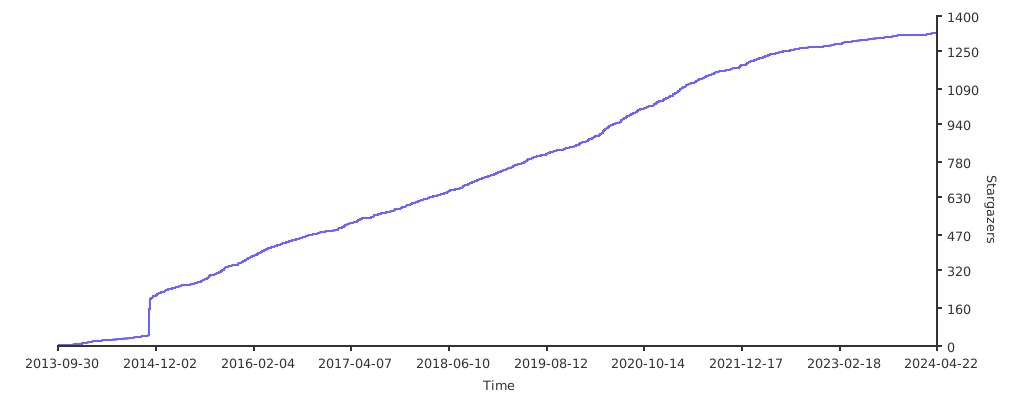
Stargazers over time