A simple XML to JSON converter



Install
Simply install using NPM in your project directory
npm install simple-xml-to-json
Usage and API
1. convertXML(xmlToConvert [,customConverter])
xmlToConvert <string>customConverter <function>- Returns: <JSON> by default or other if
customConverter is used
2. createAST(xmlToConvert)
xmlToConvert <string>- Returns: An AST representation of the XML <JSON>
Code Example:
const {convertXML, createAST} = require("simple-xml-to-json")

const myJson = convertXML(myXMLString)
const myYaml = convertXML(myXMLString, yamlConverter)
const myAst = createAST(myXMLString)
 Typescript compatible
Notes and how to use code
- The easiest thing to start is to run
node example/example.js in your terminal and see what happens.
- There's the
xmlToJson.js file for convenience. Just pass in the XML as a String.
- It's MIT licensed so you can do whatever :)
- Profit
How this works in a nutshell
- The library converts the XML to an AST
- There is a JSON converter that takes the AST and spits out a JSON
- You can write your own converters if you need XML-to-ANY-OTHER-FORMAT
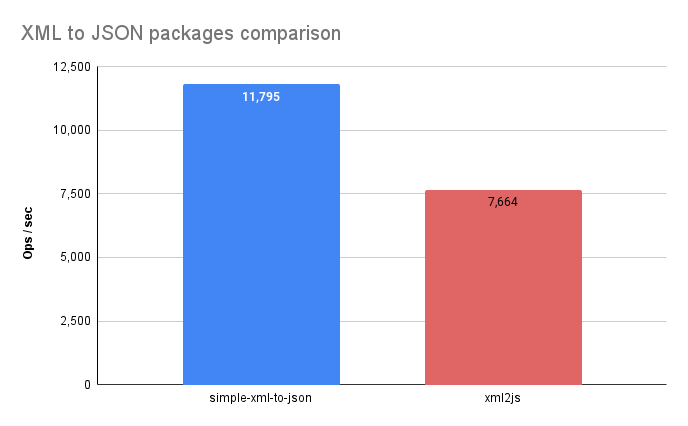
Benchmark
Take these results with a grain of salt.
According to a simple benchmark test I performed in April 2024 with a random XML. YMMV.
Current Drawbacks
- All values are translated to strings in JSON
- There are currently reserved words in the JSON converter:
- "content" - up to version 1.2.3
- "children"
Default Mapping & Collisions
By default, an element's text content is mapped to a "content" property, while its attributes are mapped directly to JSON properties of the same name.
The Risk
If an XML element possesses an attribute actually named content while also containing text content, a name collision occurs. This typically results in a parsing error or data loss due to duplicate keys.
Example Collision:
<MyElement content="attr-value">text-content</MyElement>
Version 1.2.3+ Fix
To prevent these collisions, versions newer than 1.2.3 will specifically prefix the "content" attribute name with an @ symbol. So the attribute "content" now becomes the "@content" JSON property.
[!NOTE]
If you need to, you can write your own converter from the AST created by the parser, and pass it as a 2nd parameter after the xml string





