



Security News
Deno 2.6 + Socket: Supply Chain Defense In Your CLI
Deno 2.6 introduces deno audit with a new --socket flag that plugs directly into Socket to bring supply chain security checks into the Deno CLI.
By Sarah Gooding - Dec 12, 2025
slop-loader
Advanced tools
Prompt-to-component loader for Next.js. Import LLM output as build-time content, storing only prompts in source.
Prompt-to-code loader for Next.js/Webpack. Import LLM outputs as build-time content, storing raw prompts in your repository as sources.
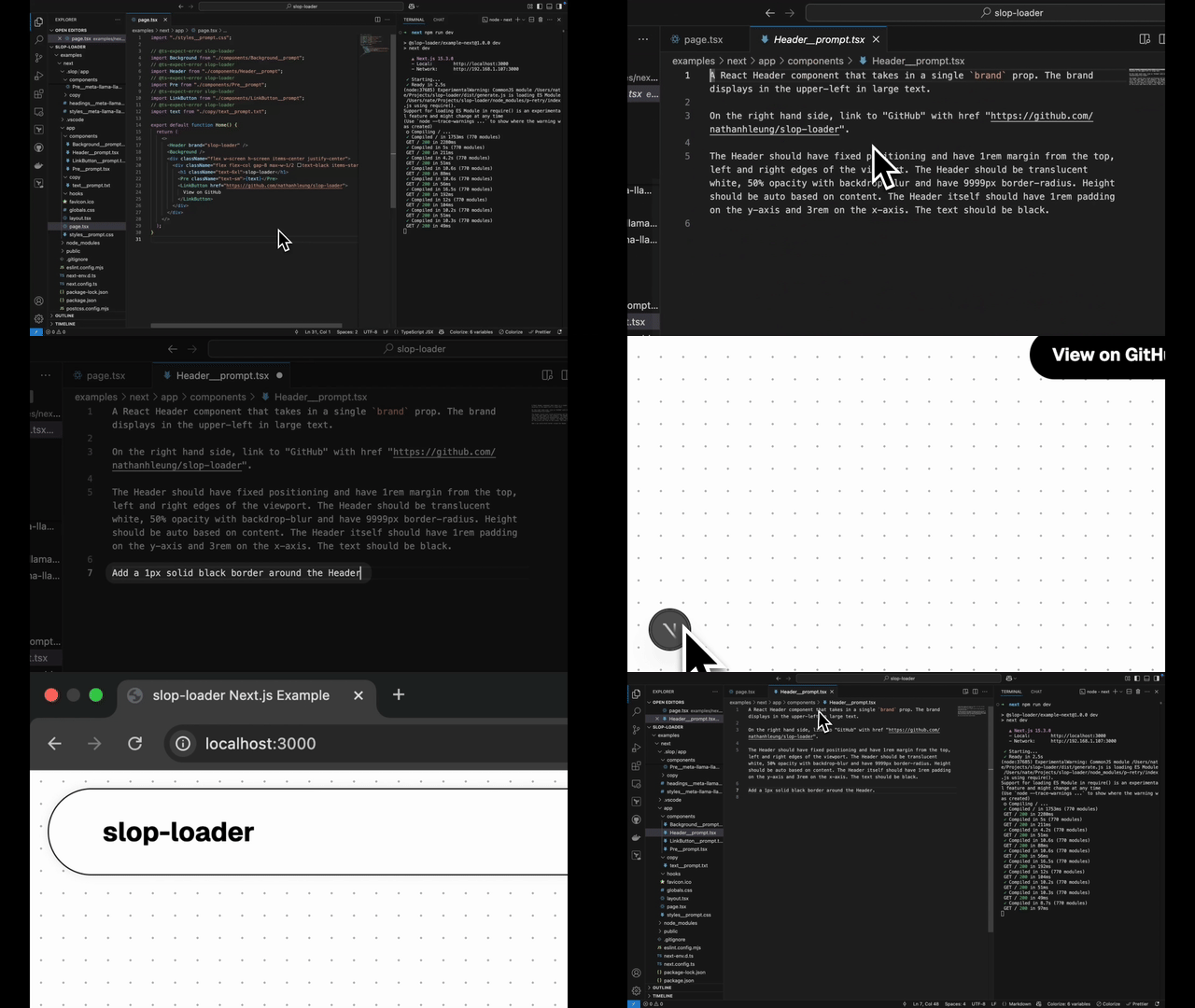
slop-loader lets you write natural-language prompt files like Header__prompt.tsx as source files, and get importable components generated at build-time by the LLM of your choice.
No copy-pasting code, no AI noise polluting your sources. Just import Header from "./Header__prompt.tsx" and render <Header />.
Live Example Next.js App | Example Next.js App on CodeSandbox
⚠️ Warning
Probably only works in Next.js with Webpack. Untested in Turbopack and other Webpack contexts. Depending on how fast your model inference provider is, builds may be slow. See Limitations below for more details.
.js, .tsx, .css, etc.).next dev hot reload on prompt changes..slop directory) with hot reload.Install the loader.
npm install slop-loader
Update your Next.js app's config to enable the loader.
// next.config.ts

import { openai } from '@ai-sdk/openai'; // Ensure OPENAI_API_KEY environment variable is set
import type { NextConfig } from "next";
import path from "path";

const openaiModel = openai('gpt-4-turbo');

const nextConfig: NextConfig = {
  // ...
  typescript: {
    // This is necessary for builds to work, if you're generating `.ts` or `.tsx` files
    ignoreBuildErrors: true,
  },
  webpack: (config) => {
    config.module.rules.push({
      // This is the only supported import pattern for now; make sure your `test` matches exactly.
      test: /__prompt\.[0-9a-zA-Z]+$/,
      use: [
        {
          loader: "slop-loader",
          options: {
            // Any `LanguageModel` created by Vercel's AI SDK will work.
            model: openaiModel,
          },
        },
      ],
    });

    return config;
  },
  // ...
};

export default nextConfig;
Optionally, update your VS Code, ESLint and TypeScript configs to make your IDE more cooperative.
.vscode/settings.json, eslint.config.mjs, tsconfig.json// .vscode/settings.json - display prompt files as Markdown
{
"files.associations": {
"*__prompt.*": "markdown"
}
}
// eslint.config.mjs - don't run ESLint on prompt files

const eslintConfig = [
  ...compat.extends("next/core-web-vitals", "next/typescript"),
  {
    ignores: ["**/*__prompt.*"],
  },
];
// tsconfig.json - don't typecheck prompt files

{
  "exclude": ["node_modules", "**/*__prompt.ts", "**/*__prompt.tsx"]
}
Create files by prompting.
<!--- app/components/Header__prompt.tsx --->

A React Header component that takes in a single `brand` prop. The brand displays in the upper-left in large text.

On the right hand side, link to "GitHub" with href "https://github.com/nathanhleung/slop-loader".

The Header should have fixed positioning and have 1rem margin from the top, left and right edges of the viewport. Height should be auto based on content. The Header itself should have 1rem padding on the y-axis and 3rem on the x-axis. The background should be translucent white with 9999px border-radius corners (circular sides) and backdrop-blur. The text should be black.
<!--- app/components/Background__prompt.tsx --->

cool web3 background, absolutely positioned, liquid gradients, black, blue, purple, red, green (but not straight web colors, should have some cohesion) heavily blurred, low z-index, no harsh edges, no majority one color.

The background should fill the entire screen.
Import prompt files directly into your app.
💡 Tip
Add
@ts-expect-error slop-loaderabove your imports if TypeScript is giving you import errors.
// app/page.tsx

// @ts-expect-error slop-loader
import Header from "./components/Header__prompt";
// @ts-expect-error slop-loader
import Background from "./components/Background__prompt";

export default function Home() {
  return (
    <>
      <Header brand="My App" />
      <Background />
    </>
  );
}
View generated outputs in the .slop directory.
// .slop/app/components/Background__meta-llama-llama-3-3-70b-instruct-free__baa00b2fe9684c8e.tsx

"use client";
import * as React from "react";

/**
 * This file was proudly generated by slop-loader.
 *
 * Generated at: 2025-04-19T04:12:10.618Z
 */

const Background = () => {
  return (
    <div
      style={{
        position: "absolute",
        top: 0,
        left: 0,
        width: "100%",
        height: "100vh",
        zIndex: -1,
        background:
          "linear-gradient(90deg, #000000 0%, #03055B 30%, #3500FF 50%, #FF0000 70%, #00FF00 100%)",
        backdropFilter: "blur(10px)",
      }}
    >
      <div
        style={{
          position: "absolute",
          top: 0,
          left: 0,
          width: "100%",
          height: "100%",
          background:
            "radial-gradient(at 50% 50%, #6c5ce7 20%, transparent 50%), radial-gradient(at 30% 30%, #ff3737 20%, transparent 50%), radial-gradient(at 70% 70%, #34A85A 20%, transparent 50%)",
          backgroundSize: "200px 200px",
          opacity: 0.5,
          filter: "blur(50px)",
        }}
      />
    </div>
  );
};

export default Background;
Continue by either (a) editing the source prompt in your <filename>__prompt.<ext> file or (b) editing the generated files directly in the .slop directory created at your project's root.
⚠️ Warning
Upon any change of either type, the Next.js dev server will reload the file. The rebuild may take a while due to inference time; the circular Next.js logo in the bottom left will animate if generation is in progress.
💡 Tip
By default, when you edit the source prompt, the previously-generated version of the file will be sent to the LLM to use as a base for the new generation. To start over, include the string
!!START OVERsomewhere in your prompt, or delete the content of the previously generated file in.slop.
⚠️ Warning
If you want to import a shared component into a generated file in
.slop, imports should be relative to the location of the original source prompt file, not the generated file. This will probably show an error in your IDE; ignore it.
When you're satisfied with your changes, commit the .slop directory to source control to save LLM outputs (and your edits, if applicable) for future builds.
💡 Tip
Or not, if you want a surprise every time you run
next build.
💡 Tip
Running into weird build errors? Try deleting
.nextand restarting.
slop-loader hooks into file imports of the form <filename>__prompt.<ext>, but instead of immediately importing, it sends the prompt file content to an LLM for generation at build/bundle time. Then, it hands the output off to the standard Next.js build process.
We're able to hook into the standard Next.js build process after initial code generation because the extension of the imported file <filename>__prompt.<ext> is still .<ext>. So the default Next.js Webpack loaders which handle .<ext> files take over automatically. For practical purposes, this means that slop-loader supports generating and importing any file types that your existing Webpack config already supports.
The loader's default prompt includes extra context about the project (e.g. package.json, directory structure) and encourages consistent outputs (e.g. default exports for React components).
The loader's options supports using the LLM of your choice, as long as it's configured with Vercel's AI SDK. It also supports customization of the default prompt with your own instructions.
LLMs are inundating our source repos with a tsunami of generated slop, making it difficult to tell what code is disposable or not.
slop-loader lets developers store their carefully engineered LLM prompts as source files next to their other source code, and separates them from the generated slop that comes out. Essentially, we're storing prompts as code.
.slop directory in version control. Changes to prompts may take a while to be fully processed.<filename>__prompt.<ext> files.<filename>__prompt.tsx? files don't pass type checking, so build-time type checking must be disabled for Next.js builds to work..slop should import files with paths that are relative to the original <filename>__prompt.<ext> file location; IDE import hints will show an error even though the import will work at build-time.Loader options are specified below. They can be passed to the loader in your Webpack config, e.g.
{
  test: /__prompt\.[0-9a-zA-Z]+$/,
  use: [
    {
      loader: "slop-loader",
      options: {
        model: "<insert your model here>",
        getPrompt: "<define your getPrompt function here>"
      },
    },
  ],
}
modelType: import("ai").LanguageModel
A LanguageModel from Vercel's AI SDK.
getPromptType: (ctx: { currentDate: Date; filepath: string; sourcePrompt: string; rootContext: string; previousGeneration: string; }) => string
A function which takes in a PromptContext (containing the current date, the path of the file to generate filepath, the sourcePrompt from the <filename>__prompt.<ext> file, the project root directory rootContext, and the previously generated file previousGeneration) and returns the final, combined (i.e. system + source) prompt for the file to send to the LLM.
If you'd like to use a custom system prompt, this is where you'll want to define it. Make sure you append the sourcePrompt afterwards.
@noahfiner came up with this idea while we were chatting in the living room about whether we'd still have jobs in five years.
FAQs
Prompt-to-component loader for Next.js. Import LLM output as build-time content, storing only prompts in source.
We found that slop-loader demonstrated a healthy version release cadence and project activity because the last version was released less than a year ago. It has 1 open source maintainer collaborating on the project.
Did you know?

Socket for GitHub automatically highlights issues in each pull request and monitors the health of all your open source dependencies. Discover the contents of your packages and block harmful activity before you install or update your dependencies.
Security News
Deno 2.6 introduces deno audit with a new --socket flag that plugs directly into Socket to bring supply chain security checks into the Deno CLI.

Security News
New DoS and source code exposure bugs in React Server Components and Next.js: what’s affected and how to update safely.

Security News
Socket CEO Feross Aboukhadijeh joins Software Engineering Daily to discuss modern software supply chain attacks and rising AI-driven security risks.