SSP CLI AI
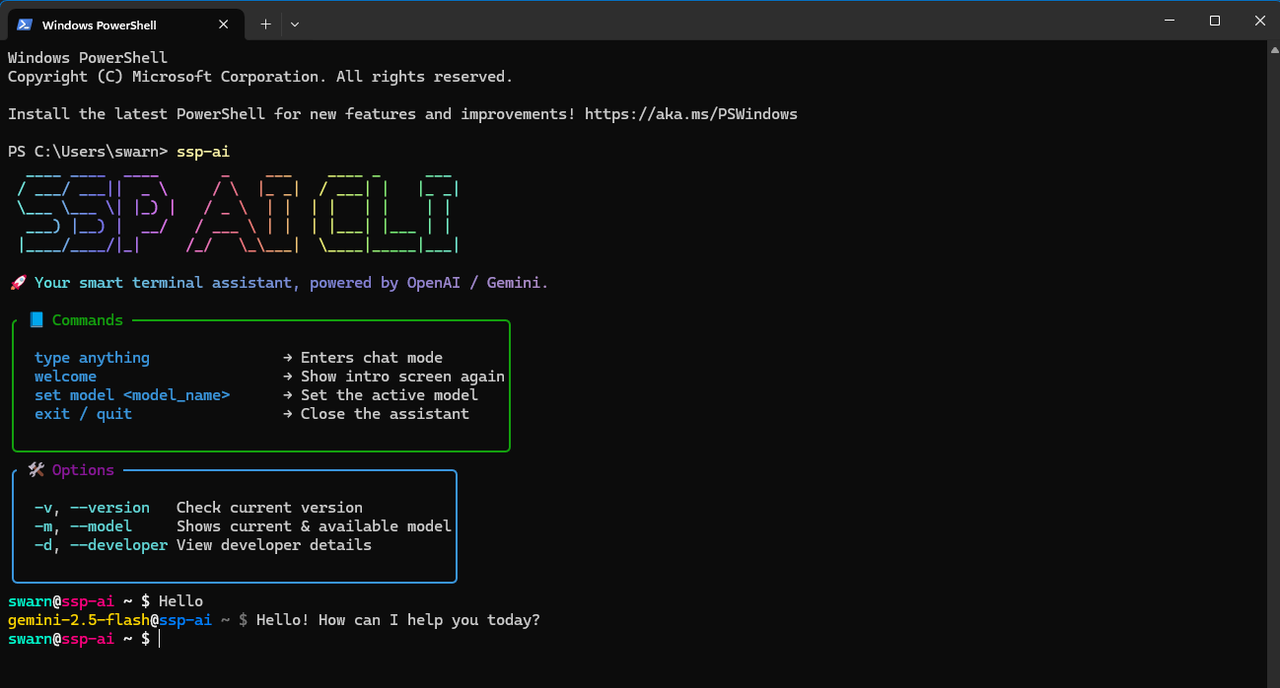
A fast and colorful terminal AI interface built for developers, by developers.

✨ Features
- 🎨 Stylish Terminal UI – ASCII banners, chalk styling, and a colorful experience
- ⚡ Quick Setup – Running an Different dedicated dedicated server for fetching data
- 💬 Interactive Chat – Talk to SSP AI directly from your terminal
- 🔧 Model Switching – Use different AI models instantly
- 📜 Version Info – See current version and changelog
🚀 Installation
npm install -g sspai-cli
sspai-cli
Hello
💬Usage
Commands
type anything
welcome
set model <model_name>
exit / quit
Options
-v, --version
-m, --model
-d, --developer
⚡ Backend Server
git clone https://github.com/swarnade/ssp-ai-backend
Google_Gemini_Key=
Azure_Openai_Key=
Azure_Openai_Endpoint=
MongoDB_String=
npm install
node server
🎯 Available Models
gemini-2.0-flash | Google | Free |
gemini-2.5-flash | Google | Free |
o3-mini | Azure OpenAi | Free |
o4-mini | Azure OpenAi | Free |
⚙️Advanced Configuration [Optional]
export SSPAI_DEFAULT_MODEL=<model name>
🛠️Development & Contribution
git clone https://github.com/swarnade/sspai-cli
cd sspai-cli
npm install
node index
📄 License
MIT License - see LICENSE file for details.





