
StageMask
Visual regression testing made simple for Playwright
Interactively mask dynamic content in your screenshots with a visual editor.
No more flaky tests due to timestamps, avatars, or ads.
Installation •
Quick Start •
Features •
API •
CLI
The Problem
Visual regression tests often fail due to dynamic content:
- Timestamps and dates
- Random IDs and session tokens
- User avatars and profile pictures
- Advertisements and dynamic banners
- Live counters and metrics
Manually specifying pixel coordinates for masks is tedious and error-prone.
The Solution
StageMask provides an interactive visual editor where you can:
- See exactly where your screenshots differ
- Draw masks directly on the images
- Save masks to a config file that's version-controlled
- Re-run tests with masks automatically applied
Installation
npm install -D stagemask
Quick Start
1. Update your test file
Replace Playwright's built-in screenshot assertions with StageMask's fixture:
import { test, expect } from '@playwright/test';
test('homepage', async ({ page }) => {
await page.goto('https://example.com');
await expect(page).toHaveScreenshot('homepage.png');
});
import { test } from 'stagemask';
test('homepage', async ({ page, visualSnapshot }) => {
await page.goto('https://example.com');
await visualSnapshot('homepage.png');
});
2. Run your tests
npx playwright test
First run creates baseline screenshots. Second run compares and will fail if there are differences.
3. Open the mask editor
npx stagemask review
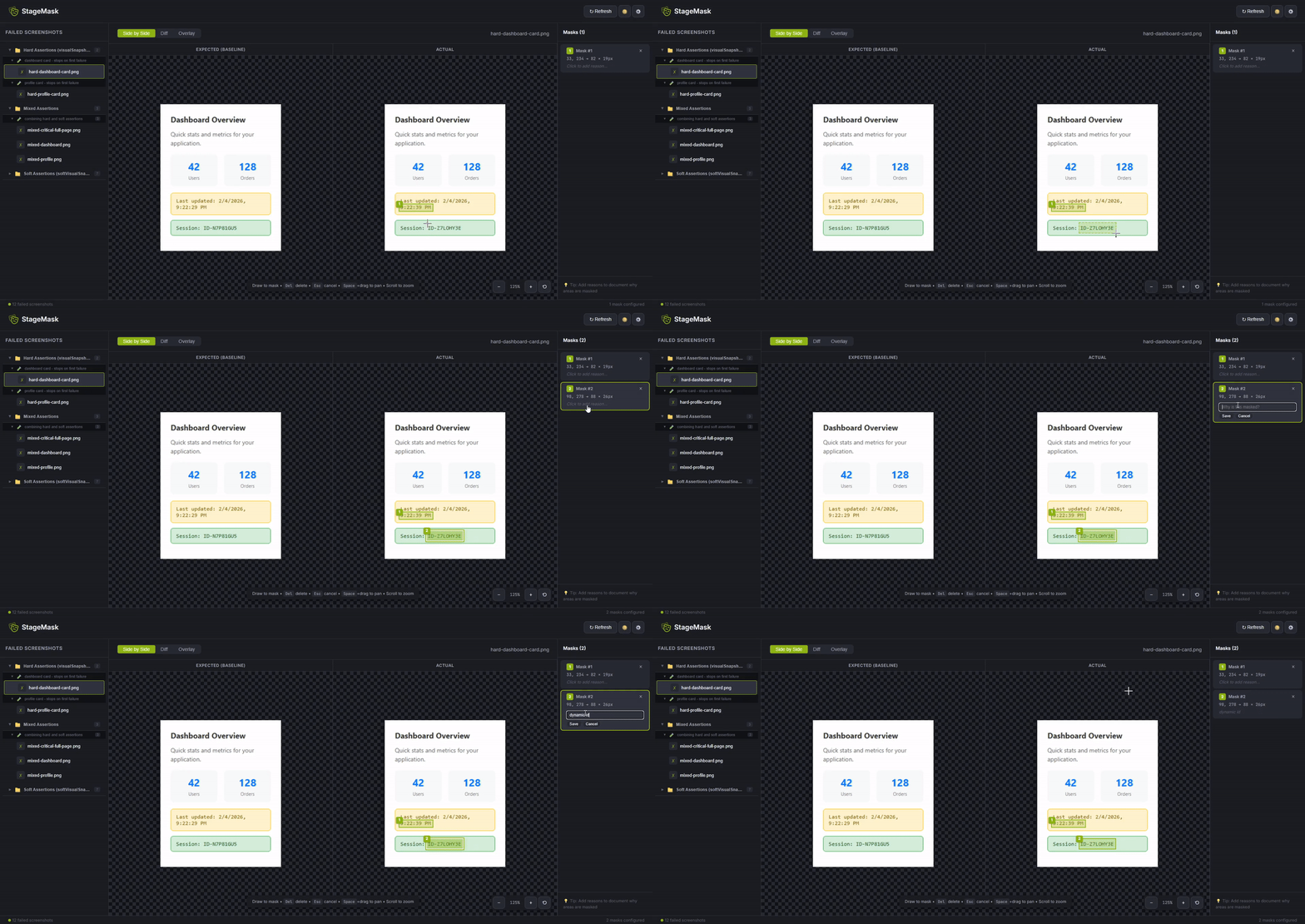
This opens a visual editor where you can:
- See the expected vs actual screenshots side-by-side
- View the diff highlighting differences
- Draw masks over dynamic content
- Save masks to
stage-masks.json
4. Re-run tests
npx playwright test
Tests now pass because masked regions are ignored during comparison.
Features
🎭 Visual Mask Editor
- Side-by-side view: Compare expected and actual screenshots
- Diff view: See exactly which pixels changed
- Overlay view: Blend images to spot subtle differences
- Pan & zoom: Navigate large screenshots easily
- Draw masks: Click and drag to create mask regions
- Resize & move: Adjust masks with handles
- Keyboard shortcuts:
Del to delete, Esc to cancel, Space to pan
📸 Two Assertion Modes
Hard Assertions (default)
Fails immediately on first mismatch - good for critical screenshots:
test('checkout flow', async ({ visualSnapshot }) => {
await visualSnapshot('cart.png');
await visualSnapshot('checkout.png');
await visualSnapshot('confirm.png');
});
Soft Assertions
Collects all failures - good for reviewing multiple screenshots at once:
test('dashboard widgets', async ({ softVisualSnapshot }) => {
await softVisualSnapshot('header.png');
await softVisualSnapshot('sidebar.png');
await softVisualSnapshot('content.png');
await softVisualSnapshot('footer.png');
});
Mixed Mode
Combine both in the same test:
test('mixed assertions', async ({ visualSnapshot, softVisualSnapshot }) => {
await softVisualSnapshot('header.png');
await softVisualSnapshot('sidebar.png');
await visualSnapshot('critical-cta.png');
await softVisualSnapshot('footer.png');
});
📁 Organized Test Results
Screenshots are grouped by describe blocks and test names in the UI:
📁 Checkout Flow
  🧪 cart page should display items
    ✗ cart-empty.png
    ✗ cart-with-items.png
  🧪 payment form should validate
    ✗ payment-form.png

📁 Dashboard
  🧪 widgets should render
    ✗ dashboard-full.png
🎨 Customizable
- Threshold: Adjust pixel comparison sensitivity
- Custom mask colors: Change the mask overlay color
- Dark/Light theme: UI adapts to your preference
API
visualSnapshot(name, options?)
Takes a screenshot and compares it to the baseline. Throws immediately if different.
await visualSnapshot('screenshot.png', {
element: page.locator('.card'),
masks: [
{ x: 10, y: 10, width: 100, height: 50 }
],
threshold: 0.2,
updateBaseline: false,
screenshotOptions: {
fullPage: true,
animations: 'disabled'
}
});
softVisualSnapshot(name, options?)
Same as visualSnapshot but collects failures instead of throwing immediately. All failures are thrown at the end of the test.
await softVisualSnapshot('widget-1.png');
await softVisualSnapshot('widget-2.png');
await softVisualSnapshot('widget-3.png');
CLI
npx stagemask review
Launch the visual review UI.
npx stagemask review [options]

Options:
  -p, --port <number>       Port to run on (default: 5899)
  -r, --results-dir <path>  Custom test results directory (default: test-results)
  -d, --dir <path>          Project directory (default: current directory)
  --no-open                 Don't open browser automatically
npx stagemask init
Create a new stage-masks.json config file.
npx stagemask init [options]

Options:
  -d, --dir <path>  Project directory
  -f, --force       Overwrite existing config
npx stagemask list
List all configured masks.
npx stagemask list
npx stagemask ls
npx stagemask port
Set a custom default port (saved to config).
npx stagemask port
npx stagemask port 3000
npx stagemask port --reset
npx stagemask clear <screenshot>
Remove all masks for a specific screenshot.
npx stagemask clear homepage.png
npx stagemask export
Export mask configuration.
npx stagemask export
npx stagemask export -o masks-backup.json
npx stagemask export -s homepage.png cart.png
npx stagemask import <file>
Import mask configuration.
npx stagemask import masks-backup.json
npx stagemask import masks-backup.json --merge
Configuration
Masks are stored in stage-masks.json in your project root:
{
  "version": 1,
  "threshold": 0.1,
  "port": 5899,
  "screenshots": {
    "homepage.png": {
      "name": "homepage.png",
      "masks": [
        {
          "id": "mask_1234567890_abc123",
          "x": 150,
          "y": 200,
          "width": 200,
          "height": 50,
          "reason": "Dynamic timestamp",
          "createdAt": "2024-01-15T10:30:00.000Z"
        }
      ],
      "threshold": 0.15,
      "updatedAt": "2024-01-15T10:30:00.000Z"
    }
  }
}
Configuration Options
version | number | 1 | Config schema version |
threshold | number | 0.1 | Global pixel comparison threshold (0-1) |
port | number | 5899 | Default port for review server |
screenshots | object | {} | Per-screenshot mask configurations |
Per-Screenshot Options
masks | array | Array of mask regions |
threshold | number | Override global threshold for this screenshot |
Playwright Configuration
StageMask works with your existing Playwright configuration. The test results directory can be customized:
export default defineConfig({
outputDir: './custom-results',
expect: {
toHaveScreenshot: {
}
}
});
Then tell StageMask where to find results:
npx stagemask review --results-dir ./custom-results
Best Practices
1. Commit your config file
Add stage-masks.json to version control so masks are shared across the team.
2. Use meaningful screenshot names
await visualSnapshot('screenshot-1.png');
await visualSnapshot('checkout-cart-empty.png');
3. Group related screenshots with soft assertions
test('all dashboard widgets render correctly', async ({ softVisualSnapshot }) => {
  await softVisualSnapshot('dashboard-header.png');
  await softVisualSnapshot('dashboard-sidebar.png');
  await softVisualSnapshot('dashboard-main.png');
  await softVisualSnapshot('dashboard-footer.png');
});
4. Use element screenshots for components
await visualSnapshot('user-card.png', {
element: page.locator('[data-testid="user-card"]')
});
5. Disable animations
await visualSnapshot('animated-component.png', {
  screenshotOptions: {
    animations: 'disabled'
  }
});
Security
StageMask is designed for local development use only:
- The review server binds to
localhost only (not accessible from network)
- File access is restricted to your project directory
- No data is sent to external servers
⚠️ Do not expose the review server to the internet.
Troubleshooting
Screenshots not appearing in the UI
- Make sure tests have run and failed:
npx playwright test
- Check that
test-results/ directory exists and contains -actual.png and -expected.png files
- If using a custom output directory, specify it:
npx stagemask review -r ./custom-results
Masks not being applied
- Verify
stage-masks.json exists in your project root
- Check the screenshot name matches exactly (case-sensitive)
- Look at the console output for
[stagemask] logs during test runs
Port already in use
npx stagemask review -p 3001
npx stagemask port 3001
Contributing
Contributions are welcome! Please read our Contributing Guide for details.
License
MIT © Irfan Mujagic





