


Launch Week Day 5: Introducing Reachability for PHP.Learn More
Socket
Book a DemoSign in
Socket

tad

Package Overview
Dependencies
Maintainers
1
Versions
38
Alerts
File Explorer

Advanced tools

Socket logo

Install Socket

Detect and block malicious and high-risk dependencies

Install

tad

JavaScript test suite

latest
Source
npmnpm
Version
3.1.1
Version published
Maintainers
1
Created
Source

TAD - JavaScript test suite

Goal of this framework is to allow writing tests with minimal hassle. TAD will locate your test file, and provide tested module for your test functions.

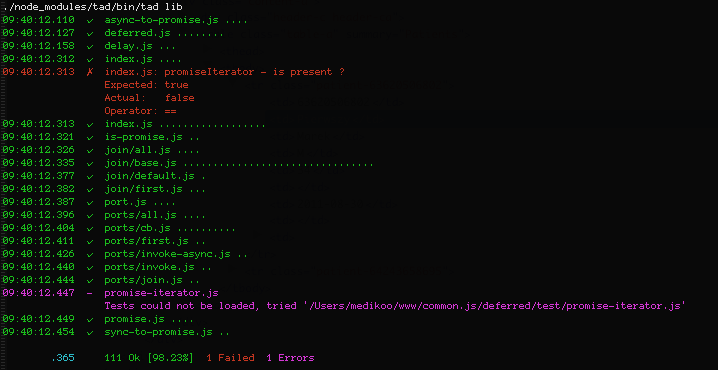
Example console output:

  • Installation
  • Usage _ File managment _ Test files _ Test functions _ Assertions * Running tests
  • TODO

Installation

$ npm install tad

Usage

File management

Keep your tests in test folder. For each file in in main folder have corresponding test file in test folder.

Test files

Tests should be written as set of functions, it can be just one function:

module.exports = function (t, a, d) {
  // tests
};

or many thematically grouped functions:

exports["Test this"] = function (t, a, d) {
  // tests
};
exports["Test that"] = function (t, a, d) {
  // tests
};

Test functions

Arguments passed to test functions are:

  • t - Tested module
  • a - Assert object
  • d - Done function, it's for tests that need to be run asynchronously. You may pass additional block of tests to this function and they'll be run right after. d argument makes no sense for synchrounous tests, declare such tests without it.

All arguments are optional, and by the way function is declared suite detect which arguments should be passed to test function. Examples:

  • Asynchronous test:
exports["Some tests"] = funtcion (t, a, d) {
		// tests
		setTimeout(function () {
		   // tests
		   d();
		}, 100);
};
  • Synchronous test:
exports["Some tests"] = function (t, a) {
  // tests
};

Tests can be nested, and declared various ways (synchronous/asynchronous)

module.exports["Test all"] = function (t, a) {
  // Preparation code

  // ... tests ...

  return {
    "Test this": function () {
      // We already have module and assert object
      // ... tests ...
    },
    "Test that async way": function (d) {
      // This one is asynchronous
      // ... tests ....

      seTimeout(function () {
        // ... tests ...
        d({
          "Some extra tests": function () {
            // ... tests ...
          }
        });
      }, 100);
    }
  };
};

Assertions

TAD uses assert object from UncommonJS tests runner, It's API is nearly same as of assert that can be found in Node. Full spec is available at https://github.com/kriskowal/uncommonjs/blob/master/tests/specification.md .

TAD adds some extra sugar to UncommonJS Assert object:

  • a === a.strictEqual, so you can write your assertions as:
a(shouldBeTrue, true, "It's true");
// it has same effect as:
a.strictEqual(shouldBeTrue, true, "It's true");
  • a.not is an alias for a.notStrictEqual
  • a.deep is an alias for a.deepEqual
  • a.notDeep is an alias for a.notDeepEqual
  • assert.never with that you can check function paths that should never be called.

Running tests

Test your file with provided binary:

$ bin/tad lib/test-file

or test all files in path:

$ bin/tad lib

TODO

  • Full custom context support
  • Code coverage
  • TAP support
  • jslint, jshint as side validation option
  • Port tests to browsers

Keywords

test

FAQs

Package last updated on 24 Aug 2023

Did you know?

Socket

Socket for GitHub automatically highlights issues in each pull request and monitors the health of all your open source dependencies. Discover the contents of your packages and block harmful activity before you install or update your dependencies.

Install

Related posts

