textmarked






Enable Markdown editing in HTML <textarea />
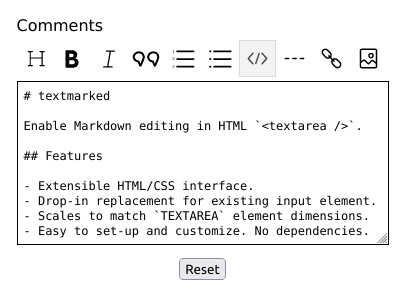
Features
- Extensible HTML/CSS interface.
- Drop-in replacement for existing input element.
- Scales to match
TEXTAREA element dimensions.
- Easy to set-up and customize. No dependencies.
Checkout the demo for examples of use.
Dependencies
Installation
Install the package into your project using NPM, or download the sources.
$ npm install textmarked
Usage
There are two ways you can use this package. One is by including the JavaScript/CSS sources directly. The other is by importing the module into your component.
Script include
After you build the distribution sources the set-up is fairly simple..
<script type="text/javascript" src="path/to/textmarked.min.js"></script>
<link rel="stylesheet" href="path/to/textmarked.min.css" media="all" />

<script type="text/javascript">
  textMarked(textarea, settings);
</script>
Module import
If your using a modern framework like Aurelia, Angular, React, or Vue
import TextMarked from 'textmarked';
import 'textmarked/dist/textmarked.css';

const textMarked = new TextMarked(textarea, settings);
HTML markup
<textarea id="comments" name="comments" cols="50" rows="10"></textarea>
Example
const settings = {
  allowKeys: `a-z0-9\\s,.?!$%&()\\[\\]"'-_#*\`>`,
  allowEnter: true,
  clipboard: false,
  showExample: true,
  options: [
    'Heading',
    'Bold',
    'Italic',
    'Blockquote',
    'Ordered-List',
    'Unordered-List',
    'Code',
    'Horizontal-Rule',
    'Link',
    'Image'
  ]
};

const textarea = document.getElementById('comments');

textMarked(textarea, settings).focus();
Supported elements
Heading, Bold, Italic,
Blockquote, Ordered-List, Unordered-List, Code, Horizontal-Rule, Link, Image
Editor settings
Overriding defaults can be done using the following options:
| allowKeys | Support keyboard characters (REGEX) | String | a-z0-9\\s,.?!$%&()\\[\\]"'-_#*\`> |
| allowEnter | Allow keyboard carriage return. | Boolean | false |
| clipboard | Enable clipboard functionality. | Boolean | false |
| showExample | Show Markdown example in title. | Boolean | false |
| options | List of Supported elements. | Array | all elements |
Developers
CLI options
Run ESLint on project sources:
$ npm run lint
Transpile ES6 sources (using Babel) and minify to a distribution:
$ npm run build
Run WebdriverIO E2E tests:
$ npm run test
References
Versioning
This package is maintained under the Semantic Versioning guidelines.
License and Warranty
This package is distributed in the hope that it will be useful, but without any warranty; without even the implied warranty of merchantability or fitness for a particular purpose.
textmarked and Lineicons are provided under the terms of the MIT license
Author
Marc S. Brooks





