


Security News
The Hidden Blast Radius of the Axios Compromise
The Axios compromise shows how time-dependent dependency resolution makes exposure harder to detect and contain.
By Ahmad Nassri - Apr 01, 2026
tidy-table
Advanced tools





Create a HTML table that can be sorted, selected, and post-processed.
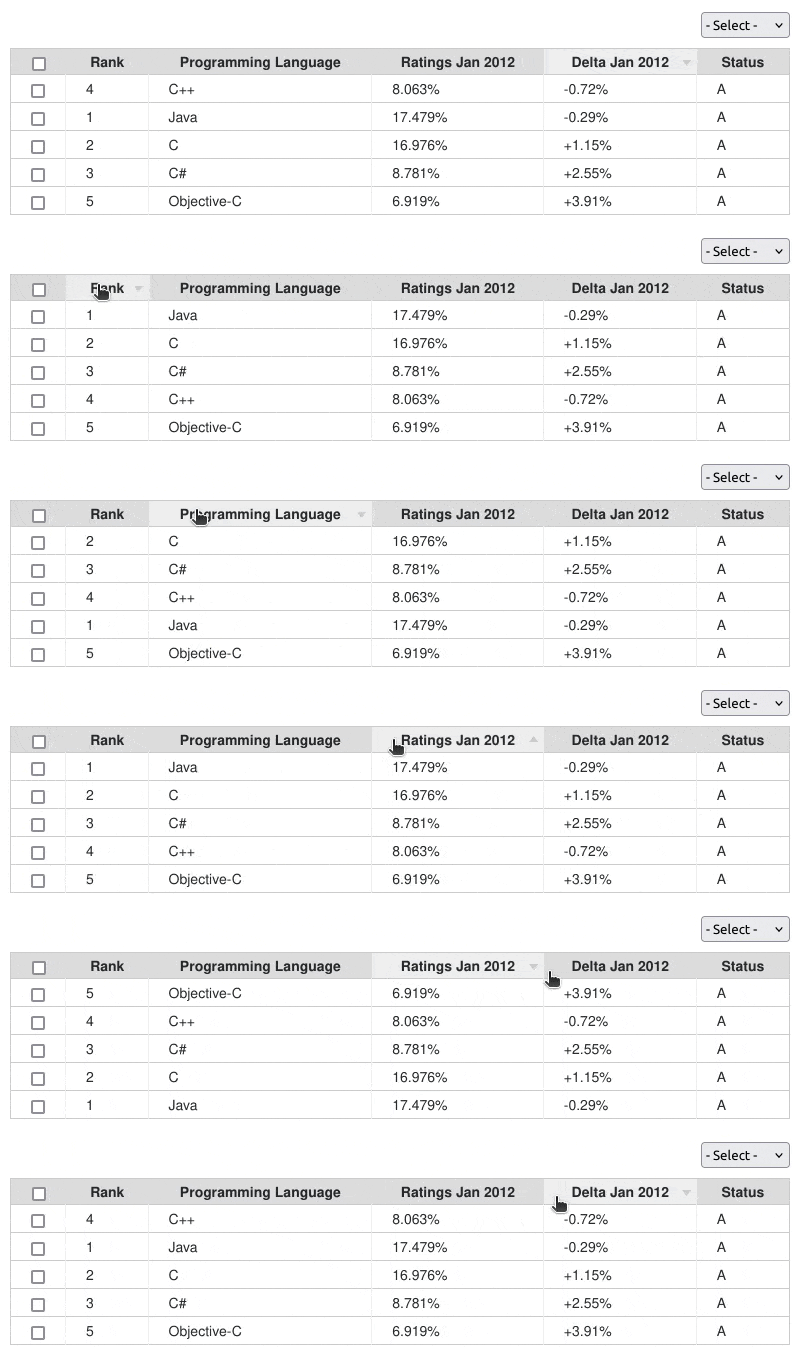
Checkout the demo for examples of use.
Install the package into your project using NPM, or download the sources.
$ npm install tidy-table
To add to an existing React or Vue project you can install this package using YARN.
$ yarn add react-tidy-table
$ yarn add vue-tidy-table
There are two ways you can use this package. One is by including the JavaScript/CSS sources directly. The other is by importing the module into your component.
After you build the distribution sources the set-up is fairly simple..
<script type="text/javascript" src="path/to/tidy-table.min.js"></script>
<link rel="stylesheet" href="path/to/tidy-table.min.css" media="all" />

<script type="text/javascript">
  tidyTable(container, settings, options);
</script>
If your using a modern framework like Aurelia, Angular, React, or Vue
import TidyTable from 'tidy-table';
import 'tidy-table/dist/tidy-table.css';

const tidyTable = new TidyTable(container, settings, options);
<div id="tidy-table"></div>
const options = {
  enableCheckbox: true,
  enableMenu:     true,
  reverseSortDir: true,
  responsive:     true
};

const settings = {
  columnTitles: ['Rank', 'Programming Language', 'Ratings Jan 2012', 'Delta Jan 2012', 'Status'],
  columnValues: [
    ['1', 'Java', '17.479%', '-0.29%', 'A'],
    ['2', 'C', '16.976%', '+1.15%', 'A'],
    ['3', 'C#', '8.781%', '+2.55%', 'A'],
    ['4', 'C++', '8.063%', '-0.72%', 'A'],
    ['5', 'Objective-C', '6.919%', '+3.91%','A']
  ],

  // Add menu options to bind result events.
  menuOptions: [
    ['- Action -', null],
    ['Callback 1', {callback: (rows) => {}}],
    ['Callback 2', {callback: (rows) => {}}]
  ],

  // Post-process rendered HTML output.
  postProcess: {
    table:  (HTMLTableElement)     => {},
    column: (HTMLTableCellElement) => {},
    menu:   (HTMLTableElement)     => {}
  },

  // Pre-process column values before sort.
  sortByPattern: function(colNum, val) {
    if (colNum !== 1) return val;

    return val?.replace(/\$|%|#/g, '');
  }
};

const container = document.getElementById('tidy-table');

const tidyTable = new TidyTable(container, settings, options);
Overriding defaults can be done using the following options:
| Option | Description | Default |
|---|---|---|
| enableCheckbox | Add checkbox functionality to table output. | false |
| enableMenu | Add select menu options to alter table output. | false |
| reverseSortDir | Change the sorting arrow image direction. | false |
| responsive | Enable/disable responsive layout support. | false |
There are times where you may need to customize the table result behavior. This can be achieved using postProcess hooks.
function callback(table) {
  const cols = table.querySelectorAll('th:nth-child(2), td:nth-child(2)');

  for (let i = 0; i < cols.length; i++) {
    cols[i].style.display = 'none';
  }
}
function callback(col) {
  col.addEventListener('click', function() {
    if (!this.querySelector('form')) {
      const form = document.createElement('form');
      form.addEventListener('submit', function() {
        const xhr = new XMLHttpRequest();
        xhr.open('POST', '/path/to/script');
        xhr.send(null);
      });

      const field = document.createElement('input');
      field.setAttribute('type', 'text');
      field.setAttribute('value', this.textContent);

      const button = document.createElement('input');
      button.setAttribute('type', 'submit');

      form.appendChild(field).appendChild(button);

      this.removeChild(this.firstChild);
      this.appendChild(form);
    });
  }
}
function callback(menu) {
  if (!getCookie('session')) {
    menu.style.display = 'none';
  }
}
The Illustrator template used to create the sort arrows has been provided with this package for reference.
Run ESLint on project sources:
$ npm run lint
Transpile ES6 sources (using Babel) and minify to a distribution:
$ npm run build
Run WebdriverIO E2E tests:
$ npm run test
If you fix a bug, or have a code you want to contribute, please send a pull-request with your changes. (Note: Before committing your code please ensure that you are following the Node.js style guide)
This package is maintained under the Semantic Versioning guidelines.
This package is distributed in the hope that it will be useful, but without any warranty; without even the implied warranty of merchantability or fitness for a particular purpose.
tidy-table is provided under the terms of the MIT license
FAQs
Create a HTML table that can be sorted, selected, and post-processed.
We found that tidy-table demonstrated a healthy version release cadence and project activity because the last version was released less than a year ago. It has 1 open source maintainer collaborating on the project.
Did you know?

Socket for GitHub automatically highlights issues in each pull request and monitors the health of all your open source dependencies. Discover the contents of your packages and block harmful activity before you install or update your dependencies.
Security News
The Axios compromise shows how time-dependent dependency resolution makes exposure harder to detect and contain.

Research
A supply chain attack on Axios introduced a malicious dependency, plain-crypto-js@4.2.1, published minutes earlier and absent from the project’s GitHub releases.

Research
Malicious versions of the Telnyx Python SDK on PyPI delivered credential-stealing malware via a multi-stage supply chain attack.