


Product
Introducing Reports: An Extensible Reporting Framework for Socket Data
Explore exportable charts for vulnerabilities, dependencies, and usage with Reports, Socket’s new extensible reporting framework.
By André Staltz - Apr 21, 2026
tui-image-editor-teng
Advanced tools

Full featured image editor using HTML5 Canvas. It's easy to use and provides powerful filters.





TOAST UI ImageEditor applies Google Analytics (GA) to collect statistics on the use of open source, in order to identify how widely TOAST UI ImageEditor is used throughout the world. It also serves as important index to determine the future course of projects. location.hostname (e.g. > “ui.toast.com") is to be collected and the sole purpose is nothing but to measure statistics on the usage. To disable GA, use the following usageStatistics option when creating the instance.
var options = {
    //...
    usageStatistics: false
}

var imageEditor = new tui.ImageEditor('#tui-image-editor-container', options);
Or, include tui-code-snippet(v1.4.0 or later) and then immediately write the options as follows:
tui.usageStatistics = false;
 Chrome Chrome |  Internet Explorer Internet Explorer |  Edge Edge |  Safari Safari |  Firefox Firefox |
|---|---|---|---|---|
| Yes | 10+ | Yes | Yes | Yes |
| Crop | Flip | Rotation | Drawing | Shape |
|---|---|---|---|---|
 | 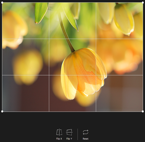 |  |  |  |
| Icon | Text | Mask | Filter | |
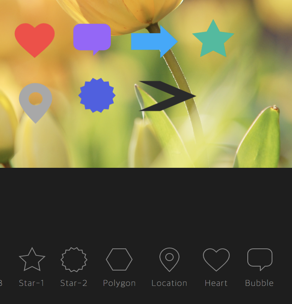 | 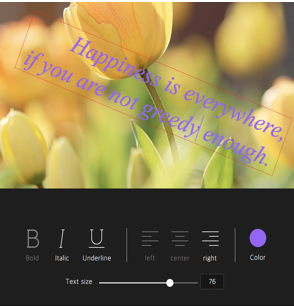 |  |  |
| Grayscale | Noise | Emboss | Pixelate |
|---|---|---|---|
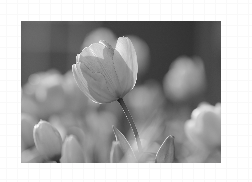 |  |  |  |
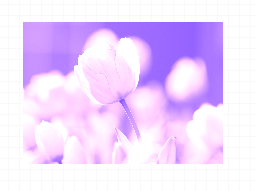
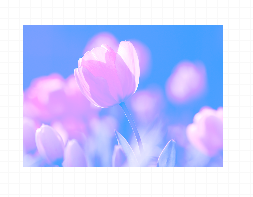
| Sepia | Sepia2 | Blend-righten | Blend-diff | Invert |
|---|---|---|---|---|
 |  |  |  |  |
| Multifly | Tint | Brightness | Remove-white | Sharpen |
|---|---|---|---|---|
 |  |  |  |  |
var imageEditor = new tui.ImageEditor('#tui-image-editor-container', {
     includeUI: {
         menu: ['shape', 'crop']
         ...
     },
 ...
Widely supported in browsers including IE10.
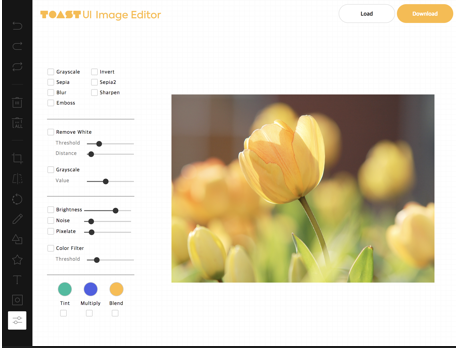
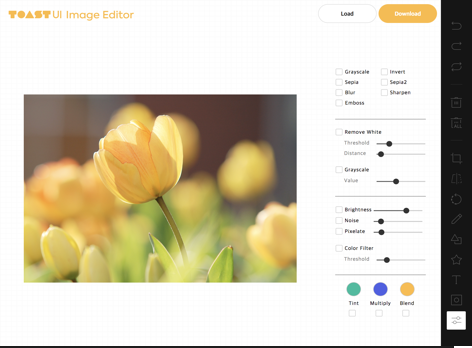
Option to support various display sizes. (allows you to use the editor features on your web pages at least over 550 * 450 sizes)

| black - top | black - bottom | white - left | white - right |
|---|---|---|---|
 |  |  |  |
The TOAST UI products can be installed by using the package manager or downloading the source directly. However, we highly recommend using the package manager.
You can find TOAST UI producs via npm and bower package managers. Install by using the commands provided by each package manager. When using npm, be sure Node.js is installed in the environment.
$ npm install --save tui-image-editor # Latest version
$ npm install --save tui-image-editor@<version> # Specific version
fabric.js dependency module does not go smoothlyTo solve the problem, you need to refer to Some Steps to solve the problem.
$ bower install tui-image-editor # Latest version
$ bower install tui-image-editor#<tag> # Specific version
TOAST UI products are available over the CDN powered by TOAST Cloud.
You can use the CDN as below.
<link rel="stylesheet" href="https://uicdn.toast.com/tui-image-editor/latest/tui-image-editor.css">
<script src="https://uicdn.toast.com/tui-image-editor/latest/tui-image-editor.js"></script>
If you want to use a specific version, use the tag name instead of latest in the URL.
The CDN directory has the following structure.
tui-image-editor/
├─ latest/
│  ├─ tui-image-editor.js
│  ├─ tui-image-editor.min.js
│  └─ tui-image-editor.css
├─ v3.1.0/
│  ├─ ...
Add the container element where TOAST UI ImageEditor will be created.
<body>
...
<div id="tui-image-editor"></div>
...
</body>
Add dependencies & initialize ImageEditor class with given element to make an image editor.
var ImageEditor = require('tui-image-editor');
var FileSaver = require('file-saver'); //to download edited image to local. Use after npm install file-saver
var blackTheme = require('./js/theme/black-theme.js');
var locale_ru_RU = { // override default English locale to your custom
    'Crop': 'Обзрезать',
    'Delete-all': 'Удалить всё'
    // etc...
};
var instance = new ImageEditor(document.querySelector('#tui-image-editor'), {
     includeUI: {
         loadImage: {
             path: 'img/sampleImage.jpg',
             name: 'SampleImage'
         },
         locale: locale_ru_RU,
         theme: blackTheme, // or whiteTheme
         initMenu: 'filter',
         menuBarPosition: 'bottom'
     },
    cssMaxWidth: 700,
    cssMaxHeight: 500,
    selectionStyle: {
        cornerSize: 20,
        rotatingPointOffset: 70
    }
});
Or ~ UI
var ImageEditor = require('tui-image-editor');
var instance = new ImageEditor(document.querySelector('#tui-image-editor'), {
    cssMaxWidth: 700,
    cssMaxHeight: 500,
    selectionStyle: {
        cornerSize: 20,
        rotatingPointOffset: 70
    }
});
Can find more details in this document.
If you using TypeScript, You must import module = require('module') on importing.
export = and import = require()
import ImageEditor = require('tui-image-editor');
var FileSaver = require('file-saver'); //to download edited image to local. Use after npm install file-saver

const instance = new ImageEditor(document.querySelector('#tui-image-editor'), {
    cssMaxWidth: 700,
    cssMaxHeight: 500,
    selectionStyle: {
        cornerSize: 20,
        rotatingPointOffset: 70
    }
});
See details for additional informations.
The TOAST UI products are open-source. After fixing issues, create a pull request(PR). Run npm scripts and develop with the following process.
Fork master branch into your personal repository.
Clone to local computer.
Install node modules.
Before starting development, check for any errors.
$ git clone https://github.com/{username}/tui.image-editor.git
$ cd tui.image-editor
$ npm install
$ npm run test
$ npm run serve
FAQs
TOAST UI ImageEditor
The npm package tui-image-editor-teng receives a total of 2 weekly downloads. As such, tui-image-editor-teng popularity was classified as not popular.
We found that tui-image-editor-teng demonstrated a not healthy version release cadence and project activity because the last version was released a year ago. It has 1 open source maintainer collaborating on the project.
Did you know?

Socket for GitHub automatically highlights issues in each pull request and monitors the health of all your open source dependencies. Discover the contents of your packages and block harmful activity before you install or update your dependencies.
Product
Explore exportable charts for vulnerabilities, dependencies, and usage with Reports, Socket’s new extensible reporting framework.

Product
Socket for Jira lets teams turn alerts into Jira tickets with manual creation, automated ticketing rules, and two-way sync.

Company News
Socket won two 2026 Reppy Awards from RepVue, ranking in the top 5% of all sales orgs. AE Alexandra Lister shares what it's like to grow a sales career here.