


Product
Introducing Data Exports
Export Socket alert data to your own cloud storage in JSON, CSV, or Parquet, with flexible snapshot or incremental delivery.
By Ola Adekola - Apr 23, 2026
vue-weather-widget
Advanced tools
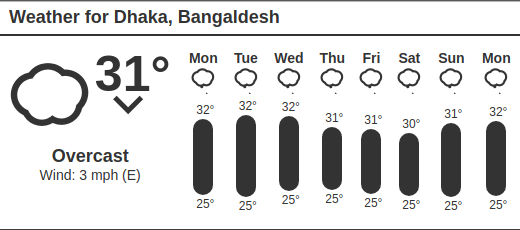
Weather widget inspired by forecast embeds and powered by darksky api.




npm install --save vue-weather-widget
yarn add vue-weather-widget
# install dependencies
npm install

# build dist files
npm run build
<template>
    <weather
        api-key="<your-dark-sky-api-key>"
        title="Weather"
        latitude="24.886436"
        longitude="91.880722"
        language="en"
        units="uk">
    </weather>
</template>

<script>
import VueWeatherWidget from 'vue-weather-widget';
import 'vue-weather-widget/dist/css/vue-weather-widget.css';

export default {
    components: {
        'weather': VueWeatherWidget
    },
}
</script>
<!-- Requirements -->
<script src="https://code.jquery.com/jquery-3.2.1.min.js" integrity="sha256-hwg4gsxgFZhOsEEamdOYGBf13FyQuiTwlAQgxVSNgt4=" crossorigin="anonymous"></script>
<script type="text/javascript" src="https://cdnjs.cloudflare.com/ajax/libs/vue/2.4.0/vue.js"></script>

<!-- vue-weather-widget -->
<script type="text/javascript" src="vue-weather-widget.js"></script>
<link href="vue-weather-widget.css" rel="stylesheet">

<!-- Vue app -->
<div id="app">
    <weather
        api-key="<your-dark-sky-api-key>"
        title="Weather"
        latitude="24.886436"
        longitude="91.880722"
        language="en"
        units="uk">
    </weather>
</div>

<script>
window.vm = new Vue({
    el: '#app',
    components: {
        'weather': VueWeatherWidget
    }
});
</script>
| Props | Type | Default | Description |
|---|---|---|---|
| api-key | String, required | - | Your Dark Sky secret key |
| latitude | String, required | - | The latitude of a location (in decimal degrees). Positive is north, negative is south. |
| longitude | String, required | - | Return summary properties in the desired language. See below for a list of supported languages. |
| units | String | "us" | A list of supported units are given below. |
| bar-color | String | "#333" | Color of the Temparature bar. |
| text-color | String | "#333" | Color of the text. |
| title | String | "Weather" | Title of the widget. |
| hide-header | Boolean | false | Controls whether to show or hide the title bar. |
| disable-animation | Boolean | false | Use static icons when enabled. |
| update-interval | Number | null | Interval in seconds to update weather data automatically. Set it to 0 or null to disable auto update. |
List of supported units:
auto: automatically select units based on geographic locationca: same as si, except that windSpeed and windGust are in kilometers per houruk2: same as si, except that nearestStormDistance and visibility are in miles, and windSpeed and windGust are in miles per hourus: Imperial units (the default)si: SI unitsar: Arabicaz: Azerbaijanibe: Belarusianbg: Bulgarianbs: Bosnianca: Catalancs: Czechde: Germanel: Greeken: English (which is the default)es: Spanishet: Estonianfr: Frenchhr: Croatianhu: Hungarianid: Indonesianit: Italianis: Icelandicka: Georgiankw: Cornishnb: Norwegian Bokmålnl: Dutchpl: Polishpt: Portugueseru: Russiansk: Slovaksl: Sloveniansr: Serbiansv: Swedishtet: Tetumtr: Turkishuk: Ukrainianx-pig-latin: Igpay Atinlayzh: simplified Chinesezh-tw: traditional ChineseApache License Version 2.0 © Sudipto Chandra
FAQs
Weather forecast widget for Vuejs using DarkSky api
The npm package vue-weather-widget receives a total of 78 weekly downloads. As such, vue-weather-widget popularity was classified as not popular.
We found that vue-weather-widget demonstrated a healthy version release cadence and project activity because the last version was released less than a year ago. It has 1 open source maintainer collaborating on the project.
Did you know?

Socket for GitHub automatically highlights issues in each pull request and monitors the health of all your open source dependencies. Discover the contents of your packages and block harmful activity before you install or update your dependencies.
Product
Export Socket alert data to your own cloud storage in JSON, CSV, or Parquet, with flexible snapshot or incremental delivery.

Research
/Security News
Bitwarden CLI 2026.4.0 was compromised in the Checkmarx supply chain campaign after attackers abused a GitHub Action in Bitwarden’s CI/CD pipeline.

Research
/Security News
Docker and Socket have uncovered malicious Checkmarx KICS images and suspicious code extension releases in a broader supply chain compromise.