W3C HTML Validator
<img src=https://centerkey.com/graphics/center-key-logo.svg align=right width=200 alt=logo>
Check the markup validity of HTML files using the W3C validator




A) Setup
Install
Install package for node:
$ npm install --save-dev w3c-html-validator
Import
Import into your application:
import { w3cHtmlValidator } from 'w3c-html-validator';
or invoke directly from the command line or from a package.json script.
B) Usage
Call the validate() function:
const options = { filename: 'docs/index.html' };
w3cHtmlValidator.validate(options).then(console.log);
To display formatted output, replace console.log with w3cHtmlValidator.reporter:
w3cHtmlValidator.validate(options).then(w3cHtmlValidator.reporter);
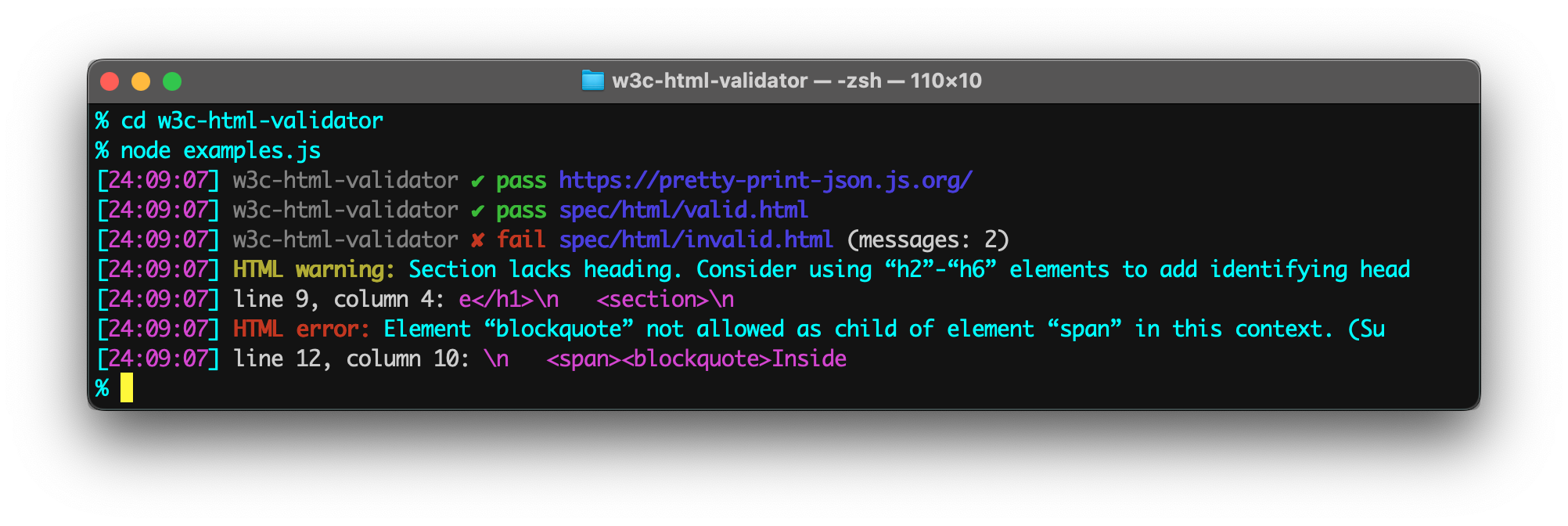
To see some example validation results, run the commands:
$ cd w3c-html-validator
$ node examples.js
<img src=https://raw.githubusercontent.com/center-key/w3c-html-validator/main/examples.png
width=800 alt=screenshot>
C) Options
w3cHtmlValidator.validate(options)
html | string | null | HTML string to validate. |
filename | string | null | HTML file to validate. |
website | string | null | URL of website to validate. |
checkUrl | string | 'https://validator.w3.org/nu/' | W3C validation API endpoint. |
ignoreLevel | 'info' or 'warning' | null | Skip unwanted messages.* |
ignoreMessages | string or regex | null | Skip messages containing a string or matching a regular expression.* |
output | 'json' or 'html' | 'json' | Get results as an array or as a web page. |
*The ignoreMessages and ignoreLevel options only work for 'json' output.
Option value 'warning' also skips 'info'.
w3cHtmlValidator.reporter(options)
maxMessageLen | number | null | Trim validation messages to not exceed a maximum length. |
quiet | boolean | false | Suppress messages for successful validations. |
title | string | null | Override display title (useful for naming HTML string inputs). |
D) TypeScript Declarations
The TypeScript Declaration File file is w3c-html-validator.d.ts
in the dist folder.
The output of the w3cHtmlValidator.validate(options: ValidatorOptions) function is a promise
for ValidatorResults object:
type ValidatorResults = {
validates: boolean,
mode: 'html' | 'filename' | 'website';
html: string | null,
filename: string | null,
website: string | null,
output: 'json' | 'html',
status: number,
messages: ValidatorResultsMessage[] | null,
display: string | null,
};
E) Mocha Example
import assert from 'assert';
import { w3cHtmlValidator } from 'w3c-html-validator';

describe('Home page', () => {
   it('validates', (done) => {
      const handleResults = (results) => {
         assert(results.status === 200, 'Request succeeded');
         assert(results.validates, 'Home page validates');
         done();
         };
      const options = { filename: 'docs/index.html' };
      w3cHtmlValidator.validate(options).then(handleResults);
      });
   });
F) Command Line
You can install w3c-html-validator globally and then run it anywhere directly from the terminal.
Example terminal commands:
$ npm install --global w3c-html-validator
$ html-validator
$ html-validator docs
$ html-validator docs/*.html flyer.html
$ html-validator docs --quiet
$ html-validator docs --trim=30
or as an npm script in package.json:
   "scripts": {
      "validate":   "html-validator docs/*.html flyer.html",
      "one-folder": "html-validator docs",
      "all":        "html-validator --quiet"
   },
Passing no parameters defaults to validating all HTML files in the project (skipping the
node_modules folder).
Build Tools
- 🎋 add-dist-header: Prepend a one-line header comment (with license notice) to distribution files
- 📄 copy-file-util: Copy or rename a file (CLI tool designed for use in npm scripts)
- 📂 copy-folder-cli: Recursively copy a folder (CLI tool designed for use in npm scripts)
- 🚦 w3c-html-validator: Check the markup validity of HTML files using the W3C validator
Feel free to submit questions at:
github.com/center-key/w3c-html-validator/issues
MIT License