


Security News
CVE Volume Surges Past 48,000 in 2025 as WordPress Plugin Ecosystem Drives Growth
CVE disclosures hit a record 48,185 in 2025, driven largely by vulnerabilities in third-party WordPress plugins.
By Sarah Gooding - Jan 09, 2026



$ npm install wave.io
<script src="https://cdn.jsdelivr.net/wave.io/latest/wave.io.min.js"></script>
wave.io.min.js in your project<script src="Path/To/wave.io.min.js"></script>
bower install wave.io
wave.io is a lightweight client-side, syntactic-sugar JS library that wraps the browser's WebSocket API with a familiar http-like syntax. In other words wave gives you the feeling of using the regular http functions that you love and know, and at the same time it uses WebSocket instead of HTTP to transmit the data to the server. All these gives wave some "BOOM!" performance, when it comes to send and receive data from your server (see benefits).
At the Client: (using wave.io)
<script src="/wave.io/wave.io.min.js"></script>
<script>
    http.seturl("localhost:8080");
    http.get("/getest", function (data) {
        console.log(data);
    });
    http.post("/postest",{wave:"Is Awesome"},function(data){
        console.log(data);
    });
</script>
Node.JS server example: (using wave.io-nodejs)
var http = require('http');
var server = http.createServer(function(req, res){ }).listen(8080);
var router = require('wave.io-server')(server);
router.post('/postest',function(req,res){
    console.log(req.data);
    res.send('Ya I Know');
});
The flow of this example:
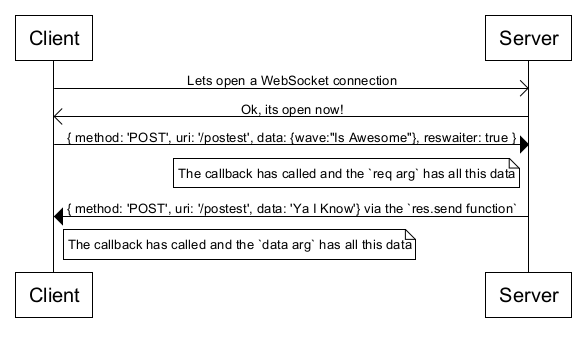
Wave.io exposes an http object to the main scope of your application so you can use it wherever you want.
This object is the core of Wave as it contains most of the well-knowen HTTP verbs (GET,POST,PUT,DELETE) in the form of functions with callbacks.
The seturl function open the ws:// connection to the server in order to transmit the data you send to the server.
NOTE: In order to wave to work properly
- You must call http.seturl() function.
- The url string must represent a server that listening for WebSocket connections.
The get function sends this JSON schema (as a string) to the server:
{ method: 'GET', uri: '/path-arg', data: '', reswaiter: true }
The post function sends this JSON schema (as a string) to the server:
{ method: 'POST', uri: '/path-arg', data: 'data-arg', reswaiter: true }
The put function sends this JSON schema (as a string) to the server:
{ method: 'PUT', uri: '/path-arg', data: 'data-arg', reswaiter: true }
The delete function sends this JSON schema (as a string) to the server:
{ method: 'DELETE', uri: '/path-arg', data: 'data-arg', reswaiter: true }
wave.io designed to make a ws connection to the server and transmit your data in the form of a JSON schema look like this:
{ method: 'Method', uri: '/SomePath', data: 'SomeData', reswaiter: true }
method :The HTTP verb of the request (String).uri :The relative path of the request (String).data :The data to transmit (Any DataType).reswaiter:Represent whether the callback arg is used or not (Boolean).This means, that in order to return data to the callback on the client, wave demands that the response from the server will be the same JSON schema with the same method and uri values.
TIP: If your using Node, you might wanna take a look on wave.io-nodejs, which simplifies all the work with wave on the server side.
As you all know HTML5 WebSocket represents a major upgrade in the history of web communications. Before WebSocket, all communication between web clients and servers relied only on HTTP. Now, dynamic data can flow freely over WebSocket connections that are persistent (always on), full duplex (simultaneously bi-directional) and blazingly fast!.
If you wanna contribute to wave, You can help with server side module like wave.io-nodejs,
which implements the principles from here, for other languages like (C#, Java, PHP, Ruby, Python, Perl).
Your more then welcome to email me any time Rannn505@outlook.com
wave using the awesome reconnecting-websocket of joewalnes.
Don't forget a Star :)

MIT wave.io project (c)2016 Ran Cohen
FAQs
The fastest communication via WebSocket using a familiar HTTP syntax
We found that wave.io demonstrated a not healthy version release cadence and project activity because the last version was released a year ago. It has 1 open source maintainer collaborating on the project.
Did you know?

Socket for GitHub automatically highlights issues in each pull request and monitors the health of all your open source dependencies. Discover the contents of your packages and block harmful activity before you install or update your dependencies.
Security News
CVE disclosures hit a record 48,185 in 2025, driven largely by vulnerabilities in third-party WordPress plugins.

Security News
Socket CEO Feross Aboukhadijeh joins Insecure Agents to discuss CVE remediation and why supply chain attacks require a different security approach.

Security News
Tailwind Labs laid off 75% of its engineering team after revenue dropped 80%, as LLMs redirect traffic away from documentation where developers discover paid products.