XML Digester
Maps Xml to JavaScript objects while allowing you to influence the conversion. Thereby some unusual Xml documents can be mapped with ease.
Disclaimer
This is my first node module and I have never really programmed in JavaScript before. So be warned. If you do not need the features of this converter, you should probably use one of the alternatives
Why yet another Xml-to-JavaScript mapper?
I had an Xml I needed to convert with an unusual charcteristic:
<nodes>
<crossing/>
<street/>
<cross-walk/>
<street/>
<end-of-town/>
</nodes>
I needed to preserve the order of the 'nodes' ("crossing", "street", etc.):
{ nodes: [ {name:"crossing"}, {name:"street"}, ... ] }
But none of the converters I tried (see below alternatives), allowed me to do that. If the nodes were of the same name they would automatically be collected into an array:
<nodes>
   <node kind="crossing"/>
   <node kind="street"/>
   <node kind="cross-walk"/>
   <node kind="street"/>
   <node kind="end-of-town"/>
</nodes>
which would result in
{ nodes: { node: [ { kind: 'crossing' }, { kind: 'street' }, ... ] } }
but I didn't want to create a stylesheet that first transformed these documents.
There are other mappers like xmldom that create a whole Dom tree, but I wanted something simpler and something that could easily be extended by someone else.
Basic usage
var xml_digester = require("xml-digester");
var digester = xml_digester.XmlDigester({});
var xml = "<root>"
+ "<foo>foo1</foo>"
+ "<bar>bar1></bar>"
+ "<foo>foo2</foo>"
+ "</root>"
digester.digest(xml, function(err, result) {
if (err) {
console.log(err);
} else {
console.log(result);
}
})
This is the normal mapping behaviour, which all other converters offer. So it should be possible to simply replace your existing mapper with xml-digester.
Advanced usage
If you need to influence the mapping you can declare that certain Xml elements should be converted by a special handler. The declaration supports a very minimal subset of XPath:
foo matches all 'foo' elementsbar/foo matches all 'foo' elements which have a 'bar' element as parentbar//foo matches all 'foo' elements which have a 'bar' element as ancestor/bar//foo matches all 'foo' elements which have a 'bar' element as root elementbar/* matches all elements which have a 'bar' element as parentbar/*/foo matches all 'foo' elements which have a 'bar' element as grand parent
There are three predefined handlers.
- The SkipElementsHandler (
xml_digester.SkipElementsHandler) that just removes elements (and their child elements)
- The OrderElementsHandler (
xml_digester.OrderedElementsHandler) that is used to preserve the order of elements (see Why ...)
- And the DefaultHandler (
xml_digester.DefaultHandler), which is used normally but which can be used by another handler as well
To use the handler you have to set it as an option to the digester:
var xml_digester = require("../lib/xml-digester");
var handler = new xml_digester.OrderedElementsHandler("kind");
var options = {
"handler": [
{ "path": "nodes/*", "handler": handler}
]};
var digester = xml_digester.XmlDigester(options);
var xml = "<nodes>"
+ "<crossing/><street/><cross-walk/><street/><end-of-town/>"
+ "</nodes>"
digester.digest(xml, function(err, result) {
if (err) {
} else {
console.log(result);
}
})
Since the name of the nodes should preserved, you can define a property-name (in the above example it is 'kind'). The Xml Element name will then be stored in the JavaScript object in that property.
If you do not give a property-name, the '_name' property will be used. But this property is not 'enumerable', i.e. Object.keys(node) will not list the '_name' property.
If there are multiple paths that match a given Xml element, the handler of the first matching path in the 'handler' array will be used.
Create your own handler
You can create your own handler, if you understand some of the inner workings of the XmlDigester. For now I would advise you not to do that, because the API might change.
The handler API
Each handler must (currently) implement the following functions:
onopentag(node, digester)
The DefaultHandler
- pushes the current object on the object stack (
digester.object_stack)
- creates a new object based on the attributes of the element and ...
- ... makes that object the current object (
digester.current_object)
onclosetag(node_name, digester)
The DefaultHandler
- gets the parent object from the object stack (
digester.object_stack)
- If the current node has no children and no attributes but some text content, then the text will be used as current object
- assigns the current object to a property (using the "node_name" as property name)
- if there already is a property with that name, an array will be created that contains the previous and the new object (every following object with the same name will simply be added to the array)
- reinstates the parent object as the current object
The easiest way to write a new handler is to reuse the DefaultHandler and to use it as delegate:
function MyHandler() {
this.defaultHandler = new xml_digester.DefaultHandler();
}
MyHandler.prototype.onopentag = function(node, digester) {
this.defaultHandler.onopentag(node, digester);
}
MyHandler.prototype.onclosetag = function(node_name, digester) {
var parent_object = digester.object_stack.pop();
this.defaultHandler.textifyCurrentObject(digester);
parent_object[digester.current_object.name] = digester.current_object.content;
digester.current_object = parent_object;
}
In the above example only the onclosetag function is adapted. The XML may look
like:
<root>
  <bar name="bar1"><content>some_text</content></bar>
  <bar name="bar2"><content>some_other_text</content></bar>
</root>
Normally the object would be:
{ root:
   { bar:
      [ { name: 'bar1', content: 'some_text' },
        { name: 'bar2', content: 'some_other_text' } ] } }
The above handler gets rid of the "bar" property and directly assign the 'bar' elements to the root object using their "name" as property-name in the root object and the "content" as value.
{ root: { bar1: 'some_text', bar2: 'some_other_text' } }
Logging/Debugging
This module contains a very simple debugging mechanism that allows you to inspect the inner workings.
var _logger = xml_digester._logger;
_logger.level(_logger.TRACE_LEVEL);
The following logging level are supported
_logger.ERROR_LEVEL
_logger.WARN_LEVEL
_logger.INFO_LEVEL
_logger.DEBUG_LEVEL
_logger.TRACE_LEVEL
If you look at logging in examples/basic-example.js you should see something like
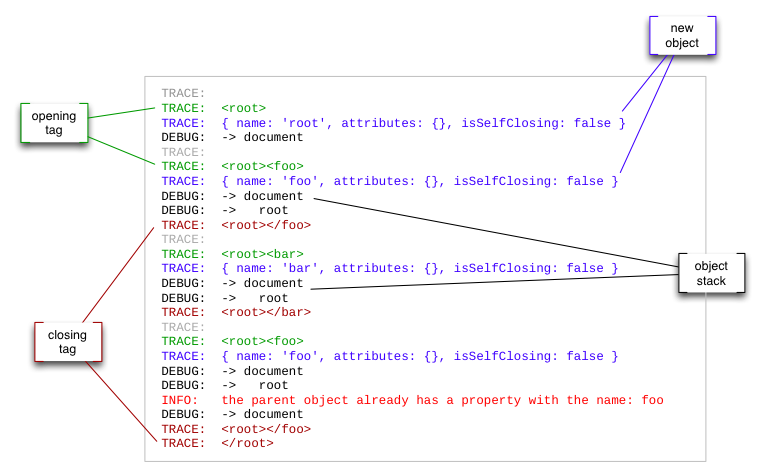
You can see
-
all the opening tags (with their parent tags), e.g <root><foo>
-
each current element as returned by sax-js: { name: 'root', attributes: {}, isSelfClosing: false }
-
all the closing tags (with their parent tags), e.g <root></foo>
-
and the current object stack:
DEBUG:  -> document
DEBUG:  ->   root
the object stack always contains a top level element 'document' and will normally directly correspond to the Xml element hierarchy, but if you manipulate the object stack (as the OrderedElementsHandler does) the stack might look completely different.
This logging should really help you, when you try to develop your own handler.
TODOs
- Handling of CDATA
- Some handling of Namespaces
- Forwarding of any sax-js options
- Using Buffers as well as Strings
- Using Streams
Alternatives
xml2json
xml2js
libxml-to-js
xml-object-stream
xmldom
xml-stream
xml-mapping
node-xml
The above are the ones I tried. See
https://github.com/joyent/node/wiki/modules#wiki-parsers-xml
for the full list.
Dependencies
The Xml Digester is based on Issac Schlueter's sax-js.
That library also works in the browser! It would be great if anyone
were willing to test Xml Digester in the browser and send me a pull request ...





