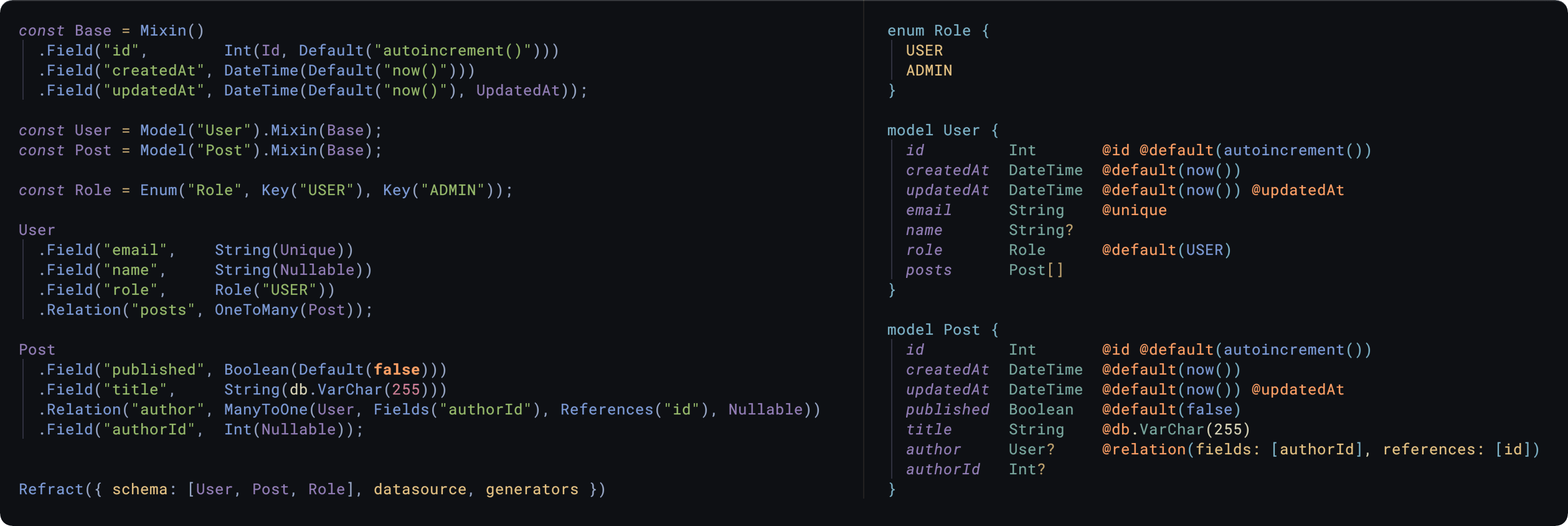
zen-stack-ts

Generate ZenStack from TypeScript, based on Refract.
Installation
npm i -D zen-stack-ts
yarn add -D zen-stack-ts
Usage
See here for a full demo.
Use the ZenStackTs default export of this package to generate a Prisma file.
import ZenStackTs from 'zen-stack-ts';
import { Roles, User, Posts } from './models';
ZenStackTs({
schema: [Roles, User, Posts],
datasource: {
provider: 'postgresql',
url: 'env("DATABASE_URL")',
shadowDatabaseUrl: 'env("DATABASE_SHADOW_URL")',
referentialIntegrity: 'prisma',
},
generators: [
{
provider: 'prisma-client-js',
previewFeatures: ['referentialIntegrity'],
engineType: 'library',
binaryTargets: ['native'],
},
],
output: path.join(process.cwd(), 'schema.prisma'),
});
A command like npx ts-node schema.ts will run this TypeScript code & generate
the resulting Prisma file at the output path.
Models
const User = Model('User', 'This is an optional comment');
User.Field('id', Int(Id, Default('autoincrement()')), 'The primary key');
Model uses a fluid interface, so you can chain the following methods:
.Field(name, scalar): Add a scalar column to a Model.Relation(name, relation): Add a relationship to a Model.Block(compound): Add a block field, e.g. @@id, @@unique, @@map.Mixin(mixin): Inherit columns from a Mixin for compositional Models.Raw(value): Escape hatch into writing raw Prisma
Scalars
Scalars are the types of data that the column contains, Int, String
etc. You can define & re-use Scalars wherever in your models
const PrimaryKey = Int(Id, Default('autoincrement()'));
m.Field('id', PrimaryKey);
Modifiers
Modifiers are functions/objects that append attributes to a column e.g.
String(Default('Hello World'), Nullable);
Int(Id, Unique, Default('autoincrement()'));
DateTime(Default('now()'), UpdatedAt);
Certain modifiers are constrained to certain scalars, the mapping is:
String: Unique, Id, Default(string | 'auto()'), Limit(number)Int: Unique, Id, Default('cuid' | 'autoincrement()' | 'uuid()' | number)Float: Unique, Default(number)BigInt: Unique, Default(BigInt)Bytes: UniqueDecimal: UniqueBoolean: UniqueDateTime: Default('now()'), UpdatedAtUnsupported
Additionally all scalars can use: Nullable, Map, Ignore, Raw & Array modifiers.
The Raw() modifier can be used as an escape hatch:
String(Raw('@db.ObjectId'));
@db attributes
Currently there's support for mysql, postgresql, cockroachdb & mongodb @db
attributes, and can be used like all the other modifiers.
import { MySql as db } from 'zen-stack-ts';
m.Field('email', String(db.VarChar(255)));
Check src/public/db/mysql.ts (mongo.ts/postgresql.ts/cockroach.ts) for list of mappings between scalar types &
attributes.
Relationships
OneToMany (model, name?, ...modifiers)
OneToOne (model, name?, fields, references, ...modifiers)OneToOne (model, name?, ...modifiers)
- Nullable, OnUpdate(Action), OnDelete(Action)
ManyToOne (model, name?, fields, references, ...modifiers)
- Nullable, OnUpdate(Action), OnDelete(Action)
Where Action is one of: Cascade, Restrict, NoAction, SetNull, SetDefault
Examples
OneToOne
const User = Model('User');
const Something = Model('Something');
Something
.Field('id', PrimaryKey)
.Field('userId', Int())
.Relation('user', OneToOne(User, Fields('userId'), References('id')));
User
.Field('id', PrimaryKey)
.Relation('thingy', OneToOne(Something));
Implicit ManyToMany
https://www.prisma.io/docs/concepts/components/prisma-schema/relations/many-to-many-relations#implicit-many-to-many-relations
const Post = Model('Post');
const Category = Model('Category');

Post
  .Field('id',            Int(Id, Default('autoincrement()')))
  .Relation('categories', OneToMany(Category));

Category
  .Field('id',            Int(Id, Default('autoincrement()')))
  .Relation('posts',      OneToMany(Post));
The 2nd parameter of the Relation can be a string & explicitly denote the name
of the relation.
m.Relation(
'pinnedBy',
OneToOne(
User,
'PinnedPost',
Fields('pinnedById'),
References('id'),
Nullable,
),
);
Referentials Actions
OnUpdate & OnDelete modifiers can be used as follows:
m.Relation(
'tag',
ManyToOne(
Fields('tagId'),
References('id'),
OnUpdate('Cascade'),
OnDelete('Cascade'),
Nullable,
),
);
Enums
Composed of two parts:
Enum(name, comment?, ...Key)Key(value, ...modifiers, comment?)
const Animal = Enum(
'Animal',
Key('Seacow'),
Key('Capybara'),
Key('Otter', Map('otter')),
);
model
.Field('fave', Animal('Seacow'))
.Field('null', Animal());
const WithComment = Enum(
"Foo", "This is with a comment",
Key("Bar", "Another comment")
);
Blocks
Used for adding fields like @@map, @@id, @@fulltext etc.
import { Compound, Mongo as db } from 'zen-stack-ts';
model
.Field('id', Int(Id, Default('autoincrement()')))
.Field('authorId', Int())
.Relation('author', ManyToOne(User, Fields('authorId'), References('id')))
.Block(Compound.Id('id', 'authorId'));
Model('User')
.Field('id', String(Id, db.ObjectId, Map('_id')))
.Block(Compound.Map('users'));
Mixins
Allows you to re-use groups of fields, compositional models.
const Timestamps = Mixin()
.Field('createdAt', DateTime(Default('now()')))
.Field('updatedAt', DateTime(Nullable, UpdatedAt));
const User = Model('User').Field('id', PrimaryKey).Mixin(Timestamps);
Programmatic usage
const prisma = ZenStackTs.generate({
datasource: {...},
generators: [...],
schema
})
console.log(prisma);
Handling circular relationships
At some point you'll want to split the schema across files, which introduces issues with circular relationships when you're importing for .Relation()s in Node
One way to get around this is to have a file with all the models/enums defined, and have files import those & apply the fields, e.g.
const User = Model("User");
const Post = Model("Posts");
import { User, Post } from './models'
User
.Field("id", Int(Id, Default("autoincrement()")))
.Relation("posts", OneToMany(Post))
import { User, Post } from './models'
Post
.Field("id", Int(Id, Default("autoincrement()")))
.Field("authorId", Int())
.Relation("author", ManyToOne(User, Fields("authorId"), References("id")))
import * as schema from './models'
import "./posts";
import "./users";
ZenStackTs({
datasource: {...},
generators: [...],
schema
})