


Security News
Feross on TBPN: How North Korea Hijacked Axios
Socket CEO Feross Aboukhadijeh breaks down how North Korea hijacked Axios and what it means for the future of software supply chain security.
By Sarah Gooding - Apr 08, 2026

Zero configuration web framework.
Features | Installation | Getting Started | Examples | Docs

Zero is a web framework to simplify modern web development. It allows you to build your application without worrying about package management or routing. It's as simple as writing your code in a mix of Node.js, React, HTML, MDX, Vue, Svelte, Python, and static files and putting them all in a folder. Zero will serve them all. Zero abstracts the usual project configuration for routing, bundling, and transpiling to make it easier to get started.
An example project with different types of pages, all in one folder:
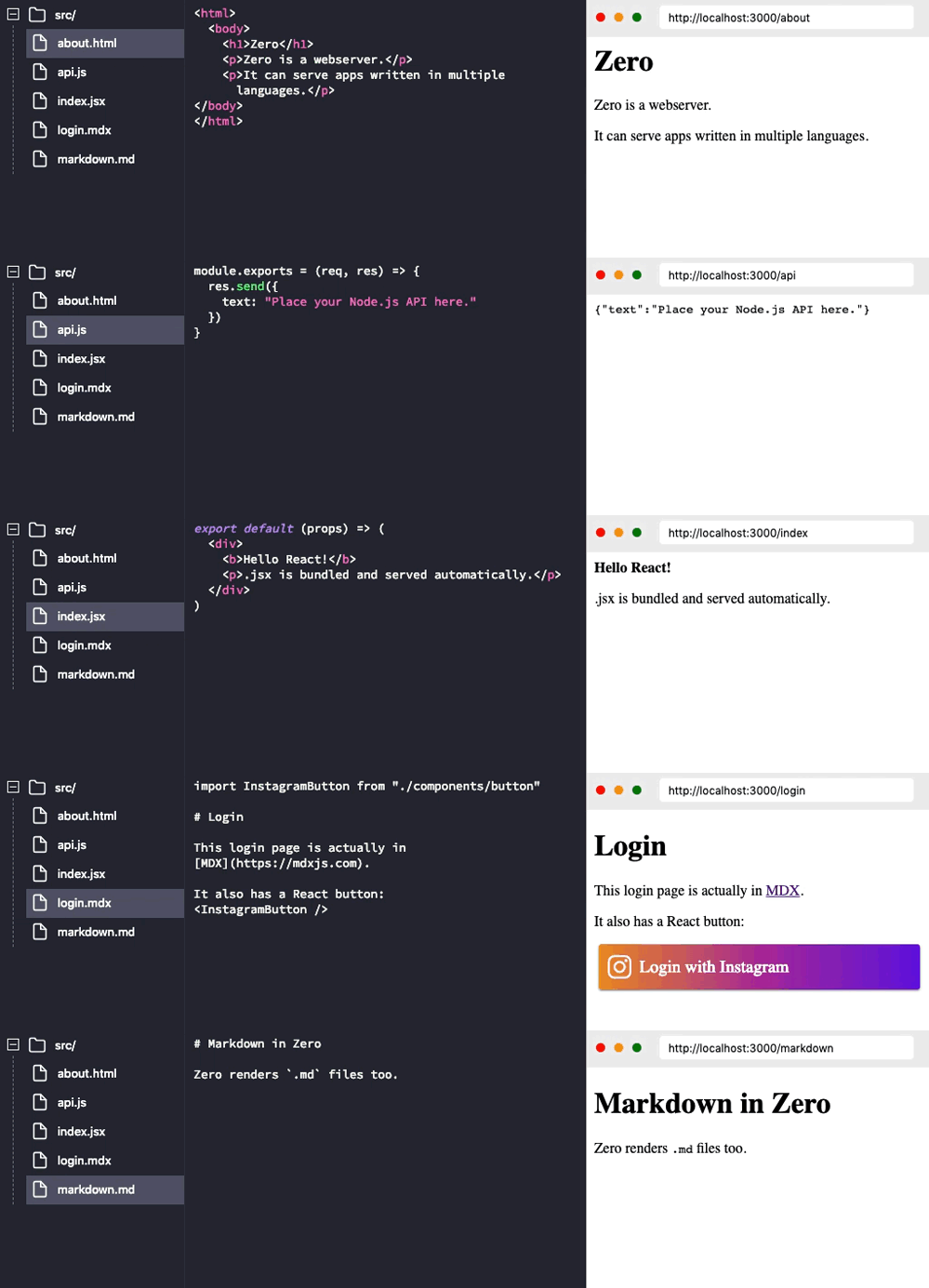
Auto Configuration: Your project folder doesn't require config files. You just place your code and it's automatically compiled, bundled and served.
File-system Based Routing: If your code resides in ./api/login.js it's exposed at http://<SERVER>/api/login. Inspired by good ol' PHP days.
Auto Dependency Resolution: If a file does require('underscore'), it is automatically installed and resolved. You can always create your own package.json file to install a specific version of a package.
Multiple Languages: Zero is designed to support code written in many languages all under a single project. Imagine this:
All under a single project folder as a single web application.
You can play with Zero without installing it locally. Click the button below:

You can install zero globally by:
npm install -g zero
Let's start by making a website that tells us server time.
First we need to create an API endpoint in Node.js to tell us time in JSON.
Create a new folder and add a new file time.js in that folder. In this file, export a function that accepts Request and Response objects (like Express):
// time.js
const moment = require("moment");

module.exports = (req, res) => {
  var time = moment().format("LT"); // 11:51 AM
  res.send({ time: time });
};
Once saved, you can cd into that folder and start the server like this:
zero
Running this command will automatically install any dependencies (like momentjs here) and start the web server.
Open this URL in the browser: http://localhost:3000/time
You just created an API endpoint 🎉:

Keep the server running. Now let's consume our API from a React page, create a new file index.jsx and add the following code:
// index.jsx
import React from "react";

export default class extends React.Component {
  static async getInitialProps() {
    var json = await fetch("/time").then(resp => resp.json());
    return { time: json.time };
  }

  render() {
    return <p>Current time is: {this.props.time}</p>;
  }
}
This is a standard React component. With one additional hook for initial data population:
getInitialProps is an async static method which is called by zero when the page loads. This method can return a plain object which populates props.
Now go to this URL: http://localhost:3000/ and you should see the current server time rendered by React while fetch-ing an API endpoint you created earlier:

zero automatically bundles your code and supports server-side rendering. You don't need to fiddle with webpack anymore.
That's it! You just created a web application.
If a file does require('underscore'), the latest version of that package is automatically installed from NPM and resolved.
But sometimes you want to use a specific version or a dependency from a private repository. You can do that by creating a package.json in your project folder and adding dependencies to it. Zero will install those versions instead.
Example (package.json):
{
  "name": "myapp",
  "dependencies": {
    "underscore": "^1.4.0",
    "private_ui_pkg": "git+https://github.com/user/repo.git"
  }
}
Please see our CONTRIBUTING.md
Zero is Apache-2.0 licensed.
FAQs
Zero Server Zero configuration web framework.
The npm package zero receives a total of 142 weekly downloads. As such, zero popularity was classified as not popular.
We found that zero demonstrated a not healthy version release cadence and project activity because the last version was released a year ago. It has 1 open source maintainer collaborating on the project.
Did you know?

Socket for GitHub automatically highlights issues in each pull request and monitors the health of all your open source dependencies. Discover the contents of your packages and block harmful activity before you install or update your dependencies.
Security News
Socket CEO Feross Aboukhadijeh breaks down how North Korea hijacked Axios and what it means for the future of software supply chain security.

Security News
OpenSSF has issued a high-severity advisory warning open source developers of an active Slack-based campaign using impersonation to deliver malware.

Research
/Security News
Malicious packages published to npm, PyPI, Go Modules, crates.io, and Packagist impersonate developer tooling to fetch staged malware, steal credentials and wallets, and enable remote access.