Welcome to FormCMS! 🚀

Our mission is to make data modeling, backend development, and frontend development as simple and intuitive as filling out a form 📋
We’d love for you to contribute to FormCMS! Check out our CONTRIBUTING guide to get started.
Love FormCMS? Show your support by giving us a ⭐ on GitHub and help us grow! 🌟
Have suggestions? Report an Issue.
What is FormCMS?
FormCMS is an open-source Content Management System designed to simplify and accelerate web development workflows for CMS projects and general web applications. It streamlines data modeling, backend development, and frontend design, making them as intuitive as filling out a form. With a focus on fostering user engagement, FormCMS provides robust social features alongside powerful tools for data management, API development, and dynamic page creation.
Key Features
1. Data Modeling and CRUD with RESTful APIs
FormCMS offers intuitive data modeling and built-in RESTful APIs for Create, Read, Update, and Delete (CRUD) operations. These are complemented by a React-based admin panel, enabling seamless data management for developers and content creators alike.
2. GraphQL Queries and Grapes.js Page Designer
Harness the power of GraphQL to fetch multiple related entities in a single query, enhancing client-side performance, security, and flexibility. The integrated Grapes.js page designer, powered by Handlebars, allows effortless creation of dynamic, data-bound pages, simplifying the design process.
3. Rich Social Engagement Features
FormCMS enhances user interaction with built-in social capabilities:
- Likes, Shares, and Saves: Users can engage with content by liking, sharing, or saving it, with the system tracking view counts for analytics.
- User Portal: A personalized portal allows users to access their interaction history, view liked and saved content, and manage their bookmarks, fostering deeper engagement.
- Notifications: Users receive real-time alerts for actions like comment likes or replies, boosting interactivity.
- Comments: A YouTube-inspired commenting system encourages community interaction and discussion.
- Popular Score: A dynamic metric ranks content based on views, likes, shares, and recency, powering trending sections and personalized feeds.
4. Additional Features for Enhanced Functionality
- Video Processing: Converts MPEG files to HLS format for seamless streaming, managed by a dedicated plugin.
- Payment Integration: Supports subscription-based access to all content or one-time purchases for individual items.
- Authentication: Built on the ASP.NET Core Identity Framework, with flexible options for customization or replacement.
By combining robust CMS functionality with a strong emphasis on social engagement, FormCMS empowers developers to create interactive, scalable, and user-centric web applications with ease.
New CMS? — Data Modeling
Data Modeling in Current CMS Solutions
Most CMS solutions support entity customization and adding custom properties, but they implement these changes in three distinct ways:
- Denormalized Key-Value Storage: Custom properties are stored in a table with columns like ContentItemId, Key, and Value.
- JSON Data Storage: Some CMS platforms store custom properties as JSON data in a document database, while others use relational databases.
- Manually Created C# Classes: Writing code adds custom properties to create classes that the system uses with Entity Framework.
The Pros and Cons:
- Key-Value Storage: This approach offers flexibility but suffers from performance inefficiencies and lacks relational integrity.
- Document Database: Storing data as documents lacks a structured format and makes data integrity harder to enforce.
- C# Classes: While my preferred method, it lacks flexibility. Any minor changes require rebuilding and redeploying the system.
Data Modeling with FormCMS
In contrast, FormCMS adopts a normalized, structured data approach, where each property is mapped to a corresponding table field:
- Maximized Relational Database Functionality: By leveraging indexing and constraints, FormCMS enhances performance and ensures data integrity.
- Data Accessibility: This model allows for easy data integration with other applications, Entity Framework, or even non-C# languages.
- Support for Relationships: FormCMS enables complex relationships (many-to-one, one-to-many, many-to-many), making it easy to provide GraphQL Query out of the box and provide more advanced querying capabilities.
New CMS? — GraphQL Issues
Key Challenges
- Security & Over-Fetching – Complex or poorly optimized queries can overload the backend, exposing vulnerabilities and impacting performance.
- Caching Limitations – GraphQL lacks built-in CDN caching, making performance optimization harder.
- N+1 Query Problem – Individual resolver calls can lead to inefficient database queries.
Solution: Persisted Queries with GET Requests
Many GraphQL frameworks support persisted queries with GET requests, enabling caching and improved performance.
How FormCMS Solves These Issues
FormCMS automatically saves GraphQL queries and converts them into RESTful GET requests. For example:
query TeacherQuery($id: Int) {
teacherList(idSet: [$id]) {
id firstname lastname
skills { id name }
}
}
becomes GET /api/queries/TeacherQuery.
- Security & Efficiency – Only Admins can define GraphQL queries, preventing abuse. Backend and frontend teams optimize queries to avoid excessive data requests.
- Caching – GET requests enable efficient CDN caching, while ASP.NET Core’s hybrid cache further boosts performance.
- Performance – Related entities are retrieved in a single optimized query, avoiding the N+1 problem.
By transforming GraphQL into optimized REST-like queries, FormCMS ensures a secure, efficient, and scalable API experience.
Online Course System Demo
Live Demo
Additional Resources
Examples Source Code
example code can be found at /formCMS/examples
- for Sqlite: run the SqliteDemo project
- for SqlServer: run the SqlServerDemo/SqlServerAppHost project
- for PostgreSQL : run the PostgresDemo/PostgresAppHost project
- for Mysql : run the MysqlDemo/MysqlAppHost project
Defult login:
- Eamil :
samdmin@cms.com
- Password:
Admin1!
After login to Admin Panel, you can go to Tasks, click Import Demo Data, to import demo data.
Performance, Scalability & Reusability
FormCMS is designed with performance, scalability, and extensibility as core principles.
Design Objectives
FormCMS was built to address three critical concerns for modern CMS platforms:
1. Performance
- P95 latency under 200ms for the slowest APIs
- Throughput over 1,000 QPS per application node
- Support for complex queries (5-table joins over 1M rows)
- Efficient handling of large tables (100M+ records for user activities)
2. Scalability
- Handle millions of posts and users
- Support billions of user activities (views, likes, shares)
- Horizontal scaling for high-volume features
- CDN-friendly architecture for content delivery
3. Extensibility & Reusability
- Distributed as a NuGet package for easy integration
- Hook system for custom business logic
- Message broker for event-driven architecture
- Modular design with isolated features
Performance Benchmarks
FormCMS achieves performance comparable to specialized GraphQL engines while maintaining full CMS functionality.
Test Environment
- PostgreSQL + App Server (4 CPU, 4GB RAM each)
- Tables: post (1M), post_tag (3M), tag (100K), post_cat (2M), category (10K)
Query Performance Comparison
| FormCMS | 48 ms | 2,400 QPS | 55 ms | 2,165 QPS |
| Hasura | 48 ms | 2,458 QPS | 53 ms | 2,056 QPS |
| Orchard Core | 2.3 s | 30 QPS | — | — |
High-Volume Activity Data (100M rows)
| Read operations | 187 ms | ~1,000 QPS |
| Buffered writes | 19 ms | ~4,200 QPS |
Performance Optimization Strategies
1. Normalized Data Modeling
Most CMS platforms use key-value storage or JSON documents for flexibility, sacrificing performance. FormCMS takes a different approach:
Traditional CMS (Key-Value Storage):
+------------------+
| ContentItemId    |
| PropertyName     |  ← No indexes, slow joins
| PropertyValue    |
+------------------+

FormCMS (Normalized Tables):
+------------------+
| id               |  ← Primary key
| title            |  ← Indexed
| publishedAt      |  ← Indexed
| categoryId       |  ← Foreign key
+------------------+
Benefits:
- Leverages database indexes for fast queries
- Maintains referential integrity
- Enables efficient joins and complex queries
- Standard SQL tools work out of the box
2. Intelligent Caching Strategy
Schema Caching:
- Entity and query definitions cached in memory
- Hybrid cache (local + distributed) for multi-node setups
- 20-second local expiration for consistency
- Automatic invalidation on schema changes
Data Caching:
- Output caching for query results and pages
- CDN-friendly GET requests for GraphQL queries
- Configurable expiration policies per query type
3. Write Buffering for High Volume
For user activity data (likes, views, shares):
- In-memory buffer collects writes for 1 minute
- Batch flush reduces database round trips
- ~30GB buffer handles 5,000 QPS for 10 minutes
- Result: 19ms P95 latency at 4,200+ QPS
4. Query Optimization
- Single optimized SQL query per GraphQL request
- Eliminates N+1 query problem
- Efficient JOIN strategies for related entities
- Unique key lookups to reduce redundant queries
Scalability Architecture
FormCMS separates cacheable CMS content from high-volume user data for independent scaling.
CMS Content (Scale via Caching)
CDN Layer
    ↓
App Nodes (with local cache)
    ↓
Distributed Cache (Redis)
    ↓
Primary Database
Characteristics:
- GraphQL queries converted to cacheable GET requests
- Static content served from CDN
- 1M posts × 10KB average = ~10GB cache size
- Easily handles hundreds of millions of monthly visits
User Activity Data (Scale via Sharding)
App Nodes
    ↓
Shard Router (MD5 hash by userId)
    ↓
+----------+  +----------+  +----------+
| Shard 1  |  | Shard 2  |  | Shard N  |
| ~100M    |  | ~100M    |  | ~100M    |
| records  |  | records  |  | records  |
+----------+  +----------+  +----------+
Characteristics:
- 1M users × 10K activities = 10B records
- Shard by userId for data locality
- ~100M records per shard (~200GB with indexes)
- Real-time updates (not cacheable)
- Linear scaling with additional shards
Scaling Example: News Portal
Using The New York Times scale (639M monthly visits):
- Static content: Served by CDN (no backend load)
- Dynamic queries: 4-10 app nodes handle thousands of QPS
- User activities: Sharded across multiple database servers
- Search: Dedicated FTS database with read replicas
Extensibility & Reusability
FormCMS is designed as a reusable framework rather than a standalone application.
NuGet Package Distribution
Install FormCMS in any ASP.NET Core project:
dotnet add package FormCMS
builder.Services.AddPostgresCms(connectionString);
builder.Services.AddCmsAuth<CmsUser, IdentityRole, CmsDbContext>(authConfig);
await app.UseCmsAsync();
Hook System for Custom Logic
Inject custom business logic at key lifecycle points:
hookRegistry.Register(HookPointType.EntityPreAdd, async (args, ct) => {
var entity = args.Entity;
var record = args.Record;
return Result.Ok();
});
hookRegistry.Register(HookPointType.EntityPostUpdate, async (args, ct) => {
return Result.Ok();
});
Available Hooks:
- Schema:
SchemaPreGetAll, SchemaPostSave
- Entity:
EntityPreAdd, EntityPostUpdate, EntityPreDel, EntityPostDel
- Query:
QueryPreList, QueryPostList
- Asset:
AssetPreAdd, AssetPostDelete
Message Broker Integration
Event-driven architecture for loosely coupled systems:
builder.Services.AddCrudMessageProducer(["course", "lesson"]);
public class CustomEventHandler : IHostedService
{
public async Task HandleCourseCreated(CourseCreatedEvent evt)
{
}
}
Benefits:
- Decouple features from core CMS
- Scale event processors independently
- Add new features without modifying core code
Module Isolation
Each feature owns its data and can be enabled/disabled independently:
builder.Services.AddCmsAuth<CmsUser, IdentityRole, CmsDbContext>(authConfig);
builder.Services.AddEngagement(enableBuffering: true, shardConfigs);
builder.Services.AddComments(commentShards);
builder.Services.AddNotify(notifyShards);
builder.Services.AddSearch(ftsProvider, connString);
builder.Services.AddSubscriptions();
builder.Services.AddVideo();
Benefits:
- No bloat from unused features
- Independent versioning and updates
- Easier testing and maintenance
Why This Matters
For Small Projects
- Start with single database, no sharding
- Leverage CDN for free global scaling
- Add features incrementally as needed
- Low operational complexity
For Medium Projects (100K - 1M users)
- Add Redis for distributed caching
- Enable write buffering for activities
- Use read replicas for database scaling
- Still manageable with small DevOps team
For Large Projects (1M+ users)
- Shard high-volume features across databases
- Multi-region CDN deployment
- Dedicated search infrastructure
- Scales to billions of records
For Developer Teams
- Reuse FormCMS across multiple projects
- Customize with hooks instead of forking
- Standard .NET ecosystem tools
- Clear separation between framework and business logic
Real-World Applicability
FormCMS architecture supports diverse use cases:
- News Portals: Handle millions of articles with CDN caching (e.g., NYT scale)
- Online Courses: Manage complex hierarchies with efficient queries (e.g., Udemy scale)
- Video Platforms: Process HLS video, track billions of views (e.g., YouTube-like features)
- E-commerce: Product catalogs with dynamic pricing and inventory
- Social Platforms: User-generated content with engagement tracking
The combination of normalized data modeling, intelligent caching, horizontal sharding, and modular architecture enables FormCMS to scale from prototype to production while maintaining developer productivity.
Online Course System Backend
This section provides detailed guidance on developing a foundational online course system, encompassing key entities: teacher, course, lesson,skill, and material.
Database Schema
1. Teachers Table
The Teachers table maintains information about instructors, including their personal and professional details.
id | ID | Int |
firstname | First Name | String |
lastname | Last Name | String |
email | Email | String |
phone_number | Phone Number | String |
image | Image | String |
bio | Bio | Text |
2. Courses Table
The Courses table captures the details of educational offerings, including their scope, duration, and prerequisites.
id | ID | Int |
name | Course Name | String |
status | Status | String |
level | Level | String |
summary | Summary | String |
image | Image | String |
desc | Description | Text |
duration | Duration | String |
start_date | Start Date | Datetime |
3. Lessons Table
The Lessons table contains detailed information about the lessons within a course, including their title, content, and associated teacher.
id | ID | Int |
name | Lesson Name | String |
description | Description | Text |
teacher | Teacher | Int (Foreign Key) |
course | Course | Int (Foreign Key) |
created_at | Created At | Datetime |
updated_at | Updated At | Datetime |
4. Skills Table
The Skills table records competencies attributed to teachers.
id | ID | Int |
name | Skill Name | String |
years | Years of Experience | Int |
created_by | Created By | String |
created_at | Created At | Datetime |
updated_at | Updated At | Datetime |
5. Materials Table
The Materials table inventories resources linked to courses.
id | ID | Int |
name | Name | String |
type | Type | String |
image | Image | String |
link | Link | String |
file | File | String |
Relationships
- Courses to Teachers: Man-to-One(Each teacher can teach multiple courses; each course is assigned to one teacher. A teacher can exist independently of a course).
- Teachers to Skills: Many-to-Many (Multiple teachers can share skills, and one teacher may have multiple skills).
- Courses to Materials: Many-to-Many (A course may include multiple materials, and the same material can be used in different courses).
- Courses to Lessons: One-to-Many (Each course can have multiple lessons, but each lesson belongs to one course. A lesson cannot exist without a course, as it has no meaning on its own).
Schema Creation via FormCMS Schema Builder
Accessing Schema Builder
After launching the web application, locate the Schema Builder menu on the homepage to start defining your schema.
Adding Entities
Example Configuration
- Navigate to the Entities section of the Schema Builder.
- Create entities such as "Teacher" and "Course."
- For the
Course entity, add attributes such as name, status, level, and description.
Defining Relationships
Example Configuration
1. Course and Teacher (Many-to-One Relationship)
To establish a many-to-one relationship between the Course and Teacher entities, you can include a Lookup attribute in the Course entity. This allows selecting a single Teacher record when adding or updating a Course.
| Field | teacher |
| DataType | Lookup |
| DisplayType | Lookup |
| Options | Teacher |
Description: When a course is created or modified, a teacher record can be looked up and linked to the course.
2 Course and Lesson(One-to-Many Relationship)
To establish a one-to-many relationship between the Course and Lesson entities, use a Collection attribute in the Course entity. This enables associating multiple lessons with a single course.
| Field | lessons |
| DataType | Collection |
| DisplayType | EditTable |
| Options | Lesson |
Description: When managing a course , you can manage lessons of this course.
3. Course and Materials (Many-to-Many Relationship)
To establish a many-to-many relationship between the Course and Material entities, use a Junction attribute in the Course entity. This enables associating multiple materials with a single course.
| Field | materials |
| DataType | Junction |
| DisplayType | Picklist |
| Options | Material |
Description: When managing a course, you can select multiple material records from the Material table to associate with the course.
Admin Panel
The last chapter introduced how to model entities, this chapter introduction how to use Admin-Panel to manage data of those entities.
Display Types
The Admin Panel supports various UI controls to display attributes:
-
"text": Single-line text input.
-
"textarea": Multi-line text input.
-
"editor": Rich text input.
-
"dictionary": Key-Value pairs
-
"number": Single-line text input for numeric values only.
-
"localDatetime": Datetime picker for date and time inputs, displayed as the browser's timezone.
-
"datetime": Datetime picker for date and time inputs.
-
"date": Date picker for date-only inputs.
-
"image": Upload a single image, storing the image URL.
-
"gallery": Upload multiple images, storing their URLs.
-
"file": Upload a file, storing the file URL.
-
"dropdown": Select an item from a predefined list.
-
"multiselect": Select multiple items from a predefined list.
-
"lookup": Select an item from another entity with a many-to-one relationship (requires Lookup data type).
-
"treeSelect": Select an item from another entity with a many-to-one relationship (requires Lookup data type), items are organized as tree.
-
"picklist": Select multiple items from another entity with a many-to-many relationship (requires Junction data type).
-
"tree": Select multiple items from another entity with a many-to-many relationship (requires Junction data type), items are organized as a tree.
-
"edittable": Manage items of a one-to-many sub-entity (requires Collection data type).
See this example how to configure entity category, so it's item can be organized as tree.
DataType to DisplayType Mapping Table
Below is a mapping of valid DataType and DisplayType combinations:
| Int | Number | Input for integers. |
| Datetime | LocalDatetime | Datetime picker for local datetime. |
| Datetime | Datetime | Datetime picker for date and time inputs. |
| Datetime | Date | Date picker for date-only inputs. |
| String | Number | Input for numeric values. |
| String | Datetime | Datetime picker for date and time inputs. |
| String | Date | Date picker for date-only inputs. |
| String | Text | Single-line text input. |
| String | Textarea | Multi-line text input. |
| String | Image | Single image upload. |
| String | Gallery | Multiple image uploads. |
| String | File | File upload. |
| String | Dropdown | Select an item from a predefined list. |
| String | Multiselect | Select multiple items from a predefined list. |
| Text | Multiselect | Select multiple items from a predefined list. |
| Text | Gallery | Multiple image uploads. |
| Text | Textarea | Multi-line text input. |
| Text | Editor | Rich text editor. |
| Text | Dictionary | Key-Value Pair |
| Lookup | Lookup | Select an item from another entity. |
| Lookup | TreeSelect | Select an item from another entity. |
| Junction | Picklist | Select multiple items from another entity. |
| Lookup | Tree | Select multiple items from another entity. |
| Collection | EditTable | Manage items of a sub-entity. |
List Page
Example Course List Page
The List Page displays entities in a tabular format, supporting sorting, searching, and pagination for efficient browsing or locating of specific records.
Sorting
Sort records by clicking the ↑ or ↓ icon in the table header.
Filtering
Apply filters by clicking the Funnel icon in the table header.
Duplicate
Clicking the duplicate button opens the "Add New Data" page with prefilled values from the selected record for quick entry.
Detail Page
Detail page provides an interface to manage single record.
Example of display types date,image, gallery, muliselect, dropdown,
Lesson Detail Page.
Example of lookup,picklist,edittable
Course Detail Page
Publish / Preview Content
This feature allows content creators to plan and organize their work, saving drafts for later completion.
Content Publication Status
Content can have one of the following publication statuses:
draftscheduledpublishedunpublished
Only content with the status published can be retrieved through GraphQL queries.
Setting Default Publication Status in the Schema Builder
When defining an entity in the Schema Builder, you can configure its default publication status as either draft or published.
Managing Publication Status in the Admin Panel
On the content edit page, you can:
- Publish: Make content immediately available.
- Unpublish: Remove content from public view.
- Schedule: Set a specific date and time for the content to be published.
Preview Draft/Scheduled/Unpublished Content
By default, only published content appears in query results.
If you want to preview how the content looks on a page before publishing, you can add the query parameter preview=1 to the page URL.
For a more convenient approach, you can set the Preview URL in the Entity Settings page.
Example Entity Settings Page
Once set, you can navigate to the Entity Management page and simply click the Preview button to view the content in preview mode.
Example Content Manage Page
Publication Worker
The Publication Worker automates the process of updating scheduled items in batches, transitioning them to the published status at the appropriate time.
Concurrent Update Protection
Protect user from dirty write(concurrent update)
How does it work?
Return the updated_at timestamp when fetching the item. When updating, compare the stored updated_at with the one in the request. If they differ, reject the update
When Is updatedAt Checked
- During updates
- During Deletions
If a concurrent modification is detected, the system will throw the following exception:
"Error: Concurrent Write Detected. Someone else has modified this item since you last accessed it. Please refresh the data and try again."
Audit Logging
Audit logging in FormCMS helps maintain accountability and provides a historical record of modifications made to entities within the system.
Audit Log Entity
An audit log entry captures essential information about each modification. The entity structure includes the following fields:
- UserId (string): The unique identifier of the user performing the action.
- UserName (string): The name of the user.
- Action (ActionType): The type of action (Create, update, Delete) performed.
- EntityName (string): The name of the entity affected.
- RecordId (string): The unique identifier of the record modified.
- RecordLabel (string): A human-readable label for the record.
- Payload (Record): The data associated with the action.
- CreatedAt (DateTime): The timestamp when the action occurred.
When Is Audit Log Added
An audit log entry is created when a user performs any of the following actions:
- Creating a new record.
- Updating an existing record.
- Deleting a record.
How to view Audit Log
Audit logs can be accessed and searched by users with appropriate permissions. The following roles have access:
These users can:
- View a list of audit logs.
- Search logs by user, entity, or action type.
- Filter logs by date range.
Benefits of Audit Logging
- Ensures transparency and accountability.
- Helps with troubleshooting and debugging.
- Provides insights into system usage and modifications.
- Supports compliance with regulatory requirements.
By maintaining a detailed audit trail, the System enhances security and operational efficiency, ensuring that all modifications are tracked and can be reviewed when necessary.
Asset Library
The Asset Library centralizes the management of uploaded assets (e.g., images, files), supporting both local and cloud storage. It enables reuse, optimizes storage, and provides robust permissions and extensibility for various cloud providers.
Overview
Assets are stored in a repository, each identified by a unique Path (e.g., 2025-03/abc123, where 2025-03 is a folder based on yyyy-MM and abc123 is a ULID) and a fixed Url (e.g., /files/2025-03/abc123 or a cloud-specific URL). Relationships to data entities are tracked via AssetLink records. The system supports local storage by default and integrates with cloud storage providers (e.g., Azure Cloud Storage) via the IFileStore interface. For images, uploads are resized to a default maximum width of 1200 pixels and a compression quality of 75, configurable in SystemSettings.
Core Features
Adding Assets to Data
In forms with image, file, or gallery fields, users can:
- Upload: Upload a new file via
IFileStore.Upload. The system generates a unique Path (e.g., 2025-03/abc123), sets a Url (local or cloud-based), and records metadata (Name, Size, Type, CreatedBy, CreatedAt). Images are resized (max width: 1200px, quality: 75) before saving to the chosen storage provider in the 2025-03 folder. A default Title is derived from Name.
- Choose: Select an existing asset from a dialog with:
Gallery View: Thumbnails for images.List View: Table with Name, Title, Size, CreatedAt, and Type. Filterable by keyword, size range, or date range; sortable in ascending/descending order.- Selection links the asset, incrementing
LinkCount and adding an AssetLink.
- Delete: Remove the asset reference from the entity, reducing
LinkCount.
- Edit: Update
Title or metadata.
Managing Orphan Assets
The Asset List Page lists assets with Name, Title, Size, Type, CreatedAt, and LinkCount. Assets with LinkCount of 0 (orphans) can be deleted via IFileStore.Del, removing them from storage (e.g., the 2025-03 folder) and the system.
Replacing Files
On the Asset Detail Page, users can replace content:
- Upload a new file via
IFileStore.Upload to the same Path (e.g., 2025-03/abc123), updating Size, Type, and UpdatedAt.
- Images are resized per settings (max width: 1200px, quality: 75).
Path and Url remain unchanged, ensuring continuity for linked entities.
Updating Metadata
On the Asset Detail Page, users can modify:
- Title: Change the display name (defaults to
Name).
- Metadata: Update key-value pairs (e.g.,
{"AltText": "Description"}), updating UpdatedAt.
Cloud Storage Integration
The Asset Library supports cloud storage through the IFileStore interface, with Azure Cloud Storage as an example. Other providers (e.g., Google Cloud Storage, AWS S3) can be integrated by implementing this interface and registering it in the dependency injection container.
IFileStore Interface
namespace FormCMS.Infrastructure.FileStore;

public record FileMetadata(long Size, string ContentType);

public interface IFileStore
{
    Task Upload(IEnumerable<(string, IFormFile)> files, CancellationToken ct);
    Task Upload(string localPath, string path, CancellationToken ct);
    Task<FileMetadata?> GetMetadata(string filePath, CancellationToken ct);
    string GetUrl(string file);
    Task Download(string path, string localPath, CancellationToken ct);
    Task Del(string file, CancellationToken ct);
}
Functionality
- Upload: Stores files in the provider, using the folder structure (e.g.,
2025-03/abc123).
- GetMetadata: Retrieves
Size and ContentType.
- GetUrl: Returns the asset’s URL (e.g.,
https://<account>.blob.core.windows.net/<container>/2025-03/abc123 for Azure).
- Download: Retrieves the file to a local path.
- Del: Deletes the file from its folder.
Extending to Other Providers
To use Google Cloud Storage, AWS S3, or others:
- Implement
IFileStore with provider-specific logic (e.g., S3’s PutObject for uploads to 2025-03/abc123).
- Register it in dependency injection (e.g.,
services.AddScoped<IFileStore, AwsS3FileStore>()).
Example: Azure Cloud Storage
- Uploads files to Azure Blob Storage under the
2025-03 folder (e.g., 2025-03/abc123).
- Generates URLs like
https://<account>.blob.core.windows.net/<container>/2025-03/abc123.
- Supports metadata retrieval and deletion via Azure APIs.
Permissions
A role-based system controls asset access:
- Super Admin: Full control over all assets, including those in cloud folders (e.g.,
2025-03).
- No Permissions: No asset interaction.
- Restricted Read: Choose only self-uploaded assets.
- Full Read: Choose any asset.
- Restricted Write: Manage only self-uploaded assets.
- Full Write: Manage all assets (except assigning).
Permissions filter the library dialog and validate actions against ownership and storage location.
Configuration
- Image Compression (
ImageCompressionOptions):
MaxWidth: Default 1200px.Quality: Default 75 (0-100).
- Asset URL: Local prefix defaults to
/files (e.g., /files/2025-03/abc123); cloud URLs depend on the provider (via IFileStore.GetUrl).
- Storage Provider: Set via dependency injection (e.g., Azure, local).
Benefits
- Reuse: Assets are shared across entities, reducing redundancy.
- Storage: Orphan deletion, image resizing, and folder-based organization (e.g.,
2025-03) optimize usage; cloud storage scales capacity.
- Consistency: Fixed
Url ensures seamless updates.
- Flexibility: Metadata, replacements, and cloud extensibility adapt to needs.
- Tracking:
LinkCount and AssetLink monitor usage.
- SEO:
Title as alt text enhances image discoverability.
- Scalability: Cloud integration (e.g., Azure) and
IFileStore support growing storage demands.
Asset Security Concern
FormCMS takes measures to reduce security vulnerabilities
Large File Limitation
By default, ASP.NET Core buffers uploaded files entirely in memory, which can lead to excessive memory consumption.
FormCMS restricts individual file uploads to a default size of 10MB. This limit is configurable.
builder.AddSqliteCms(databaseConnectionString, settings => settings.MaxRequestBodySize = 1024 * 1024 * 15),
Chunked Uploading
For files exceeding the maximum size limit, FormCMS supports chunked uploading.
The client uploads the file in 1MB chunks.
Custom File Storage Location
FormCMS supports both local and cloud-based file storage.
By default, uploaded files are saved to <app>/wwwroot/files.
However, this default setting may present some challenges:
- It's difficult to retain uploaded files when redeploying the application.
- Uploading large files to the system drive can exhaust disk space.
You can configure a different path for file storage as shown below:
builder.AddSqliteCms(databaseConnectionString, settings => settings.LocalFileStoreOptions.PathPrefix = "/data/"),
File Type Restrictions and Signature Verification
FormCMS allows uploading only specific file types: 'gif', 'png', 'jpeg', 'jpg', 'zip', 'mp4', 'mpeg', 'mpg'.
It verifies the binary signature of each file to prevent spoofing.
You can extend the file signature dictionary as needed.
public Dictionary<string, byte[][]> FileSignature { get; set; } = new()
{
    {
        ".gif", [
            "GIF8"u8.ToArray()
        ]
    },
    {
        ".png", [
            [0x89, 0x50, 0x4E, 0x47, 0x0D, 0x0A, 0x1A, 0x0A]
        ]
    },
Date and Time
The Date and Time system in FormCMS manages how dates and times are displayed and stored, supporting three distinct formats: localDatetime, datetime, and date. It ensures accurate representation across time zones and consistent storage in the database.
Overview
FormCMS provides three display formats for handling date and time data, each serving a specific purpose:
localDatetime: Displays dates and times adjusted to the user's browser time zone (e.g., a start time that varies by location).
datetime: Zone-agnostic, showing the same date and time universally (e.g., a fixed event time).
date: Zone-agnostic, displaying only the date without time (e.g., a birthday).
Display Formats
localDatetime
- Purpose: Represents a date and time that adjusts to the user's local time zone, ideal for events like start times where the local context matters.
- Behavior: The system converts the stored UTC
datetime to the browser's time zone for display. For example, an event starting at 2025-03-19 14:00 UTC would appear as 2025-03-19 09:00 EST for a user in New York (UTC-5) or 2025-03-19 23:00 JST for a user in Tokyo (UTC+9).
- Storage: When entered, the system converts the user’s local input to UTC before saving. For instance,
2025-03-19 09:00 EST is stored as 2025-03-19 14:00 UTC.
- Use Case: Event schedules, deadlines, or anything requiring local time awareness.
datetime
- Purpose: Displays a fixed date and time that remains consistent regardless of the user’s time zone, suitable for universal reference points.
- Behavior: No conversion occurs; the stored value is shown as-is. For example,
2025-03-19 14:00 is displayed as 2025-03-19 14:00 everywhere.
- Storage: Saved exactly as input, without time zone adjustments, assuming it’s a universal time.
- Use Case: Logs, publication timestamps, or system events where a single point in time applies globally.
date
- Purpose: Represents only a date without time, zone-agnostic, and consistent across all users.
- Behavior: Displayed as a date only (e.g.,
2025-03-19), with no time component or zone consideration.
- Storage: Stored as a
datetime with the time set to 00:00:00 (midnight), typically in UTC for consistency, but the time portion is ignored in display.
- Use Case: Birthdays, anniversaries, or any date-specific data where time is irrelevant.
Storage in Database
- System-Generated Timestamps: All automatically generated times (e.g.,
CreatedAt, UpdatedAt) are stored as UTC datetime values (e.g., 2025-03-19 14:00:00Z). This ensures a universal reference point for auditing and synchronization.
localDatetime Handling:
Input: Converted from the user’s local time (based on browser settings) to UTC before storage.
Output: Converted from UTC back to the user’s local time zone for display.datetime Handling: Stored and retrieved as entered, with no conversion, assuming it’s a fixed point in time.date Handling: Stored as a datetime with the time component set to 00:00:00 (e.g., 2025-03-19 00:00:00Z), though only the date part is used in display.
Examples
Benefits
- Consistency: UTC storage for system times ensures reliable auditing and cross-time-zone integrity.
- Flexibility:
localDatetime adapts to user locations, while datetime and date provide universal clarity.
- Simplicity: Clear separation of use cases reduces confusion in data entry and display.
- Scalability: Standardized UTC storage supports global applications without time zone conflicts.
Export and Import Data
This feature allows you to export or import data
This feature is helpful for the following scenarios:
- Migrating data from one server to another, or even between different types of databases.
- Backing up your data.
- Cleaning data by exporting only the latest schema, excluding audit log data.
Exporting Data
- Log in to the 'Admin Panel' and navigate to
Tasks.
- Click
Add Export Task.
- Wait a few minutes, then refresh the page. Once the task is complete, you can download the exported zip file.
Importing Data
- Log in to the 'Admin Panel' and go to
Tasks.
- Click
Add Import Task, then select the zip file you wish to import.
- Wait a few minutes, then refresh the page to check if the task was successful.
Customizing the Admin Panel
FormCms' modular component structure makes it easy to modify UI text, replace components, or swap entire pages.
FormCmsAdminSdk and FormCmsAdminApp
The FormCms Admin Panel is built with React and split into two projects:
-
FormCmsAdminSdk
This SDK handles backend interactions and complex state management. It is intended to be a submodule of your own React App. It follows a minimalist approach, relying only on:
"react", "react-dom", "react-router-dom": Essential React and routing dependencies."axios" and "swr": For API access and state management."qs": Converts query objects to strings."react-hook-form": Manages form inputs.
-
FormCmsAdminApp
A demo implementation showing how to build a React app with the FormCmsAdminSdk. Fork this project to customize the layout, UI text, or add features.
Why is FormCmsAdminSdk a Submodule Instead of an NPM package?
A Git submodule embeds an external repository (e.g., FormCmsAdminSdk) as a subdirectory in your project. Unlike NPM packages, which deliver bundled code, submodules provide the full, readable source, pinned to a specific commit. This offers flexibility for customization, debugging, or upgrading the SDK directly in your repository.
To update a submodule:
git submodule update --remote
Then commit the updated reference in your parent repository.
Setting Up Your Custom AdminPanelApp
To create a custom AdminPanelApp with submodules, start with the example repo FormCmsAdminApp:
git clone --recurse-submodules https://github.com/FormCms/FormCmsAdminApp.git
The --recurse-submodules flag ensures the SDK submodule is cloned alongside the main repo.
cd FormCmsAdminApp
pnpm install
Start the formCms backend, you might need to modify .env.development, change the Api url to your backend.
VITE_REACT_APP_API_URL='http://127.0.0.1:5000/api'
Start the React App
pnpm dev
Deploying Your Customized Admin Panel
After customizing, build your app:
pnpm build
Copy the contents of the dist folder to <your backend project>\wwwroot\admin to replace the default Admin Panel.
Customizing Layout and Logo
The SDK (FormCmsAdminSdk) includes an integrated router and provides three hooks for menu items:
useEntityMenuItemsuseAssetMenuItemsuseSystemMenuItems
Use these to design your app’s layout and update the logo within this structure.
Modifying Page Text
Each page (a root-level component tied to the router) can use a corresponding use***Page hook from the SDK. These hooks handle state and API calls, returning components for your UI.
To customize text:
- Pass specific prompts and labels via the
pageConfig argument in the hook.
- For text shared across pages, use the
componentConfig argument.
Swapping UI Components
Replace table columns, input fields, or other UI components with your custom versions as needed.
Video Processing Plugin
FormCMS's video processing plugin converts MPEG files to HLS format, enabling seamless online video streaming.
Overview
The video processing plugin can be deployed as a standalone node for scalability or deployed to the same node as the web app for simplicity.
Deployment Options
Distributed Deployment
Web Apps (n) ┌──→ NATS Message Broker ───→ Video Processing Apps (m)
             │                                 │
             └────────→ Cloud Storage ◄────────┘
- Multiple web apps send video processing requests via a NATS message broker.
- Video processing apps (scalable instances) convert videos and store outputs in cloud storage.
Single-Node Deployment
Web App ───→ Channel ───→ Video Processing Worker
   │                                     │
   └──────→ Storage (Local/Cloud) ◄──────┘
- A single web app communicates with a background worker via a channel.
- Processed videos are saved to local or cloud storage.
Video Upload
Upload videos as you would any asset. When the server detects a video file, it triggers a processing event by sending a message.
Video Processing
Upon receiving the message, the plugin:
- Converts the MPEG file to an HLS-compliant
.m3u8 playlist and segmented video files.
- Stores the output in cloud storage.
Video Playback
Integrate videos into your site using the Grape.js Video component:
- Drag and drop the component into your layout.
- Set the source to
{{video_field_name.url}} for seamless playback.
GraphQL Query
FormCMS simplifies frontend development by offering robust GraphQL support.
Getting Started
Accessing the GraphQL IDE
To get started, launch the web application and navigate to /graph. You can also try our online demo.
Singular vs. List Response
For each entity in FormCMS, two GraphQL fields are automatically generated:
<entityName>: Returns a record.<entityNameList>: Returns a list of records.
**Single Course **
{
  course {
    id
    name
  }
}
Try it here
**List of Courses **
{
  courseList {
    id
    name
  }
}
Try it here
Field Selection
You can query specific fields for both the current entity and its related entities.
Example Query:
{
  courseList{
    id
    name
    teacher{
      id
      firstname
      lastname
      skills{
        id
        name
      }
    }
    materials{
      id,
      name
    }
  }
}
Try it here
Filtering with Value Match in FormCMS
FormCMS provides flexible filtering capabilities using the idSet field (or any other field), enabling precise data queries by matching either a single value or a list of values.
Filter by a Single Value Example:
{
  courseList(idSet: 5) {
    id
    name
  }
}
Try it here
Filter by Multiple Values Example:
{
  courseList(idSet: [5, 7]) {
    id
    name
  }
}
Try it here
Advanced Filtering with Operator Match in FormCMS
FormCMS supports advanced filtering options with Operator Match, allowing users to combine various conditions for precise queries.
matchAll Example:
Filters where all specified conditions must be true.
In this example: id > 5 and id < 15.
{
  courseList(id: {matchType: matchAll, gt: 5, lt: 15}) {
    id
    name
  }
}
Try it here
matchAny Example:
Filters where at least one of the conditions must be true.
In this example: name starts with "A" or name starts with "I".
{
  courseList(name: [{matchType: matchAny}, {startsWith: "A"}, {startsWith: "I"}]) {
    id
    name
  }
}
Try it here
Filter Expressions in FormCMS
Filter Expressions allow precise filtering by specifying a field, including nested fields using JSON path syntax. This enables filtering on subfields for complex data structures.
Example: Filter by Teacher's Last Name
This query returns courses taught by a teacher whose last name is "Circuit."
{
  courseList(filterExpr: {field: "teacher.lastname", clause: {equals: "Circuit"}}) {
    id
    name
    teacher {
      id
      lastname
    }
  }
}
Try it here
Sorting
Sorting by a single field
{
  courseList(sort:nameDesc){
    id,
    name
  }
}
Try it here
Sorting by multiple fields
{
  courseList(sort:[level,id]){
    id,
    level
    name
  }
}
Try it here
Sort Expressions in FormCMS
Sort Expressions allow sorting by nested fields using JSON path syntax.
Example: Sort by Teacher's Last Name
{
  courseList(sortExpr:{field:"teacher.lastname", order:Desc}) {
    id
    name
    teacher {
      id
      lastname
    }
  }
}
Try it here
Pagination on root field
{
  courseList(offset:2, limit:3){
    id,
    name
  }
}
Try it here
Pagination on sub field
{
  courseList{
    id,
    name
    materials(limit:2){
      id,
      name
    }
  }
}
Try it here
Variable
Variables are used to make queries more dynamic, reusable, and secure.
Variable in Value filter
query ($id: Int!) {
  teacher(idSet: [$id]) {
    id
    firstname
    lastname
  }
}
Try it here
Variable in Operator Match filter
query ($id: Int!) {
  teacherList(id:{equals:$id}){
    id
    firstname
    lastname
  }
}
Try it here
Variable in Filter Expression
query ($years: String) {
  teacherList(filterExpr:{field:"skills.years",clause:{gt:$years}}){
    id
    firstname
    lastname
    skills{
      id
      name
      years
    }
  }
}
Try it here
Variable in Sort
query ($sort_field:TeacherSortEnum) {
  teacherList(sort:[$sort_field]) {
    id
    firstname
    lastname
  }
}
Try it here
Variable in Sort Expression
query ($sort_order:  SortOrderEnum) {
  courseList(sortExpr:{field:"teacher.id", order:$sort_order}){
    id,
    name,
    teacher{
      id,
      firstname
    }
  }
}
Try it here
query ($offset:Int) {
  teacherList(limit:2, offset:$offset) {
    id
    firstname
    lastname
  }
}
Try it here
Required vs Optional
If you want a variable to be mandatory, you can add a ! to the end of the type
query ($id: Int!) {
  teacherList(id:{equals:$id}){
    id
    firstname
    lastname
  }
}
Try it here
Explore the power of FormCMS GraphQL and streamline your development workflow!
Saved Query
Realtime queries may expose excessive technical details, potentially leading to security vulnerabilities.
Saved Queries address this issue by abstracting the GraphQL query details. They allow clients to provide only variables, enhancing security while retaining full functionality.
Transitioning from Real-Time Queries to Saved Queries
Using OperationName as the Saved Query Identifier
In FormCMS, the Operation Name in a GraphQL query serves as a unique identifier for saved queries. For instance, executing the following query automatically saves it as TeacherQuery:
query TeacherQuery($id: Int) {
  teacherList(idSet: [$id]) {
    id
    firstname
    lastname
    skills {
      id
      name
    }
  }
}
Try it here
Saved Query Endpoints
FormCMS generates two API endpoints for each saved query:
Using REST API Query Strings as Variables
The Saved Query API allows passing variables via query strings:
Additional Features of Saved Query
Beyond performance and security improvements, Saved Query introduces enhanced functionalities to simplify development workflows.
Built-in variables offset and limit enable efficient pagination. For example:
https://fluent-cms-admin.azurewebsites.net/api/queries/TeacherQuery?limit=2&offset=2
To display a limited number of subfield items (e.g., the first two skills of a teacher), use the JSON path variable, such as skills.limit:
https://fluent-cms-admin.azurewebsites.net/api/queries/TeacherQuery?skills.limit=2
For large datasets, offset pagination can strain the database. For example, querying with offset=1000&limit=10 forces the database to retrieve 1010 records and discard the first 1000.
To address this, Saved Query supports cursor-based pagination, which reduces database overhead.
Example response for https://fluent-cms-admin.azurewebsites.net/api/queries/TeacherQuery?limit=3:
[
  {
    "hasPreviousPage": false,
    "cursor": "eyJpZCI6M30"
  },
  {
  },
  {
    "hasNextPage": true,
    "cursor": "eyJpZCI6NX0"
  }
]
Subfields also support cursor-based pagination. For instance, querying https://fluent-cms-admin.azurewebsites.net/api/queries/TeacherQuery?skills.limit=2 returns a response like this:
[
  {
    "id": 3,
    "firstname": "Jane",
    "lastname": "Debuggins",
    "hasPreviousPage": false,
    "skills": [
      {
        "hasPreviousPage": false,
        "cursor": "eyJpZCI6MSwic291cmNlSWQiOjN9"
      },
      {
        "hasNextPage": true,
        "cursor": "eyJpZCI6Miwic291cmNlSWQiOjN9"
      }
    ],
    "cursor": "eyJpZCI6M30"
  }
]
To fetch the next two skills, use the cursor:
https://fluent-cms-admin.azurewebsites.net/api/queries/TeacherQuery/part/skills?limit=2&last=eyJpZCI6Miwic291cmNlSWQiOjN9
Below is a rewritten version of the Asset Type and Distinct chapters from your GraphQL Query documentation. The rewrite aims to improve clarity, structure, and readability while preserving the technical details.
Asset Type
In FormCMS, attributes with display types such as image, file, or gallery are represented as Asset Objects in GraphQL query results. These objects correspond to assets stored in the system's centralized Asset Library (see the Asset Library section for details). When querying entities with these attributes, the response includes structured asset data, such as the asset’s Path, Url, Name, Title, and other metadata.
Example Query
Consider a course entity with an image field:
{
  courseList {
    id
    name
    image {
      id
      path
      url
      name
      title
      size
      type
    }
  }
}
Try it here
Response Example
{
  "data": {
    "courseList": [
      {
        "id": 1,
        "name": "Introduction to GraphQL",
        "image": {
          "id": "abc123",
          "path": "2025-03-abc123",
          "url": "/files/2025-03-abc123",
          "name": "graphql_intro.jpg",
          "title": "GraphQL Course Banner",
          "size": 102400,
          "type": "image/jpeg"
        }
      }
    ]
  }
}
Benefits
- Consistency: The
url field provides a fixed access point to the asset, ensuring reliable retrieval across the application.
- Metadata: Fields like
title can be used as captions or alt text for images, enhancing accessibility and SEO.
- Flexibility: The Asset Object structure supports various file types (
image, file, gallery) with a uniform response format.
Distinct
When querying related entities in FormCMS, joining tables can result in duplicate records due to one-to-many relationships. The DISTINCT keyword helps eliminate these duplicates, but it has limitations that require careful query design.
Why Use DISTINCT?
Consider the following data structure:
- Posts:
[{id: 1, title: "p1"}]
- Tags:
[{id: 1, name: "t1"}, {id: 2, name: "t2"}]
- Post_Tag:
[{post_id: 1, tag_id: 1}, {post_id: 1, tag_id: 2}]
A query joining these tables might look like this in SQL:
SELECT posts.id, posts.title
FROM posts
LEFT JOIN post_tag ON posts.id = post_tag.post_id
LEFT JOIN tags ON post_tag.tag_id = tags.id
WHERE tags.id > 0;
Without DISTINCT, the result duplicates the post for each tag:
[
{"id": 1, "title": "p1"},
{"id": 1, "title": "p1"}
]
Using DISTINCT ensures each post appears only once:
SELECT DISTINCT posts.id, posts.title
FROM posts
LEFT JOIN post_tag ON posts.id = post_tag.post_id
LEFT JOIN tags ON post_tag.tag_id = tags.id
WHERE tags.id > 0;
Result:
[
  {"id": 1, "title": "p1"}
]
Limitation of DISTINCT
In some databases, such as SQL Server, DISTINCT cannot be applied to fields of type TEXT (or large data types like NTEXT or VARCHAR(MAX)). Including such fields in a query with DISTINCT causes errors.
Solution/Workaround
To address this limitation, split the entity’s queries into two parts:
- List Query: Retrieves a lightweight list of records without
TEXT fields, using DISTINCT to avoid duplicates.
{
    postList {
       id
       title
   }
}
- Detail Query: Retrieves full details, including
TEXT fields, by querying a single record using its ID.
{
    post(idSet: 1) {
       id
       title
       description  # TEXT field
   }
}
Example with GraphQL
List query to avoid duplicates:
{
  postList {
    id
    title
    tags {
      id
      name
    }
  }
}
Detail query for a specific post:
{
post(idSet: 1) {
id
title
description
tags {
id
name
}
}
}
Benefits
- Efficiency: The list query remains lightweight and deduplicated.
- Compatibility: Avoids database-specific limitations on
DISTINCT.
- Flexibility: Developers can fetch detailed data only when needed.
Drag and Drop Page Designer
The page designer utilizes the open-source GrapesJS and Handlebars, enabling seamless binding of GrapesJS Components with FormCMS Queries for dynamic content rendering.
Page Types: Landing Page, Detail Page, and Home Page
Landing Page
A landing page is typically the first page a visitor sees.
- URL format:
/page/<pagename>
- Structure: Comprised of multiple sections, each section retrieves data via a
query.
Example:
Landing Page
This page fetches data from:
Detail Page
A detail page provides specific information about an item.
- URL format:
/page/<pagename>/<router parameter>
- Data Retrieval: FormCMS fetches data by passing the router parameter to a
query.
Example:
Course Detail Page
This page fetches data from:
https://fluent-cms-admin.azurewebsites.net/api/queries/course/one?course_id=22
Home Page
The homepage is a special type of landing page named home.
- URL format:
/pages/home
- Special Behavior: If no other route matches the path
/, FormCMS renders /pages/home by default.
Example:
The URL / will be resolved to /pages/home unless explicitly overridden.
Introduction to GrapesJS Panels
Understanding the panels in GrapesJS is crucial for leveraging FormCMS's customization capabilities in the Page Designer UI. This section explains the purpose of each panel and highlights how FormCMS enhances specific areas to streamline content management and page design.

-
Style Manager:
- Used to customize CSS properties of elements selected on the canvas.
- FormCMS Integration: This panel is left unchanged by FormCMS, as it already provides powerful styling options.
-
Traits Panel:
- Allows modification of attributes for selected elements.
- FormCMS Integration: Custom traits are added to this panel, enabling users to bind data to components dynamically.
-
Layers Panel:
- Displays a hierarchical view of elements on the page, resembling a DOM tree.
- FormCMS Integration: While FormCMS does not alter this panel, it’s helpful for locating and managing FormCMS blocks within complex page designs.
-
Blocks Panel:
- Contains pre-made components that can be dragged and dropped onto the page.
- FormCMS Integration: FormCMS enhances this panel by adding custom-designed blocks tailored for its CMS functionality.
By familiarizing users with these panels and their integration points, this chapter ensures a smoother workflow and better utilization of FormCMS's advanced page-building tools.
Data Binding: Singleton or List
FormCMS leverages Handlebars expressions for dynamic data binding in pages and components.
Singleton
Singleton fields are enclosed within {{ }} to dynamically bind individual values.
List
Handlebars supports iterating over arrays using the {{#each}} block for repeating data structures.
{{#each course}}
    <li>{{title}}</li>
{{/each}}
In FormCMS, you won’t explicitly see the {{#each}} statement in the Page Designer. If a block's data source is set to data-list, the system automatically generates the loop.
Steps to Bind a Data Source
To bind a Data List to a component, follow these steps:
- Drag a block from the Data List category in the Page Designer.
- Open the Layers Panel and select the
Data List component.
- In the Traits Panel, configure the following fields:
| Query | The query to retrieve data. |
| Qs | Query string parameters to pass (e.g., ?status=featured, ?level=Advanced). |
| Offset | Number of records to skip. |
| Limit | Number of records to retrieve. |
| Pagination | Options for displaying content: |
| - Button: Divides content into multiple pages with navigation buttons (e.g., "Next," "Previous," or numbered buttons). |
| - Infinite Scroll: Automatically loads more content as users scroll. Ideal for a single component at the bottom of the page. |
| - None: Displays all available content at once without requiring additional user actions. |
Copy component between Pages
You can copy a component to the clipboard on one page and paste it from the clipboard on another page.
Online Course System Frontend
Having established our understanding of FormCMS essentials like Entity, Query, and Page, we're ready to build a frontend for an online course website.
Key Pages
- Home Page (
home): The main entry point, featuring sections like Featured Courses and Advanced Courses. Each course links to its respective Course Details page.
- Course Details (
course/{course_id}): Offers detailed information about a specific course and includes links to the Teacher Details page.
- Teacher Details (
teacher/{teacher_id}): Highlights the instructor’s profile and includes a section displaying their latest courses, which link back to the Course Details page.
             Home Page
                 |
                 |
       +-------------------+
       |                   |
       v                   v
 Latest Courses       Course Details
       |                   |
       |                   |
       v                   v
Course Details <-------> Teacher Details
Designing the Home Page
- Drag and Drop Components: Use the FormCMS page designer to drag a
Content-B component.
- Set Data Source: Assign the component's data source to the
course query.
- Link Course Items: Configure the link for each course to
/pages/course/{{id}}. The Handlebars expression {{id}} is dynamically replaced with the actual course ID during rendering.

Creating the Course Details Page
- Page Setup: Name the page
course/{course_id} to capture the course_id parameter from the URL (e.g., /pages/course/20).
- Query Configuration: The variable
{course_id:20} is passed to the course query, generating a WHERE id IN (20) clause to fetch the relevant course data.
- Linking to Teacher Details: Configure the link for each teacher item on this page to
/pages/teacher/{{teacher.id}}. Handlebars dynamically replaces {{teacher.id}} with the teacher’s ID. For example, if a teacher object has an ID of 3, the link renders as /pages/teacher/3.
Creating the Teacher Details Page
- Page Setup: Define the page as
teacher/{teacher_id} to capture the teacher_id parameter from the URL.
- Set Data Source: Assign the
teacher query as the page’s data source.
Adding a Teacher’s Courses Section
- Drag a
ECommerce A component onto the page.
- Set its data source to the
course query, filtered by the teacher’s ID (WHERE teacher IN (3)).

When rendering the page, the PageService automatically passes the teacher_id (e.g., {teacher_id: 3}) to the query.
Navigation by Category
Demo of Category Tree and Breadcrumb Navigation
Creating a Category Entity
To create a category entity in the Schema Builder, include parent and children attributes.
Configuration Options for Navigation
-
DataType: lookup & DisplayType: TreeSelect
Use this configuration to display a category as a property.
Edit Example
-
DataType: junction & DisplayType: Tree
Use this configuration to enable category-based navigation.
Edit Example
Using Navigation Components in Page Designer
Schema Version Control
FormCMS saves each version of schemas, allowing users to roll back to earlier versions. Admins can freely test draft versions, while only published versions take effect.
Requirements
To illustrate this feature, let's take a Page as an example. Once a page is published, it becomes publicly accessible. You may need version control for two main reasons:
- You want to make changes but ensure they do not take effect until thoroughly tested.
- If issues arise in the latest version, you need the ability to roll back to a previous version.
Choosing a Version
After making changes, the latest version's status changes to draft in the Page List Page.
To manage versions, click the View History button to navigate to the History Version List Page.
Here, you can select any version and set it to published status.
Testing a Draft Version
To preview a draft version, append sandbox=1 as a query parameter in the URL: Preview Draft Version Page.
Alternatively, click the View Page button on the Page Design page.
Compare schema Changes
You can compare the difference between different versions, use the Schema Diff Tool.
Duplicate
You can duplicate any schema version and save it as a new schema.
User Engagement
The user engaagment feature enhances user engagement by enabling views, likes, saves, and shares. It also provides detailed analytics to help understand content performance.
Endpoints
-
GET /api/engagements/{entityName}/{recordId:long}
Increments the view count by 1. Returns the engagement status and count for: like, view, share, and save.
-
GET /api/engagements/record/{entityName}/{recordId}?type={view|share}
Retrieves engagement info of type view or share for a given entity record.
-
POST /api/engagements/toggle/{entityName}/{recordId}?type={like|save}&active={true|false}
Toggles the engagement (like or save) on or off based on the active flag.
Challenges
The system cannot leverage traditional output caching due to dynamic nature of the content, which may lead to high database load under heavy traffic.
To address this, buffered writes are introduced. Engagement events are first stored in a buffer (in-memory or Redis), and then periodically flushed to the database, balancing performance and accuracy.
Load Testing
Below is a test script using k6 to simulate traffic and measure performance:
import http from 'k6/http';
import { check } from 'k6';
import { Trend } from 'k6/metrics';

const ResponseTime = new Trend('response_time', true);

export const options = {
    stages: [
        { duration: '30s', target: 300 },
        { duration: '30s', target: 300 },
        { duration: '30s', target: 0 },
    ],
    thresholds: {
        'http_req_failed': ['rate<0.01'],
        'http_req_duration': ['p(95)<500'],
        'response_time': ['p(95)<500'],
    },
};

export default function () {
    const id = Math.floor(Math.random() * 100) + 1;
    const res = http.get(`http://localhost:5000/api/engagements/post/${id}`);
    ResponseTime.add(res.timings.duration);
    check(res, { 'status is 200': (r) => r.status === 200 });
}
Performance Comparison
No Buffer
- ✅ Simple to deploy and debug
- ❌ High database load under heavy traffic
- ⏱ Avg. response time: 35.28ms
- 🧪 Total requests: 509,762
- 📉 Throughput: ~5,664 req/s
Redis Buffer
- ✅ High performance
- ✅ Scalable across instances
- ❌ More complex infrastructure (requires Redis setup)
- ⏱ Avg. response time: 11.78ms
- 🧪 Total requests: 1,520,072
- 📉 Throughput: ~16,889 req/s
Memory Buffer
- ✅ Highest performance
- ✅ Easy to deploy
- ❌ Not horizontally scalable (buffer is local to instance)
- ⏱ Avg. response time: 4ms
- 🧪 Total requests: 4,132,111
- 📉 Throughput: ~45,912 req/s
Summary
Each buffering strategy has its tradeoffs:
| No Buffer | Medium | High | Low | ~35ms |
| Memory Buffer | High | Low | Low | ~4ms |
| Redis Buffer | High | High | Medium | ~12ms |
Choose the approach based on your system’s scalability requirements and infrastructure constraints.
User Portal
Users can access their view history, liked posts, bookmarked posts, and manage authentication via GitHub OAuth in a personalized portal.
The User Portal in FormCMS provides a centralized interface for users to manage their social engagement, including viewing their interaction history, liked posts, bookmarked content, and authenticating seamlessly via GitHub OAuth. This enhances user engagement by offering a tailored experience to revisit, organize content, and simplify account creation.
History
Users can view a list of all items they have previously accessed, such as pages, posts, or other content. Each item in the history is displayed with a clickable link, allowing users to easily revisit the content.
Liked Items
The Liked Items section displays all posts or content that the user has liked. Users can browse their liked items, with options to unlike content or click through to view the full item, fostering seamless interaction with preferred content.
Bookmarked Items
Users can organize and view their saved content in the Bookmarked Items section. Bookmarks can be grouped into custom folders for easy categorization, enabling users to efficiently manage and access their saved items by folder or as a complete list.
GitHub OAuth Login
The User Portal supports GitHub OAuth for user authentication, streamlining the login and registration process. By integrating with GitHub's OAuth system, users can log in or register using their existing GitHub credentials, eliminating the need to create and manage a separate username and password for FormCMS.
How It Works
- Login/Registration: Users are redirected to GitHub's authentication page, where they grant FormCMS permission to access their GitHub profile (e.g., username and email).
- Account Creation: If the user is new, FormCMS automatically creates an account using their GitHub profile information, bypassing the need for manual registration or password setup.
- Security: The integration uses OAuth 2.0, ensuring secure token-based authentication without storing sensitive user credentials.
- User Experience: Returning users can log in with a single click, leveraging their GitHub session for quick access to the portal.
Benefits
- Convenience: Users avoid the hassle of remembering a new password.
- Speed: Instant account creation and login enhance the onboarding experience.
- Security: Leverages GitHub's robust authentication system, reducing the risk of password-related vulnerabilities.
Administrators can enable or configure GitHub OAuth in the Authentication Settings section, where they provide the GitHub OAuth client ID and secret, and define redirect URIs for seamless integration.
Configuration
The User Portal displays items with the following metadata:
- Image: A thumbnail or visual representation of the item.
- Title: The primary name or heading of the item.
- Subtitle: A brief description or secondary text for the item.
- URL: The link to access the full item.
- PublishedAt: The publication date and time of the item.
Metadata mappings are configured on the Entity Settings page, where administrators can define how data fields map to the portal's display. The following settings are available:
- PageUrl: Specifies the base URL for item links (e.g., "/content/").
- BookmarkQuery: Defines the query used to fetch bookmarked items.
- BookmarkQueryParamName: Sets the parameter name for the query (e.g., "id").
- BookmarkTitleField: Maps the field containing the item's title.
- BookmarkSubtitleField: Maps the field for the item's subtitle.
- BookmarkImageField: Maps the field for the item's image URL.
- BookmarkPublishTimeField: Maps the field for the item's publication timestamp.
These settings allow for flexible customization, ensuring the User Portal displays content accurately and consistently across history, liked items, and bookmarked items.
Popular Score
The Popular Score is a dynamic metric that measures the engagement level of content record
The Popular Score is a simple way to measure how engaging content (like posts, videos, or articles) is based on user interactions such as views, likes, shares, and how long ago the content was posted. It helps platforms rank and promote content that’s getting attention, making it more visible on homepages, trending sections, or personalized feeds.
Calculation of the Popular Score
The Popular Score combines views, likes, shares, bookmarks, comments, and time since posting, with each part weighted to reflect its importance. Newer content gets a boost, while older content loses a bit of its score.
Scores are updated frequently (e.g., every minute) and stored in a fast system like Redis to keep things running smoothly.
To favor fresh content, the score is slightly reduced for older posts. The older the content, the more its score drops.
How It’s Used
The Popular Score powers key features:
- Ranking Content: Shows the most engaging posts on homepages or trending pages.
- Personalized Feeds: Combines scores with user interests to suggest content.
- Creator Insights: Helps creators see what’s working to improve their posts.
- Content Moderation: Flags high-scoring content for review to ensure it follows platform rules.
Making It Work Smoothly
To handle lots of interactions without slowing down:
- Batching: Group interaction counts (views, likes, shares) to reduce database work.
- Quick Updates: Only update scores for new interactions to save time.
- Fast Storage: Use Redis to store scores for instant access.
- Background Processing: Update scores in the background to keep the platform responsive.
FormCMS's Comments Plugin enables adding a comments feature to any entity, enhancing user interaction.
- In the Page Designer, drag the
Comments component from the Blocks toolbox onto your page. Customize its layout as needed.
- From the
Layout Manager toolbox, select the Comment-form component and set its Entity Name trait.
After configuring, click Save and Publish to enable the comments feature. The Comments Plugin is designed for Detail Pages, where comments are associated with an Entity Name and RecordId (automatically retrieved from the page URL parameters).
Authenticated users can add, edit, delete, like, and reply to comments. The Comments Plugin sends events for these actions, which are handled by other plugins. For example:
- The Notification Plugin processes these events to send notice to the comment's creator.
- The Engagement Plugin uses these events to update the record's engagement score.
Each Detail Page is linked to a FormCMS GraphQL query. To include comments:
- Add the
Comments field to your GraphQL query.
- The Comments Plugin automatically attaches comment data to the query results.
Update Score and Daily Engagement
- Each comment contributes to increasing the record's popularity score.
- The admin panel displays the daily comment count.
Notification Plugin
FormCMS's Notification Plugin alerts users when their comments are liked or replied to, boosting engagement.
Adding the Notification Bell
The Notification Bell displays the number of unread notifications for a user, enhancing their interaction with the platform. To add it:
- In the Page Designer, drag the
Notification Bell block from the toolbox onto your page.
Viewing Notifications in the User Portal
When a user clicks the Notification Bell, they are directed to the Notification List page in the User Portal. From there, users can:
- View a list of their notifications.
- Click any notification to access the associated content, such as the original comment or data.
Subscription
A website can integrate a subscription feature to generate revenue.
Overview
FormCms integrates Stripe to ensure secure payments. FormCms does not store any credit card information; it only uses the Stripe subscription ID to query subscription status.
Admins and users can visit the Stripe website to view transactions and logs.
Register Stripe Developer Account and Obtain Keys
Follow the Stripe documentation to obtain the Stripe Publishable Key and Secret Key.
Add these keys to the appSettings.json file as follows:
"Stripe": {
"SecretKey": "sk_***",
"PublishableKey": "pk_***"
}
Set the Access Level
For the online course demo system at https://fluent-cms-admin.azurewebsites.net/, each course may include multiple lessons.
The course video serves as an introduction, and the first lesson of a course is free. When users attempt to access further lessons, they are restricted and prompted by FormCms to subscribe.
To implement this, add an accessLevel field to the lesson entity.
Then, include a condition accessLevel:{lte: $access_level} in the query to provide data for the Lesson Page:
query lesson($lesson_id:Int, $access_level:Int){
lesson(idSet:[$lesson_id],
accessLevel:{lte: $access_level}
){
id, name, description, introduction, accessLevel
}
The Subscription Page
When an unpaid user attempts to access restricted content (requiring a subscription), FormCms redirects them to the Stripe website for payment.
After payment, users can view their subscription status in the user portal.
Fulltext search
FormCMS's Full-Text Search feature allows users to search for keywords in titles, content, and other fields.
- In the Page Designer, drag the
Search Bar component from the Blocks toolbox onto your page.
- Create a new
Search page, drag a component from the Data List catalog, and bind its query to the search query.
How Full-Text Search Calculates Scores
FormCMS searches for the query keyword in the title, subtitle, and content fields, with keywords in the title receiving the highest score.
Optimizing Caching
FormCMS employs advanced caching strategies to boost performance.
For detailed information on ASP.NET Core caching, visit the official documentation: ASP.NET Core Caching Overview.
Cache Schema
FormCMS automatically invalidates schema caches whenever schema changes are made. The schema cache consists of two types:
-
Entity Schema Cache
Caches all entity definitions required to dynamically generate GraphQL types.
-
Query Schema Cache
Caches query definitions, including dependencies on multiple related entities, to compose efficient SQL queries.
By default, schema caching is implemented using IMemoryCache. However, you can override this by providing a HybridCache. Below is a comparison of the two options:
IMemoryCache
- Advantages:
- Simple to debug and deploy.
- Ideal for single-node web applications.
- Disadvantages:
- Not suitable for distributed environments. Cache invalidation on one node (e.g., Node A) does not propagate to other nodes (e.g., Node B).
HybridCache
- Key Features:
- Scalability: Combines the speed of local memory caching with the consistency of distributed caching.
- Stampede Resolution: Effectively handles cache stampede scenarios, as verified by its developers.
- Limitations:
The current implementation lacks "Backend-Assisted Local Cache Invalidation," meaning invalidation on one node does not instantly propagate to others.
- ** FormCMS Strategy**:
FormCMS mitigates this limitation by setting the local cache expiration to 20 seconds (one-third of the distributed cache expiration, which is set to 60 seconds). This ensures cache consistency across nodes within 20 seconds, significantly improving upon the typical 60-second delay in memory caching.
To implement a HybridCache, use the following code:
builder.AddRedisDistributedCache(connectionName: CmsConstants.Redis);
builder.Services.AddHybridCache();
Cache Data
FormCMS does not automatically invalidate data caches. Instead, it leverages ASP.NET Core's output caching for a straightforward implementation. Data caching consists of two types:
By default, output caching is disabled in FormCMS. To enable it, configure and inject the output cache as shown below:
builder.Services.AddOutputCache(cacheOption =>
{
cacheOption.AddBasePolicy(policyBuilder => policyBuilder.Expire(TimeSpan.FromMinutes(1)));
cacheOption.AddPolicy(CmsOptions.DefaultPageCachePolicyName,
b => b.Expire(TimeSpan.FromMinutes(2)));
cacheOption.AddPolicy(CmsOptions.DefaultQueryCachePolicyName,
b => b.Expire(TimeSpan.FromSeconds(1)));
});
app.UseOutputCache();
Aspire Integration
FormCMS leverages Aspire to simplify deployment.
Architecture Overview
A scalable deployment of FormCMS involves multiple web application nodes, a Redis server for distributed caching, and one or more database servers, all behind a load balancer.
Basic Architecture (Single Database)
                 +------------------+
                 |  Load Balancer   |
                 +------------------+
                          |
        +-----------------+-----------------+
        |                                   |
+------------------+              +------------------+
|    Web App 1     |              |    Web App 2     |
|   +-----------+  |              |   +-----------+  |
|   | Local Cache| |              |   | Local Cache| |
+------------------+              +------------------+
        |                                   |
        |                                   |
        +-----------------+-----------------+
                 |                       |
       +------------------+    +------------------+
       | Database Server  |    |   Redis Server   |
       +------------------+    +------------------+
Advanced Architecture (Sharded Databases)
For high-traffic applications, FormCMS supports horizontal database sharding for engagement, comments, notifications, and full-text search features. See the Database Sharding section for detailed configuration.
                    +------------------+
                    |  Load Balancer   |
                    +------------------+
                             |
           +-----------------+-----------------+
           |                                   |
   +------------------+              +------------------+
   |   Web App Node   |              |   Web App Node   |
   +------------------+              +------------------+
           |                                   |
           +-------------------+---------------+
                               |
       +-------------------+---+--------+--------------+
       |                   |            |              |
  +----v-----+      +------v---+   +---v------+   +---v-----+
  | CMS DB   |      |Engagement|   | Comment  |   | Notify  |
  |(Primary) |      | Shards   |   | Shards   |   | Shards  |
  +----------+      +----------+   +----------+   +---------+
Local Emulation with Aspire and Service Discovery
Example Web project on GitHub
Example Aspire project on GitHub
To emulate the production environment locally, FormCMS leverages Aspire. Here's an example setup:
var builder = DistributedApplication.CreateBuilder(args);
var redis = builder.AddRedis(name: CmsConstants.Redis);
var db = builder.AddPostgres(CmsConstants.Postgres);
builder.AddProject<Projects.FormCMS_Course>(name: "web")
.WithEnvironment(CmsConstants.DatabaseProvider, CmsConstants.Postgres)
.WithReference(redis)
.WithReference(db)
.WithReplicas(2);
builder.Build().Run();
Benefits:
By adopting these caching and deployment strategies, FormCMS ensures improved performance, scalability, and ease of configuration.
Query with Document DB
Optimizing query performance by syncing relational data to a document database, such as MongoDB, significantly improves speed and scalability for high-demand applications.
Limitations of ASP.NET Core Output Caching
ASP.NET Core's output caching reduces database access when repeated queries are performed. However, its effectiveness is limited when dealing with numerous distinct queries:
- The application server consumes excessive memory to cache data. The same list might be cached multiple times in different orders.
- The database server experiences high load when processing numerous distinct queries simultaneously.
Using Document Databases to Improve Query Performance
For the query below, FormCMS joins the post, tag, category, and author tables:
query post_sync($id: Int) {
  postList(idSet: [$id], sort: id) {
    id, title, body, abstract
    tag {
      id, name
    }
    category {
      id, name
    }
    author {
      id, name
    }
  }
}
By saving each post along with its related data as a single document in a document database, such as MongoDB, several improvements are achieved:
- Reduced database server load since data retrieval from multiple tables is eliminated.
- Reduced application server processing, as merging data is no longer necessary.
Performance Testing
Using K6 scripts with 1,000 virtual users concurrently accessing the query API, the performance difference between PostgreSQL and MongoDB was tested, showing MongoDB to be significantly faster:
export default function () {
const id = Math.floor(Math.random() * 1000000) + 1;
const url = `http://localhost:5091/api/queries/post/?id=${id}`;
const res = http.get(url);
check(res, {
'is status 200': (r) => r.status === 200,
'response time is < 200ms': (r) => r.timings.duration < 200,
});
}
Synchronizing Query Data to Document DB
Architecture Overview

Enabling Message Publishing in WebApp
To enable publishing messages to the Message Broker, use Aspire to add a NATS resource. Detailed documentation is available in Microsoft Docs.
Add the following line to the Aspire HostApp project:
builder.AddNatsClient(AppConstants.Nats);
Add the following lines to the WebApp project:
builder.AddNatsClient(AppConstants.Nats);
var entities = builder.Configuration.GetRequiredSection("TrackingEntities").Get<string[]>()!;
builder.Services.AddNatsMessageProducer(entities);
FormCMS publishes events for changes made to entities listed in appsettings.json:
{
  "TrackingEntities": [
    "post"
  ]
}
Enabling Message Consumption in Worker App
Add the following to the Worker App:
var builder = Host.CreateApplicationBuilder(args);

builder.AddNatsClient(AppConstants.Nats);
builder.AddMongoDBClient(AppConstants.MongoCms);

var apiLinksArray = builder.Configuration.GetRequiredSection("ApiLinksArray").Get<ApiLinks[]>()!;
builder.Services.AddNatsMongoLink(apiLinksArray);
Define the ApiLinksArray in appsettings.json to specify entity changes and the corresponding query API:
{
  "ApiLinksArray": [
    {
      "Entity": "post",
      "Api": "http://localhost:5001/api/queries/post_sync",
      "Collection": "post",
      "PrimaryKey": "id"
    }
  ]
}
When changes occur to the post entity, the Worker Service calls the query API to retrieve aggregated data and saves it as a document.
Migrating Query Data to Document DB
After adding a new entry to ApiLinksArray, the Worker App will perform a migration from the start to populate the Document DB.
Replacing Queries with Document DB
Architecture Overview

To enable MongoDB queries in your WebApp, use the Aspire MongoDB integration. Details are available in Microsoft Docs.
Add the following code to your WebApp:
builder.AddMongoDBClient(connectionName: AppConstants.MongoCms);
var queryLinksArray = builder.Configuration.GetRequiredSection("QueryLinksArray").Get<QueryLinks[]>()!;
builder.Services.AddMongoDbQuery(queryLinksArray);
Define QueryLinksArray in appsettings.json to specify MongoDB queries:
{
  "QueryLinksArray": [
    { "Query": "post", "Collection": "post" },
    { "Query": "post_test_mongo", "Collection": "post" }
  ]
}
The WebApp will now query MongoDB directly for the specified collections.
Integrating it into Your Project
Follow these steps to integrate FormCMS into your project using a NuGet package.
You can reference the code from https://github.com/FormCMS/FormCMS/tree/main/examples
-
Create a New ASP.NET Core Web Application.
-
Add the NuGet Package:
To add FormCMS, run the following command:
dotnet add package FormCMS
-
Modify Program.cs:
Add the following line before builder.Build() to configure the database connection (use your actual connection string):
builder.AddSqliteCms("Data Source=cms.db");
var app = builder.Build();
Currently, FormCMS supports AddSqliteCms, AddSqlServerCms, and AddPostgresCms.
-
Initialize FormCMS:
Add this line after builder.Build() to initialize the CMS:
await app.UseCmsAsync();
This will bootstrap the router and initialize the FormCMS schema table.
Adding Business Logic
Learn how to customize your application by adding validation logic, hook functions, and producing events to Kafka.
Adding Validation Logic with Simple C# Expressions
Simple C# Validation
You can define simple C# expressions in the Validation Rule of attributes using Dynamic Expresso. For example, a rule like name != null ensures the name attribute is not null.
Additionally, you can specify a Validation Error Message to provide users with feedback when validation fails.
Using Regular Expressions
Dynamic Expresso supports regular expressions, allowing you to write rules like Regex.IsMatch(email, "^[a-zA-Z0-9_.+-]+@[a-zA-Z0-9-]+\\.[a-zA-Z0-9-.]+$").
Note: Since Dynamic Expresso doesn't support verbatim strings, you must escape backslashes (\).
Extending Functionality with Hook Functions
To implement custom business logic, such as verifying that a teacher entity has valid email and phone details, you can register hook functions to run before adding or updating records:
var registry = app.GetHookRegistry();
registry.EntityPreAdd.Register("teacher", args =>
{
VerifyTeacher(args.RefRecord);
return args;
});
registry.EntityPreUpdate.Register("teacher", args =>
{
VerifyTeacher(args.RefRecord);
return args;
});
Producing Events to an Event Broker (e.g., Kafka)
To enable asynchronous business logic through an event broker like Kafka, you can produce events using hook functions. This feature requires just a few additional setup steps:
-
Add the Kafka producer configuration:
builder.AddKafkaMessageProducer("localhost:9092");
-
Register the message producer hook:
app.RegisterMessageProducerHook();
Here’s a complete example:
builder.AddSqliteCms("Data Source=cmsapp.db").PrintVersion();
builder.AddKafkaMessageProducer("localhost:9092");
var app = builder.Build();
await app.UseCmsAsync(false);
app.RegisterMessageProducerHook();
With this setup, events are produced to Kafka, allowing consumers to process business logic asynchronously.
Database Sharding for Scalability
FormCMS supports horizontal database sharding to scale high-volume features independently.
Overview
FormCMS allows you to distribute data across multiple database servers for improved scalability and performance. While the main CMS content remains in a single database (optimized for CDN caching), high-volume features like engagements, comments, notifications, and full-text search can be scaled independently using dedicated databases or sharding.
Architecture
+------------------+     +------------------+     +------------------+
|   Web App Node   |     |   Web App Node   |     |   Web App Node   |
+------------------+     +------------------+     +------------------+
         |                        |                        |
         +------------------------+------------------------+
                                  |
         +------------------------+------------------------+
         |            |            |            |          |
+--------v----+  +----v-----+  +--v-------+  +-v--------+ +-v------+
| CMS         |  |Engagement|  | Comment  |  | Notify   | | FTS    |
| Database    |  | Shards   |  | Shards   |  | Shards   | | DB     |
| (Primary)   |  | (2-N)    |  | (2-N)    |  | (2-N)    | |        |
+-------------+  +----------+  +----------+  +----------+ +--------+
Shardable Features
FormCMS supports sharding for the following features:
1. Engagement Data (Likes, Shares, Bookmarks, Views)
- Shard Key:
userId (consistent hashing)
- Use Case: High-volume user activity tracking
- Benefits:
- Distributes write load across multiple databases
- Enables buffering for ~19ms P95 latency at 4200+ QPS
- Supports billions of engagement records
- Shard Key:
recordId (entity ID)
- Use Case: User-generated content and discussions
- Benefits:
- Data locality (all comments for an entity in one shard)
- Efficient threaded comment queries
- Independent scaling from CMS content
3. Notifications
- Shard Key:
userId
- Use Case: User notification inbox
- Benefits:
- User-specific data isolation
- Fast notification queries per user
- Scalable notification storage
4. Full-Text Search (FTS)
- Configuration: Dedicated database with read replicas
- Use Case: Search index isolation
- Benefits:
- Optimized hardware for search workloads
- Independent resource scaling
- Read replica support for query load distribution
Configuration
All sharding configuration is done in appsettings.json:
Engagement Shards
{
  "EngagementShards": [
    {
      "DatabaseProvider": "Postgres",
      "LeadConnStr": "Host=db1.example.com;Database=engagement1;Username=user;Password=pass",
      "FollowConnStrings": [
        "Host=db1-replica.example.com;Database=engagement1;Username=user;Password=pass"
      ],
      "Start": 0,
      "End": 6
    },
    {
      "DatabaseProvider": "Postgres",
      "LeadConnStr": "Host=db2.example.com;Database=engagement2;Username=user;Password=pass",
      "FollowConnStrings": [],
      "Start": 6,
      "End": 12
    }
  ]
}
{
  "CommentShards": [
    {
      "DatabaseProvider": "Postgres",
      "LeadConnStr": "Host=db3.example.com;Database=comment1;Username=user;Password=pass",
      "FollowConnStrings": [],
      "Start": 0,
      "End": 4
    },
    {
      "DatabaseProvider": "Postgres",
      "LeadConnStr": "Host=db4.example.com;Database=comment2;Username=user;Password=pass",
      "FollowConnStrings": [],
      "Start": 4,
      "End": 8
    },
    {
      "DatabaseProvider": "Postgres",
      "LeadConnStr": "Host=db5.example.com;Database=comment3;Username=user;Password=pass",
      "FollowConnStrings": [],
      "Start": 8,
      "End": 12
    }
  ]
}
Notification Shards
{
  "NotifyShards": [
    {
      "DatabaseProvider": "Postgres",
      "LeadConnStr": "Host=db6.example.com;Database=notify1;Username=user;Password=pass",
      "FollowConnStrings": [],
      "Start": 0,
      "End": 3
    },
    {
      "DatabaseProvider": "Postgres",
      "LeadConnStr": "Host=db7.example.com;Database=notify2;Username=user;Password=pass",
      "FollowConnStrings": [],
      "Start": 3,
      "End": 6
    },
    {
      "DatabaseProvider": "Postgres",
      "LeadConnStr": "Host=db8.example.com;Database=notify3;Username=user;Password=pass",
      "FollowConnStrings": [],
      "Start": 6,
      "End": 9
    },
    {
      "DatabaseProvider": "Postgres",
      "LeadConnStr": "Host=db9.example.com;Database=notify4;Username=user;Password=pass",
      "FollowConnStrings": [],
      "Start": 9,
      "End": 12
    }
  ]
}
Full-Text Search Configuration
{
  "FtsProvider": "Postgres",
  "FtsPrimaryConnString": "Host=fts-primary.example.com;Database=fts;Username=user;Password=pass",
  "FtsReplicaConnStrings": [
    "Host=fts-replica1.example.com;Database=fts;Username=user;Password=pass",
    "Host=fts-replica2.example.com;Database=fts;Username=user;Password=pass"
  ]
}
Program.cs Setup
Configure sharding in your Program.cs:
void AddCmsFeatures()
{
var enableEngagementBuffer = builder.Configuration.GetValue<bool>("EnableEngagementBuffer");
var engagementShards = builder.Configuration.GetSection("EngagementShards").Get<ShardConfig[]>();
builder.Services.AddEngagement(enableEngagementBuffer, engagementShards);
var commentShards = builder.Configuration.GetSection("CommentShards").Get<ShardConfig[]>();
builder.Services.AddComments(commentShards);
var notifyShards = builder.Configuration.GetSection("NotifyShards").Get<ShardConfig[]>();
builder.Services.AddNotify(notifyShards);
var ftsProvider = builder.Configuration.GetValue<string>("FtsProvider") ?? dbProvider;
var ftsPrimaryConnString = builder.Configuration.GetValue<string>("FtsPrimaryConnString") ?? dbConnStr;
var ftsReplicaConnStrings = builder.Configuration.GetSection("FtsReplicaConnStrings").Get<string[]>();
builder.Services.AddSearch(Enum.Parse<FtsProvider>(ftsProvider), ftsPrimaryConnString, ftsReplicaConnStrings);
}
Shard Configuration Parameters
Each shard configuration supports:
- DatabaseProvider: Database type (
Postgres, Mysql, SqlServer, Sqlite)
- LeadConnStr: Primary database connection string (for writes)
- FollowConnStrings: Array of read replica connection strings (optional)
- Start: Start of hash range (0-11)
- End: End of hash range (0-12)
Hash Range Calculation
FormCMS uses MD5 hashing for consistent shard routing:
hash = MD5(shardKey).GetHashCode() % 12
Example with 3 shards:
- Shard 1:
Start=0, End=4 → handles hashes 0,1,2,3
- Shard 2:
Start=4, End=8 → handles hashes 4,5,6,7
- Shard 3:
Start=8, End=12 → handles hashes 8,9,10,11
Read Replicas
Each shard can have multiple read replicas specified in FollowConnStrings:
{
  "LeadConnStr": "Host=primary.example.com;Database=engagement1;...",
  "FollowConnStrings": [
    "Host=replica1.example.com;Database=engagement1;...",
    "Host=replica2.example.com;Database=engagement1;..."
  ]
}
Benefits:
- Write operations go to
LeadConnStr (primary)
- Read operations are distributed across replicas
- Horizontal read scaling within each shard
Scaling Strategy
Start Simple (Single Database)
builder.Services.AddEngagement(enableBuffering: true);
builder.Services.AddComments();
builder.Services.AddNotify();
Scale When Needed
-
Low-Medium Traffic (< 100K users):
- Use single dedicated database per feature
- Add read replicas for FTS
-
Medium-High Traffic (100K - 1M users):
- Add 2-4 shards for engagements
- Keep comments/notifications on single DB
-
High Traffic (1M+ users):
- Use 4+ shards for all features
- Add read replicas to each shard
- Enable engagement buffering (Redis)
Performance Characteristics
Based on production testing with 100M engagement records:
Best Practices
- Plan Shard Count: Start with power-of-2 shards (2, 4, 8) for balanced distribution
- Monitor Hash Distribution: Ensure even distribution across shards
- Use Read Replicas: Add replicas before adding shards for read-heavy workloads
- Database Providers: Can mix providers (e.g., Postgres for CMS, MySQL for engagements)
- Connection Pooling: Set appropriate
MaxPoolSize based on concurrent requests
- Avoid Resharding: Hash ranges are fixed; plan capacity ahead
Migration Notes
⚠️ Important: Changing shard configuration requires data migration. The hash function determines routing, so modifying Start/End ranges will misroute existing data.
For resharding:
- Add new shards with new hash ranges
- Migrate data from old shards
- Update configuration
- Remove old shards
Development Guide
The backend is written in ASP.NET Core, the Admin Panel uses React, and the Schema Builder is developed with jQuery.
Overview
The system comprises three main components:
- Backend - Developed in ASP.NET Core.
- Admin Panel - Built using React.
- Schema Builder - Created with jQuery.
System Diagram
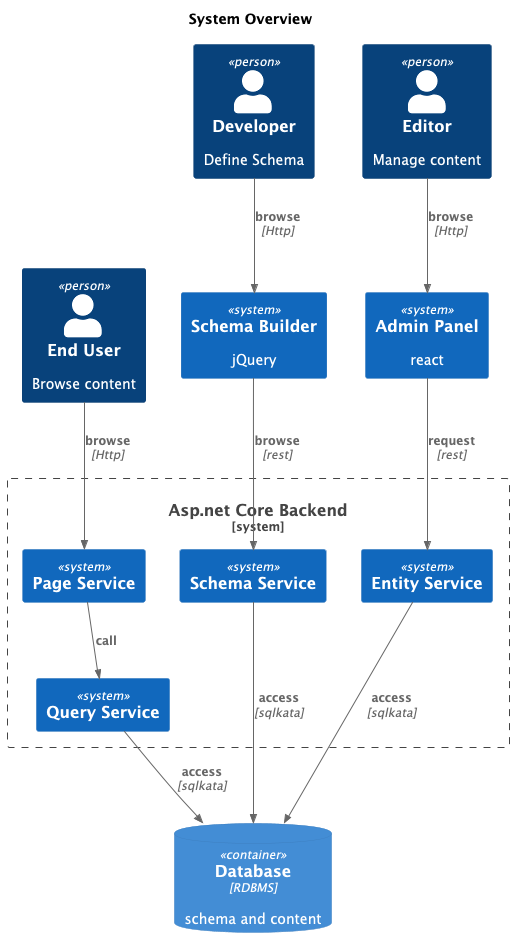
Repository Links
Backend Server
Tools
Architecture
The backend is influenced by Domain-Driven Design (DDD).

Code organization follows this diagram:

Core (Domain Layer)
The Core layer encapsulates:
- Descriptors: Includes
Entity, Filter, Sort, and similar components for building queries.
- HookFactory: Maintains a global
Hook Registry, enabling developers to integrate custom plugins.
Note: The Core layer is independent of both the Application and Infrastructure layers.
Application Layer
The Application layer provides the following functionalities:
- CMS: Entity CRUD, GraphQL Queries, and Page Designer.
- Auth: Manages permissions and roles.
- DataLink: Integrates DocumentDB and Event Streams for scalability.
Includes Builders to configure Dependency Injection and manage Infrastructure components.
Infrastructure Layer
The Infrastructure layer defines reusable system infrastructural components.
- Application services depend on interfaces instead of implementations.
- Components are designed for portability and can be reused across other projects.
Util Layer
A separate Util component contains static classes with pure functions.
- Accessible across all layers.
Admin Panel UI
Tools
Admin Panel Sequence

Schema Builder UI
Tools
Testing Strategy
This chapter describes the systems' automated testing strategy
Favors integration testing over unit testing because integration tests can catch more real-world issues.
For example, when inserting a record into the database, multiple modules are involved:
EntitiesHandlerEntitiesServiceEntity (in core)Query executors (e.g., SqlLite, Postgres, SqlServer)
Writing unit tests for each function and mocking its upstream and downstream services can be tedious.
Instead, FormCMS focuses on checking the input and output of RESTful API endpoints in its integration tests.
Integration Testing for FormCMS.Course /formcms/server/FormCMS.Course.Tests
This project focuses on verifying the functionalities of the FormCMS.Course example project.
New Feature Testing /formcms/server/FormCMS.App.Tests
This project is dedicated to testing experimental functionalities, like MongoDB and Kafka plugins.





