AstraPy
A pythonic client for DataStax Astra DB.
This README targets AstraPy version 2.0+. Click here for v1 and here for the v0 API (which you should not really be using by now).
Quickstart
Install with pip install astrapy.
Get the API Endpoint and the Token to your Astra DB instance at astra.datastax.com.
Try the following code after replacing the connection parameters:
from astrapy import DataAPIClient
from astrapy.constants import VectorMetric
from astrapy.ids import UUID
from astrapy.info import CollectionDefinition
ASTRA_DB_APPLICATION_TOKEN = "AstraCS:..."
ASTRA_DB_API_ENDPOINT = "https://01234567-....apps.astra.datastax.com"
my_client = DataAPIClient()
my_database = my_client.get_database(
ASTRA_DB_API_ENDPOINT,
token=ASTRA_DB_APPLICATION_TOKEN,
)
my_collection = my_database.create_collection(
"dreams_collection",
definition=(
CollectionDefinition.builder()
.set_vector_dimension(3)
.set_vector_metric(VectorMetric.COSINE)
.build()
)
)
my_collection.insert_many(
[
{
"_id": UUID("018e65c9-e33d-749b-9386-e848739582f0"),
"summary": "Riding the waves",
"tags": ["sport"],
"$vector": [0, 0.2, 1],
},
{
"summary": "Friendly aliens in town",
"tags": ["scifi"],
"$vector": [-0.3, 0, 0.8],
},
{
"summary": "Meeting Beethoven at the dentist",
"$vector": [0.2, 0.6, 0],
},
],
)
my_collection.update_one(
{"tags": "sport"},
{"$set": {"summary": "Surfers' paradise"}},
)
cursor = my_collection.find(
{},
sort={"$vector": [0, 0.2, 0.4]},
limit=2,
include_similarity=True,
)
for result in cursor:
print(f"{result['summary']}: {result['$similarity']}")
my_collection.drop()
Next steps:
Server-side embeddings
AstraPy works with the "vectorize" feature of the Data API. This means that one can define server-side computation for vector embeddings and use text strings in place of a document vector, both in writing and in reading.
The transformation of said text into an embedding is handled by the Data API, using a provider and model you specify.
my_collection = database.create_collection(
"my_vectorize_collection",
definition=(
CollectionDefinition.builder()
.set_vector_service(
provider="example_vendor",
model_name="embedding_model_name",
authentication={"providerKey": "<STORED_API_KEY_NAME>"}
)
.build()
)
)
my_collection.insert_one({"$vectorize": "text to make into embedding"})
documents = my_collection.find(sort={"$vectorize": "vector search query text"})
See the Data API reference
for more on this topic.
Hybrid search
AstraPy supports the "findAndRerank" Data API command,
which performs a hybrid search by combining results from a lexical search
and a vector-based search in a single operation.
r_results = my_collection.find_and_rerank(
    sort={"$hybrid": "query text"},
    limit=10,
    include_scores=True,
)

for r_result in r_results:
    print(r_result.document, r_results.scores)
This command will execute if the collection was created with the required settings
(they are enabled by default).
See the Data API reference, and the docstring for the find_and_rerank method,
for more on this topic.
Using Tables
The example above uses a collection, where schemaless "documents" can be stored and retrieved.
Here is an equivalent code that uses Tables, i.e. uniform, structured data where each row has the
same columns, which are of a specific type:
from astrapy import DataAPIClient
from astrapy.constants import VectorMetric
from astrapy.data_types import DataAPIVector
from astrapy.info import (
CreateTableDefinition,
ColumnType,
TableVectorIndexDefinition,
TableVectorIndexOptions,
)
ASTRA_DB_APPLICATION_TOKEN = "AstraCS:..."
ASTRA_DB_API_ENDPOINT = "https://01234567-....apps.astra.datastax.com"
my_client = DataAPIClient()
my_database = my_client.get_database(
ASTRA_DB_API_ENDPOINT,
token=ASTRA_DB_APPLICATION_TOKEN,
)
table_definition = (
CreateTableDefinition.builder()
.add_column("dream_id", ColumnType.INT)
.add_column("summary", ColumnType.TEXT)
.add_set_column("tags", ColumnType.TEXT)
.add_vector_column("dream_vector", dimension=3)
.add_partition_by(["dream_id"])
.build()
)
index_options=TableVectorIndexOptions(
metric=VectorMetric.COSINE,
)
my_table = my_database.create_table("dreams_table", definition=table_definition, if_not_exists=True)
my_table.create_vector_index("dreams_table_vec_idx", column="dream_vector", options=index_options, if_not_exists=True)
my_table.insert_many(
[
{
"dream_id": 103,
"summary": "Riding the waves",
"tags": ["sport"],
"dream_vector": DataAPIVector([0, 0.2, 1]),
},
{
"dream_id": 119,
"summary": "Friendly aliens in town",
"tags": ["scifi"],
"dream_vector": DataAPIVector([-0.3, 0, 0.8]),
},
{
"dream_id": 37,
"summary": "Meeting Beethoven at the dentist",
"dream_vector": DataAPIVector([0.2, 0.6, 0]),
},
],
)
my_table.update_one(
{"dream_id": 103},
{"$set": {"summary": "Surfers' paradise"}},
)
cursor = my_table.find(
{},
sort={"dream_vector": DataAPIVector([0, 0.2, 0.4])},
limit=2,
include_similarity=True,
)
for result in cursor:
print(f"{result['summary']}: {result['$similarity']}")
my_table.drop()
For more on Tables, consult the Data API documentation about Tables. Note that most features of Collections, with due modifications, hold for Tables as well (e.g. "vectorize", i.e. server-side embeddings).
Maps as association lists
When working with Tables, map columns with key of a type other than text
must be expressed as association lists,
i.e. nested lists of lists: [[key1, value1], [key2, value2], ...], in payloads.
By default, Table objects in AstraPy will use the association-list representation
only for maps wrapped by a DataAPIMap, and leave regular Python dict objects
unchanged in payloads: in practice the following row would be sent to the API as shown:
from astrapy.data_types import DataAPIMap
row_to_insert = {
"map_1": {"k": "v"},
"map_2": DataAPIMap({"k1": "v1", "k2": "v2"}),
}
This behaviour is controlled by the API Option serdes_options.encode_maps_as_lists_in_tables,
which defaults to MapEncodingMode.DATAAPIMAPS. Other options are:
MapEncodingMode.ALWAYS to convert also regular Python dict values into lists of pairs;MapEncodingMode.NEVER to never apply such conversion.
The following code demonstrates getting a Table object with the desired setting:
from astrapy.api_options import APIOptions, SerdesOptions
from astrapy.constants import MapEncodingMode
my_options = APIOptions(serdes_options=SerdesOptions(
encode_maps_as_lists_in_tables=MapEncodingMode.ALWAYS
))
my_table = my_database.get_table("my_table", spawn_api_options=my_options)
See the section about API Options, and the docstring, for more details.
Caution: if one plans to use regular Python dict objects to express user-defined types (UDTs),
setting this option to ALWAYS would interfere with the format expected by the API for UDTs.
See the section on UDTs for more details.
User-defined types (UDTs)
The Data API allows creation of "user-defined types" (UDTs), composite data types
that can be subsequently used as table column types.
from astrapy.info import (
    ColumnType,
    CreateTableDefinition,
    CreateTypeDefinition,
    TableScalarColumnTypeDescriptor,
)

player_udt_def = CreateTypeDefinition(
    fields={
        "name": TableScalarColumnTypeDescriptor(ColumnType.TEXT),
        "age": TableScalarColumnTypeDescriptor(ColumnType.INT),
    },
)
my_database.create_type("player_udt", definition=player_udt_def)

table_definition = (
    CreateTableDefinition.builder()
    .add_column("match_id", ColumnType.TEXT)
    .add_userdefinedtype_column("player1", "player_udt")
    .add_userdefinedtype_column("player2", "player_udt")
    .add_partition_by(["match_id"])
    .build()
)
udt_table = my_database.create_table("matches", definition=table_definition)
To write data to UDT columns, the default settings (in part. the SerdesOptions settings)
admit using plain Python dictionaries. When reading from a Table, by default the
UDT will be returned in the form of an astrapy.data_types.DataAPIDictUDT, a subclass
of dict.
The default write behaviour can be changed through the
serdes_options.encode_maps_as_lists_in_tables API Option,
described in the "Maps as association lists" section.
The default read behaviour can be changed by setting serdes_options.custom_datatypes_in_reading
to False, in which case UDT data will be returned as a regular dict.
The following code demonstrates the default read and write behaviour, using the udt_table just created:
from astrapy.data_types import DataAPIDictUDT
udt_table.insert_one({
"match_id": "x001",
"player1": {"name": "Anita", "age": 49},
"player2": DataAPIDictUDT({"name": "Pedro", "age": 50}),
})
Note that if the map list-encoding is set to "ALWAYS", the above insertion
will fail because of "player1": usage of DataAPIDictUDT is guaranteed to work
in all circumstances instead.
Using models for UDTs
In many cases, one wants to 'bind' a certain UDT to a model class. AstraPy provides
a way to "register" model classes both for the write and read paths, through the following
serdes API Options:
serdes_options.serializer_by_class: a map from classes (not class names; not class instances) to serializer functions. A serializer function accepts an instance of the model class and returns a corresponding dict representation;serdes_options.deserializer_by_udt: a map from UDT names to deserializer functions. A deserializer function accepts a dict representation, along with the UDT definition, and returns an instance of the model class.
The following example demonstrates this procedure, including ser/deserializers.
Suppose you have a dataclass corresponding to player_udt:
from dataclasses import dataclass

@dataclass
class Player:
    name: str
    age: int
The two required ser/des functions can be defined and configured for the API options in order to spawn a Table object able to use Player:
from typing import Any
from astrapy.api_options import APIOptions, SerdesOptions
from astrapy.info import CreateTypeDefinition
def player_serializer(pl: Player) -> dict[str, Any]:
return pl.__dict__
def player_deserializer(
pl_dict: dict[str, Any],
udt_def: CreateTypeDefinition | None,
) -> Player:
return Player(**pl_dict)
my_options = APIOptions(serdes_options=SerdesOptions(
serializer_by_class={Player: player_serializer},
deserializer_by_udt={"player_udt": player_deserializer},
))
my_model_capable_table = database.get_table("matches", spawn_api_options=my_options)
At this point, writes and reads can seamlessly use the Player class:
my_model_capable_table.insert_one({
"match_id": "x001",
"player1": Player(name="Anita", age=49),
"player2": Player(name="Pedro", age=50),
})
the_match = my_model_capable_table.find_one({"match_id": "x001"})
print(the_match["player1"])
print(the_match["player2"])
Summary for UDT usage and maps in Tables
Under the default serdes settings, the following rules apply and constitute the suggested approach:
- use DataAPIMap to write map columns;
- use DataAPIDictUDTs, or plain
dict, to write UDTs;
- expect DataAPIMap when reading map columns;
- expect DataAPIDictUDTs when reading UDTs;
- to use model classes, associate them for reads and writes correspondingly.
The following tables summarize the interplay between dict, DataAPIMap, DataAPIDictUDT and the
serdes options for writes and reads in Tables:
Items in insertions vs. serdes_options.encode_maps_as_lists_in_tables.
("D" = dict in payload, "L" = list of pairs in payload.)
| DataAPIDictUDT | ok, D | ok, D | ok, D |
| dict (for UDT) | ok, D | ok, D | NO (L: rejected) |
| dict (for map, string keys) | ok, D | ok, D | ok, L |
| dict (for map, nonstring keys) | NO [1] | NO [1] | ok, L |
MyClass, in serializer_by_class | ok, D [2] | ok, D [2] | ok, D [2] |
MyClass, no registered serializer | NO [3] | NO [3] | NO [3] |
Notes:
- The JSON serialization would silently convert the keys to string, leading to a type-mismatch API error upon insertion.
- In this case the
dict is the result of the serializer function, of course.
- An error "Object of type
<classname> is not JSON serializable" is raised.
Items in reads vs. serdes_options.custom_datatypes_in_reading.
("M" = DataAPIMap found in row, "U" = DataAPIDictUDT found in row, "D" = dict found in row.)
| map (as object, string keys) | ok, M | ok, D |
| map (as list, string keys) | ok, M | ok, D |
| map (as list, nonstring keys) | ok, M | ok, D [4] |
UDT, with entry in deserializer_by_udt | ok [5] | ok [5] |
| UDT, no registered deserializer | ok, U | ok, D |
Notes:
- Caution: the returned regular Python
dict will have nonstring keys.
- The class of the result is whatever the deserializer returns.
Usage with HCD and other non-Astra installations
The main difference when targeting e.g. a Hyper-Converged Database (HCD)
installation is how the client is
initialized. Here is a short example showing just how to get to a Database
(what comes next is unchaged compared to using Astra DB).
from astrapy import DataAPIClient
from astrapy.constants import Environment
from astrapy.authentication import UsernamePasswordTokenProvider
tp = UsernamePasswordTokenProvider("username", "password")
client = DataAPIClient(environment=Environment.HCD)
database = client.get_database("http://localhost:8181", token=tp)
For more on this case, please consult the dedicated reference.
AstraPy's API
Abstraction diagram
AstraPy's abstractions for working at the data and admin layers are structured
as depicted by this diagram:

Here's a small admin-oriented example:
from astrapy import DataAPIClient
ASTRA_DB_APPLICATION_TOKEN = "AstraCS:..."
my_client = DataAPIClient(ASTRA_DB_APPLICATION_TOKEN)
my_astra_admin = my_client.get_admin()
database_list = list(my_astra_admin.list_databases())
db_info = database_list[0].info
print(db_info.name, db_info.id, db_info.region)
my_database_admin = my_astra_admin.get_database_admin(db_info.id)
my_database_admin.list_keyspaces()
my_database_admin.create_keyspace("my_dreamspace")
Exceptions
The package comes with its own set of exceptions, arranged in this hierarchy:
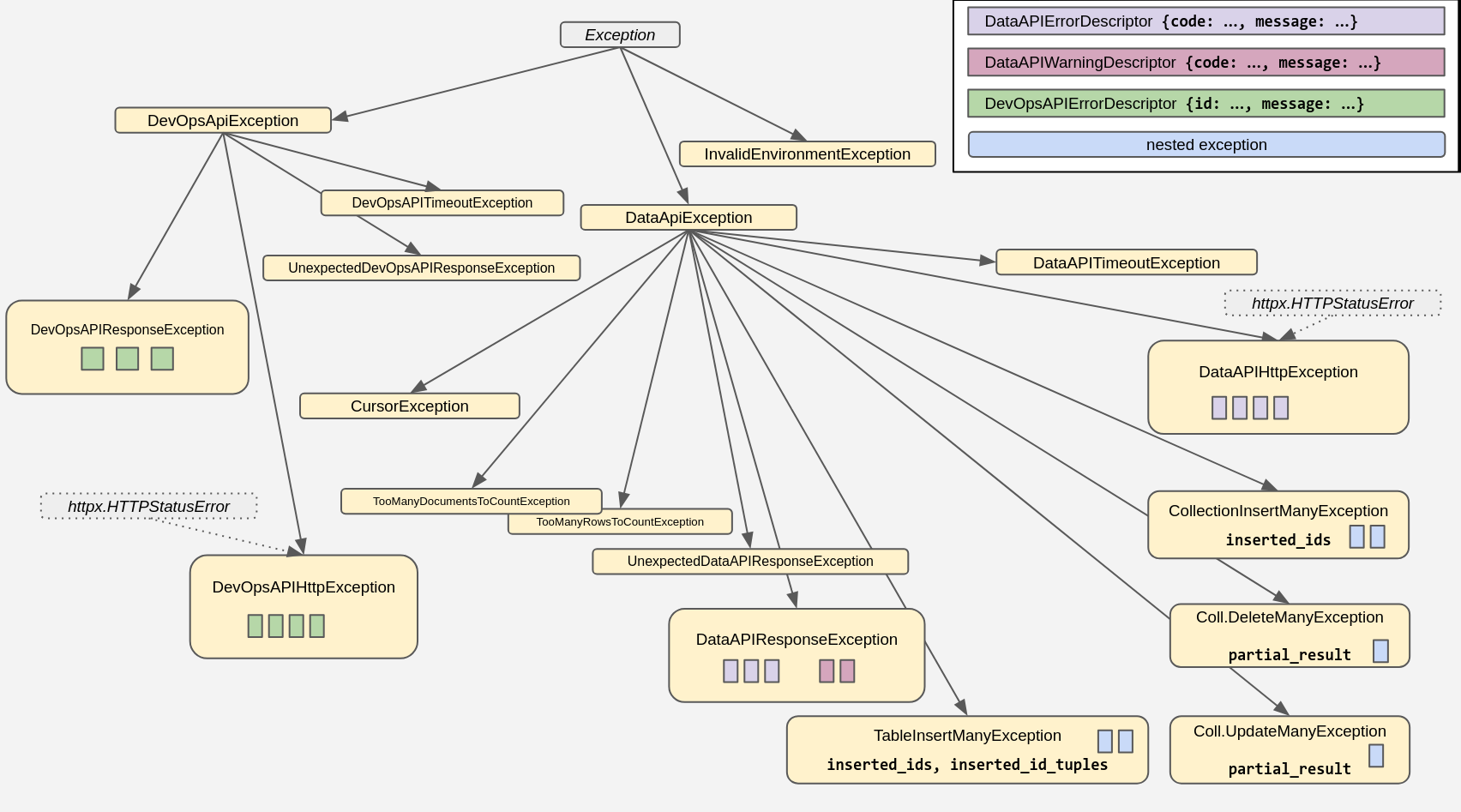
For more information, and code examples, check out the docstrings and consult
the API reference linked above.
API Options
You can configure many aspects of the interaction with the API by providing
customized "API Options" objects when either spawning a client, copying objects,
or spawning "children classes" (such as a Table from a Database).
For the details, please check the docstring for astrapy.api_options.APIOptions
and the other classes in that module. Here is a small example script to show a
practical starting point:
from astrapy import DataAPIClient
from astrapy.api_options import (
APIOptions,
SerdesOptions,
)
no_cdt_options = APIOptions(
serdes_options=SerdesOptions(
custom_datatypes_in_reading=False,
)
)
my_client = DataAPIClient(api_options=no_cdt_options)
my_database = my_client.get_database(
"https://...",
token="my-token-1",
)
my_table = my_database.get_table("my_table")
Working with dates in Collections and Tables
Date and datetime objects, i.e. instances of the standard library
datetime.datetime and datetime.date classes, can be used
anywhere when sending documents and queries to the API.
By default, what you get back is an instance of astrapy.data_types.DataAPITimestamp
(which has a much wider range of expressable timestamps than Python's stdlib).
If you want to revert to using the standard library datetime.datetime, you can do so
by turn on the APIOptions.SerdesOptions.custom_datatypes_in_reading API Options setting for the
collection/table object (note that this setting affects the returned format for several other table data types).
If you choose to have timestamps returned as standard-library datetime.datetime objects,
both for collections and tables, you may supply a specific timezone for these
(the default is UTC). You do so by providing an appropriate datetime.timezone value
to the APIOptions.SerdesOptions.datetime_tz API Options setting for the
collection/table object. You can also specify None for a timezone, in which case
the resulting values will be timezone-unaware (or "naive") datetimes.
Naive datetimes (i.e. those without a timezone information attached)
are inherently ambiguous when it comes to translating them into a unambiguous timestamp.
For this reason, if you want to work with naive datetimes, and in particular you want
AstraPy to accept them for writes, you need to explicitly
turn on the APIOptions.SerdesOptions.accept_naive_datetimes API Options setting for the
collection/table object, otherwise AstraPy will raise an error.
Remember that what effectively gets
written to DB is always a (numeric) timestamp: for naive quantities, this timestamp value depends
on the implied timezone used in the conversion, potentially leading to unexpected results
e.g. if multiple applications are running with different locale settings.
The following diagram summarizes the behaviour of the write and read paths for datetime objects,
depending on the SerdesOptions settings:

Here an example code snippet showing how to switch to having reads return regular datetime objects
and have them set to one's desired timezone offset:
from datetime import timezone,timedelta
from astrapy import DataAPIClient
from astrapy.api_options import APIOptions, SerdesOptions
my_timezone = timezone(timedelta(hours=4, minutes=30))
my_client = DataAPIClient()
my_database = my_client.get_database(
ASTRA_DB_API_ENDPOINT,
token=ASTRA_DB_APPLICATION_TOKEN,
spawn_api_options=APIOptions(
serdes_options=SerdesOptions(
custom_datatypes_in_reading=False,
datetime_tzinfo=my_timezone,
),
),
)
my_collection = my_database.get_collection("my_collection")
document = my_collection.find_one({"code": 123})
Working with ObjectIds and UUIDs in Collections
Astrapy repackages the ObjectId from bson and the UUID class and utilities
from the uuid package and its uuidv6 extension. You can also use them directly.
Even when setting a default ID type for a collection, you still retain the freedom
to use any ID type for any document:
from astrapy import DataAPIClient
from astrapy.constants import DefaultIdType
from astrapy.ids import ObjectId, uuid8, UUID

import bson

ASTRA_DB_APPLICATION_TOKEN = "AstraCS:..."
ASTRA_DB_API_ENDPOINT = "https://01234567-....apps.astra.datastax.com"

my_client = DataAPIClient()
my_database = my_client.get_database(
    ASTRA_DB_API_ENDPOINT,
    token=ASTRA_DB_APPLICATION_TOKEN,
)

my_collection = my_database.create_collection(
    "ecommerce",
    definition=CollectionDefinition.builder().set_default_id(
        DefaultIdType.UUIDV6
    ).build(),
)

my_collection.insert_one({"_id": ObjectId("65fd9b52d7fabba03349d013")})
my_collection.find({
    "_id": UUID("018e65c9-e33d-749b-9386-e848739582f0"),
})

my_collection.update_one(
    {"tag": "in_stock"},
    {"$set": {"inventory_id": bson.objectid.ObjectId()}},
    upsert=True,
)

my_collection.insert_one({"_id": uuid8()})
Escaping field names
Field names containing special characters (. and &) must be correctly escaped
in certain Data API commands. It is a responsibility of the user to ensure escaping
is done when needed; however, AstraPy offers utilities to escape sequences of "path
segments" and -- should it ever be needed -- unescape path-strings back into
literal segments:
from astrapy.utils.document_paths import escape_field_names, unescape_field_path
print(escape_field_names("f1", "f2", 12, "g.&3"))
print(escape_field_names(["f1", "f2", 12, "g.&3"]))
print(unescape_field_path("a&&&.b.c.d.12"))
For contributors
First install uv (e.g. pipx install uv), then set up a dev environment with make venv, or equivalently:
uv venv
uv sync --dev
Linter, style and typecheck should all pass for a PR:
make format
With make format-fix the style and imports are autofixed (by ruff)
Features must be thoroughly covered in tests (have a look at tests/* to infer
naming convention and module structure).
Running tests
Tests are grouped in:
- "base", covering general-purpose astrapy functionality. Divided in unit/integration;
- "vectorize", extensively running a base workload on all provider/integration choices;
- "admin", doing a whole sweep of admin operations. Very slow on Astra DB.
Astrapy's CI only runs "base". The others are to be checked manually when it's needed.
Tests can be run on three types of Data API targets (with slight differences in what is applicable):
- DockerCompose: HCD+Data API, started by the test initialization with
docker-compose. Note that in this case you will have to manually destroy the created containers.
- nonAstra: a ready-to-use (user-supplied) local Data API (e.g. using
tests/dse_compose)
- Astra: an Astra DB target account (or two, as some tests are specific to dev environment)
Depending on the test, different environment variables are needed: refer to
the templates in tests/env_templates. The "basic" credentials (one of the three options)
are always required, even for unit testing.
Docker vs. Podman
In case you use a different Docker-compatible container runtime, viz. podman, make sure to export
the environment variable DOCKER_COMMAND_NAME="podman" to have the DockerCompose tests use it properly.
Multiple Python versions
If may be useful to run e.g. unit tests with multiple Python versions. You can have uv
create more than one venv and specify the version, e.g. for each one:
uv venv --python 3.8 .venv-3.8
. .venv-3.8/bin/activate
uv sync --dev --active
Then, with the desired virtual env active, you will run e.g. uv run --active pytest [...].
Most make targets will also support running in the named virtual env:
assuming you activated a certain virtual env, you can run e.g.: make format VENV=true.
Adding/changing dependencies
After editing the pyproject.toml, make sure you run
uv lock
uv sync --dev
and then commit the new uv.lock to the repo as well.
Sample testing commands
Base:
# choose one:
uv run pytest tests/base
uv run pytest tests/base/unit
uv run pytest tests/base/integration
Note: when running locally, the reranking-related tests require ASTRAPY_FINDANDRERANK_USE_RERANKER_HEADER=y and
HEADER_RERANKING_API_KEY_NVIDIA="AstraCS:`.
Admin:
# depending on the environment, different 'admin tests' will run:
uv run pytest tests/admin
Extended vectorize:
# very many env. variables required for this one:
uv run pytest tests/vectorize

# restrict to some combination(s) with e.g.:
EMBEDDING_MODEL_TAGS="openai/text-embedding-3-large/HEADER/0,voyageAI/voyage-finance-2/SHARED_SECRET/f" \
    uv run pytest tests/vectorize/integration/test_vectorize_providers.py \
    -k test_vectorize_usage_auth_type_header_sync
All the usual pytest ways of restricting the test selection hold
(e.g. uv run pytest tests/idiomatic/unit or [...] -k <test_name_selector>). Also e.g.:
# suppress log noise
uv run pytest [...] -o log_cli=0

# increase log level
uv run pytest [...] -o log_cli=1 --log-cli-level=10
Special tests
The following are special provision to manage features under evolution or not
entirely deployed to all environments. Typically they require manually passing
certain environment variables, otherwise the associated tests are excluded from CI.
Cutting-edge features on main
Prepend tests with a ASTRAPY_TEST_LATEST_MAIN=y for features found on main that are not released anywhere.
(Tip: run a code search first to see what is currently marked as such. Chances are nothing is.)
Appendices
Appendix A: quick reference for key imports
Note: check tests/base/unit/test_imports.py for more.
Client, data and admin abstractions
from astrapy import (
    AstraDBAdmin,
    AstraDBDatabaseAdmin,
    AsyncCollection,
    AsyncDatabase,
    AsyncTable,
    Collection,
    Database,
    DataAPIClient,
    DataAPIDatabaseAdmin,
    Table,
)
Constants for data-related use:
from astrapy.constants import (
    DefaultIdType,
    Environment,
    MapEncodingMode,
    ReturnDocument,
    SortMode,
    VectorMetric,
)
Cursor for find-like operations:
from astrapy.cursors import (
  AbstractCursor,
  AsyncCollectionFindAndRerankCursor,
  AsyncCollectionFindCursor,
  AsyncTableFindCursor,
  CollectionFindAndRerankCursor,
  CollectionFindCursor,
  CursorState,
  RerankedResult,
  TableFindCursor,
)
ObjectIds and UUIDs:
from astrapy.ids import (
    UUID,
    ObjectId,
    uuid1,
    uuid3,
    uuid4,
    uuid5,
    uuid6,
    uuid7,
    uuid8,
)
API Options:
from astrapy.api_options import (
    APIOptions,
    DataAPIURLOptions,
    DevOpsAPIURLOptions,
    SerdesOptions,
    TimeoutOptions,
)
Data types:
from astrapy.data_types import (
    DataAPIDate,
    DataAPIDuration,
    DataAPIMap,
    DataAPISet,
    DataAPITime,
    DataAPITimestamp,
    DataAPIDictUDT,
    DataAPIVector,
)
Info/metadata classes:
from astrapy.info import (
    AlterTableAddColumns,
    AlterTableAddVectorize,
    AlterTableDropColumns,
    AlterTableDropVectorize,
    AlterTypeAddFields,
    AlterTypeOperation,
    AlterTypeRenameFields,
    AstraDBAdminDatabaseInfo,
    AstraDBDatabaseInfo,
    CollectionDefaultIDOptions,
    CollectionDefinition,
    CollectionDescriptor,
    CollectionInfo,
    CollectionLexicalOptions,
    CollectionRerankOptions,
    CollectionVectorOptions,
    ColumnType,
    CreateTableDefinition,
    CreateTypeDefinition,
    EmbeddingProvider,
    EmbeddingProviderAuthentication,
    EmbeddingProviderModel,
    EmbeddingProviderParameter,
    EmbeddingProviderToken,
    FindEmbeddingProvidersResult,
    FindRerankingProvidersResult,
    ListTableDefinition,
    ListTableDescriptor,
    ListTypeDescriptor,
    RerankingProvider,
    RerankingProviderAuthentication,
    RerankingProviderModel,
    RerankingProviderParameter,
    RerankingProviderToken,
    RerankServiceOptions,
    TableAPIIndexSupportDescriptor,
    TableAPISupportDescriptor,
    TableBaseIndexDefinition,
    TableIndexDefinition,
    TableIndexDescriptor,
    TableIndexOptions,
    TableInfo,
    TableKeyValuedColumnType,
    TableKeyValuedColumnTypeDescriptor,
    TablePrimaryKeyDescriptor,
    TableScalarColumnTypeDescriptor,
    TableTextIndexDefinition,
    TableTextIndexOptions,
    TableUnsupportedColumnTypeDescriptor,
    TableUnsupportedIndexDefinition,
    TableUDTColumnDescriptor,
    TableValuedColumnType,
    TableValuedColumnTypeDescriptor,
    TableVectorColumnTypeDescriptor,
    TableVectorIndexDefinition,
    TableVectorIndexOptions,
    VectorServiceOptions,
)
Authentication:
from astrapy.authentication import (
    StaticTokenProvider,
    UsernamePasswordTokenProvider,
    EmbeddingAPIKeyHeaderProvider,
    AWSEmbeddingHeadersProvider,
)
Miscellaneous utilities:
from astrapy.admin import (
ParsedAPIEndpoint,
parse_api_endpoint,
)
from astrapy.utils.document_paths import (
escape_field_names,
unescape_field_path,
)
from astrapy.utils.api_options import defaultAPIOptions
Appendix B: compatibility with pre-1.0.0 library
If your code still uses the pre-1.0.0 astrapy (i.e. from astrapy.db import AstraDB, AstraDBCollection and so on)
you are strongly advised to migrate to the current API. All of the astrapy pre-1.0 API (later dubbed "core")
works throughout astrapy v1, albeit with a deprecation warning on astrapy v. 1.5.
Version 2 drops "core" support entirely. In order to use astrapy version 2.0+, you need to migrate your application.
Check the links at the beginning of this README for the updated documentation and API reference.
Check out previous versions of this README for more on "core": 1.5.2 and pre-1.0.





