


Security News
Deno 2.6 + Socket: Supply Chain Defense In Your CLI
Deno 2.6 introduces deno audit with a new --socket flag that plugs directly into Socket to bring supply chain security checks into the Deno CLI.
By Sarah Gooding - Dec 12, 2025
axioms-drf-py
Advanced tools


OAuth2/OIDC authentication and authorization for Django REST Framework APIs. Supports authentication and claim-based fine-grained authorization (scopes, roles, permissions) using JWT tokens. Works with access tokens issued by various authorization servers including AWS Cognito, Auth0, Okta, Microsoft Entra, Keyclock, etc.
Using Flask or FastAPI? This package is specifically for Django REST Framework. For Flask applications, use axioms-flask-py. For FastAPI applications, use axioms-fastapi.









axioms-drf-py?Use axioms-drf-py in your Django REST Framework backend to securely validate JWT access tokens issued by OAuth2/OIDC authorization servers like AWS Cognito, Auth0, Okta, Microsoft Entra, Keyclock etc. Clients - such as single-page applications (React, Vue), mobile apps, or AI agents—obtain access tokens from the authorization server and send them to your backend. In response, axioms-drf-py fetches JSON Web Key Set (JWKS) from the issuer, validates token signatures, enforces audience/issuer claims, and provides scope, role, and permission-based authorization for your API endpoints.
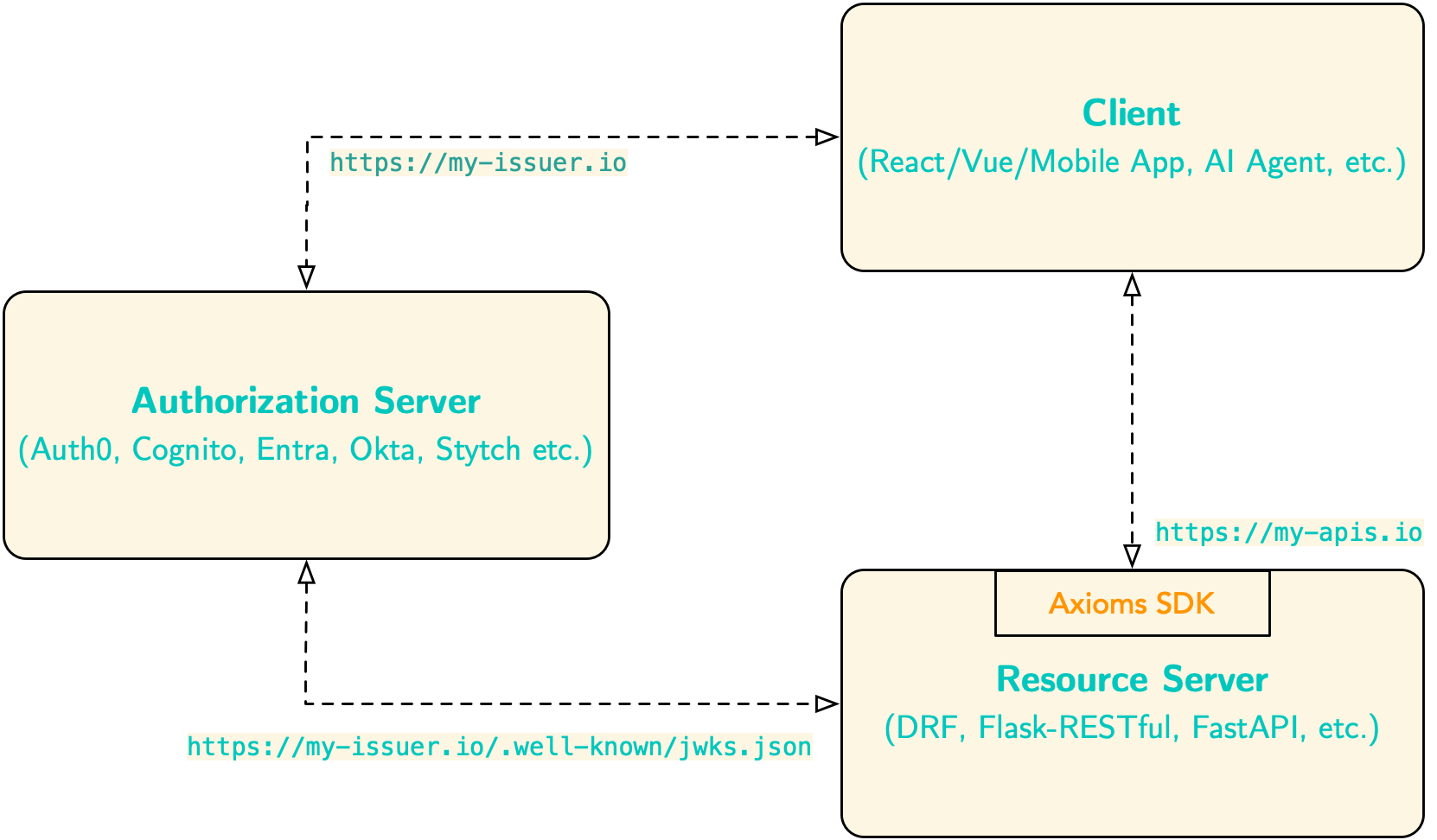
Unlike other DRF plugins, axioms-drf-py focuses exclusively on protecting resource servers, by letting authorization servers do what they do best. This separation of concerns raises the security bar by:
iss claim) to prevent token substitution attacksscopes, roles, and permissionsInstall the package using pip:
pip install axioms-drf-py
Add the middleware to your Django settings:
MIDDLEWARE = [
    'axioms_drf.middleware.AccessTokenMiddleware',
    # ... other middleware
]
The SDK supports the following configuration options in your Django settings:
| Setting | Required | Description |
|---|---|---|
AXIOMS_AUDIENCE | Yes | Expected audience claim in the JWT token. |
AXIOMS_DOMAIN | No | Axioms domain name. Used as the base to construct AXIOMS_ISS_URL if not explicitly provided. This is the simplest configuration option for standard OAuth2/OIDC providers. |
AXIOMS_ISS_URL | No | Full issuer URL for validating the iss claim in JWT tokens (e.g., https://auth.example.com/oauth2). If not provided, constructed as https://{AXIOMS_DOMAIN}. Used to construct AXIOMS_JWKS_URL if that is not explicitly set. Recommended for security to prevent token substitution attacks. |
AXIOMS_JWKS_URL | No | Full URL to JWKS endpoint (e.g., https://auth.example.com/.well-known/jwks.json). If not provided, constructed as {AXIOMS_ISS_URL}/.well-known/jwks.json |
Configuration Hierarchy:
The SDK uses the following construction order:
AXIOMS_DOMAIN → constructs → AXIOMS_ISS_URL (if not explicitly set)AXIOMS_ISS_URL → constructs → AXIOMS_JWKS_URL (if not explicitly set)Note: You must provide at least one of:
AXIOMS_DOMAIN,AXIOMS_ISS_URL, orAXIOMS_JWKS_URL. For most use cases, setting onlyAXIOMS_DOMAINis sufficient.
.env fileCreate a .env file in your project root:
AXIOMS_AUDIENCE=your-api-audience

# Set Issuer and JWKS URLs directly (optional, but recommended for security)
AXIOMS_ISS_URL = 'https://your-auth.domain.com'
AXIOMS_JWKS_URL = 'https://your-auth.domain.com/.well-known/jwks.json'

# Optionally, you can set the auth domain and let the SDK construct the URLs
# AXIOMS_DOMAIN = 'your-auth.domain.com'
Then load in your settings.py:
import environ

env = environ.Env()
environ.Env.read_env()

# Required
AXIOMS_AUDIENCE = env('AXIOMS_AUDIENCE')


AXIOMS_ISS_URL = env('AXIOMS_ISS_URL', default=None)
AXIOMS_JWKS_URL = env('AXIOMS_JWKS_URL', default=None)

# AXIOMS_DOMAIN = env('AXIOMS_DOMAIN', default=None)
Configure directly in your settings.py:
# Required settings
AXIOMS_AUDIENCE = 'your-api-audience'

AXIOMS_ISS_URL = 'https://your-auth.domain.com'
AXIOMS_JWKS_URL = 'https://your-auth.domain.com/.well-known/jwks.json'

# AXIOMS_DOMAIN = 'your-auth.domain.com'  # Simplest option - constructs issuer and JWKS URLs
For optimal performance with automatic background refresh of JWKS keys, add the JWKS manager app to your INSTALLED_APPS:
For WSGI applications (standard Django):
INSTALLED_APPS = [
    # ... other apps
    'axioms_drf.apps.JWKSManagerWSGIConfig',  # Add this line
    # ... your apps
]
For ASGI applications (async Django):
INSTALLED_APPS = [
    # ... other apps
    'axioms_drf.apps.JWKSManagerASGIConfig',  # Add this line for ASGI
    # ... your apps
]
Optional Configuration:
Customize JWKS caching behavior in settings.py:
# Optional: JWKS manager configuration (defaults shown)
AXIOMS_JWKS_REFRESH_INTERVAL = 3600  # Refresh JWKS every 1 hour (seconds)
AXIOMS_JWKS_CACHE_TTL = 7200          # Cache JWKS for 2 hours (must be >= 2x refresh_interval)
Note: If you don't add the JWKS manager app, the SDK will automatically fall back to on-demand fetching with simple caching. This works but isn't optimal for production.
Protect your API views using authentication and permission classes:
from rest_framework.views import APIView
from rest_framework.response import Response
from axioms_drf.authentication import HasValidAccessToken
from axioms_drf.permissions import HasAccessTokenScopes

class ProtectedView(APIView):
    authentication_classes = [HasValidAccessToken]
    permission_classes = [HasAccessTokenScopes]
    access_token_scopes = ['read:data']

    def get(self, request):
        return Response({'message': 'This is protected'})
| Class | Description |
|---|---|
HasValidAccessToken | Validates JWT access token from Authorization header. Performs token signature validation, expiry datetime validation, token audience validation, and issuer validation (if configured). |
IsAccessTokenAuthenticated | Alias for HasValidAccessToken. |
IsAnyPostOrIsAccessTokenAuthenticated | Allows POST requests without authentication, requires valid token for other methods. |
IsAnyGetOrIsAccessTokenAuthenticated | Allows GET requests without authentication, requires valid token for other methods. |
| Class | Description | View Attributes |
|---|---|---|
HasAccessTokenScopes | Check scopes in scope claim of the access token. | access_token_scopes or access_token_any_scopes (OR logic)access_token_all_scopes (AND logic) |
HasAccessTokenRoles | Check roles in roles claim of the access token. | access_token_roles or access_token_any_roles (OR logic)access_token_all_roles (AND logic) |
HasAccessTokenPermissions | Check permissions in permissions claim of the access token. | access_token_permissions or access_token_any_permissions (OR logic)access_token_all_permissions (AND logic) |
Method-Level Authorization: All claim-based permission classes support method-level and ViewSet action-specific authorization using Python's
@propertydecorator. This allows you to define different authorization requirements for each HTTP method (GET, POST, PATCH, DELETE) on the View or different permissions for each action (list, retrieve, create, update, destroy) of ViewSet. See the Method-Level Permissions and Action-Specific Permissions sections for implementation details.
| Class | Description | View Attributes |
|---|---|---|
IsSubOwner | Verifies that the token's sub claim matches a specified attribute on the object. Use for owner-only resource access. | owner_attribute - Name of the object attribute to compare with sub claim (default: 'user') |
IsSubOwnerOrSafeOnly | Allows safe methods (GET, HEAD, OPTIONS) for all authenticated users, restricts unsafe methods (POST, PUT, PATCH, DELETE) to owners only. | owner_attribute - Name of the object attribute to compare with sub claim (default: 'user')safe_methods - Tuple of safe HTTP methods (default: ('GET', 'HEAD', 'OPTIONS')) |
Permission classes support both OR logic (any claim) and AND logic (all claims) through different view attributes. You can also combine both for complex authorization requirements.
from rest_framework.views import APIView
from rest_framework.response import Response
from axioms_drf.authentication import HasValidAccessToken
from axioms_drf.permissions import HasAccessTokenScopes

class DataView(APIView):
    authentication_classes = [HasValidAccessToken]
    permission_classes = [HasAccessTokenScopes]
    access_token_scopes = ['read:data', 'write:data']  # OR logic

    def get(self, request):
        # User needs EITHER 'read:data' OR 'write:data' scope
        return Response({'data': 'success'})
class SecureView(APIView):
    authentication_classes = [HasValidAccessToken]
    permission_classes = [HasAccessTokenScopes]
    access_token_all_scopes = ['read:data', 'write:data']  # AND logic

    def post(self, request):
        # User needs BOTH 'read:data' AND 'write:data' scopes
        return Response({'status': 'created'})
class MixedView(APIView):
    authentication_classes = [HasValidAccessToken]
    permission_classes = [HasAccessTokenScopes]
    access_token_any_scopes = ['read:data', 'read:all']  # Needs read:data OR read:all
    access_token_all_scopes = ['openid', 'profile']       # AND needs BOTH openid AND profile

    def get(self, request):
        # User needs: (read:data OR read:all) AND (openid AND profile)
        return Response({'data': 'complex authorization'})
Check if openid or profile scope is present in the token:
from rest_framework.views import APIView
from rest_framework.response import Response
from rest_framework import status
from axioms_drf.authentication import HasValidAccessToken
from axioms_drf.permissions import HasAccessTokenScopes

class ProfileView(APIView):
    authentication_classes = [HasValidAccessToken]
    permission_classes = [HasAccessTokenScopes]
    access_token_scopes = ['openid', 'profile']  # OR logic

    def get(self, request):
        return Response({'message': 'All good. You are authenticated!'}, status=status.HTTP_200_OK)
Check if sample:role role is present in the token:
from rest_framework.views import APIView
from rest_framework.response import Response
from rest_framework import status
from axioms_drf.authentication import HasValidAccessToken
from axioms_drf.permissions import HasAccessTokenRoles

class SampleRoleView(APIView):
    authentication_classes = [HasValidAccessToken]
    permission_classes = [HasAccessTokenRoles]
    access_token_roles = ['sample:role']

    def get(self, request):
        return Response({'message': 'Sample read.'}, status=status.HTTP_200_OK)

    def post(self, request):
        return Response({'message': 'Sample created.'}, status=status.HTTP_201_CREATED)

    def patch(self, request):
        return Response({'message': 'Sample updated.'}, status=status.HTTP_200_OK)

    def delete(self, request):
        return Response({'message': 'Sample deleted.'}, status=status.HTTP_204_NO_CONTENT)
Check permissions at the API method level using properties:
from rest_framework.views import APIView
from rest_framework.response import Response
from rest_framework import status
from axioms_drf.authentication import HasValidAccessToken
from axioms_drf.permissions import HasAccessTokenPermissions

class SamplePermissionView(APIView):
    authentication_classes = [HasValidAccessToken]
    permission_classes = [HasAccessTokenPermissions]

    @property
    def access_token_permissions(self):
        method_permissions = {
            'GET': ['sample:read'],
            'POST': ['sample:create'],
            'PATCH': ['sample:update'],
            'DELETE': ['sample:delete']
        }
        return method_permissions[self.request.method]

    def get(self, request):
        return Response({'message': 'Sample read.'}, status=status.HTTP_200_OK)

    def post(self, request):
        return Response({'message': 'Sample created.'}, status=status.HTTP_201_CREATED)

    def patch(self, request):
        return Response({'message': 'Sample updated.'}, status=status.HTTP_200_OK)

    def delete(self, request):
        return Response({'message': 'Sample deleted.'}, status=status.HTTP_204_NO_CONTENT)
Apply different permissions for each ViewSet action (list, retrieve, create, update, destroy):
from rest_framework import viewsets
from rest_framework.response import Response
from rest_framework import status
from axioms_drf.authentication import HasValidAccessToken
from axioms_drf.permissions import HasAccessTokenScopes

class BookViewSet(viewsets.ModelViewSet):
    """Books API with action-specific scope requirements."""
    authentication_classes = [HasValidAccessToken]
    permission_classes = [HasAccessTokenScopes]
    queryset = Book.objects.all()
    serializer_class = BookSerializer

    @property
    def access_token_scopes(self):
        """Return required scopes based on the current action."""
        action_scopes = {
            'list': ['book:read'],             # GET /books/
            'retrieve': ['book:read'],         # GET /books/{id}/
            'create': ['book:create'],         # POST /books/
            'update': ['book:update'],         # PUT /books/{id}/
            'partial_update': ['book:update'], # PATCH /books/{id}/
            'destroy': ['book:delete'],        # DELETE /books/{id}/
        }
        return action_scopes.get(self.action, [])
Allow unauthenticated access for specific HTTP methods:
from rest_framework.views import APIView
from rest_framework.response import Response
from axioms_drf.authentication import IsAnyGetOrIsAccessTokenAuthenticated

class PublicReadView(APIView):
    authentication_classes = [IsAnyGetOrIsAccessTokenAuthenticated]

    def get(self, request):
        # Anyone can read (no authentication required)
        return Response({'articles': []})

    def post(self, request):
        # Requires valid JWT token to create
        return Response({'status': 'created'})
Restrict access to resources based on ownership using the sub claim from the JWT token:
from rest_framework import viewsets
from axioms_drf.authentication import HasValidAccessToken
from axioms_drf.permissions import IsSubOwner

class ArticleViewSet(viewsets.ModelViewSet):
    authentication_classes = [HasValidAccessToken]
    permission_classes = [IsSubOwner]
    owner_attribute = 'author_sub'  # Compare token sub with article.author_sub

    def perform_create(self, serializer):
        # Automatically set the author from the token's sub claim
        serializer.save(author_sub=self.request.user)
Allow anyone to read, but only the owner can update or delete:
from rest_framework import viewsets
from axioms_drf.authentication import HasValidAccessToken
from axioms_drf.permissions import IsSubOwnerOrSafeOnly

class ArticleViewSet(viewsets.ModelViewSet):
    authentication_classes = [HasValidAccessToken]
    permission_classes = [IsSubOwnerOrSafeOnly]
    owner_attribute = 'author_sub'  # Compare token sub with article.author_sub

    def perform_create(self, serializer):
        serializer.save(author_sub=self.request.user)
For a complete working example, check out the example folder in this repository or checkout our docs.
FAQs
OAuth2/OIDC authentication and authorization for Django REST Framework APIs
We found that axioms-drf-py demonstrated a healthy version release cadence and project activity because the last version was released less than a year ago. It has 1 open source maintainer collaborating on the project.
Did you know?

Socket for GitHub automatically highlights issues in each pull request and monitors the health of all your open source dependencies. Discover the contents of your packages and block harmful activity before you install or update your dependencies.
Security News
Deno 2.6 introduces deno audit with a new --socket flag that plugs directly into Socket to bring supply chain security checks into the Deno CLI.

Security News
New DoS and source code exposure bugs in React Server Components and Next.js: what’s affected and how to update safely.

Security News
Socket CEO Feross Aboukhadijeh joins Software Engineering Daily to discuss modern software supply chain attacks and rising AI-driven security risks.